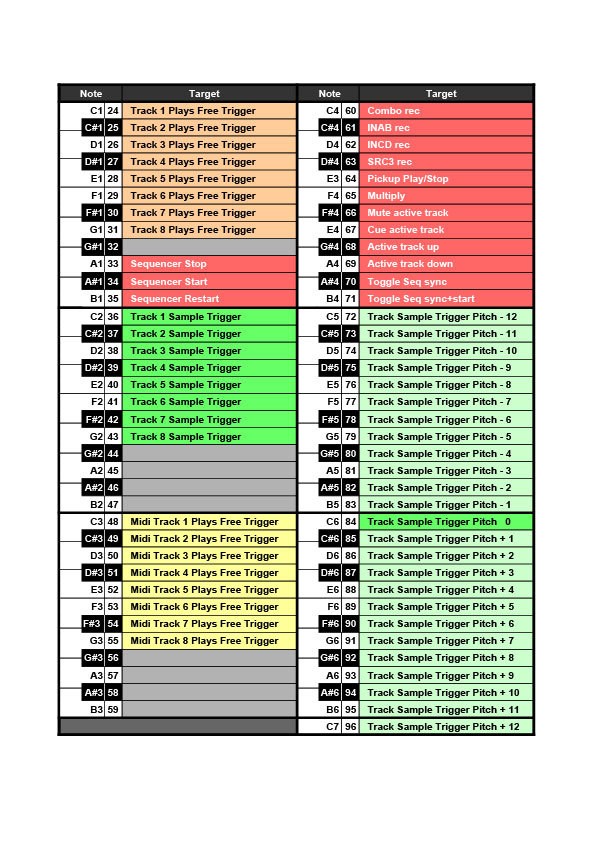
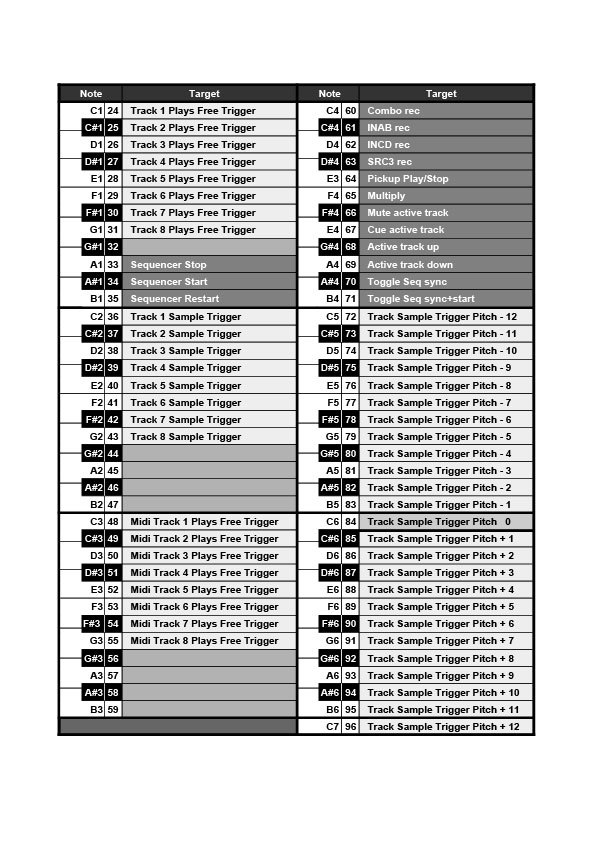
The manual is pretty vague about note mapping for the auto channel, there are a few note numbers designated in the ranges which do not appear to do anything:
24-31 are track trigs 1-8 for plays free, 32 is ?, 33-35 are transport, 36-43 are samples trigs 1-8, 44-47 are ? 48-55 are midi track trigs if plays free, 56-59 are ?
So 32,44,45,46,47,56,57,58 and 59 do not seem to be used, the manual indicates they are but does not tell what, has anyone figured it out?
The first table is just trying to show which octaves are used for which purpose, when in fact some of the note numbers in the octaves are not used. It’s a bit clumsy.
IMHO the first 2 tables in the appendix c could be replaced with the actual mappings for each note, it would make it much more legible and avoid the potential for confusion.
I started mine too ! I would place notes on the left too.
Notes with octave number are important too I think. Ex 84 / C5.
I would add Plays Free trigger too, not obvious at first, when you begin with OT.
you’ll need to account for the gaps you were bemoaning (32 etc) if you want the leftmost columns to line up with the key notation (36=C etc) - but it’s a nice way to present concisely and clearly - making the gaps obvious is also helpful imho
Aren’t you just the best? This is Elektronauts showing its best and most generous side.
Its a very useful table you have made and Ill be happy to put it in the manual.
With very kind @darenager autorisation and suggestions I made some changes to its clever mapping.
These versions are vertical, maybe you prefer horizontal. I can make several versions if needed.
Any suggestions in order to optimize it are very welcome !
It can be larger to fit more A4 format, I think about writing some words in FULL CAPS (Pickups), add eventual remarks / reminders…
Colors are maybe not the best, I was inspired by OT’s led colors.
Pitch 0 is same pitch as default sample pitch so I used the same green.