Thanks, I could be doing something wrong as it’s been ages since I’ve pulled it out. Decided to do the update and noticed it now defaults to multimode. I will have another look after work and see if it’s me being a twit.
1 Like
Yeah, it sounds like strange behavior. Let me know if you want me to try anything specific on my M to compare with yours. Hopefully it all shakes down.
One crazy idea: Did you update both DSP and Host (two separate procedures)? I’ve never heard of the issue you describe, but different versions of Host vs. DSP can cause odd things to happen. fwiw.
1 Like
I updated both. If my problem still persists I’ll try updating again and if that doesn’t work I’ll submit a ticket. I strong suspect user error on my part tho. It wouldn’t be the first time !
1 Like
Yeah, it’s a confusing machine sometimes. Good luck with it!
2 Likes
It sounds to me like you’re pressing the knob in an attempt to load the patch, rather than pressing the recall button. Pressing the knob down will switch between single/multi modes. Use the knob to scroll to a Single patch, then press Recall. (maybe I’m wrong, but it’s worth a shot)
2 Likes
finally got some time to sit down with the M again. I was being a twit and forgetting to hit recall. thanks for setting me straight.
1 Like
I fired up my M today, and did exactly the same. Pressed the encoder instead of pressing recall. hehe.
1 Like
I do find this synth confusing and regret updating as I’m running into weird quirks. going to try updating again in case I’ve done something wrong which wouldn’t surprise me tbqh
good news for me, re-updating solved the issue I was having. as my M decided not to play back polyphonically and seemed to be adding extra notes, sounded a bit like a slow arp was happening despite not being used.
Hey all. Trying to use the M with a cirklon and finding some weird stuffs…
-Red knob 2 sends out cc74 out the DIN, but that same knob’s function receives cc78 and controls wave2.
-When using multimode, if you set part 1 to midi 1, part 2 to midi 2, etc… the M always sends midi 1 out the DIN, no matter what part you have selected. So you basically can’t record automation of more than the first part. eg, you’d think you’d be able to send out a cc50 filter sweep per channel/part from the M.
-When sending cc from cirklon to M for wave table and wave, and many other parameters, the display doesn’t actually update. So you can change osc1 from table 1 to table 30, and the sound changes, but the display doesn’t actually update.
I just got this thing and it’s on the latest firmware. Anyone know if these are known behaviors? Having trouble finding anything.
Kinda asked the same thing over in GS a bit ago.
1 Like
I think so, multimode has definitely felt messy… hopefully the guy working on it will clean it up but I feel like he has become more focused on new features instead of polishing everything up for a long while now. Kind of drove me to focus way more on the old Waldorf Q which has a great multi mode. M is still really a fantastic sounding thing but yeah I dunno hard not to feel let down that it still isn’t in an amazing place with multi mode, midi cc and so on after all this time and yet for some reason it has some mutable instruments inspired oscillators in it now that are clunky to use.
Right? I was thinking about grabbing the voice expansion, but would kinda want the multimode to function correctly before making that investment.
Well, I submitted to Waldorf. I’ll report back if they do.
Wavetable Metaphysics Is Awakening
6 Likes
this is a stupid question and not necessarily Waldorf M specific, but in my case, it’s M related:
I have been noticing an issue when using 2 mono channels on my A&H Zed R16 mixer where stereo synths like the Waldorf M and Digitone 2 sound very lifeless/hollow compared to how vastly better and more 3 dimensional they sound when i plug headphones straight into the synths.
I am just now finally realizing this may be a phase issue. my mixer does not have phase cancelling or polarity switches. I could technically run a channel through the daw via adat and use a plugin before running it back into the mixer, but that is definitely not ideal, as i like to keep my whole setup as “set-and-forget” as possible
Would it be a bad idea to use the Mono out (L) output of the M into one channel versus 2? all my stereo channels are taken up by fx returns and they lack eq, so that doesnt really work for me. but i would be fine with running it into the mixer with a single (TRS? TS? maybe doesnt matter?) cable if it sounds closer to the high definition clear tone i get when i plug my headphones in, even if it isnt technically stereo
would it make sense to use something like a radial Phazer on a stereo synth?
Whatever solution works here, im going to use on my digitone 2 as well, so I hope I can figure something out. I like mixing out of the box, and my interface doesnt have enough inputs for my needs, so it kind of has to include using this mixer as part of the solution probably
any ideas?
if zoom makes a Livetrak 12 max with 4 aux sends and more dedicated stereo channels, I might just do that down the road, but for now I’d really like to fix this issue. for a long time, i’d been suspecting the master channel compressor and even the fact that i use thru machines versus the DIR in level on my Octa (which my mixer hits before feeding into my Evo 16 ins 1 & 2), but I’m almost positive this is a phase issue now
Could this actually be a simpler issue, like your particular headphones have a more pleasantly colored output than maybe your monitors do? Not sure what your monitoring setup is like. Generally monitors are designed for flat response. Monitoring headphones should also have this in mind, but often headphones do not actually have a flat response.
I ran my M into mono inputs of a mixer hard-panned left and right when I had it, and thought it sounded incredibly good. (also on my AKG 701s)
I currently run something similar though skipping the analog mixer. Running the outputs from my Super Gemini, TR-8S, a Digitone 2 into hard-panned inputs on my Clarett interface. I don’t use any special settings at all. (the Gemini is going into the Neve Dual Transformer DI on its way in, but still as two separately handled channels)
I’m not doing any phase adjustment whatsoever or any care at all in panning, short of tweaking patches the way I like them or using stereo effects here and there (some internal to a machine like the DN2, others in the DAW).
My setup sounds as good on monitors as it does in my headphones.
2 Likes
it might help to run the m into a stereo input on your mixer (listening via the headphone output of the mixer) to help troubleshoot where the issue comes from.
i don’t have a m, but it looks like the main/aux outputs are unbalanced/balanced, so may also help to see if your mixer has balanced inputs or not, and you can try going out of the aux output with a trs>ts splitter cable
2 Likes
this is a stupid answer - are you sure you are using pans on the mono channels correctly? are you using line inputs or mic inputs? have you tried different combinations of output level on synth and input gain on the mixer?
you can of course use mono output, but I am not sure if there is some main setting on M to tell the synth you are running it mono and therefore to not apply any panning modulation. this might not be issue with your own patches, but many factory / commercial patches use pan modulation.
2 Likes
i hardly ever touch the panning on my M. so im hoping its not a big issue aside from that. i only ever use send fx on the same mixer.
i am not using the mic inputs for any of my synths, so im bypassing all of the pre amps. i was actually panning not fully hard left and right, but more like 3 o’clock & 9o’clock. i tried hard left and right, but it sounds more like its behind the ears, like when i use an ambisonic binaural panning plugin in the daw. could be the issue though. i also tried using both channels with the panning at Center, but that didnt sound great either
i was using ts cables for about a year, maybe longer on the M, but i switched to trs because i read somewhere that you should err on the side of balanced without much of a negative consequence if you arent sure. and i also noticed it did sound slightly better. its heard to tell obviously with such a minor difference but i do remember thinking it was a better signal .
but i know ive also read that if its an unbalanced out, you should probably use ts. still kind of confused about that. looking now, it says the mixer i use has balanced trs inputs but the M has unbalanced outputs. so im not sure what’s the best option there actually
thats a good idea, i should at least try it
no, the headphones im referring to are the ones i take with me when im away from home with just my M, a blackbox, and my launchpad pro. they are $20 sony headphones that i initially got from target. at home i always use headphones. i recently (maybe 8 months ago) switched from dt770 pro 80 ohm to ATH-M40x which i love
i know if tested a bunch of different signals and gain staging. i basically troubleshoot my pain in the butt setup every day, trying different things for the best signal but im obviously not very knowledgeable about the technical details at all. so i know i’ve tested the audio straight from the mixer versus mixer into octa into art pro vla 2 compressor and ive tested different gain staging and routing on the Octa and ive tried running directly into my interface. and im sure i have notes on those tests somewhere but i dont remember exactly how it sounded during those times, so i’ll have to try again when i get a chance
i was actually wondering if maybe a di box between the M and the mixer would kind of resolve the issue. my mixer automatically routes all channels via adat pre-eq at all times, so i can easily switch back and forth between the evo 16 interface signal from the M (adat from A&H R16 to adat on Evo16) and the mixer signal, but the trim pot still has an effect on that adat signal, even though its always around 0db. right now they’re actually attenuated, below 0db, which could also be an issue i guess. but i did notice that it sounds better through the digital signal. theres just so much crap and even d/a conversion and all that complex gain staging through the octa plus the master channel 8’s compressor.
so im considering using the Zed R16’s 2 track out and 2 track ins (trs) for the octa, so i can kind of mix it it while routing the mixer channels through it (if thats possible without feedback(?), so that i can run the mixer signal in paralell with the octa output rather than through it/serial. but im not sure that’ll work
the answer to my issue might lie in here somewhere:
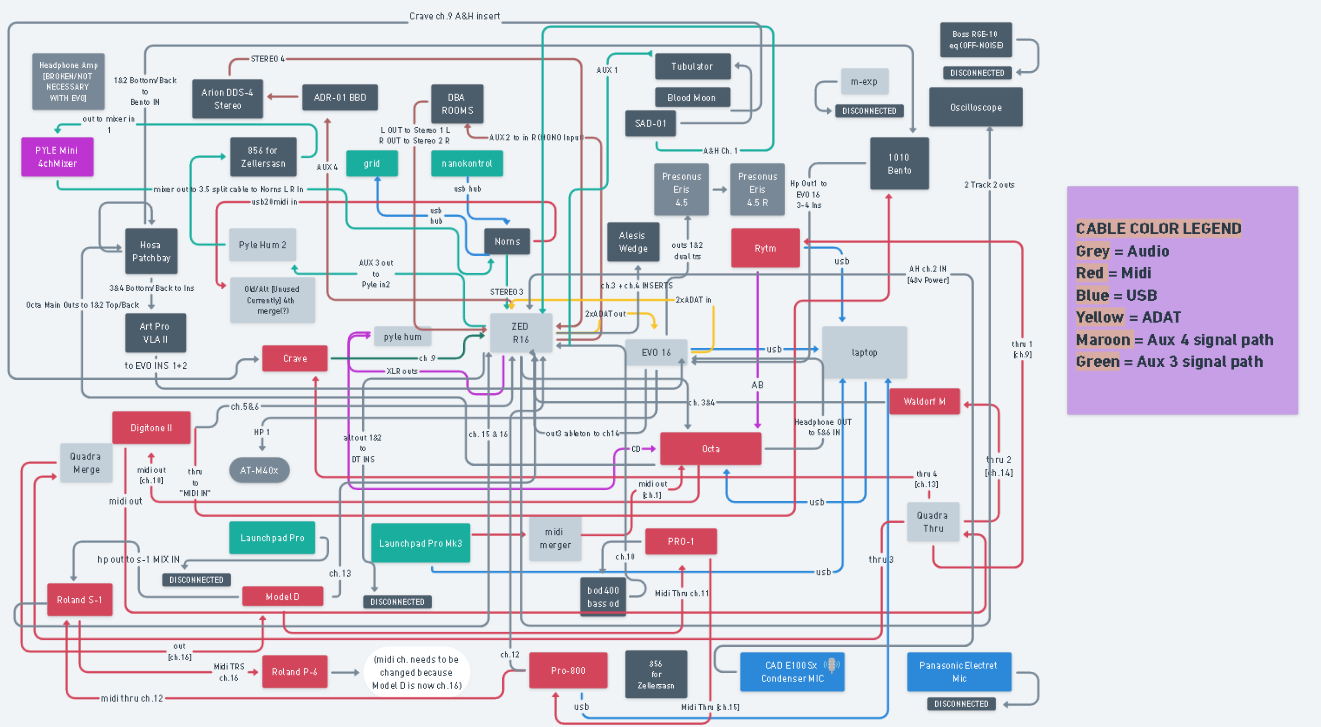
i think mostly ive just locked myself into a mess of a setup without knowing enough about how to route a setup like this.
but i really just wanted to ask whether or not it was a bad idea or even potentially a fix or not, for my particular issue (which Radek did asnwer) . i believe i’ve either thought of, attempted to mitigate, or ruled out most other potential causes. there are things i havent tried, but it only occured to me recently that it may be a phase issue because it really seems like that hollow ineffable phasey sound that makes the tone lose energy and body
its a weird thing. and i remember hearing that with other things, like my old bastl thyme when plugging the wrong cable into its input or forgetting to turn on the mono in mode
thanks for the suggestions. i will try these
Generally speaking you want hard left hard right to capture the full stereo image, then limit the pan to the ranges you like in the synth itself. Otherwise you are just limiting the max pan in either direction. Maybe worth mentioning that headphones don’t actually give you a true stereo image as the audio needs to “mix” in the air for that to happen and both ears can hear both speakers and gives the more 3d effect vs the overly wide sound you hear in headphones.
Could be a speaker placement or room acoustics issue? Could be you are more used to headphones than stereo speakers? Are you using balanced cables? That can cause issue on a mixer looking for unbalanced inputs.
I was reading over your post again use unbalanced cables with the M you could be getting cancellation because of that.
2 Likes
sorry, i meant to say i strictly use headphones both away from home at at my desk. I never use my monitors to make music. I believe you’re right about monitors but i just prefer headphones and im used to hearing music in them. bad habit which i may try to overcome at some point
i use balanced cables on the M now but the M has unbalanced outs and the mixer has balanced jacks. I was using unbalanced before, but i found that i preferred the balanced slightly more (from what i can tell)
oh ok, so use unbalanced? i will try switching back, but even with unbalanced, its not an ideal signal
the issue could be something else entirely. i will have to retry all of my various stages in the path checkpoints to rule out certain connections and narrow it down. from what i remember, even if i single out just the mixer, its still not the same sound that im getting from plugging directly into the M with headphones, and the Digitone 2 sounds awful for some reason
thank you. sorry to derail the M thread but this has been very helpful
Hmm yeah if it sounds pretty much the same then it might not matter which you use in this instance, I might keep it at unbalanced until you resolve the issue though.