Waft Wave

wftlrd.uk/waftwave


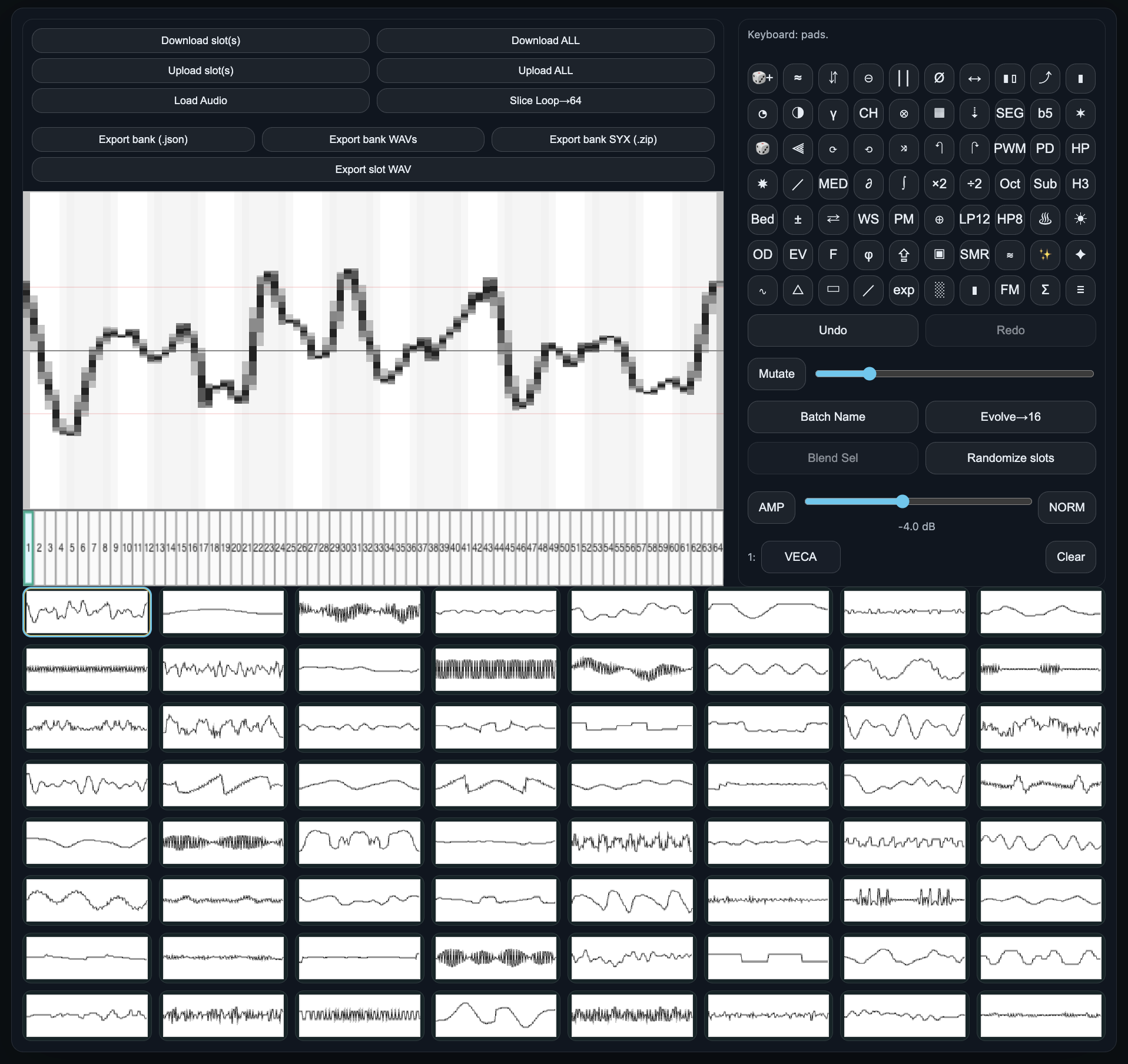
Waft Wave: a tool for generating, preparing, sending, and receiving single-cycle waveforms in the DigiPRO format on the Elektron Monomachine.

Waft Wave is a single-cycle laboratory, built for experimentation, exploration, and pushing DigiPRO synthesis further.

Leveraging new understanding of the DigiPRO format it became clear that normalisation is baked into each waveform. Waft Wave introduces a Hot mode that bypasses this behaviour, allowing for brighter & louder waveforms when played back on DigiPRO machines.

Additional features include:
• Loop-slice import
• Importing and automatically chopping larger samples into multi slot banks
• Evolve, morph, combine, and blend waveforms, both individually and in groups
• Flexible export paths for hardware and software workflows
• Full TM-1 support
• .wav & SDS exporting for the Machinedrum and other samplers

Huge thanks to @jw for testing, feedback, audio demos, and helping steer development towards wave engines.


Here’s a video of a DDRW machine in polymode, each note cycling through a 64 slot generated wave engine. All movement is via a half ramp LFO sweeping through WAV1 positions (a little reverb and delay added for atmosphere).

Here’s some direct audio examples of sliced WAV imports. DigiPRO sample playback on the Monomachine becomes way cleaner and more usable when we bypass slot normalisation and keep the original gain structure intact across a loop or single hit.


(1 drum hits, 2 break, 3 303, 4 break)

Chromium browsers and MIDI interface required for WebMIDI.

wftlrd.uk/waftwave


If this is all of no interest or concern to you then please visit Colundi Waftundi; generate a V2 seed, press play and sit down.

wftlrd.uk/colundi


42 Likes

It was a privilege to help work on this with you. I think the final product is the best thing to happen to the Monomachine since Elektron added the Phaser and Flanger :grin:

Waftlord didn’t highlight this in his post but I just want to point out that tool supports DigiPRO CONVERSION and transmission from any web browser. This means Mac users finally have a means to take full advantage of DigiPRO madness on the newer M1 machines.

9 Likes

This is absolutely awesome, Lord @waftLord
:clap: :clap: :clap:

3 Likes

thanx, we are not worthy

3 Likes

Incredible work, bravo and thanks!

2 Likes

Refresher

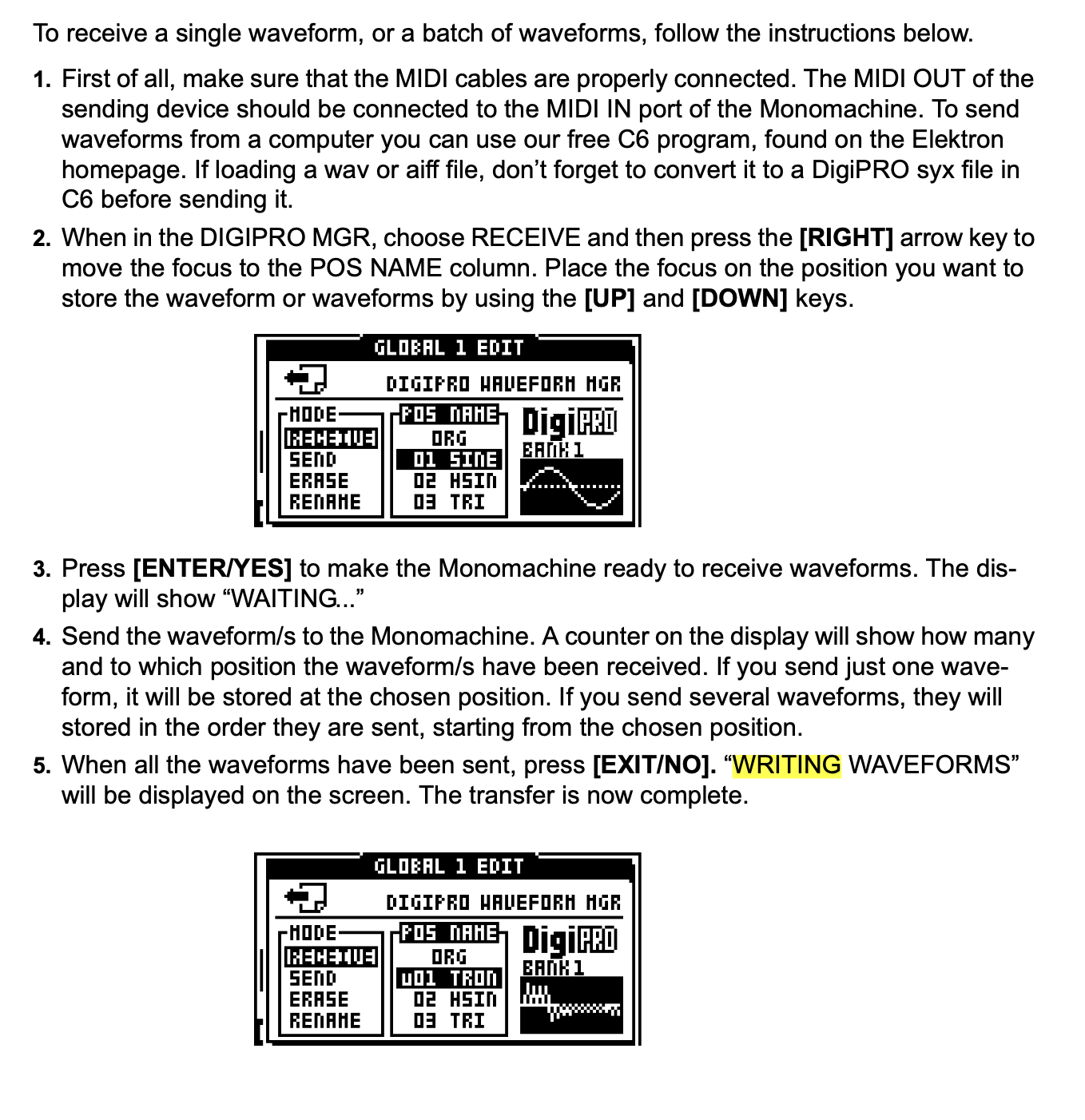
Known Issue — Monomachine “WRITING WAVEFORMS” Hang

In some cases, the Monomachine may hang on “WRITING WAVEFORMS” after uploading DigiPRO waveforms

Although the unit appears frozen, the waveform data is usually written successfully and available after a restart.

This behaviour has been observed intermittently during testing (including with C6) and does not occur consistently — multiple uploads may work fine before the issue appears.

At present, this is believed to be an OS-level issue on the Monomachine, rather than a problem with the tool, data or upload process.

If the unit hangs, restart the Monomachine and continue as normal.

6 Likes

If you encounter bugs when uploading waveforms, try to create a brand new project in the MM then upload your waveforms.

4 Likes

@waftlord you are jezus

2 Likes

This happens to me sometimes with c6

2 Likes

For those spending time in Waftundi land, who want alternative vibes to their seed discoveries, there’s now a few more 64 step tonal arrays which can be applied by chance in the tuning table. Colundi Waftundi

Colundi Waftundi Scales

Core Colundi

  • Colundi (64-step) (Downsampled from the canonical 128-cent Colundi table)

Equal temperaments

  • 12-TET
  • 19-TET
  • 31-TET
  • 7-TET
  • 8-TET
  • 9-TET
  • 17-TET
  • 24-TET (Quarter-tone)
  • 48-TET (Eighth-tone)
  • 53-TET

Fixed-step / algorithmic microtonality

  • Carlos Alpha (78¢ step)
  • Carlos Beta (63.8¢ step)
  • Carlos Gamma (35.1¢ step)
  • Exponential Step (Ă—1.1)
  • Ď€-step (1200/π¢)
  • Ď€-Power (8 steps over Ď€)

Bohlen–Pierce / tritave family

  • Bohlen–Pierce (13-EDT)
  • Bohlen–Pierce (JI ratios)

Ratio / pattern scales

  • Just Intonation (chromatic)
  • Pythagorean (chromatic)
  • Arabian (chromatic)
  • Chinese Pentatonic
  • Octatonic

24-EDO derived scales

  • Hungarian Minor (24-EDO)
  • Byzantine (24-EDO)
  • Maqam Hijaz (24-EDO)
  • Persian (24-EDO)
  • Maqam Bayati (24-EDO)
  • Raga Todi (24-EDO)

Classic temperaments

  • Meantone (1/4-comma)
  • Werckmeister III
  • Kirnberger III
  • Vallotti
  • Young

Octave-based

  • Just Major (5-limit)
  • Pythagorean
  • Slendro (approx)
  • Pelog (approx)

Spectral + number-theory

  • Harmonic 8
  • Harmonic 16
  • Fibonacci Ratios (8)
  • Fibonacci Weights
  • Golden Ratio Orbit
5 Likes

I haven’t a Monomachine but boy do i want one after listening to this. Great work and implementation.

2 Likes

Silverbox renaissance!

6 Likes

Here’s a requested breakdown of all the Morph, Evolve and Blend functions available in Waft Wave (well most, all will be in the next update) for creating Wavetables.
Along with a Wavetable preview in the export sub menu.

Waft Wave Processes

Evolve modes (single wave → motion across slots)

Spectral / harmonic evolves

  1. Smooth → Fold
    Smooths the wave, then gradually introduces wavefolding or saturation to add harmonics.
  2. Spectral Sweep
    Progressively reshapes brightness by shifting harmonic emphasis across the table.
  3. Spectral Diffusion
    Spreads harmonic energy for a smoother, less spiky spectrum.
  4. Odd/Even Balance
    Moves energy between odd and even harmonics over time.
  5. Formant Sweep
    Adds a moving formant emphasis across the wavetable.
  6. Formant Drift
    Applies a gentler, slower formant motion across the wavetable.
  7. Phase Spray
    Randomizes phase progressively while largely preserving harmonic magnitudes.
  8. Harmonic Rotate
    Rotates harmonic content across the spectrum over the series.
  9. Harm Warp
    Remaps harmonic positions progressively for a spectral warp effect.
  10. Harmonic Stretch / Compress
    Stretches or compresses harmonic spacing across the table.

Time / phase-domain bending evolves

  1. PWM Scan
    Warps the time axis to create a pulse-width style movement.
  2. Phase Warp
    Applies a smooth phase warp that changes internal timing without hard clipping.
  3. Phase Warp Asym
    Applies an asymmetric phase warp for more expressive timing distortion.
  4. Phase Warp Odd
    Uses odd-harmonic modulation to drive phase warp motion.
  5. Phase Fold
    Folds the phase path to introduce harmonics via time-domain bending.
  6. Phase Quantize
    Quantizes the time axis into stepped segments across the series.
  7. Phase Staircase
    Creates a stepped time-axis warp with a different stepping pattern.
  8. PD Warp
    Performs phase-distortion style time-warping across the table.
  9. PD Integrate
    Uses a smoother phase-distortion mapping aimed at stability across the series.

Digital / procedural evolves

  1. AM Sweep
    Sweeps amplitude-modulation depth or rate across the wavetable series.
  2. Unison Thickener
    Adds layered or resampled components to increase density.
  3. Bin Swap
    Splits the cycle into chunks and deterministically shuffles them.
  4. Harmonic Swap
    Swaps harmonic groups progressively across the series.
  5. Alt Density
    Alternates between sparser and denser transformations across the table.
  6. Chebyshev Drive
    Applies polynomial waveshaping with increasing intensity across the series.
  7. Asymmetric Bend
    Bends positive and negative halves differently across the series.
  8. Gate Scan
    Scans gated or notched windows around the cycle over time.
  9. Hard-Sync Sweep
    Simulates sync by increasing phase rate to sweep harmonics.
  10. Hard-Sync Sweep Plus
    Extends the sync sweep range with smoother behaviour at extremes.
  11. Seeded Drift
    Uses a deterministic seeded chain of transformations across the table.

Morph modes (A ↔ B motion between anchors)

  1. Time Crossfade
    Performs a direct sample-by-sample blend from A to B.
  2. PM Boost
    Blends A to B with added phase modulation near the midpoint.
  3. Spectral Blur
    Morphs in the spectral domain with added smoothing through the transition.
  4. Spectral Tilt Morph
    Morphs using a progressive shift in spectral tilt from A toward B.
  5. Harmonic Weave
    Interleaves harmonic influence from A and B across the transition.
  6. Spectral Sweep
    Transitions harmonics in bands to create a moving spectral change.
  7. Harmonic Crossover
    Blends low and high harmonic regions from different sources across the morph.
  8. Mag A Phase B
    Uses A for magnitude and B for phase during the morph.
  9. Mag B Phase A
    Uses B for magnitude and A for phase during the morph.
  10. WaveShape Morph
    Uses one wave to shape the other during the transition.
  11. Ring Mod Morph
    Uses multiplication as the midpoint character while transitioning from A to B.
  12. Ring Warp
    Uses ring-derived modulation as a smoother midpoint character during the morph.
  13. XOR Morph
    Uses a bitwise XOR midpoint character during the morph.
  14. AND Morph
    Uses a bitwise AND midpoint character during the morph.
  15. OR Morph
    Uses a bitwise OR midpoint character during the morph.

Blend modes (2+ selected waves → one combined result)

  1. Time Avg
    Averages all selected waves sample-by-sample.
  2. Aligned Avg
    Aligns phase or rotation to a reference, then averages.
  3. Median
    Takes the per-sample median across the selected waves.
  4. Mosaic 8
    Builds one cycle by stitching 8 segments from the selected waves.
  5. Mosaic 12
    Builds one cycle by stitching 12 segments from the selected waves.
  6. Mosaic 16
    Builds one cycle by stitching 16 segments from the selected waves.
  7. Spec Mag Avg
    Averages spectral magnitudes while using phase from a reference.
  8. Spec Mag Avg Dominant Phase
    Averages spectral magnitudes while using phase from the dominant wave.
  9. HarmX 25%
    Combines lows from one wave and highs from another with crossover at 25%.
  10. HarmX 50%
    Combines lows from one wave and highs from another with crossover at 50%.
  11. HarmX 75%
    Combines lows from one wave and highs from another with crossover at 75%.
  12. Convolve
    Multiplies spectra to combine timbres in the frequency domain.
  13. Ring
    Multiplies waves sample-by-sample to combine them.
  14. XOR
    Bitwise digital combination.
  15. AND
    Bitwise digital combination.
  16. OR
    Bitwise digital combination.
7 Likes

I’m not super familiar with wavetable synthesis, nor these techniques of wavetable creation above. Gonna have a play with this for sure but maybe someone out there can answer a relatively simple question first.

Part of what pushed me over the edge to buy a Monomachine was actually a video made by Catabolic/@Veets about “Sine Width Modulation.” He posted about it here and on his website.

The idea is that because the DigiPRO Doubledraw machine can interpolate between waveforms, a bank of different widths of a sine wave can be loaded into it for something similar to PWM, but for a sine wave. It sounds amazing in his video here.

His DigiPRO bank has 11 waveforms in it all cut up to different widths, which sounds awesome when you use an LFO to scan through them with some interpolation time on the TIME parameter. But all this got me thinking about if it would be possible to make a full bank of 64 widths, and therefore get the ultimate SWM bank for Monomachine? Could I use one or a few different techniques above to generate a bank like that?

Like would this one do it?

  1. PWM Scan
    Warps the time axis to create a pulse-width style movement.
2 Likes

Hey @warrenlain cool questions. They’re useful both for helping others explore Waft Wave, and for thinking about how it could evolve in a direction inspired by Catabolics’ more hand-crafted approach.

Current state of play

At the moment, Waft Wave’s Evolve lengths are fixed to 8 / 16 / 32 / 48 / 64 slots, which can feel a bit rigid. You can work around this by selecting specific slots, combining morph selections and then filling the gaps between them, but allowing any integer evolve length would open up more organic movement and finer control for wavetable creation.

It’s easier to show than explain, but ultimately: you’re absolutely right.

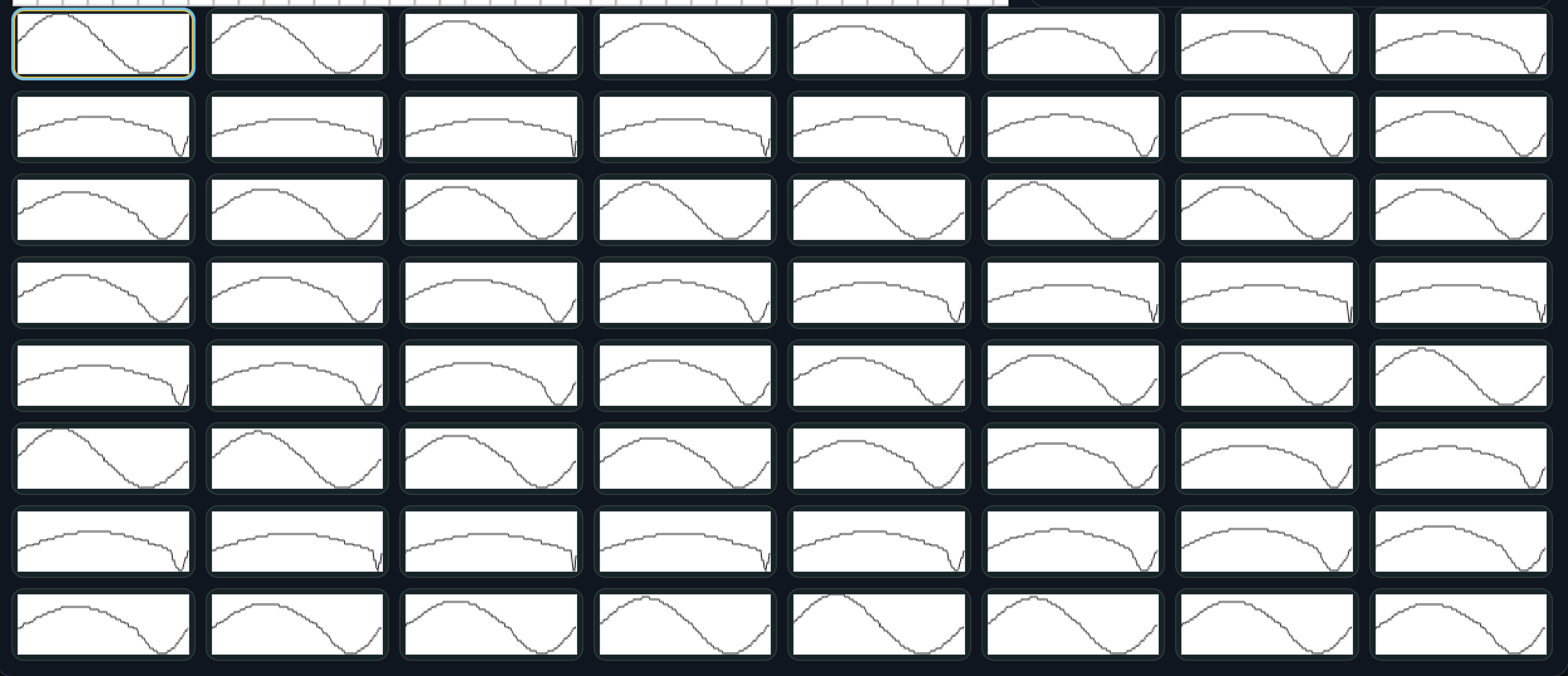
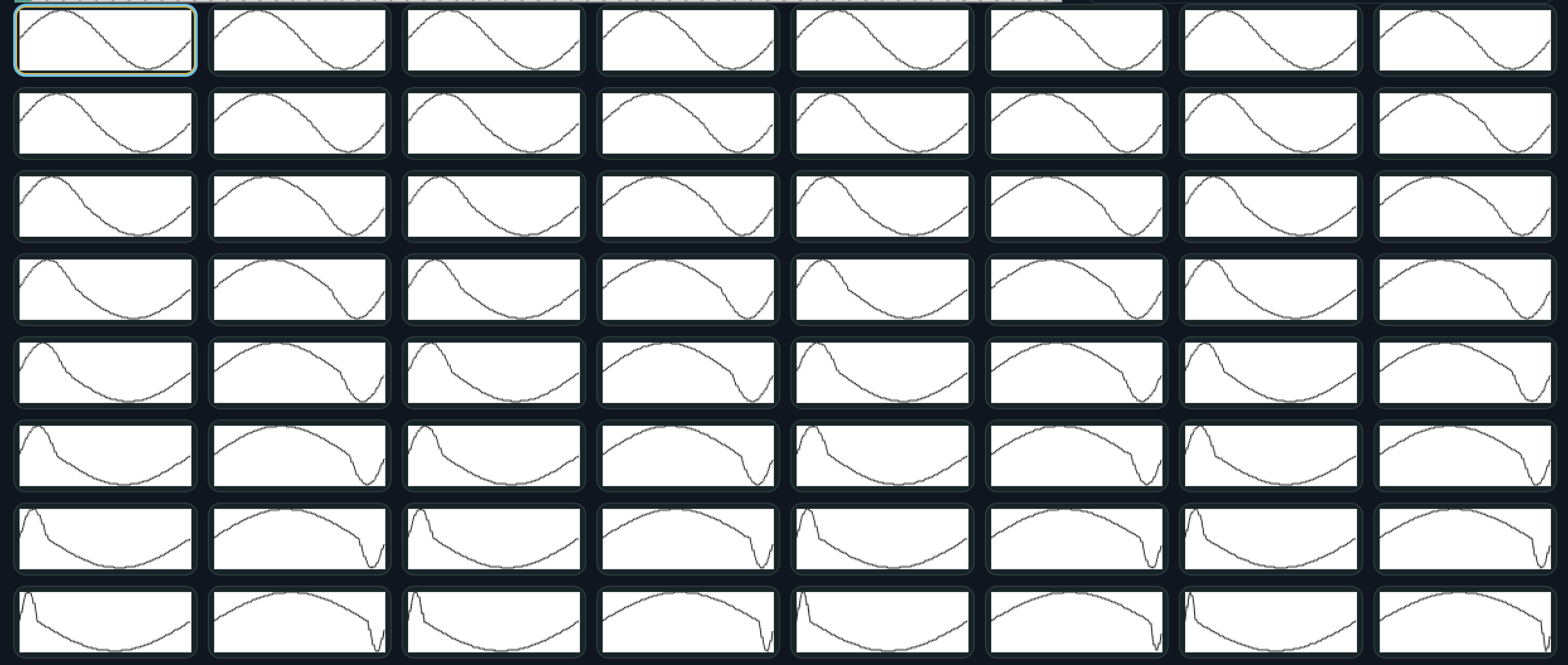
Here’s @veets bank:

What’s striking here is how it ping-pongs roughly every 20 slots or so.

reasons?

Veets’ bank is beautifully handmade. Really inspiring stuff to pick apart, i want to take this forward for WW soon. @warrenlain told me i need to watch the video apparently as he hand chopped 11 sines and arranged them over the bank for that nice movement.
Catabolic also created one of the first MD videos i saw that opened my eyes to LFO modulation potential , that SLOW LFO trick has been a go to for many a year. :slight_smile:

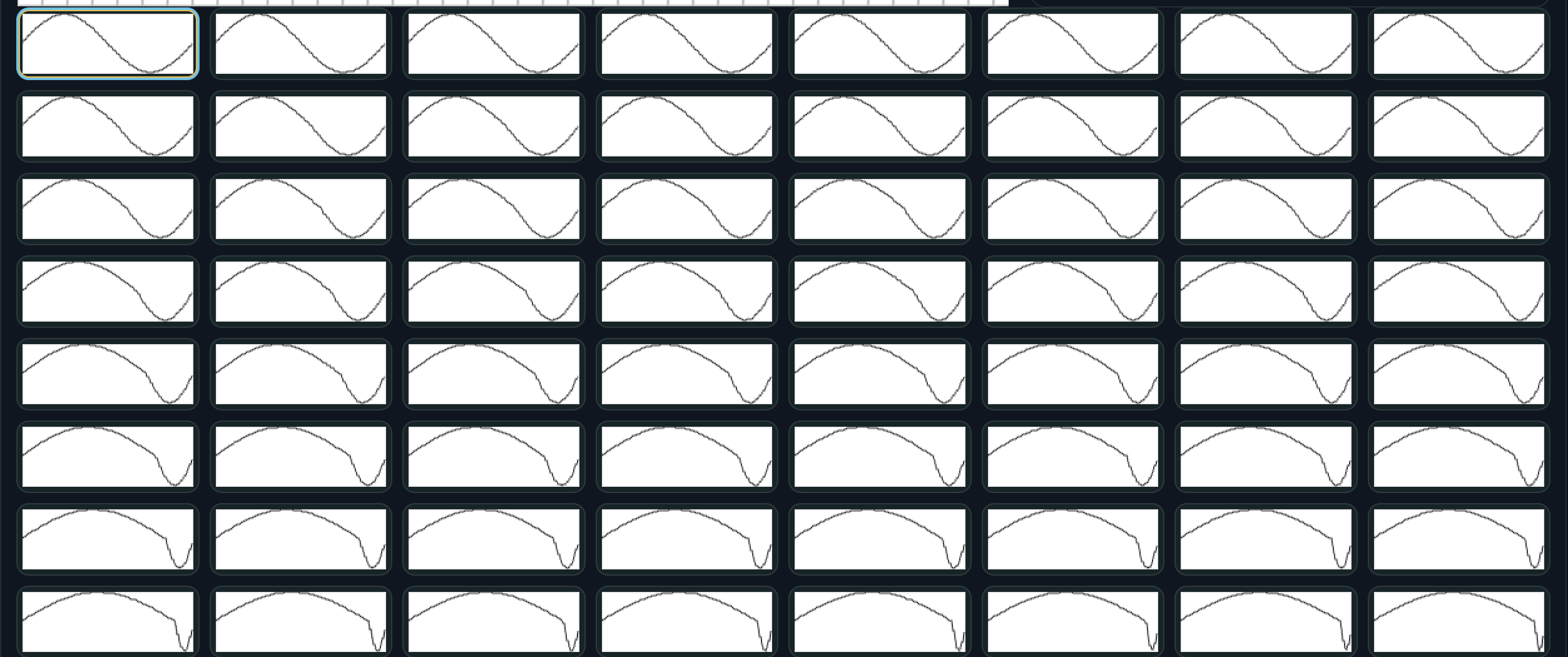
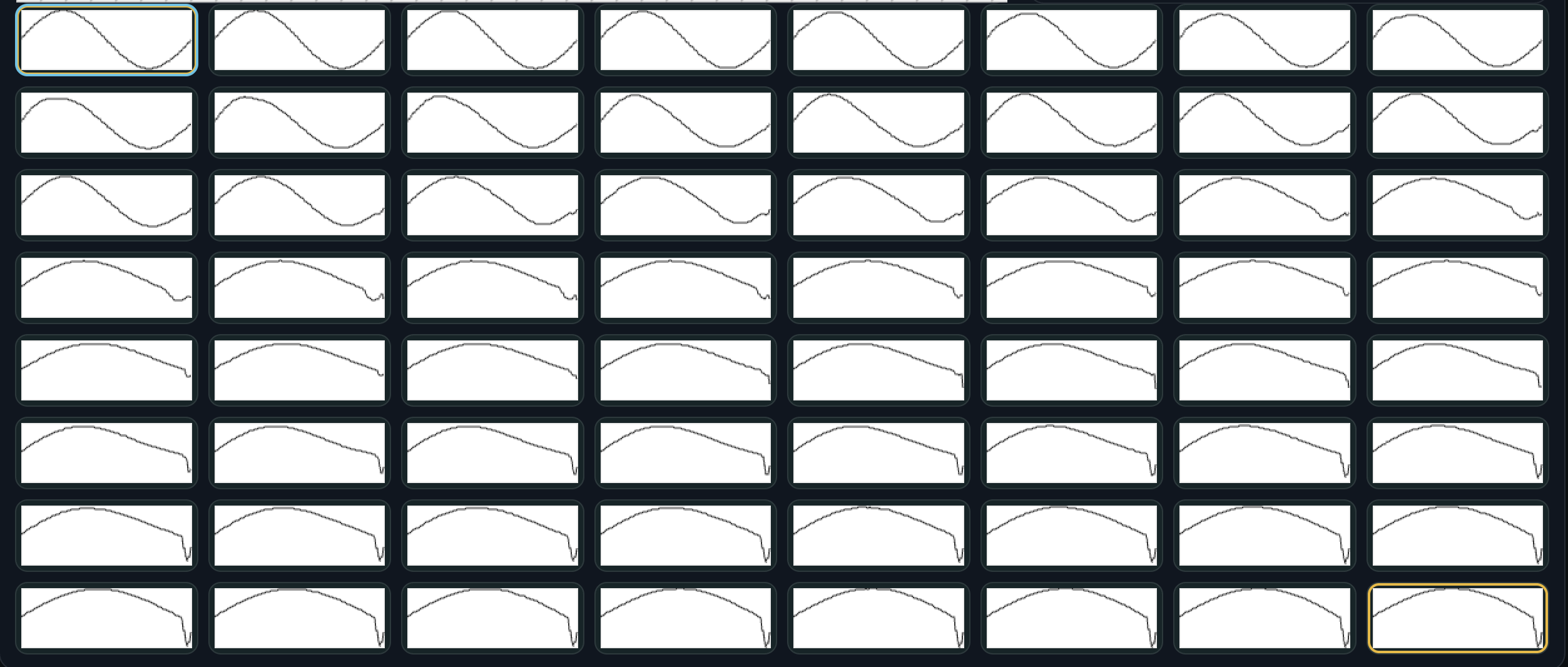
So here’s the Waft Wave sine wave Evolve PWM Scan over the whole 64 slot range:

This produces a clean, monotonic PWM sweep. It can be exported as a looped chain, with optional ping-ponging to create a 126-slot loop (so the first and last slots don’t repeat, audio below). You can also select and export any subsection of slots in WW, depending on the movement you want.

Here’s a Waft Wave 2 way Morph Evolve PWM Scan (That’s the first and last slots from the bank above selected, and morph fills the in between) over the whole 64 slot range:

This looks a tiny bit different.

reasons

In Waft Wave, PWM Scan is defined as a scan position where ~0.5 is “neutral” and values below/above skew in opposite directions. Single-slot Evolve remaps this so it only scans 0.5→1.0, giving a clean one-way PWM sweep from the same seed wave (pivot stays consistent).
Two-slot Morph (PWM mode) first crossfades A→B, then applies PWM as a mid-series shaping overlay (strongest near the middle, fades out toward the ends, with easing), while keeping endpoints exact. Because the base wave changes every slot during the morph, the PWM pivot/zero-cross can shift slightly too.
That’s why they look very close but not identical.

I’m at work today but here’s the syx and ping ponged audio of banks to compare if you can upload to MnM:
veets.syx (439.2 KB)

waftwaveevolvesine64.syx (439.2 KB)

3 Likes

first test for an Alt Skew mode. this is awesome.

4 Likes

I don’t understand: it seems the wave form is spanning on 2 consecutive slots, but I have trouble understanding how you use this or anticipate how this will sound…

1 Like

with this each step in the wavetable pushes the shape in the opposite direction to the previous one, a little bit more each time.
Alt skew alternates the direction of each step while increasing its strength, so neighbouring slots become left/right pairs. That’s why the wave can look like it’s evolving over two slots instead of one, it’s moving back and forth as it grows.

4 Likes

Mad respect @waftlord ! This is phenomenal!

3 Likes

Whoaaaa this sounds wild. Kind of like the original sound I was searching for but even more pronounced “Wow”-like filter sweep! Is that because it’s pushing the modulation of the period out in both directions? It’s also alternating between each direction! I didn’t know that sound would be smooth to the ear, but I guess now that I think about it, the narrow widths and the wide widths link into each other this way. Wow.

Edit: Haha you explained in the very next reply.

2 Likes