I map 8 of the performance parameters (only got 8 encoders). The first 8 basically.
Very glad to know that patterns are being implemented. Will really help my workflow with Battalion
2 Likes
A friend was over so i could hear his minitaur and bass station 2. I used Battalion databroth presets for accompaniment and his head exploded hearing and seeing Battalion in action. Way to go, unfiltered! And @Databroth
4 Likes
Yep Databroth presets are top notch !
2 Likes
Trying my best to get User Samples in today, but I might kick it to Monday since I’ve made some massive changes. Here’s what’s happening:
- I’ve completely eliminated the hidden file system. Now, all User Presets will be saved to a visible iCloud folder. This makes syncing between devices a whole lot easier.
- As a side effect, I caught a bug in the Mac/Windows plugin where loading a preset saved on iOS doesn’t load the samples properly because of the new file system. I’ll have to create a public beta for Mac/Windows for the new iOS users.
- Now that the preset storage has been rewritten, the User Samples folder will be the same. It will be one visible folder shared between Standalone and AUv3, synced on iCloud.
- I’ll need to do some more testing with WiFi turned off just to double-check some guardrails.
- This iCloud change will make its way to the other iOS plugins.
I’m really happy about this, as this was the workflow I had wanted. I had hit a ton of JUCE vs. Apple issues, but I think it’s been solved.
17 Likes
…I hesitate to ask, but what if the user does not use iCloud? Can that user still save User Presets locally?
2 Likes
I believe so! I guess we’ll find out in beta. The iCloud folder should still be a locally available and visible folder. I suppose I’ll need to add “sign out and double-check before sending this out into the world” to my TODO 
5 Likes
Hi TF, just checking in on the sample slicing tracks?
I will try and check it out as well, but I won’t be signing IN and OUT or enabling iCloud sync (which I only use for calendars and Notes, I think), because that has caused endless heads forcne in the past. 
Thanks for braving that! 
This file system is a pain you know where ! Thanks for the hard work !
1 Like
@trickyflemming any info on an update to the plugin? 
2 Likes
I’ve heard some strong clues that iOS 19 will eliminate all of the iOS Files issues with a more MacOS style Finder set up. This may make life easier for iOS developers. Just got to wait until Sep/Oct when it will likely get released 
Good morning @trickyflemming and @amusesmile - I ran a search in this thread, but did not see a mention of adding ‘Background audio’ to the iOS version. I will assume that is coming, but I just wanted to mention it in case no one had yet.
Also, just to let you know, I have iCloud Drive turned off on my iPad, which means that the folder does NOT appear locally. I am not sure how saving User Presets will work for people with iCloud Drive turned off, since it doesn’t appear to be a valid location for reading/writing. Maybe a folder in “On My iPad” could be an alternative?
As always, thank you for porting your amazing instruments and effects to iOS! You’ve made my iPad something I look forward to using!
2 Likes
Wish granted! It’s in the next beta.
Thanks! “On My iPad” is unfortunately not an option surprisingly, at least as far as I can find. The Standalone and AUv3 are technically different apps (or, an app and an “appex” app extension). With iCloud I can at least grant the apps access to the same iCloud container. I’ll keep looking to see if there’s an easier way to get it into On My iPad, but boy does Apple like to keep things mysterious.
I’ve added in a bunch of safety and fallback code to keep the file system the way it was if iCloud is not present. I’m sure this will be 100% bug-free and there will be no catastrophic behavior whatsoever 
9 Likes
Yahoo! That’s great to hear. I am always a bit sad when the sound fades if I have to switch to something else.
To that end… I have saved two User Presets. They are available in the browser…but where do they live? I don’t quite know.
Issues? With the file system on a beta app for iOS? …naaaaah  I wish you luck in sorting this stuff out. iOS has never made it easy, but I have an ABS system in place with betas… Always Be Sampling!
2 Likes
Good work on the iOS files issue! At the risk of being a pain, I really think that adding Patterns will be a workflow gamechanger for a whole bunch of people. Is there an ETA on that?
1 Like
Hidden! So AUv3 and Standalone are technically two different apps with two different identifiers. By iOS defaults, they are unaware of each other. To share files between the two, we have what’s called a “security group” where the two apps can read/write to the same hidden folder that is basically its own island (or sandbox, as Apple calls it).
After we get through this initial release for iOS. I will be more than happy to spend my entire day on something other than learning a new file system.
10 Likes
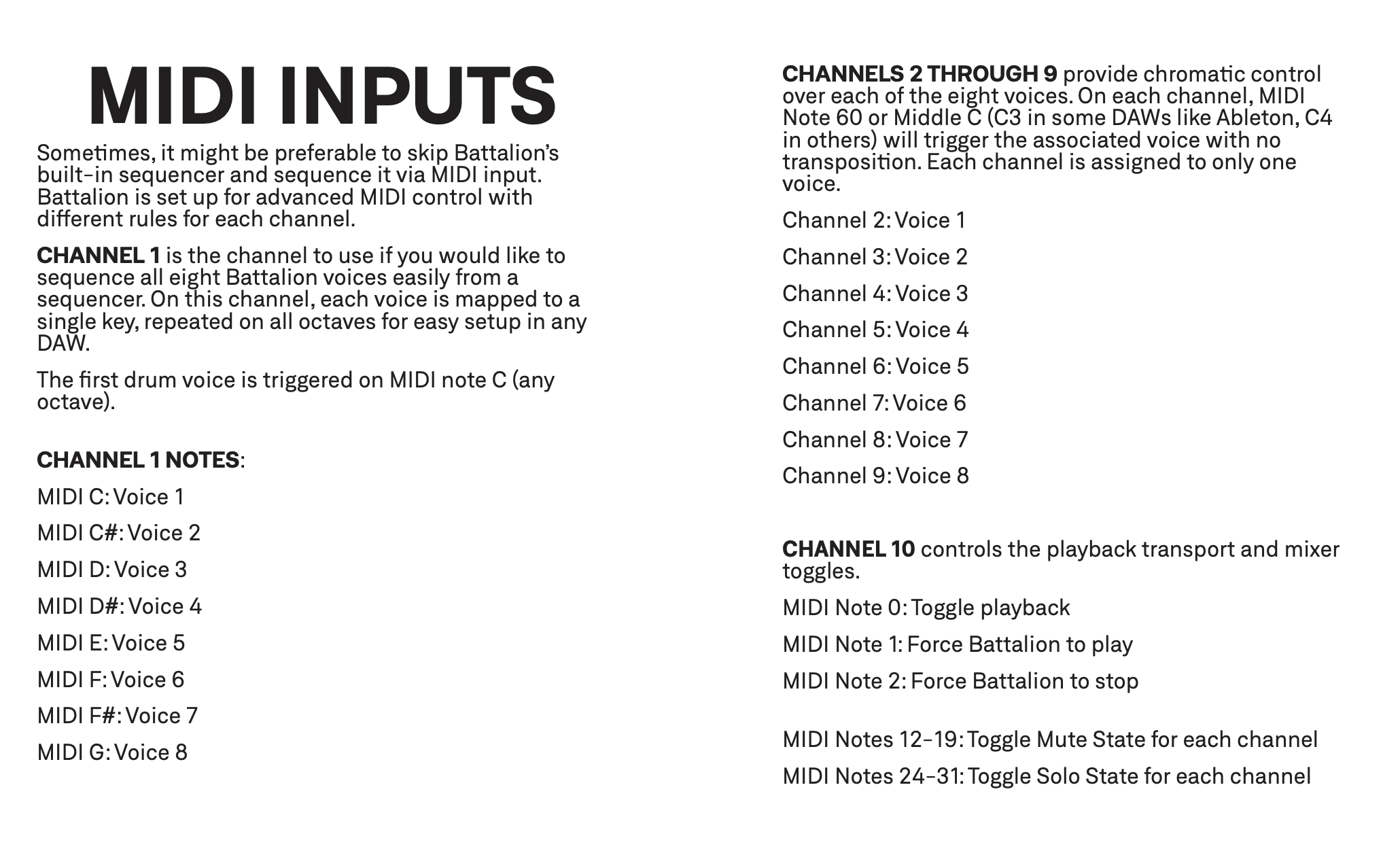
Do play and stop have exposed parameters ? I searched in the gazillions parameters avaliable but no luck finding them. Thx.
The Melbourne Roto Controller looks like a nice fit for Battalion btw