User sample import isn’t in place yet. I’m trying to figure out the optimal solution for dealing with Apple’s file system madness.
2 Likes
And on windows?
Did an update to 1.0.7, and it’s great
When i go to load sample, it takes me to a folder, but i don’t see any of the samples/presets there.
Thanks for the reply I thought I was becoming totally mad…
Some other minor stuffs :
- No way to setup midi channel it seems.
- When in setting menus, link to the manual leads to a page where there are all UA manuals but battalion’s.
- Online ressources link leads to a 404.
No bugs for now.
Since you’re in sample folders…
Unless i’m mistaking, it is impossible to set up a user sample directory by hand.
On pc, I have to copy my samples to battalion fixed directory, on C: ( could talk of Gb here ! ) or drop a sample in the engine directly, which is convenient but then, the “load sample” option recalls the default directory so I need to pick up samples one by one or copy the directory to user samples. Am I right ?
- Would it be possible to have a folder constrain option for randomizing samples ?
The idea would be to randomize samples only withinh a chosen subset of samples, snares, kicks or whatever, instead of the whole library if that makes sense…
I suppose it would involve a consequent aount of work but I had to ask ! 
Still not had a bug for the moment.
Thank you so much for your detailed reply!
If you allow, I have a few ideas to make it more live performance improvised oriented:
- It would be amazing that If I have a kick selected on a channel and I press randomize sample, It only picks samples from the kick folder, so the sound stays on the same area as the kick, In this way you could avoid a random hihat sample on the place of the kick and get a lot of variation. The same applies to the rest of the engines
-Implement something to be more precise selecting the engines. On pc, you can only map the arrows to pass through all the engines. This is not ideal on a live situation. Instead of a menu, make the engines selectable by a button, so I can switch to whatever engine with the press of a button instead of having to press the arrow and scroll thru all the engines
-Accessing the sequencer:
Ideally, this would be done using a dedicated MIDI controller. However, I’m not sure how feasible that is from a technical standpoint—I’m a total beginner when it comes to engineering this kind of setup. That said, I think this could be a real gamechanger.
One of the most practical ways to approach this might be via an iPad, which offers tactile, real-time control over all parameters.
Another concept I’ve been imagining involves a custom MIDI controller, with one main row per channel—similar to Elektron’s parameter locks, but with the ability to view and interact with all channels simultaneously rather than one at a time. Each channel would have its own metronome-guided visual feedback to help keep track of timing.
With a few knobs mapped to specific parameters, you could simply press a step on the controller, turn a knob, and instantly create step-based modulation. Think of it like an Elektron-style sequencer, but expanded to show all 8 channels at once.
As far as I know, there isn’t a controller on the market that currently does this—unless you’re willing to use eight Elektron boxes, which feels a bit over the top.
-Save and recall function: press save, tweak some parameters, and then press recall to go back to the original state
Hope this give you a few ideas, I have some more, but for the moment this would be amazing. The Variation, depth and multiply parameters that are currently implemented are amazing for live performance, Thats why I have a lot of faith on this plugin. Been looking for a solution to have complex drums on an improvised live performance situation for a long time, and I think this is the solution. I use a lot the rest of your plugins as well  they are amazing! Thank you so much
3 Likes
Thank you- we add stuff like this to our notes and review them pretty often when adding features or brainstorming new products. Appreciate it immensely. 
2 Likes
Just installed Battalion and played around a bit. Really cool! And there’s so much Analog Rytm in there, wow, amazing! I bought it, because I wanted to have the Rytm’s choking behaviour in software. Well, not only because of that, but it seemed like it would do that also and I’m glad it does.
Recreating Rytm patterns in the daw always had this massive hurdle for me, because Ableton Live and any plugin I have chokes when overlapping midi notes are present, so when you have closed hats on all 16ths notes and put in open hats in the same midi clip, it does not play the open hat at all. Removing the notes in places where the open hat gets triggered works - the tail of the open hat gets choked - but it sounds different.
Battalion works on the audio level and not on midi/trigger level, it seems. Perfect. But the envelopes do not take note length into account, right? No “auto” mode for the hold stage that follows note length like the Rytm has or a “gate mode” like many software drum samplers have?
I checked the manual and seems that is the case.
Nevertheless this is such an amazing drum machine plugin! I’ll probably be playing with it the whole day and night.
3 Likes
Not sure if this is exactly what you’re hitting but the choke/trigger stuff is done per-sample and in order of the voices, so say you have a note on voice 2 but voice 3 is choking it, that won’t play. If it’s the other order, it will play, because voice 2 chokes 3 before 3 is triggered. To get around it you can put a microscopic shift on voice 2 so it’s a few samples delayed from 3. Someone else hit this.
We could always change the behavior so it’d check if a trigger had happened on the same sample and override the choke. It kind of gets down to weird edge-case opinion stuff. If a drum gets two triggers and a choke on the same sample, should it play? Etc.
1 Like
The choking behaviour is exactly what I was looking for!
I would like to have a “gate mode” for the envelopes, so that the note length determines how much of the sample gets played. On the Rytm, only the hold stage follows note length when set to auto, the decay stage is still independent.
Here’s an eample of the Rytm with a hi hat and different note lengths every other step. Hold is set to auto (or "gate mode as it’s more commonly known). You can still control decay.
Here’s an example how it behaves when the auto setting is disengaged and hold is turned up. (On the Rytm the hold knob set to 0 engages auto so that hold stage follows note length. 1 is then the shortest hold time and from 1 up, it just lengthens the hold stage
It’s a very effective way to add some subtle variation to hi hats and other percussive elements, but it’s still very live tweaking friendly.
Choking behaviour in Battalion is exactly what I was looking for (and btw. Battalion sounds really good!). An auto setting or gate mode for the hold stage of the envelope would make it perfect!
Or is there a way to control the hold time with note length and I simply overlooked it?
1 Like
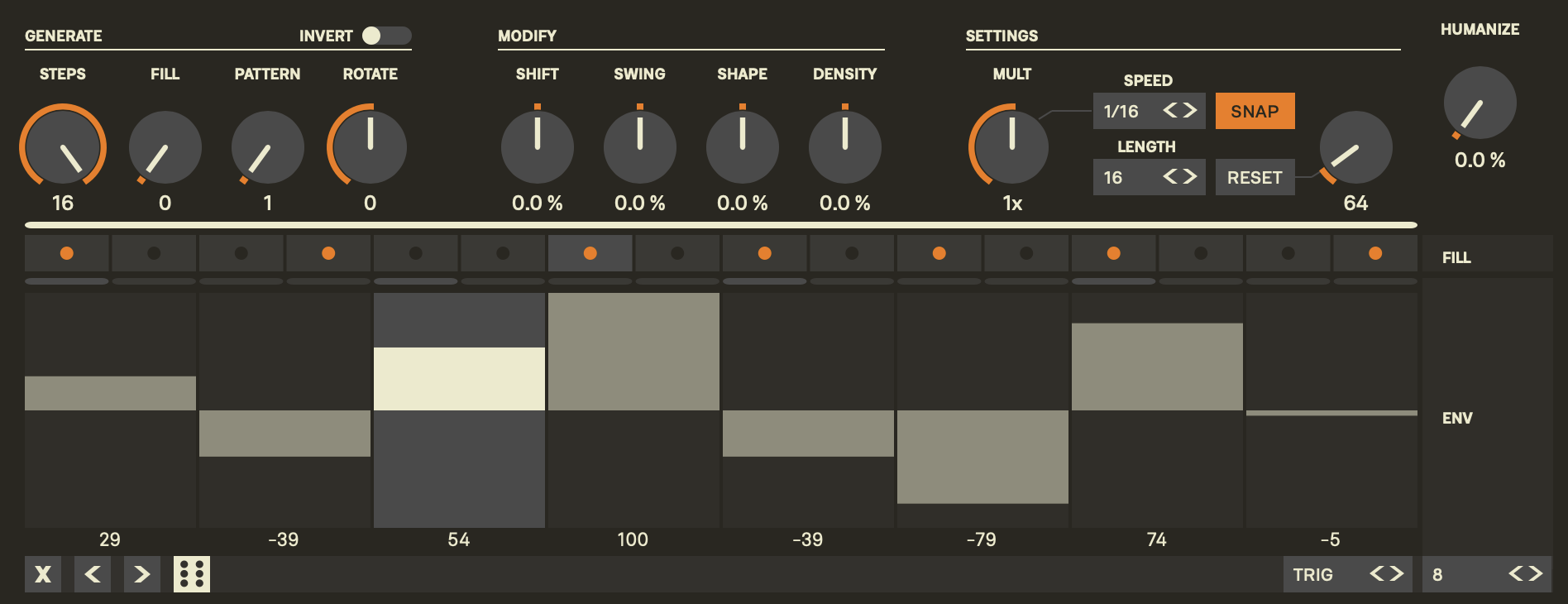
I made an audio demo with your sample showing one way to do this in Battalion but it won’t let me upload as I’m a new user. Anyway, see the screenshot for one way to get that kind of behavior. The ENV lane scales the envelope. It sounded basically like your example to my ears. You can get nice patterns by using trig mode of different length than the sequence. The on the performance page you can scale each section. The auto hold thing is interesting- I’m very far from an Elektronaut so need to read up to understand. Mike will know instantly.
3 Likes
Sorry if this has already been covered, I thought it had already but scrolling through the thread I can’t see it,
Does the iOS version accept incoming midi? Can it be sequenced by an external sequencer?
If not is it something that’s in development?
1 Like
Perfect, that works, thanks!
Auto mode is like gate mode in Ableton Live’s Simpler and Drum Sampler. It just means that the hold time is set by the note length. So hold will be 1/16th or 1/32th or whatever the note length is and decay time can still be set manually.
It’s similar how envelopes react differently to a gate and a trigger. A trigger just starts the envelope, a gate controls how long the hold or sustain stage is active.
Lot’s of drum machines have this, the Rytm is just special in the way that it’s not a button you can press to change from trigger to gate mode, it’s all part of the hold parameter. Doesn’t really matter. A button to change to gate or auto mode would work just as well.
If you guys could add that, would be so awesome! And it’s just added functionality, so doesn’t change anything for people that do not want to use it.
Battalion is really such an awesome plugin! The blend of synthesis, sample playback, sequencer and performance controls is just great. Not sure if it was in part inspired by the Analog Rytm, but there are so many similarities which either way is awesome. 
3 Likes
Gotta say, I just love it when makers of different kinds bounce ideas — some make music, some make plugins (and the two overlap).
Cool stuff bateleurs (can’t remember the name of your company!  )
)
Very much so- Mike could talk for days on what aspects of which Elektron boxes inspired different parts of Battalion. He’s an expert and has an encyclopedic knowledge of the industry. Then I’m the opposite where I often try to do everything from scratch without looking at other companies until certain moments in the process. It’s a fun collaboration style and beautiful but frustrating in different ways for both of us, surely. Very fruitful, creatively.
10 Likes
Oh, yeah, of course! I recognize CTRL-All, Machinedrum synthesis, the 3 band master eq from the Machinedrum, layering tracks from Machinedrum, filter, envelopes, delay, reverb sends, midi handling and mix of synth and sample playback is very Analog Rytm.
It’s like a digital Machinedrum/Rytm hybrid!
Curious what else I’ll find… Only got it today.
I never recognized any Elektron inspiration in your other plugins, but maybe that’s more in the newer stuff.
It’s pretty rare these days that I get so excited about a plugin, but Battalion is so much fun.
Edit; Added missing commas.
10 Likes
Hello again guys,
I am looking for a portable touchscreen monitor to use battallion, for a live set in Bitwig (As It supports multitouch), but those aliexpress screens are not giving me too much confidence. Do you guys have any reccomendation between 14 and 20"? I was looking at the verbatim pmt
Ipad app is amazing, but maybe Its too small for manipulating the sequencer in real time If you can throw some light into this I will be really glad, thanks!
You can midi map the sequencers controls to hardware midi controller on iPad, I’ve done it for one track and it works really well.
2 Likes
I haven’t used the desktop plugin so may be doing it incorrectly, but when trying to map e.g. the Random device to one of the engine parameters on the iPad beta, it didn’t seem to be possible. For example, I wanted to map it to Reverb send, and when the map button was selected that was highlighted but not matter what I did it didn’t seem actually to start changing the Reverb send.
Which hardware did you use? Does the triggers get reflected on the sequencer? Something like an oxi one? I am highly interested on this, let me know 
I used novation LaunchControl XL, I mapped the rotary dials to the 4 generate knobs on the sequencer page (Steps, Fill, Pattern, Rotate) and a button for invert. This is more like a Torso T1 than Oxi one I’d say, I did not map a buttons to steps1-16 to turn them on/off, it sounds like this is what you’re trying to achieve. Glitch Step hosted in Loopy pro is able to this, i.e. have 16 buttons on a midi controller that turn on/off individual steps in the sequencer and have the the buttons light up to show which are active. Hope that helps
1 Like