I’ve got it running!
- MacBookPro M1 14"
- macOS Seqoia 15.3.2
- UTM with a Windows 7 ISO
It was a relative easy setup if you follow the UTM Windows 7 setup Windows 7 | UTM
I’ve got it running!
It was a relative easy setup if you follow the UTM Windows 7 setup Windows 7 | UTM
Did you use/install the SPICE Tools as well?
Yes I did.
Could you please confirm? - Is this a viable solution to running Nord Modular G2 with Apple Silicon? Thank you!
I can confirm that after installing UTM Windows 7 on my MacBook Air M2, the Nord G2 editor works great.
Edit- My friend helped me with it. The UTM webite seems to be very detailed on install instructions.
The version of Windows is important. He downloaded it from Archive.org.
" You need an Windows 7 installation ISO. There are many different ones that work but a good working image for English users is named en_windows_7_ultimate_with_sp1_x64_dvd_u_677332.iso and has the SHA1 hash of 36ae90defbad9d9539e649b193ae573b77a71c83."
Here is the UTM Win7 link
I tried it also with Windows XP (smaller, less resources, maybe faster). And it works also. A bit more hassle to install the Clavia USB driver and to get the shared folder working (a bit buggy). But it seems solid and a bit faster starting up.
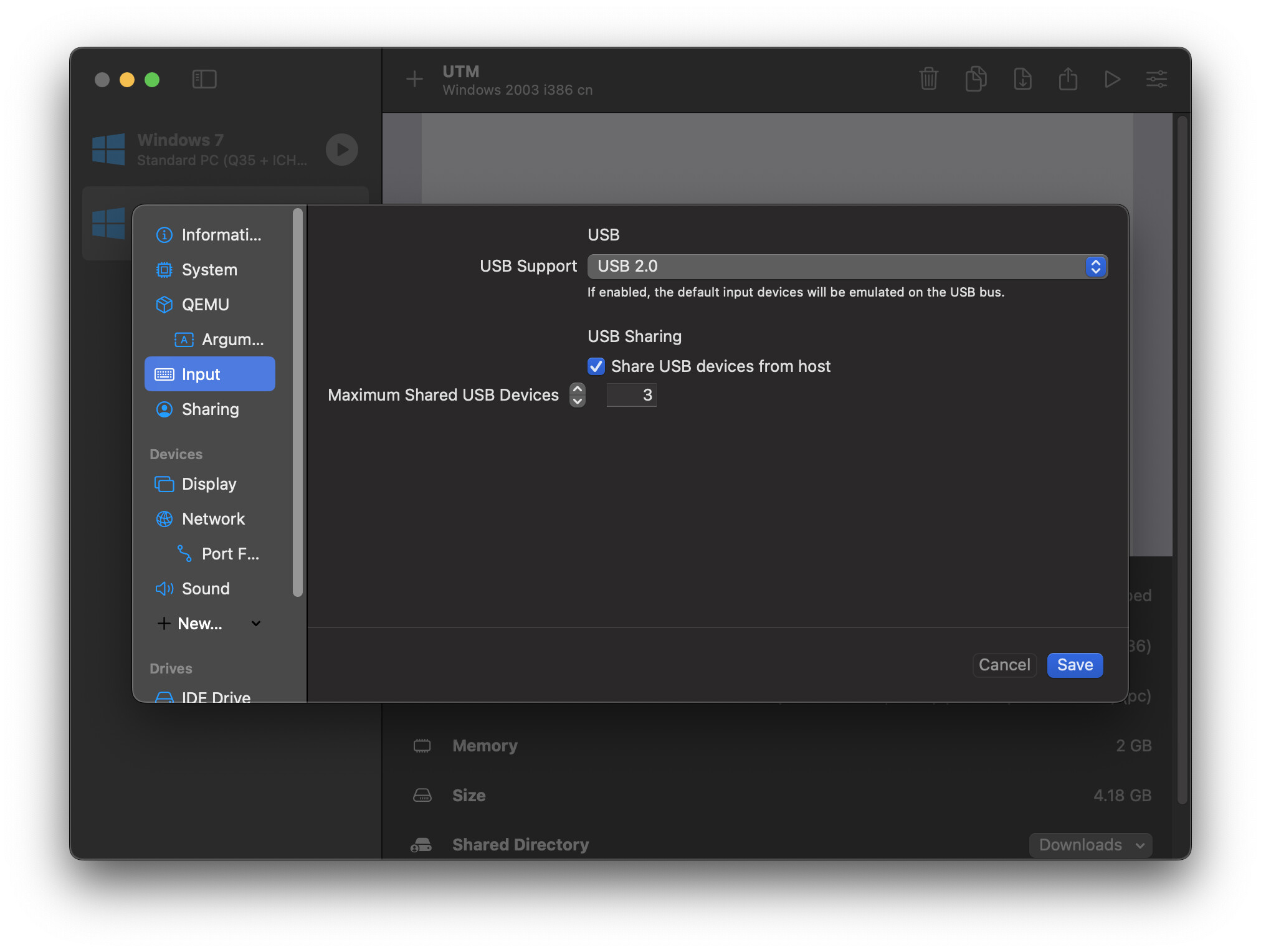
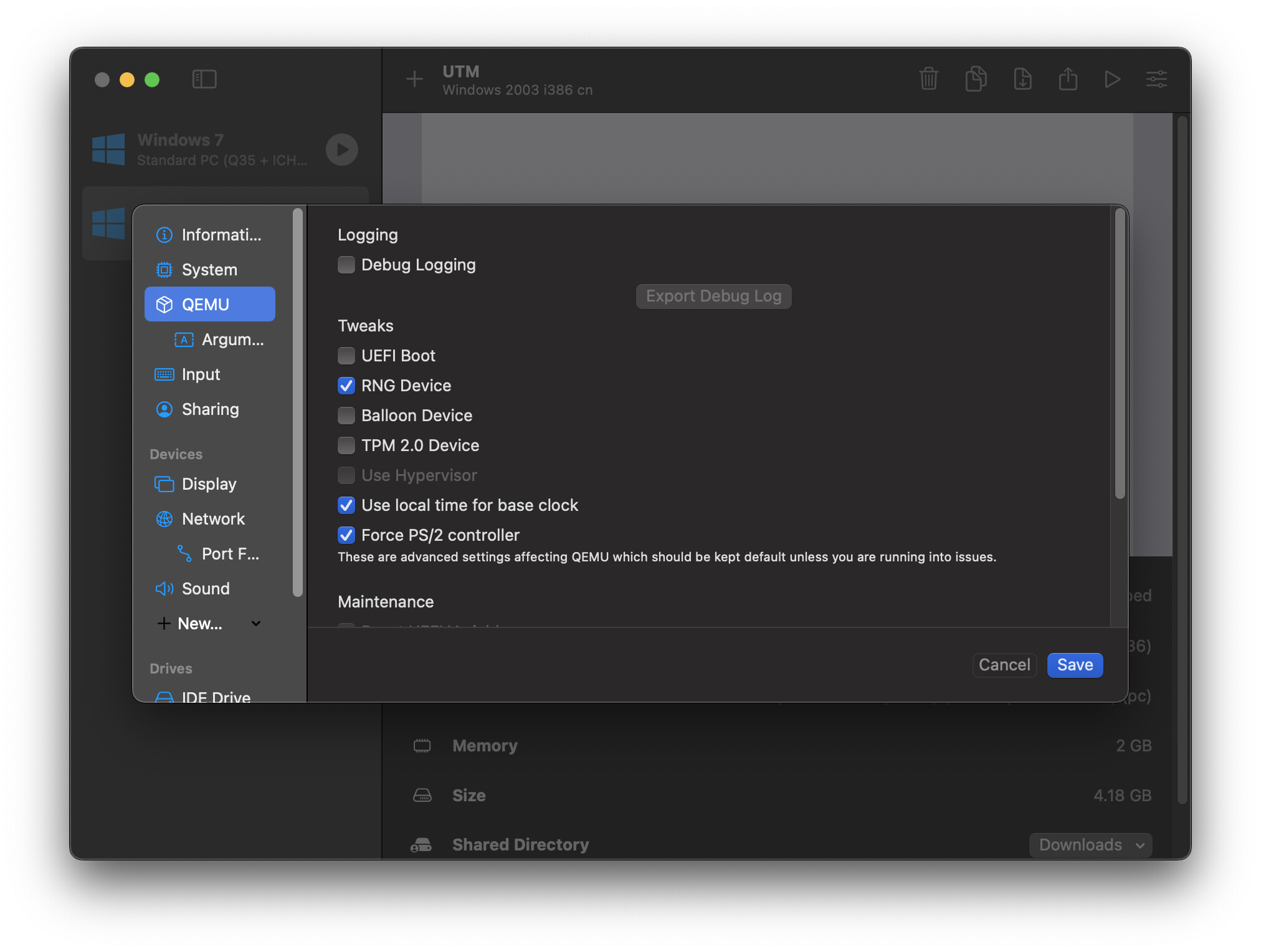
Hi guys, glad to hear more success stories. I want to document a detail setting of making USB sharing work on Windows XP virtual machines for me. First, in “Input” setting, select USB 2.0 and tick “Sharing USB devices from host”. Then “QEMU” setting, tick “Force PS/2 controller”. The reason (from my guessing) is that when enable USB, UTM won’t emulate a PS/2 device by default while Windows XP expecting a PS/2 devcie (otherwise it will not boot). “Force PS/2 controller” will force UTM to emulate a PS/2 device.
If you found UTM useful for you (not only for running nord editor, but other old windows utilities), you may consider buying UTM from the mac app store or donating some money to the developers. No affiliation with them, just a happy user.
Just tried it myself on my M1 Mac mini - UTM and Windows 7. Installed Spice Tools, then downloaded the G2 Editor and the Clavia USB Driver, and we’re away!
Any weird knob movement issues in MTM G2 editor (like we see when using MS Remote Desktop)?
If I notice anything, I’ll post here. Haven’t had time to a full test in the studio yet…But, I kind of doubt it.
To confirm - This also works with G1 Editor
That’s great news!!!
This should work with Intel Macs using latest MacOS as well, right?
Hey Chris, Electro-music has been a ghost town the last few times I went there. I will look into the Github, as I don’t want to join a facebook group, I stopped using that platform years ago. I would love to have a native MacOS version of the editor and know enough C that I could perhaps help by filling in templates for the simpler modules. I feel like ~70% of them use the same basic UI components of sockets, knobs, and radio buttons or checkboxes.
Finally installed UTM and G2 editor.
On my old Intel 2018 MacBook Pro, Win7 feels a bit sluggish but once I’m inside the G2 editor everything works perfectly.
Installation and setup was quite simple if you follow the instructions.
EDIT. The second time I booted Win7 everything worked way faster and more responsibly.
Yeah, it is a bit sluggish turning knobs. But, as an editor to build with modules and use the editor tools (file browser, patch mutator, parameter overview) it’s great. The connection using UTM seems very, very stable.
Have you tried changing knob movement to circular? It made all the difference for me.
Same here. Vertical mouse mode (I prefer this one) felt weird. I find circular mode less convenient to my state but feels like it’s working better.
I just finished installing UTM and Windows 7 and the Editor. The process was relatively painless. Didn’t try with the actual synth yet, I hope the USB connection will work.
Hasn’t lost connection once in the past few hours. Really impressed at how well it works.
Someone with an active account should post on Electromusic G2 forum. This is huge news! 
I had some problems getting the UTM/Win7 setup going last night, but I think I figured it out. I think I was trying to do everything too fast. Win 7 is pretty slow, so I finally just let it load for a bit after win7 opened, then chose the NordG2 udb driver…let it think for a bit. Then opened the editor.
Basically, Win7 needs time to warm up and think.
Don’t know if this will help anybody. Just putting it out there.
Will try this. Thanks.