Depends on filter type I suppose.
@elektrosamplist may give more precise infos…
@cirklown did you try this?
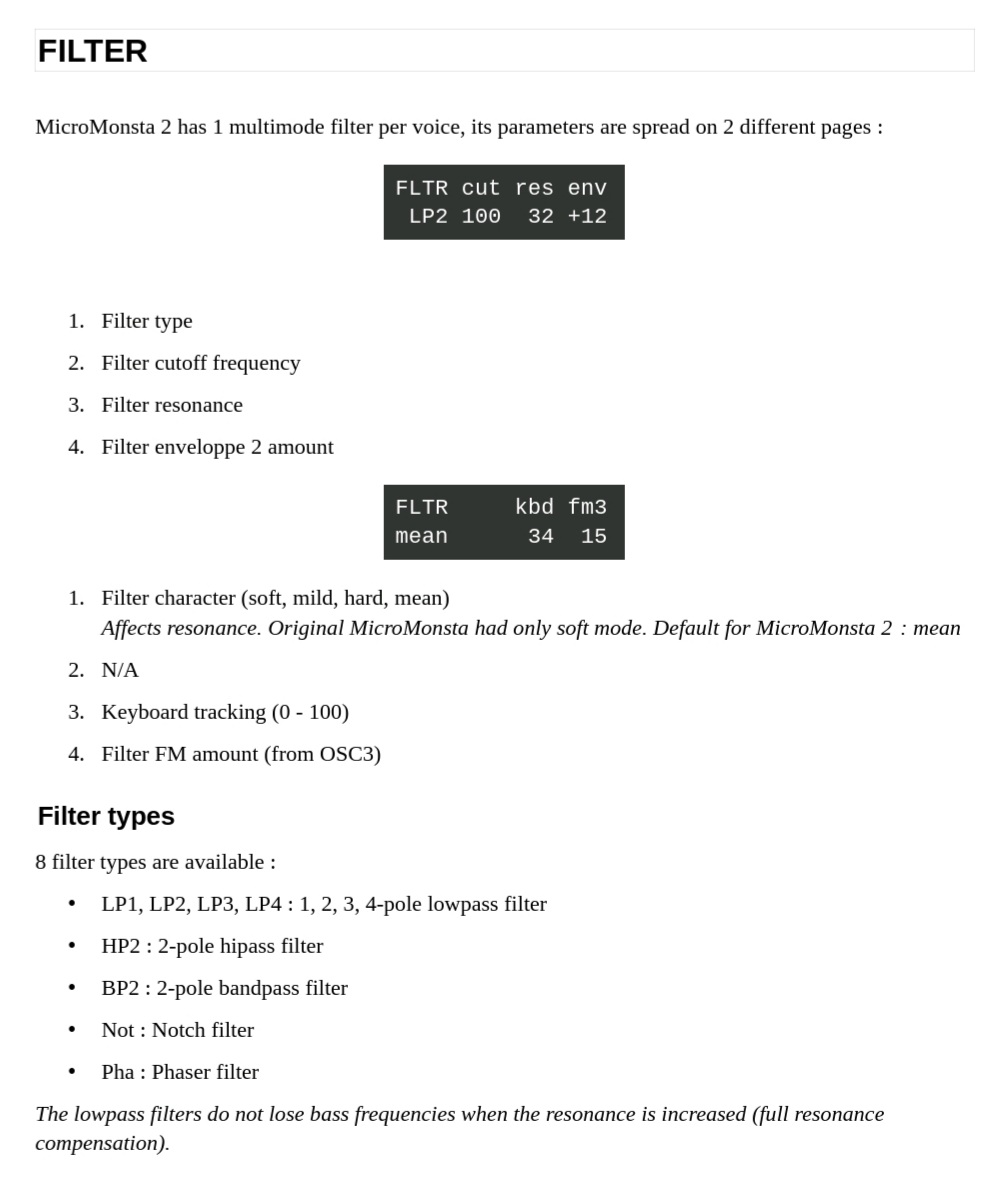
(1) Filter character ( soft , mild , hard , mean )
Affects resonance. Original MicroMonsta had only soft mode.
Default for MicroMonsta 2: mean .
4 Likes
let me try it now
Edit: Yeah! It changes quite a lot, thanks! At the softest you can’t even hear the resonance peak, it’s there but like at 10%, there are options now. I would like to visualize the changes, maybe I will go to ableton and check.
2 Likes
Filter settings is what I meant by filter type.
I guess character AND type change resonance behavior ?
I mean, I suppose changing between 1-4 poles types also changes resonance Q, isn’t it ?
Do character change resonance gain and Q ?
1 Like
Got my hands on one of these for a good price. Honestly on the first night I thought it was too deep, too many menus for the extremely limited time I have to make music. I thought I might need to go for something simpler and more wysiwyg. But then after a few hours I had a handle on it and now I know where everything is without having to search. Feels fast and fluid to operate. It’s so versatile and so rewarding… it’s been said 1000 times but it really does sound amazing.
13 Likes
It’s a really well put together piece of synthesizer. Future classic for sure
6 Likes
The UI is also award-worthy … incredibly easy to use despite minimal controls.
1 Like
All I need is some tape and some orange spray paint. The racing stripes from some of the marketing material is really neat xD

2 Likes
Also I generally hate using dented encoders for ‘musical’ knob twiddling, fine for data entry… However these dented encoders feel really nice! they have a kind of rounded click which is precise enough for data entry but smooth enough to not feel horrible on your finger tips when twisting macros etc…
2 Likes
It’s very good, also great that it can all be done with one hand… I dont think there are any operations that require two hands.
Still getting used to the pages that you have to tap multiple times to get through though, like the oscilators or lfos… would be great if there was a way to go back as well as forward in the cycle. But very minor gripe im sure i’ll forget about as it’s all becoming muscle memory very quickly
1 Like
I’m having an issue accessing programs over #99 when sending Program change messages from my OP XY. I would guess if I changed bank the program change ought to go up beyond 99 so I can access my own patches. Im wondering if this is an MM2 issue or OPXY issue. Is anyone else able to access all patches via external program change?
1 Like
yes, it requires a bank change (cc 0) first. I have done this with the Oxi one, not the op-xy.
2 Likes
Can someone please explain what is the idea of chord sets (set1..set8) in the internal keyboard settings are?
This. UI feels absolutely optimized to the best, everything feels very fast and natural after some time, very elektron-like. I always ponder whether to switch it for my TI snow because Virus are the absolute champions for trance, but making a patch on it is painful, slow and no fun. I can make at least 3 patches on the MM2 in the time I make a single patch on my virus snow.
That’s why I always come back to my MM2. The reverb is also top level!
8 Likes
I don’t regret the Virus TI !
(…Blofeld, MM1, TI, MM2…)
They are sets of particular chords progressions. For each root note you can have a different chord type.
Doesn’t seem to be in the manual, I don’t feel like analyzing 8x7 chords at 4h30 AM. ; )
Maybe @elektrosamplist could reveal them ?
3 Likes
@elektrosamplist first of all, thanks for all your hard work on the Micromonsta 2!
Would it be possible to make the Alt button more useful? Currently, it only seems to work in the following cases (please correct me if I’m wrong):
| Page | Press Alt |
|---|---|
| OSC | Replaces Knob4 with MIX |
| MIXER | Shows DRIVE page |
| ARP | Shows ARP switch and latch page |
I think there is a lot of potential to expand what the Alt button can do. Here are a few ideas for how it could be used:
| Page | Press Alt |
|---|---|
| FILTER | Show ENV2 page |
| MATRIX | if SRC = ENV → Show that ENV page |
| if SRC = LFO → Show that LFO page | |
| ARP | Knob1: DELAY time or feedback, Knob2: DELAY level, Knob3: REVERB decay, Knob4: REVERB level |
| FX REVERB | Show FX DELAY page |
| FX DELAY | Show FX REVERB page |
Perhaps forum members could suggest even more cases for the Alt button. Lets make the best little synth even better!
7 Likes
Yesterday I ordered one of these. I was on the waiting list but didn’t receive any information about their availability (and from what I’ve read, they’ve been available for a few months now).
Maybe in the spam folder?
The thing is, I’ve been tempted many times to buy one second-hand, but I always found it at a similar or higher price than a new one, and frankly, I don’t like speculation and abuse.
I can’t wait for it to arrive!!
2 Likes
Very good idea.
I implemented my take of this in v2.8, hopefully this makes it even more enjoyable now.
Changelog / update here:
https://www.audiothingies.com/tools/micromonsta2_updater/
29 Likes
Do you have any idea why the update isn’t working?
I’m putting the MM2 into Firmware Updater mode, and when I click Start Update , the OSC*LED starts blinking as expected. After the process completes, I get the “SysEx data sent successfully!” notification, but the MM2 remains stuck in Firmware Updater mode.
After restarting the device, it still reports the old firmware version, so it looks like the update was never actually applied. Tried it on several browsers with different cables.
Am I missing a step, or is there anything else I should check?