I did some stuff on this and posted it up then forgot to come back here and mention it!
The complete patch is described here, FYI with links to the main patch on patchstorage.
(It amuses me that by far the most popular component is the one that turns an LCXL’s LEDs on&off…)
Thanks again for exploring this query so thoroughly! I still don’t own a MIDIhub yet but it is in my future and the in-roads you’ve made here make the prospect even sweeter!
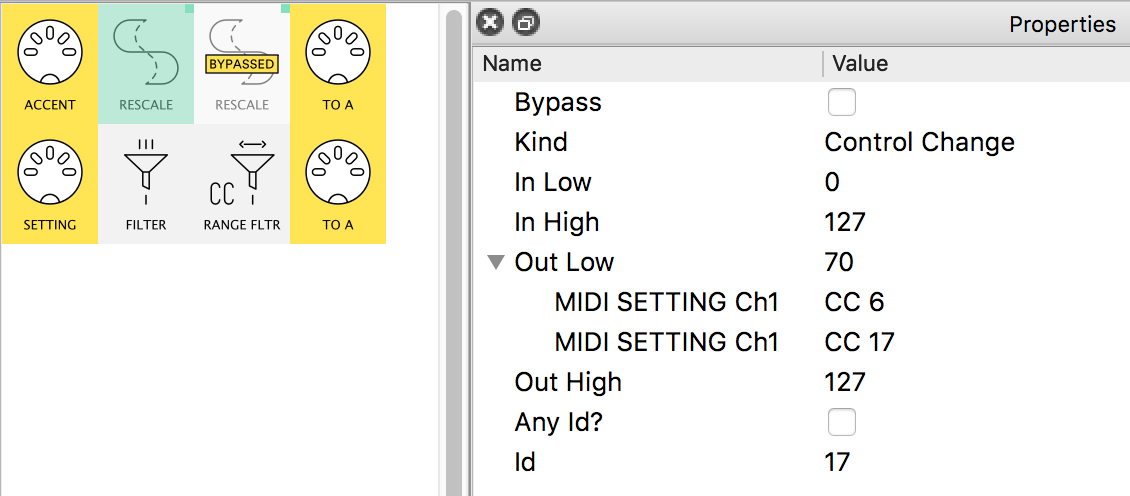
the main control for the parameter (say Filter) comes in the SETTING pipe.
(if this were coming from a controller it’d go out to the synth. If it were coming from the synth itself, it’d be likely filtered out)
This is CC17 in this patch
the “offset” controller (Touché, BopPad, etc) comes in the ACCENT pipe.
The SETTING CC17 controls the “floor” of the ACCENT’s output.
So, at this point in time, the touch device would come in as 0→127, but be rescaled to 70→127
(The CC6 extra mapping is included to show the possibility to set the ‘touch range’ independently of the main control)
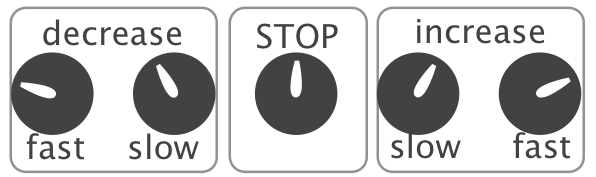
The other (bypassed) Rescale flips the offset to go from ‘main’ value→0 thus reversing the effect of the touch device
sorry, description took longer than patch to write!
PS. @redrabbit mentions “No flicker”. My Touché is not so well behaved.
Probably the least glamorous role of my Midihubs is to get my many old and now incontinent controllers to stop chattering at other devices
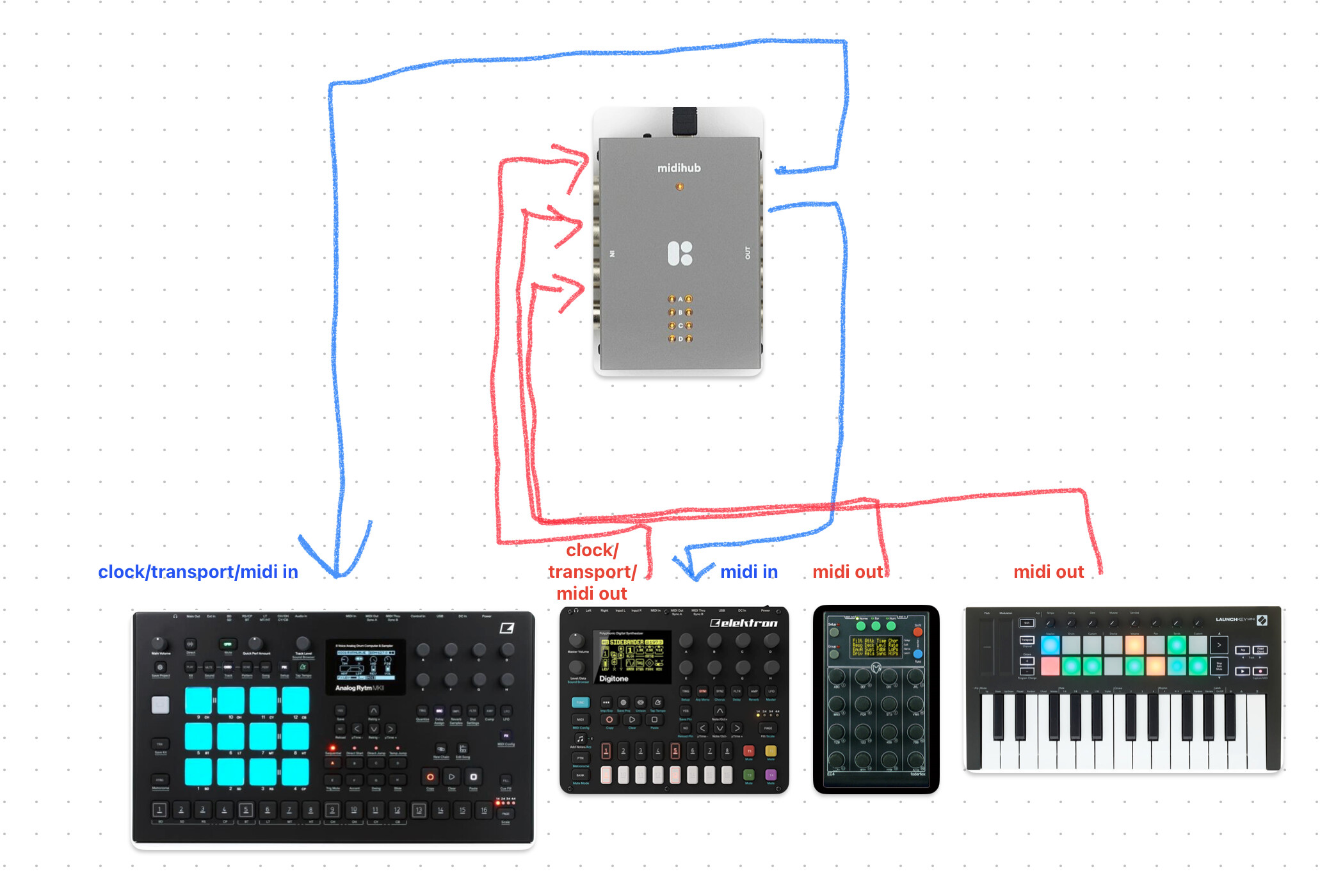
hello, I’m looking for a solution to connect my setup in a way so I can use my Faderfox EC4 and Launchkey mini mk3 to control Digitone and Rytm while having the Digitone as master clock/transport and sending midi out from its midi tracks (additional lfos for Rytm, yey!), someone suggested the midihub and it looks like it would do the job but I couldn’t find a definitive answer so thought I’d ask here before heading to the blokas forum.
this is a simple diagram of what I’m looking to achieve:
and what I want additionally is to have the option to split tracks from the EC4 so I would have DN/RYTM control, for example channels 1-5 would go to DN 4 tracks and FX channels, channels 6-16 would go to Rytm FX track and 9 perfs macros or something like that.
is the midihub the right tool for the job?
thanks!
Yeah the Midihub would definitely work for that. I’m not sure but you might be able to achieve what you want by chaining things the right way, but honestly the Midihub just makes it all so much easier and gives you extra flexibility and capabilities that I would strongly recommend it regardless.
I’ve been using mine for a few months now and it’s been solid and super useful, I’m able to quickly solve various problems that would be a headache to deal with without it. I see so many threads where people are having trouble figuring out how to connect several boxes and controllers that could be solved straight away if they had one of these tbh. A great investment for any smallish setup.
At a glance, your spec would be met with just a few Filter and Channel Filter pipes deciding what will go through virtual ins&outs (to split and combine your messages)
With a Midihub you’ll soon be able to leverage its ‘beyond routing’ capabilities; check out some of the other pipes in the manual (as many LFO’s as you’ve got CCs for?!)
tried everything in my powers to make it work but couldn’t get it work, if I send DN Midi Thru > AR Midi In I lose clock/transport, if I send DN Midi Out > AR Midi In I can’t get the EC4 to send information to AR… someone suggested Midi Solutions Midi Merge to merge DN Midi Out + Midi Thru but looking at the cost of QuadraMerge it’s pretty much the same, so I figured I might go for something capable to do more rather a single solution, I just wanted to make sure that I’m not missing something.
yeah that looks cool, I imagine I can have macros/lfos for both machines controlled from the EC4 which can be great, overall it looks like a very capable solution! I can also perhaps use it as a modulation for DN FX, DN does not have FX track so having lfo to control delay filter can be useful!
Maybe also look into the EC4’s ability to merge incoming midi signals with its own controller data. This can alleviate the need for an additional midi merge device.
I did look into that, and it might work without the Launchkey, as I would have to do something like DN Out > EC4 In || EC4 Out > DN In || DN Thru > AR In
so DN In and EC4 In would be occupied without the option to add the Launchkey.
Yep, Midihub goes way further for the extra euros.
Maybe take a skip through this tutorial – it’s best actually done with a Midihub in hand but it might be useful for you to scan through cos it starts with a simple MIDI Merge-then-Split scenario then builds on it to evolve a more complex patch
To add: I find the online editor really accessible while being very powerful, and I also find it amazing that you can store multiple presets on the device itself (eg. one for a live setup, and another one for the studio).
Great to see an already ludicrously powerful little device get even more features. I was really hoping to see some kind of improvements in the descriptions/comments area of the editor though, being able to put descriptions on specific pipes or even change their colours would make keeping track of what’s going in complex patches so much easier. That’s probably my main complaint currently tbh, with any coding task leaving comments as you go is super important and I think this is no exception.
But yeah I love this thing, it’s been a real ‘sleeper hit’ for me and an absolutely essential part of my setup.
Right now, it’s my favourite and most useful hardware gear I have. It gives that 10-20% more to the functionalities of MD, Hapax, MM and also Max/Msp that literally make possible a lot of setups I imagine. Without it, I would have to do a lot of “manual” MIDI routing patches with Max/Msp that would kill inspiration. Sometimes I think that without Midihub I could end up selling all of my gear to go fully in the box. Great product!