Crazy stuff - Auto Filter update, Bounce In Place, even a tiny icon on track header to indicate presence of takes.
It’s like they’ve made that update for me 

Crazy stuff - Auto Filter update, Bounce In Place, even a tiny icon on track header to indicate presence of takes.
It’s like they’ve made that update for me
I hope u can see what the LFO is doing in AutoFilter that’ll be great.
you can, I tried it now.
looking amazing
bounce in place very welcome, as is the auto filter update.
Always a fan of these little quality-of-life improvements but it looks like they’ve missed a trick with the bounce. If I select part of a clip or a time selection and “bounce to a new track” that’s great, but if I do it again with another selection, I get another new bloody track! I don’t need a new audio track for every little bounce I want to make!
In Bitwig, I can just select something in the timeline and then drag and drop with a key combo held and I drop the audio wherever I like. Basically, I want to be able to bounce any selection and drop to an existing audio track or a sampler or whatever.
Perhaps this will come in time. Still, some good little updates here.
Auto Filter is available on Move and Note for the first time (and updated for Push with the new UI).
Expressive 16 Pitches lets you play Drum Rack samples melodically in an all-new mode – with Push’s MPE-enabled pads adding extra expression.
Follow Actions support is on Push (finally), across clips and scenes.
Bounce to New Track and the Groove Pool are accessible.
Live 12 Tuning Systems support is now on Push.
Let’s give them time.
Just yesterday I had a huge discussion (to put it mildly…) on Ableton’s discord about bounce in place and an icon indicating presence of take lanes with 2 or 4 other users who’d bend over backwards explaining why those things are missing from Live and why that’s a good thing.
I’m beyond amazed they’ve actually added those, plus the updated Auto Filter, Meld and Roar.
I feel vindicated
Wow the beta change list on the beta site is huge! Lots of other little things and loads of bug fixes.
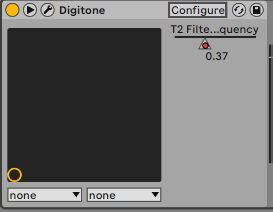
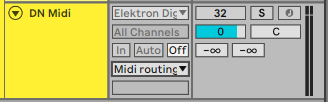
Currently, when I am recording audio over Overbridge from an Elektron box into Live, Live is recording also the parameter changes that I am making on the Digitone. If I then delete the recorded audio in arrangement view, and go for another take, Live is retaining and replaying the previously made actions, for example closing the filter on my Digitone where I previously closed the filter. If I then go to the midi track where the VST is, I can see the automation that has been recorded:
How can I disable the recording of automation in this way? I want live in these instances to act just as a tape recorder. This is new behaviour, so presumably I’ve changed something somewhere inadvertently.
I had thought that by having the midi track deselected and monitoring set to off would be enough to stop it.
Any pointers would be appreciated.
Any clue of the 12.2 release date ?
You‘d have to turn off automation recording, it‘s one of the buttons on the top. Next to the transport section. I think simply disarming doesn‘t work in this scenario.
Thanks, that was it. Just when I think I’m getting a grasp on how things work, something like this crops up and makes me realise I know nothing!
That is so that you can decide if you want to record audio/midi into the track (track armed) or automation (icon in top bar) or both.
When you only activate automation, it does not record over what’s in the track, it only records an automation lane.
IIRC 12.1 was in public beta for three or four months. I would argue 12.1 was also a bigger update, but all the same, I wouldn’t hold my breath for 12.2 until late spring.
I don’t usually like using betas, but I caved for 12.1 and don’t think I had a single issue. I also have the Note beta running on an old iPad and it’s been very reliable.
Ditto- 12.2 is all ready at Beta 9 I think, I recon it will be pretty stable. 12.1 was from the day it went public beta- they do a lot of closed beta testing first.
I’ve been running the betas exclusively on hardware and software pretty much since 12 came out and it’s as stable as the regular releases for me. Or, I expect it is. I guess I wouldn’t know, as I don’t use the regular releases 
Like others said - 12.0 and 12.1 betas took a long time between announcements and full releases, but they’ve always been stable in my experience.
And they install in parallel with current version, so no reason to NOT to try it
Holy shit, so much good stuff. Definitely will give this a go asap
edit: Scale awareness for the Resonator!  Praise be!
How to you get the new Expressive Chord device? It’s not included in my devices and I can’t find a download link on centrecode