The “temp” button is you friend.
Engage it. Make 1 change with 1 knob to you pattern. Note the difference. Revert to original pattern. Repeat.
4 Likes
I have a few questions about the Torso. Thinking about getting one.
-
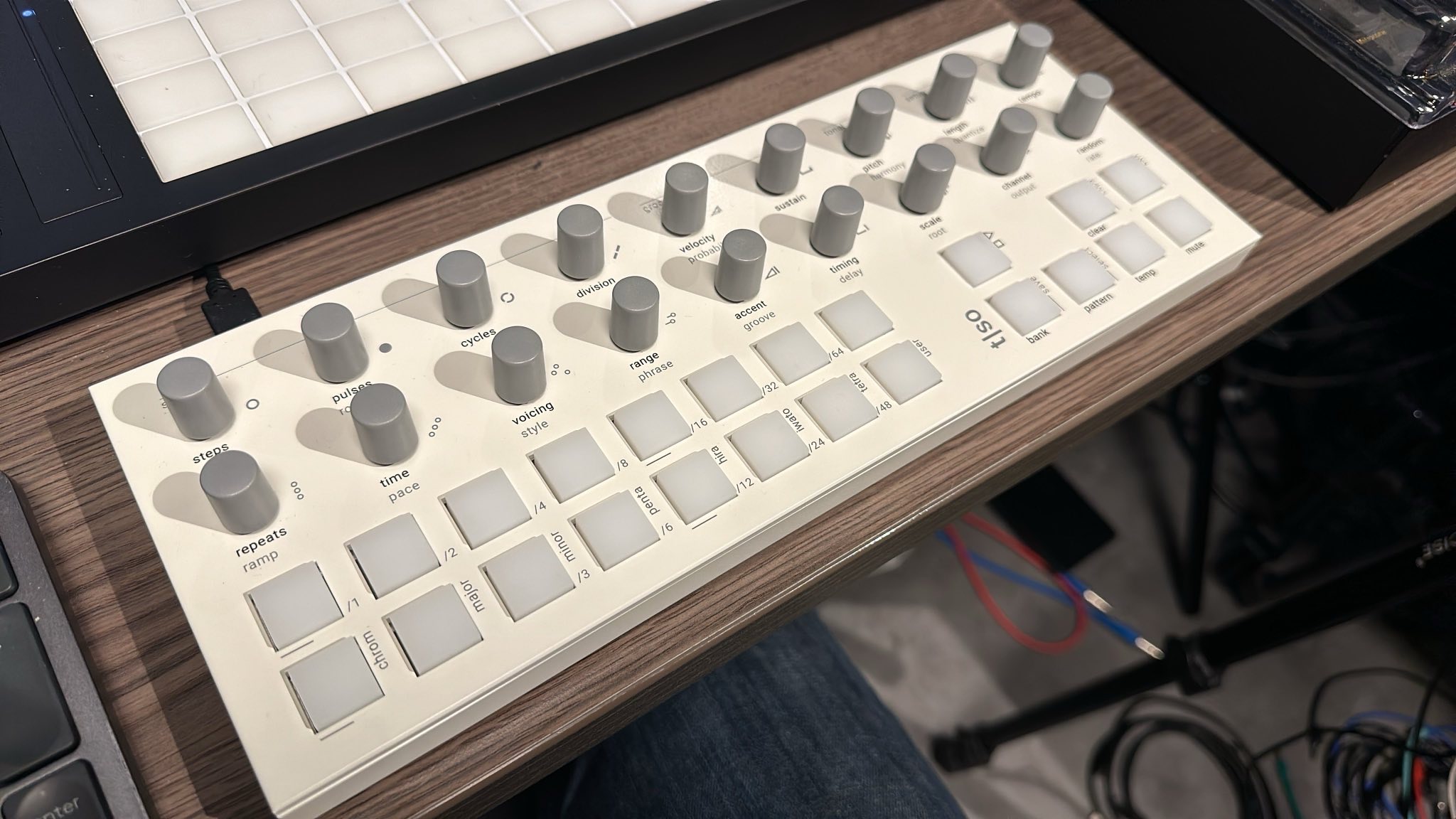
Is the light coloured one easier to see for shitty middle aged eyes like mine? The grey on black would require me to relabel, especially if I wanted to use it in low light.
-
Lots of demos are more uptempo and techno-y. Makes sense, but does it work well for slower, more mellow stuff?
-
I’ve been waiting to try one because I don’t love buying new stuff where they’re figuring out the software. Is it fairly mature at this point?
-
If I buy used is there anything to worry about or know?
-
Early reports included wonky CV. Are the CV outs stable now?
-
Relatedly, can it do MIDI-CV conversion?
-
For pitch: Are custom scales easy to input? Can you teach it to do accidentals or is everything always either totally in tune or totally chromatic?
-
I see one of the cool features is every knob gets its own Turing Machine. But having played modular, and old fashioned stringed instruments, I also like it when modulation affects multiple paramemeters at once. Is this possible, or is it more like the Norand Mono where you can’t have multiple targets for modulation?
–
Background if you want to know where I’m coming from and help me understand whether I would like this thing: I understand basic music theory and play touch guitar (sort of a bass/guitar hybrid–I play those too) and Linnstrument. But I only have two hands, and want to spend some time knob turning, and it would be nice to use this in a 3-4 voice setup where I am building up parts, gradually changing them, returning to motives, etc. As a sort of accompanist.
Other sequencer experience:
Octatrack, Norand Mono: like them ok but a little biased towards groups of 16s, 1-4 bar patterns repeating in my usage. Probably my limit, not the gear. I get more variety from just playing the Linnstruments arpeggiator.
Five12 Vector: my current favourite hardware but requires a bit of planning and setup, and I want something a little looser.
iOS sequencers: love the small “does one thing well” vibe and I use a bunch of elemental ones that do one thing well (like Fugue Machine, Bram Bos sequencers). I’d do this sort of thing in Eurorack but frankly something like Torso seems like way more bang for the buck.
Oxi One: undecided–waiting for the firmware to settle before I have a final opinion–right now I’m feeling there are a few too many unmarked key combos but a few features are unrivalled–the 8 octave keyboard, the Matriceal sequencers;
Hapax: too “thinking in MIDI” for me, sold
TIA.
I’ll do my best:
- No idea if the white is easier to read or not, but I will say I basically ignore the labeling. Muscle memory builds up fast, but also the labels just never made much sense to me. When learning it, I printed out a picture from the manual big on the page, marked it up with a sharpy, and kept that next to it while I worked. YMMV.
- I use it mostly for pretty slow generative or ambient. It works great for it. I think you see a lot of techno stuff because that’s the quickest to set up with euclidian pulses. But get 8 tracks with different arps and rhythms playing against each other nice and slow… it’s very nice.
- Yeah, feels very mature. Each firmware seems to have a bug or two in it that gets fixed on the next one, but conceptually they really know what they want it to be and have really focused it down to that. Feels complete, IMHO.
- Some early versions had smooth encoders (instead of with detents). If you have a preference, be sure to ask.
- Sorry, never used it for CV
- ditto.
- Custom scales are a matter of selecting the custom scale button and then just tapping on the notes you want on the chromatic-like pads. So if you want specific accidental, you just select that note in addition to the notes of your key.
- I can’t think of a way to do this. Each parameter has its own “random source” track that is used to modulate it. To modulate multiple parameters in the same way, you’d have to link their randoms source tracks in some way. I don’t think that’s currently possible.
3 Likes
Everything is accurate what jemmons said. I can concur with all of it. Especially with respect to #1. The labels on the white one are initially easier to read, but he’s 100% correct that you stop looking once the device “clicks” with you. The controls are laid out in a very logical way.
Personally I just got a few colors of chromacaps to color certain knobs while learning it, moved them around as needed.
I don’t pay too much attention to the lights myself, but even w/o a screen it’s very well thought out about it shows you the information required. There’s an option to have it display the current value you are adjusting. If you’re familiar with using a Launchpad, it’s very similar in the way it displays what you need to know without having to know what’s written on each button’s label, but it’s FAR better organized and executed imho.
3 Likes
The only thing I’d add is that the “smooth encoder version” wasn’t like an mk1 release or something that they had to correct in future revisions. The t-1 had detented encoders at launch and then they did a small run of the clickless smooth encoders maybe a year in. So if you ended up finding a clickless one, it should have the same overall quality as the standard detented ones. It’s just a matter of preference obviously (I always prefer clicking for anything except cutoff and res on a synth).
1 Like
Correct.
This was confirmed by Jonas at Torso Electronics when I asked him about the difference between click vs clickless encoders 
1 Like
- CV is absolutely stable
- I believe you could say yes to this as you can use FX tracks
1 Like
honestly i’d recommend not getting the “clickless” encoders on this device.
i’m not a one or the other boat kinda person when it comes to encoders, but i do think the tactile feel of detents on this device is super helpful without having a screen to see a value (per se).
you’ll wanna know when you make an adjustment, cause if you bump an encoder…and its generator goes off…
i just found it better to know the encoder is kinda ‘locked’ until i deliberately move it
4 Likes
Thanks for the replies everyone. One other question. I see people trying to sell used white ones for almost-new prices, which makes no sense to me, whereas black ones are much cheaper and in greater supply.
How much of a difference am I going to notice in readability between white and black? Like, it is worth paying new prices to get white?
Will the skinny Chroma Caps will leave the labels visible?
The fat ones are the ones I use, and they cover the labels a bit.
Again, it’s moot once you get the idea how the device works.
I think @vasidudu ordered some, but dunno if he got the skinny ones. I have some pics somewhere up in this thread of the original torso encoder sitting on top of the fat chroma cap for a size comparison.
1 Like
t1 does work remarkably well without a screen
that said would be so nice to have a screen to let you know whats up with some of the randomize stuff and also to remember where you are when editing the cycles/individual steps or to visualize what the arp will do somehow
one thing that surprised me is that I built up a muscle memory for the T1 far better than for the OXI which looks like it should be easier/quicker but so far I find it slower/more complicated to use (but YMMV)
2 Likes
Correct
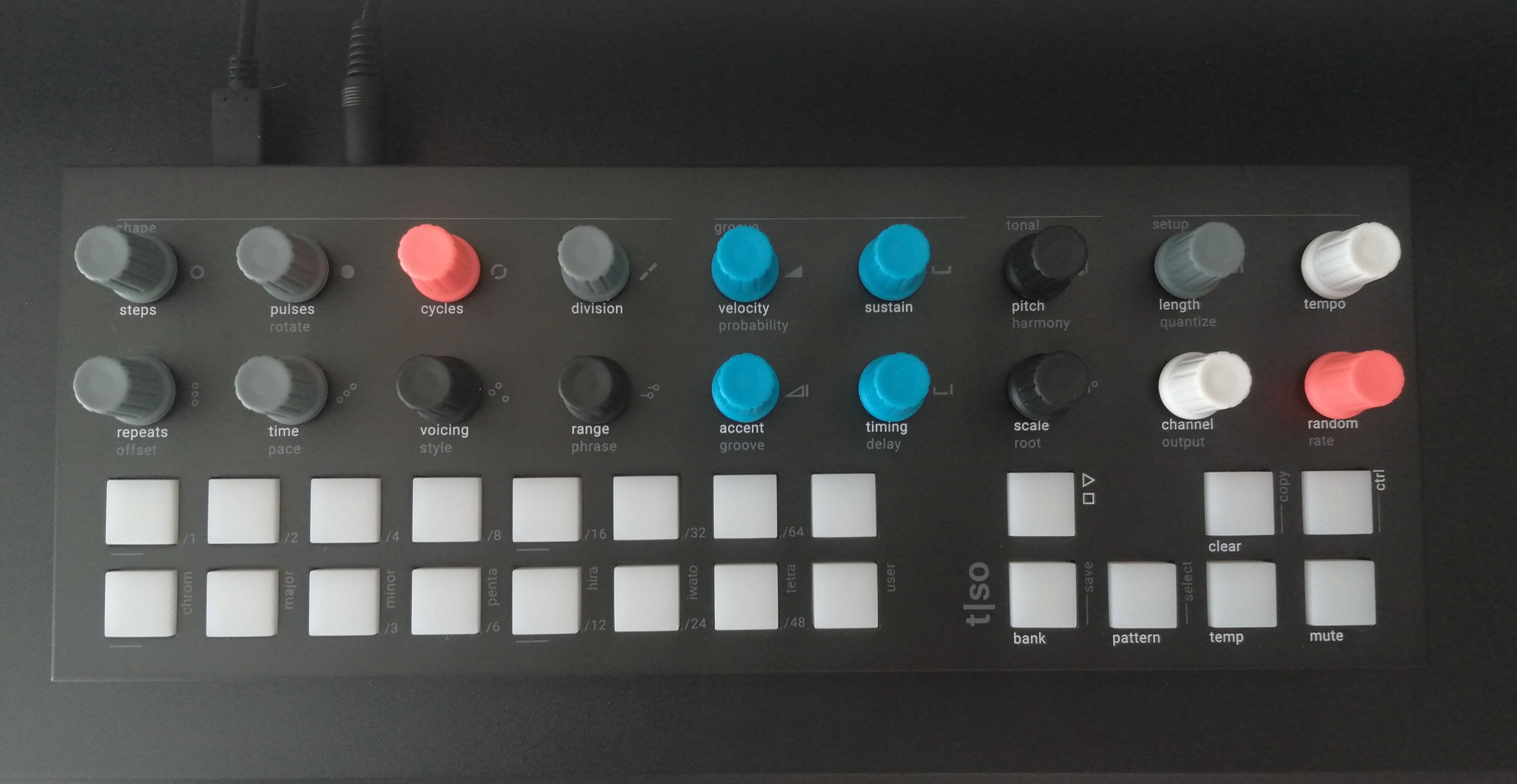
GREY: everything Euclidean
BLACK: everything pitch
BLUE: everything velocity
ORANGE: cycles & random
WHITE: channel & tempo
Really helps
14 Likes
I’m getting the bug to make generative or something like generative ambient, but I don’t want to use eurorack. I hate money, but not that much.
Just wondering if anybody has ideas about some good ways of going about generative music production with more conventional hardware and synths.
I’ve been looking at a Torso T1 as a sequencer/generator, but struggling to figure out what to pair it with. It seems like bi-timbral or multi-timbral synths would be the most efficient option. Suddenly I’m finding myself browsing Elektron boxes like a Digitone or A4 and yeah…like I said I guess I hate money…
Anyway, I’d appreciate any thoughts on this that you have to offer.
2 Likes
What synths do you have? The generative part is taken care of by the sequencer, then it’s just want sounds you like and how you like to make them.
That looks like a great solution.
Also, once again has: anyone seen both the white and the dark versions in person? Is the difference in the white worth the extra money?
TIA.
None of the synths I currently have are multitimbral. I have a prophet 5, minifreak, and monolancet. They are all baller, but I dont necessarily have the space in my music are or the desire to have everything hooked up to the Torso all at once.
I’d much rather find one multitimbral box to connect it to.
A Blofeld could be a good and cheap (if you hate money) option.
4 Likes
try an ipad? or just {your DAW of choice} and some vsts?
2 Likes
I saw your post on Mod Wiggler, and seeing your response here I think just the Torso and your current gear gets you pretty far.
Maybe add in VCV Rack for additional sound sources, effects, real-time sampling, and some modulation.
I don’t think you’d need anything else, assuming you have an audio interface.
If you don’t want to connect everything then honestly just the T1 and VCV Rack (or maybe BitWig?) get you pretty far.
2 Likes
Any plans for a video?