Is there any way to set the midi channel of each track? I think all the other elektron boxes I have let you do that, why not this one? Midi channel options seem very limited. I simply want to trigger two tracks from one midi keyboard and I can’t do that? Is there some way to do it? I could get silly and do some merging and channel mapping with my mrcc but I really hope we get better midi implementation soon.
1 Like
It is planned. Long wait…
No internal workaround, not possible to disable midi receive per track.
Bringing Per Pattern possibility.
Obviously a good thing.
Setting Per Pattern as default like all other Elektrons is another debate ! 
+1 for more Personalize options.
1 Like
oh man, something silly that was driving me crazy. i had the same sound on two tracks, one panned right, one left. copied a trig from one track to the other and volume was significantly different on one side versus the other. I finally found that the velocity to vol setting actually changes the volume of a trig. I assumed it was just how it would respond to playing over midi. I had one set different. everything else was exactly the same.
So I was able to accomplish what I want using both a midi merger/split (simple split would work also) into the MRCC. MRCC has a channel map option. what seems weird about it is I don’t see a way to map a single input channel to two output channels. you can remap a single input channel to another though. So that is what I’m doing. using 2 cables to two ports on the mrcc I can set one to simply pass through and the other I’m routing channel 3 to 4. So in the end I can trigger two tracks at once on the tonverk using my midi keyboard (digi keys in this case) I like doing this for stereo fun. I can bring in the same instrument on 2 tracks, pan one righte the other left, then slightly tweak them so they are slightly different and that usually starts creating some interesting stereo modulation. Then maybe I could make a multi sample instrument out of that. I guess and have the tonverk trigger itself? I don’t know. Either way I just like messing with stereo. Before this I was doing something similar on the a4mk2 which makes it easy. just copy a sound to all 4 tracks and set them on the same midi channel then start tweaking. If anyone is curious, here is a great video about the concept that got me going down a rabbit hole. digitone 1 or 2 also a great synth for experimenting with this concept since you have enough polyphony for chords. A4mk2 is fun for 2 tracks of 2 voices or 4 mono voices at the same time.
1 Like
Yes it is possible to multi sample Tonverk with midi loopback and audio cables. I can’t wait a better midi config to multisample several tracks ! I would be able to use a midi processor but I think I’ll wait.
cool. I will probably try to figure that out. As for midi processors I like the MRCC for the most part. I’m curious about the mio xl but I don’t think I want to learn to use something else.
sweetwater had a b stock mio xl. so i changed my mind and decided to give it a shot and see if I like it. If not I can just return it. Probably overkill and I think it might be more convoluted than the mrcc to actually use but I like the idea that I think it can be controlled over network rather than usb. The MRCC is hands on to do anything and has a tiny screen.
just want to report that I think the tonverk sounds absolutely awesome using this stereo technique I have been playing with. I’m a huge fan of snes soundtracks and I did a multisample against chipsynth sfc on a horn sound I like. brought that into two tracks panned left and right and have been tweaking some. just noticed i put a little delay on one side and a bit of chorus and reverb on the other and adjusted the filter a bit on one side and maybe some other little things and it just sounds epic. I think I might get rid of my mpc1+. The only reason I have it is for keygroups but I don’t think it does anything I care about that the tonverk does not do. I also got a rytm mk2 which I think is more fun than the mpc. mpc just feels like a computer in a box which is fine, but don’t think the workflow is for me.
last thing. I have a 61slkm3 and with zones it can easily play multiple channels at once. So really I think I might just ditch the digi keys for now. I think it is a sweet keyboard though so definitely keeping it. for midi versatility though I think nothing really can top the 61slmk3 that I’m aware of.
Hmm, if I remember correctly not with DT2.
I’d be surprised it became different from others, I sold it before last update…
Does anyone else find the Bit Reduction in Degrader sounds different to the one on DT2? I’m not sure what it is but I don’t seem to like it as much but possible I’m imaging things.
I typically write on one Elektron box at a time ( I have ST/DN2/TV) and lately it’s been a ton of DN2, but I’ve been spending days prepping samples, loops and stems and am fairly certain I’ll be writing tunes exclusively on the TV for a few months. Having a wavetable synth makes it easier to stay in one box for sure.
One of the things I love most about TV is I’m able to take tons of unfinished songs…things that don’t quite work, cut them up and throw em into TV and turn it into a finished track more often than before
10 Likes
on the dt2 u can route it before the filter but yh i think it still sounds a bit sharper sounding idk, maybe its bc the whole audio is higher fidelity so the aliasing(?) stands out more or something
1 Like
May i ask whats your approach to this? Do you record your tracks of other Elektrons as stems and build your songs in the TV by muting, and mixing all together using busses, for example? Whats your workflow?
2 Likes
Yeah your probably right, its not bad really just different sounding.
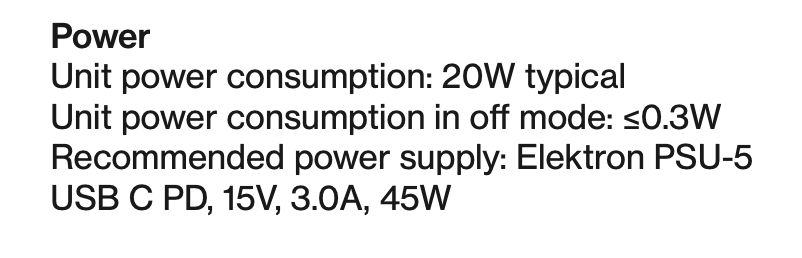
Looking at buying a power pack for TV so I can take it down the park. Any 45w usb c one should be fine yeah? Sorry but I’m an idiot about these things and don’t want to blow up my TV lol
My impression is that the bit reduction got worse with every Hardware iteration dt1 >dt2>tv
1 Like
I’m not an expert but according to the manual you should be fine with a 45Watts PSU/battery pack that has an output of 3.0A. Personally, I wouldn’t pick one of the cheaper ones 
1 Like
You may want to refer to the existing thread on this: Compatible power banks for TV - #4 by lumiewoo
2 Likes