I’ve always figured that it is best to auto sample with pretty square attack, decay and sustain settings, and then tweak to taste once the sampled instrument is loaded
1 Like
So… I finally got my Tonverk wired into my larger set-up, and just discovered the lack of midi receive channel editing features.
Am I missing something, or are the channels hardcoded at the moment with no option to reassign or disable?
I really just want to disable them, but even if I wanted to use them I have an issue; my midi keyboard (Keystep) has a few dead key which I need to use in order to assign the lower midi channel channels, so I guess I’ll be in the market for a new keyboard sooner than expected. 
It depends on what you’re trying to do. If you’re playing with a MIDI keyboard, you probably want the MIDI from the keyboard to control whatever the selected track of the Tonverk is? In which case, set the Auto Channel to something in MIDI Configuration. Have your keyboard send to that channel, and you’re done.
This is described in the manual around pg. 75:

Also note that, while the MIDI channel assigned to each track is fixed (channel 1 for track 1, channel 2 for track 2, etc.) when you set an Auto Channel, that takes precedence:

So:
- If your keyboard is sending on channel 8
- Go into TV’s MIDI config and set the Auto Channel to 8
- MIDI sent from the keyboard will be sent to whatever the selected track of the TV is.
- It will not be sent to Track 8 (unless that happens to be the selected track).
1 Like
Thanks, was planning on investigating auto channel (something I tend to ignore or disable on most machines) as a possible work around, but am not in my studio. Definitely a workaround for my broken keyboard, but I cannot wait for them to include the ability to just disable the receive channel assignments as my Tonverk is downstream (midi slave) and I’d rather use other devices in the 1-8 range. If I didn’t need synch I’d just disable the midi input.
p.s. ^ that’s just a URL link to the thread. No clue why the form is breaking the embedding, but it is what it is.
The problem is that when you are sending on any channel that isn’t the auto channel, it will trigger the corresponding tonverk track. It is a problem and it’s annoying as hell for those who aren’t using it as the boss.
@Anarchosyn my solution has been to either use it with a usb midi host that has midi routing controls and channel filters or to use it from one tap of my Oxi split so it still receives clock and transport but only receives note data when I’m in an Oxi sequencer set to tonverk autochannel.
1 Like
The midi config will be improved to match Digis line. No ETA…
All Elektrons have the possibility to set channels !
2 Likes
You can already set it up to receive sync but not CCs, notes, or program changes. Sounds like that’d be what you want?
1 Like
Coming from the original digitone to this is a very big step. Reading the manual it seems that you can’t copy/paste patterns on the fly which if I remember correctly it was possible in the original DN. Is it true? Or is there some workaround to make this possible? Thanks
2 Likes
Good point, I knew I could establish transport, program change and sync selectively, but didn’t remember note filtering options. I see them under Port config (I rarely go there).
Thanks for the reminder.
1 Like
Hey Guys
Had a solid 2hrs on the TV at my local shop today. Is it just me or in subtracks you can’t extend the pages and have stuff replicate over automatically? Like on the other boxes.
Page autocopy is possible with recent OS, option checked.
Someone reported an issue about it with subtracks. I couldn’t reproduce it.
1 Like
hmm good to know but i was on 1.3 with wavefinder OS … if I broke the feature somehow hope it gets fixed in a 1.3.1 update . I surely am not the only one
Did you verify the option was checked? You need to be on the latest version and there’s a checkbox in the “Personalized” menu that need to be enabled for this to work:
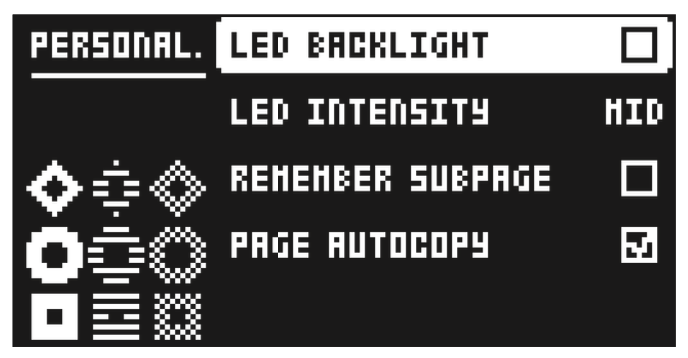
2 Likes
ah I bet it wasn’t! Was just the shop’s TV … phew yeah glad to see. As this would have been a serious QoL omission … cheers dude
1 Like
I mentioned “option checked”.
You talked about subtracks specifically. Did you check other machines ?
no i only checked for subtrack. i think it should be ok , ill try it again next time im at the shop. cheers!
1 Like
BTW if I wanted to quickly get that song I made on the TV today onto my laptop , just put the SD card in and copy paste my project file? Or do I need to use transfer? cheers
write to make Elektron aware of this anomaly - they’ve known for well over a year, not enough people have registered their opinion on this one based on the spectrum of other populist fixes which have taken precedence … i genuinely think it will help to officially register the request if you haven’t already
it’s the one crucial legacy thing i am looking for them to fix
7 Likes
Finishing songs only in shops ? 
Project folder should suffice if you used factory sounds…same factory folders architecture…
No audio in project folder.
If you used a recording you made, copy it.
If you want to be sure, copy everything…
No need for Transfer.
1 Like
I’ve just realised while renaming a recording that you can’t insert spaces anymore? You have to use the arrow keys to select the space and then hit func yes, this seems like a weird change, it throws my digi renaming muscle memory out.
1 Like