Like on the Digitakt, if you go FUNC + Samples, you’re in the browser and are able to select all. Beware currently the samples are loaded in random order 
1 Like
this may have been point out but this broke my brain a bit when i discovered this
the arp behavior on subtracks is great
changing the individual notes in the Arp menu, means you can trigger the other subtracks or just the subtrack you are pressing
it’s essentially a drum fill editor, and its really fun
even when you set it up for one fill, on the snare track
it plays something different when you play it on another subtrack. it will keep the same rhythm and length but since the source note changes it effects the notes offsets so its not really the same fill, but it is just on different drum hits
18 Likes
Chord Mode also works on subtracks, which can lead to some operator bewilderment…
4 Likes
does the chord mode record into the sequencer though? Just tried recording the arp, and it certainly does not record into the sequencer
1 Like
i had not tried sequencing the arp in subtracks yet, what a shame. The arp is recorded in other machines, so i wonder if that is a bug
I had this for longer than I’d like to admit… thought the sub track kits were all terrible until I realized
Has anyone tried testing seamless looping of vocals or tonal synth/pad loops? Does it actually sound good and seamless? Or are there clicks and pops and artifacts? This would be the make or break feature to help me decide if I need a TV in my setup or not.
And is there any trick whatsoever to change tempo of a loop without altering pitch?
Also, can each of the 8 subtracks each have their own insert or send or bus effects?
I took one of the samples from the stock library and crossfaded it 100% and you can’t hear any clicks, you can hear it here (although not the best example as I added loads of glitches on top haha) That Tonverk Sound - #135 by tdmusic
And is there any trick whatsoever to change tempo of a loop without altering pitch?
No, you’d need to pre-prepare this. There’s no timestretch.
Also, can each of the 8 subtracks each have their own insert or send or bus effects?
No, they are shared.
1 Like
Thanks for the info 
So the subtracks can’t even have separate send levels to a bus or send effect?
Guess this won’t exactly replace my Digitakt, sucks I don’t have the desk space for both 
Correct. All you can do is p-lock the “supertrack” send levels if you want to just send e.g the snare to the reverb.
Maybe one day this will change, who knows, I can’t imagine there’s a huge extra processing hit by allowing you to route to a send, but I wouldn’t buy it based on that hope. FWIW I find it’s fine, I just use like one subtrack for hi hats which are all processed the same, then put the kick on another track, etc. But depends how many tracks you tend to use.
2 Likes
I reckon subtracks getting individual send levels is in the realm of possibility.
Seems like a nice win.
2 Likes
Yeah from a software perspective it shouldn’t have a big CPU impact as it’s just mixing signals differently, though I’m not an expert so there could be reasons it’s hard. Would be nice.
Yeah I wouldn’t assume it’s easy, it seems like an obvious win tho.
In the meantime, you could hard pan left/right your subtracks, send them to CD or EF outs, and then back into TV again. This way, you could send either left or right side sounds to separate fx
4 Likes
Thanks! I figured it out last night 
So I think I just figured out a pretty incredible superpower of the Tonverk note edit approach vs. digitone ii’s.
Even on a chord trigger, every individual note gets its own probability and condition and trigger lengths and you can control those by parameter locking on the key for that note in step edit. On digitone II I think you can really only control trigger length per note on a step.
This is absolutely huge for evolving polyphonic pads and I don’t really need to tell anyone how to use it that way, but also for generative ARP sounds, since it means you can do stuff like:
A3 - 1:2, 60%
C3 - 2:2, 67%
E3 - no condition, 75%
set the arp octave range to 2 or 3, add a couple of interval movements on the arp sequencer, and you have a melodically sound but evolving arpeggiator that will preserve a vibe but stay interesting. Specifically, this allows “random” arp mode but with controllable weights and boolean conditions which makes for a far more interesting random arp than a true random arp. Embedding bar-based conditional triggers on notes also lets you sequence “passages” within your arp, all without setting a bunch of individual triggers.
To accomplish something like this on digitone ii you would need to give each note in the arp its own separate trigger, which would miss out on “full changes” if you want to sequence one trigger for each chord in a progression on the 1 of each sequencer page, for instance.
22 Likes
Not at the TV right now, but I believe you could use pitch to lengthen or shorten a loop, then use the pitch shifter effect on 100% wet to correct back to the original pitch.
Could be wrong, I’ve only just tinkered with the new effects yet.
1 Like
I think so. transpose a sample and use the pitch shifter fx for “ghetto timestretch”. Probably wont sound too hifi but might sound dope on the right sound
1 Like
Loading is as multi samples in tonverk didn’t work for me, tried drums and instrument, something specific I have to consider?
@CEKBEHTC Do you get a load error or do you not find it?
Here are the instructions for the transfer in case you’ve missed it
The folder structure might not be relevant, but i haven’t experimented with that yet
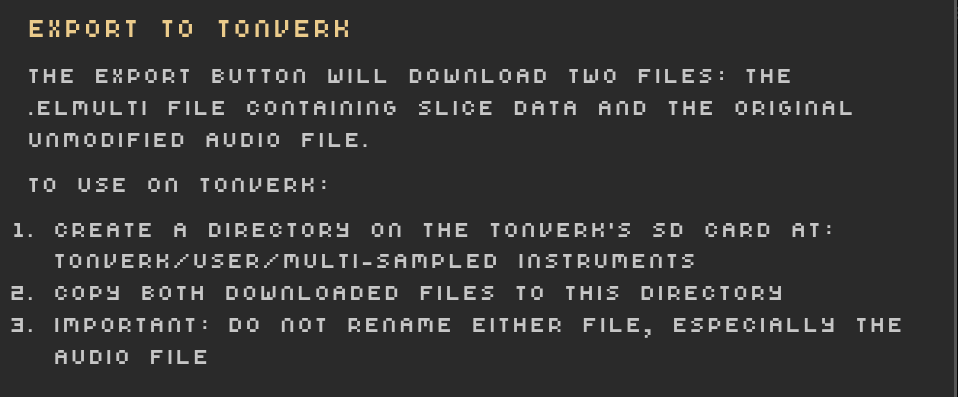
Then you should be able to load the multisample on the Tonverk thru
FUNC+SRC > MUTLIPLAYER > YES > INSTRUMENT_NAME
INSTRUMENT_NAME is set in the .elmulti file, line 3, and defaults to the original audio filename
There might also be an issue with the file format?
The samples I’ve used were in this format:
Extension      : .wav
Channels       : 2
Sample Rate    : 48000
Precision      : 24-bit
Duration       : 00:00:04.42 = 212194 samples ~ 331.553 CDDA sectors
File Size      : 1.27M
Bit Rate       : 2.30M
Sample Encoding: 24-bit Signed Integer PCM
3 Likes