Since they haven’t said if they will give a way to create loop points or not you should know that you can still use TV to make auto samples, then load the auto sample wavs to a daw autosampler or program like endless wav to add loop points and use the multisample architect app someone here made to make a new elmulti
1 Like
Can you copy paste a subtrack to another key in a single voice? How about to another voice?
Yeah I know, I’m not interested in using computer software to edit my samples, far too many steps for something that it should do in the box. I’m fine with the ones I have and occasionally downloading others until they flesh out the autosampler.
2 Likes
Just to be clear, I never asked for or even alluded to anything like this.
I’m asking if anyone knows why there is no such thing as a “filter machine selector”, or what I would call the ability to change the filter config.
Please tell me - and I’m honestly asking - if I could have expressed myself more clearly from the beginning.
Otherwise let’s just forget about this thing, because it’s taking way too much time and energy to re-explain myself to you in different words every time.
I’m in the same boat, so I hear you. Would really love them to give an automatic loop detection scheme.
1 Like
Yea in the future that would be awesome to set up loop points and have looping multsamples instruments from UI in Tonverk. But I understand Elektron not to doing it now. It is a bit tricky to determine looping points if you sample every note/velocity on the synth which has slightly different sound on every note. I see how people will be mad with the result of terrible looping or annoyed in process to determine looping points on every single note. With pads now I sample 20ms to avoid modifying elmulti files. But I wanna to dig into looping, because those samples are not much size effective 
1 Like
Sorry if you’re frustrated, I feel the same way as you also don’t seem to understand me but it’s okay. I’ve explained that exact thing multiple times; it’s a more complex UI thing they would have to make for the filter machine selector (like they currently have in the Digitone 2 and Digitakt 2), so I would assume it’s something they’ll add later. Fingers crossed!
Yeah true, loop points would be different for every note… So unless they had some magic to detect it then you’d have to pick one for each note. That’d be a pain, but maybe good to have the option still.
I think this is the part of your post that was overlooked. And of course there could be a filter selector on the filter setup menu (on the filter page itself, Env probably will then be Sprd as well or something else). However I guess it is more likely to get another Filter as Effect.
How can I do a better DJ low-pass filter effect. There is a low-pass filter on the TV FX page - but it don’t sound quite the same as the effect from DJ mixers.
I wouldn’t worry about trying to get close to another filter you like. I’ve gone down that rabbit hole too many times.
Better to learn how the filters on the TV handle and find something you like in the character they bring.
TV looks really flexible for routing options regarding the order of overdrive, base width filter, track filter.
Sometimes a little overdrive pre filter gives it a little more to chew on. Overdrive post filter might emphasize some neat harmonics.
Try all the extremes. Higher resonance sounds. Try the overdrive after filter. Etc.
Idk if you’ll match your mixers DJ filter but just find what tickles your ears in a new way.
3 Likes
I don’t know if it’s what you’re after but I’ve been enjoying the LPF and HPF on Dirtshaper for this. I’ve started using it as the last effect on each bus, and even the master so I can do those kind of filter sweeps as transitions. Both the filters sound really nice to my ears.
3 Likes
How is the Tonverk as an arpeggiator brain for multiple instruments (within the TV or external synths)?
I’ve been trying to figure out a best case setup for 2-3 different arpeggiator patterns/voices, now deciding whether it would make sense to get a Multi/poly module, or save for a TV and use midi out to 2+ desktop synths.
Its just an expensive device so I’m trying to canvas owners online before making my purchase decisions. Thanks.
Tonverk’s arp is the standard Elektron one like on the digitone and doesn’t have a ton of modes but has # of octaves and a non-scale-quantized interval sequencer that’s up to 16 steps you can do. It doesn’t have a global chance or ratchet probability and has limited modes (up, down, and as-played only) but you can use the elektron sequencer to do some nice tricks and can set probabilities and conditions on individual triggers in the poly sequence driving the arpeggiator along with sequencing modulations etc. It’s useful enough and especially now with the new performance modes like trigger musical chairs (randomly placing the existing triggers in new places) it can be very interesting.
The multi/poly has no traditional sequencer, but an elaborate multi-layer motion sequencer that modulates note, velocity, etc with a variety of playback modes. It’s complicated but crazy powerful, but you still need to sequence it with something since the note layer responds to played note triggers and actively transposes to those rather than playing like a step sequencer. The layer rotate is also insane for arps, but all that power makes for lots of time spent.
Tonverk is great and I love mine but I wouldn’t buy it solely as a hardware sequencer; an oxi one would be money much better spent if you just wanted a lot of sequencer tracks with arp capabilities because you can do things like set probability of retriggers, snapping modulated arp sequences to scale, etc. Really it depends on your needs.
1 Like
Thanks so much this is exactly the kind of insight I was looking for.
Didn’t want to take up too much space with my existing setup and needs but to give you some context I already have a Squarp Pyramid Mk3 that I can use to sequence/arp. So if I was going the multi/poly route it would be motivated more by having 4 timbres that I would arpeggiate with the Pyramid as opposed to the onboard seq/arp.
I actually have the multi/poly demo in my DAW so I’ll do some due diligence trying out that workflow a little more.
Unfortunately a lot my decisions right now are being driven by desk space so its like I’m always playing 4-D Tetris with space and sound.
If you use a hybrid workflow already I would recommend just getting multi/poly native and using it that way. It’s honestly easier to program it on a computer than on the module itself. Amazing synth, really cool capabilities, sort of a huge PITA to program just because it’s such a blank canvas with so many available directions. It’s made me realize that I prefer synths to be a little more opinionated about how they want to be used and sound. The motion sequencer is quite complex to set up on the module itself and I don’t find the tactile experience to be inspiring like it is on other synths I have unfortunately. No complaints whatsoever about sound or capabilities except maybe that it’s not a lot of sweet spot because it can really go anywhere. A lot of the stuff like programming your own envelope shapes etc. sounds great until you end up spending an hour just to get a bread and butter sound dialed in right that would have taken 5 minutes on a Peak or OB6 or something.
1 Like
I did another measurement of incoming audio latency, that is, the latency introduced to audio coming in inputs AB. I put high hat samples on two tracks, one panned hard left the other panned hard right. The right-panned one is sent out of outputs CD and back into inputs AB, then inputs AB are sent to the Mix track. The left-panned track is sent straight to the Mix track. Mix track is recorded over USB into Ableton.
(Others have measured the output latency as being negligible, so I’m attributing all delay to the input latency.)
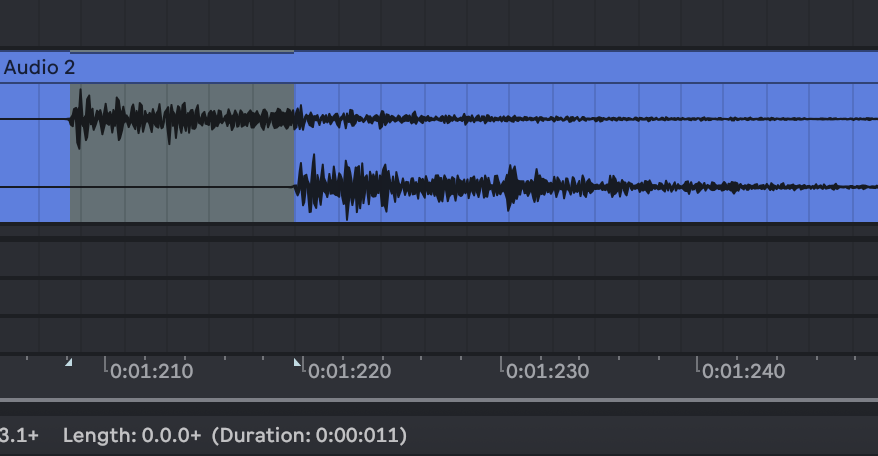
11 ms delay, so better than on the previous OS (I measured 18 there) and good enough in my opinion for many applications. (Although I do hope it continues to improve.)
Edit: added some more context about exactly what was being measured.
5 Likes
Anyone figured out how to rename multisamples?
Just hit the arrow up button (physically) when in the last menu before starting the recording. Then the standard naming menu pops up.
3 Likes
this is when you’re triggering the TV externally?