Used this technique too but sounds weird to me.
Thank you for your response.
This is wrong, they are.
The trigs thee can be used to trig amp envelope  or LFO.
Now you are right, betatesters already asked for a behavior like on A4, that offers exactly the same kind of FX bus on track 5, and for which you can adjust FX parameters while playing on the previous track.
I’d love this on TV, it does feel very necessary.
Please reach Elektron feature-request@elektron.se and add your voice 
1 Like
It would be great to have a shimmer reverb. It’s not possible to use chrono pitch effect on sends and blur it with any reverb to emulate shimmer-like effect in parallel. The only way is to use chrono pitch in an insert slot (but it adds some clicks) and blur the whole sound (dry&wet) with reverb.
1 Like
The wavetable engine would be killer feature at least for me.
5 Likes
Do we have a resonator FX? If not, Elektron please.
3 Likes
It’s best to make your Feature Requests clear (Last Used Folder retention … posted a few times above, so it’s well known as a shortcoming) and ask the broader questions in the Tonverk users or Q&A topics, otherwise this goes off-topic and FRs get missed
2 Likes
Will do, wanted to double check if I am missing something and its there somewhere implemented before asking developers . . . and obviously chosen the wrong forum.
1 Like
Link audio, for use with Ableton? This would be killer imho. Source: Ableton.com
Link Audio
Live 12.4 adds Link Audio, letting you and your peers stream audio between Link Audio-enabled devices on a local network in real time. Audio from other players appears directly as an input in Live, letting you monitor and record external devices and apps without additional hardware, cables, or manual latency compensation.
Apologies if this has already been covered,…
A way to control buss tracks (or individual) globally. EG a filter with kicks or any channel you want to control globally when changing patterns.
I grew used to this when using the Octatrack and a midi controller. Nice to know theres no surprises when you change a pattern.
Any advice on something I’m missing welcome.
Using the TV as a master with the Octatrack, Digitakt and Modules running through it is great, but struggling getting used to having to gain stage and prepare each pattern for transitions.
The OP-XY has a new addition in the lates update which lets you toggle on or off parts of the pattern to be controlled globally, wonder if Elekton will follow a similar idea, or whether it’s even possible. ?
pls allow ecoding naming for MIDI tracks. thanks!
2 Likes
With all the availaible ways to drive and route the signal, a per track clipping indicator would be highly useful to manage the multiplied complexity of gain staging on Tonverk
5 Likes
A post was merged into an existing topic: Tonverk: technical Q&A
It would be nice to have some sort of control over Randomize Velocity inside the Transform menu, like a lower and upper limit.
A Randomize timing (Humanize) option would be amazing as well.
9 Likes
Extensive MIDI Support and configuration
As a user I like to create a Preset for Midi devices where I can statically set the CC and name for AMP, FLT etc, so i can use them with more ease and do not have to remember which cc is for which function.
Furthermore I like to have more pages for MIDI. It is acceptable that are only the first two pages are automateable.
In the first step i would be happy if i create a preset on my computer and copy it to the tonverk. It is not neccessary to be able to create it on device.
- Soft reboot option without using power switch (hardware).
- Self-test diagnostics for buttons, knobs, screens and colours, etc.
- User configurable MIDI channel for the tracks.
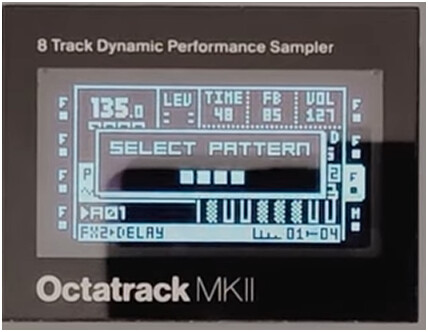
- [PTN] press to timeout like the Octatrak.
1 Like
Got a ton to come, but for now (and this extends to the Digi 2 boxes)
PLEASE enable Song Position Pointer MIDI support.
Especially with the tonverk supporting instant pattern transitions and considering all of the current offerings have song modes that are a pain to use alongside one another at present. It’s a huge bottleneck for anybody with multiple elektron boxes, live performers, working on the instruments in conjunction with a daw grid etc
It’s on the OT and Analogs but I’m dying to see it come to TV
Also, PAGE LOOP
3 Likes
FR - Multitrack recording
Either with overbridge or some other USBc multi track implementation.
FR - Wavetable synth
Yes we can use single cycle oscillators, but just make a machine to formalize this. All of the competition has it.
FR - Timestretch and Pitch Adjustment
When customizing samples give us this flexibility so we can really shape kits with one shots better.
FR - Subtrack Kits
Give us the ability to put sounds in a subtrack in a choke group
FR - Subtrack Slicing / Slice Machine
This could be a new machine where basically you load one sample and slice it up and assign a slice to one of the 8 slots in a subtrack. Or some other implementation. Either way a slicer is needed.
FR - Subtrack FX locking
Allow us to lock fx on subtrack steps.
FR - Transpose multiple tracks at the same time.
You cannot hold two track buttons and transpose them together. That means you have to quickly do two consecutively and it always sounds disjointed.
4 Likes
…an old friend of mine, who took over my former elektron fan boy flag and nowadays finds himself in that same period of his life, i just ended during pandemic days, any next new elektron device will be bought, no matter what…just told me yesterday, that there are no standard sample editor functions like normalize and start/end point adjustment options nor any sort of slicing available on his TV, their very first polyphonic SAMPLER, yet…!?
is he serious…?
if so, well, that’d be a swedish shame, really…
Well, that’s very misinformed to say these features aren’t there… You can load a sample, edit everything you want and then save (resample) it. But you can’t do that directly from the sample browser, that would make it too messy imo.
It’s possible to normalize on TV. In the sampling view, just like with DT. The difference is that it doesn’t happen automatically; you have to normalize the recorded sample manually using the arrow up button.