Who cares about sampling, go deep
4 Likes
+1
1 Like
wish If I could use tracks 13-16 as midi tracks
9 Likes
+1 for more LFOs. An additional 1 or 2 would be insanely useful.
I’d also love improvements in multi-track recording via Overbridge. All the separate “outs” are mono, which is a shame. Changing the pre/post fader setting doesn’t change this unfortunately. Strangely enough, the delay receives the audio post-pan, so you can get hard panned delays on a mono source.
More machines of course as well : D
2 Likes
A second delay so we can do weird and granulargnarly stuff but still have a normal delay 
7 Likes
That’s a really good suggestion. I’ve become a fan of the Elektron effects, you can do a lot with just the delay and reverb. But if they could sqeeze in another delay, or even allow it to replace the reverb that would be super cool. Think of p-locks on each delay 
2 Likes
What if track 12 could also be a second fx bus with fx machines like chorus?
I’m not sure how to use the modifiers yet but it would be awesome to control the mod in keyboard mode, maybe with the arrow keys?
1 Like
It’s great to have an analog Drive added in Analog FX
but it’s just a clean boost…
I would like some distortion 
ps :
Another distortion on the instruments would also be welcome 
4 Likes
When working on MIDI sequences I would love a step mode where I can hear the output of one single step while tweaking its MIDI pitch parameter. I think that’s not possible currently, or did I miss anything?
Totally agree and it don’t make sense to me since PAN comes before the VOICE OUTPUT.
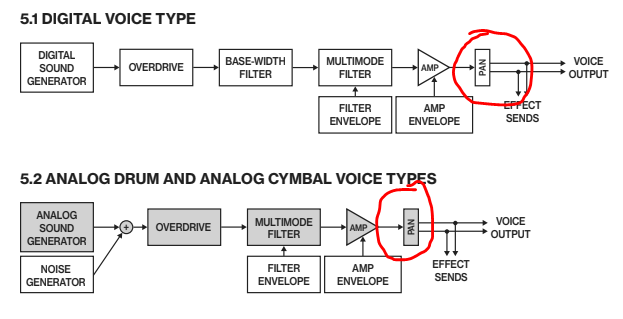
It’s the same on Digitakt… Come on… It would be a good improvement record the audio output with panning, mainly when we have LFOs acting there.
wow nice ones!
I’m fairly sure this can be explained (but i’m basing this theory on re-aligning my prior understanding to the figure shown, which imho can be misunderstood as it does NOT show the location of the ADC)
my understanding (wrt Analog voices e.g. AR) was that there’s just one mono ADC per voice that is tapped pre-pan
What the diagram shows is what the functional outcome is (after all the routing) - it doesn’t preclude the ability to apply the digitally controlled pan on the tap which is quite likely pre-pan (despite the effects sends shown above which would necessitate two ADC’s when there’s arguably no need to tap twice)
The net effect is the same as shown, but electronically, the ADC is not where you think, it’s post-AMP(pre-Pan) - the digital voices are handled similarly presumably (i.e. pre-pan feed)
This theory may well be challenged, and maybe it’s a bandwidth thing … but i have always believed based on info gleaned it was a Mono ADC Tap and that therefore has to be pre-PAN
i.e. MONO Overbridge tracks *
*(although digital panning could be applied to that too)
1 Like
I can’t remember if this has been mentioned but can we do something with the lighting when muting tracks. I can barely tell if I muted a track or unmuted a track with the current green. When muting on digitakt the lights go out to show that the track is muted. We need that on syntakt too! It’s not so bad when you have the light intensity up on max, then you can tell better but I like to keep all my machines on low intensity because max is too bright.
9 Likes
great explanation! Thanks for sharing
1 Like
Does ripping the analog section out into a Model:Waves(or whatever you wanna call it) count as a feature request?
1 Like
I would love it if it was possible to copy all the machine / parameter / sequencer data from one track to another. I like to try to keep my track layout consistent, but I often find that I end up experimenting and then wishing the whole sound / sequence was on a different track. I know sounds can be saved and sequences copied, it would just be easier to do it all in one step.
2 Likes
A paraphonic mode would just open so much up if it was allowed! I mean I doubt syntakt will ever be polyphonic, but I think it could be doable with paraphonic and it wouldn’t step on the chord machine.
3 Likes
Another one… Linking tracks to share the same note sequencer. Each track could also contain its own parameter locks / recordings?
3 Likes
You know you can copy sounds from 1 track to another and copy the track data from one track to another? It takes two steps instead of one:
- Not in Grid mode → [TRK] + Copy = Sound
- Grid mode → [FUNC] + Copy = Track data
6 Likes
Oh snap. Thank you.