I was convinced a few years ago there was going to be a UHE collaboration, they seem very close and have collaborated on several other things a…could still happen, maybe a ‘suite’ version like Live and AAS…Cytomic unlikely as they seem tied in with Live (Glue etc)
It’s a shame that Uhe didn’t fully realize the CLAP specifications in the new version of Filterscape.
Sorry, my comment that “it’s all just DSP” was a red herring. I mean, it is all DSP, but the more specific point I was driving at is that low level DSP code isn’t necessary in this case. The tricky math is in the filter’s transfer function, but everything we’re talking about here, a their core, operate as ideal 2- or 4-pole butterworths with feedback. The Grid filters have that covered.
The “character” of these filters is in their nonlinearities — that is, when and how they differ from this ideal. In other words, distortion. The Grid’s distortion game is unusually robust. Especially with MSEGs and the Transfer module in 5.
So it’s just an issue of what-shape, how-much, and how-does-it-change-in-response-to-cutoff-and-Q. The Grid provides all the math and routing we need for this (value, +, x, etc).
I don’t think we have the ability to modulate points in our MSEGs yet, so if distortion characteristics changed drastically over time, that could be tricky. Maybe multiple Transfers that we crossfade between? Not sure how that would work.
But given these are modeling analog circuits, the “shape” of the distortion is probably constant and what changes is how hard we hit it. That’s just a matter of adjusting the gain of the Transfer (and compensating on the other side).
But as I said earlier, the “how to do it” is just half the problem. The other half is the “what to do?” In other words, specifically how is the signal distorting. What’s its shape? There are probably people who can do this just from the sound, but I’m woefully bad at it and have no idea how to get better. So it’d probably be a matter of laboriously running test signals through the originals and trying to map it out on oscilloscopes or plugindoctor or whatever.
This seems, by far, the hardest part to me. This is what you’re paying for when you get a plugin. But that doesn’t mean these results are only available with plugins.
One thing I really miss from Live is that you can assign a groove to a midi region and then choose the % it quantizes the MIDI data.
Same as Elektrons do but without destructive editing.
Edit: ok so reading the manual - it says the ‘amount’ is set by this value - and so retains your performance vs hard quantize here.
Can work with this - all thought is destructive to the data (so will make a copy first if crucial as a work around).
The other thing that I can’t figure out is the following:
I monitor the audio from my hardware live via BW audio track’s - in order to hear the audio I need to have the monitoring set to the yellow speaker symbol - that way it’s audible whether armed or not.
So far so good. But the time drain that i’m constantly hitting is that once I’ve recorded audio in to the track - I need to change the monitoring from the yellow speaker icon to the grey speaker in order to hear the recorded audio.
Live is similar but in Live I can select multiple tracks and change the monitoring setting on multiple tracks at once. But in BW this isn’t possible as far as I’m aware?
And so I have to select each track and change the monitoring manually for each one.
I know you can select multiple tracks and arm/solo/mute them but I can’t find out how to do with monitoring.
I know I could have seperate audio tracks for monitoring and recording - and just mute the monitoring channels - but not the best solution for me as I have a lot of channels, had a similar setup before and if you start adding plug-ins/modulation on the monitoring channels have to copy it across to audio channels etc - for how I work it slowed me down.
Alternatively I know I could choose a different monitoring setting and always have the channel armed that way once recording is done so can simply turn off the arm on all channels and recorded audio would be audible.
But neither solution is ideal.
Any ideas?
This is the part I don’t get. Drop was written in C++ using JUCE. All it does is get samples in as numbers, perform math on them, and send them back out.
I don’t say this to trivialize it, there’s a ton of hard work in doing the right math to make it sound good. But it’s not sending it to space or using some weird neural processing. It’s getting a number, doing the arithmetic you learned in grade school to it, and sending it back out as fast as it can.
Max MSP is a whole environment custom built for taking in samples as a number, doing math to them, and outputting the result. It’s literally made for exactly this. If anything, these filters would be easier to make in max and I’d wouldn’t be at all surprised if they’d were prototyped there before being made into plugins. The only issue would be speed (compiled C is faster, though Max has compiled options now too). But again, for filters, we’re not really pushing the envelope of modern processors.
Now, granted, the Grid is not Max. It’s way more limited. But it’s odd to say “this plugin couldn’t be made in max.” It probably was, originally.
1 Like
As I said, I’m happy to eat my words if you or anyone can create Cytomic level models in the grid. I cannot and me and friends of mine have spent years trying, looking at schematics, equations, countless analyzers. You seem to know what you’re talking about so if you say it can be done, I’ll consider that despite my own experiences.
You missed an important part when you quoted me- I said ‘I’ wouldn’t be able to make anything that good in MAX (let alone the Grid)- others may well be able to, it’s the skill of the developer I was referring to, not the tool (but I have not personally heard a 3rd party MAX filter as good as the pro stuff mentioned, if you do something that good you probably want to sell it!
On the first part what I don’t get is when you say Bitwig quantizes to a %, isn’t that what you want to do? I did not even know elektron machines did that. So you are saying I could record unquantized into a digitakt and then there is a quantize % mapped to a knob that I can turn to dial in the timing without losing all the feel? That is awesome, and I don’t think I have done that or knew it existed.
On the second part, I never monitor my recordings in the daw. I use my interfaces direct monitor instead. The latency is so low from the daw (I use 64) when I live record that I can hear anything playing in the daw with the hardware without timing issues.
1 Like
5.011 out
No current betas so hopefully something new coming 
Sorry no I wasn’t clear there - it hard quantizes and then you can *humanize’ it to a percentage. (AFAIK - but going to check now as if not you could be right there  )
)
Edit so having read up on it - amount is what I was missing as this decides how much your performance is retained vs quantised. It does destructively quantise but is influenced by performance data too - which is great but destructive. (Just going to make a copy before applying)
But any suggestion for improvements on this anyone? Seen talk of feature request for groove pool so perhaps this will be solved at the same time.
A benefit of how Live handles this is that the groove is applied without destructively changing the note placement (although you can tell it to if you desire), just a case of assigning a groove to a region(s) and dialling the % in the groove pool.
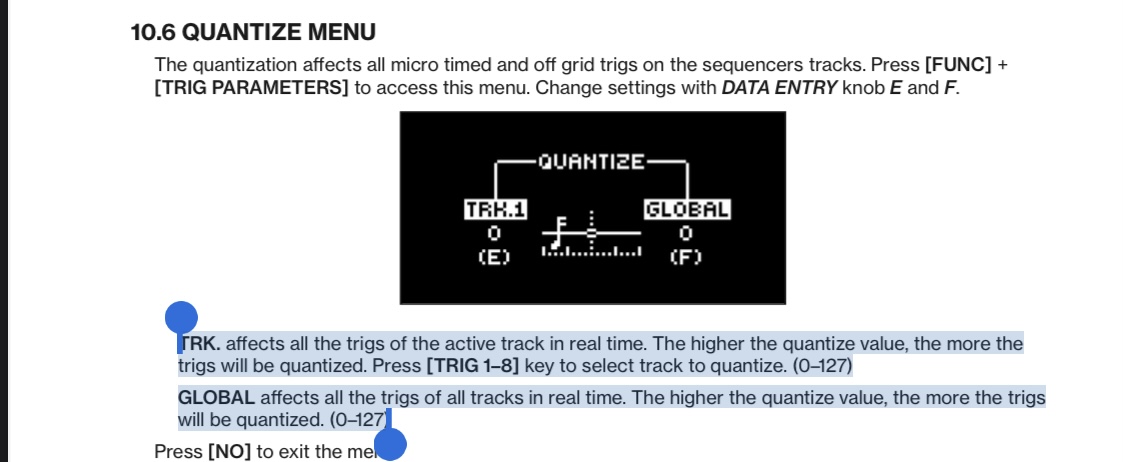
Yep  for DT just adjust these values either for the track selected or the global amount for all tracks
Monitoring in my interface isn’t possible as using an aggregate device (two linked interfaces combined in Mac and the combo being the interface used by the DAW - not sure of equiv. in Windows) - so not all channels appear in my interface software.
I think I’ll keep the tracks armed as a workaround in my default template - that way it’s just a case of dis-arming channels in bulk after recording has been done and live audio will be muted to make way for recorded audio.
Would be interested to hear from anyone that live monitors in Bitwig on how they handle this
1 Like
We live in hope! I’m such a massive fan of the Grid right now, I’d love to see more improvements there e.g. container devices so I can build bigger patches without it being a mess, have my own reusable modules etc. I think it’s such a brilliant modular environment (great balance of complexity vs usability) and it’s got so much potential for further development.
I also wondered, ever since they released Polymer, if we’ll be able to build our own devices with their own interface. It has a strange thing (you can see the underlying Grid structure) which always hinted at this…
3 Likes
I would be extremely surprised if this wasn’t on the roadmap, but tied in to this maybe a better/official away of distributing devices (possibly even locked so they could be sold and 3rd part developers get involved), maybe this will all be part of the network sharing promised since V1!
1 Like
5.1.0 beta is available:
2 Likes
5.1 beta 
3 Likes
Haha, you was like 5 sec early
1 Like
Looks like the folks hoping for more advanced filtering and saturation will be pleased!
4 Likes
Here is the list.
four new filters and six new waveshapers (headline)
More Voice Stacking Tools
Resizable mixer
Improved Audio Quantise (still no pitch quantise)
New Oscillator (Bite)
Personally not was I was hoping for, I will be skipping this one.
2 Likes
…it keeps just climbing the ladder of better and better…
and dunno what it is, with this team…but we’re debating internal filter options vs external filter options here, and there they just go…“simply” giving us even more filters to play with… 
and since the x.3 updates usually bring the real next progress, apart from the main x.zero ones of course, don’t u worry about audio to midi and such things like audio pitch quantize…with their frequent update tradition, that’s soon to come…
so i keep repeating myself…this is the very last daw of my life and in three decades of doing all this, bitwig was/is and will be the best investment in sonic tools, i’ve ever made…
nothing to skip here…
5 Likes
I just read the release notes and it looks like a massive update! Of course I’m stoked for the new filters and shapers, but also the voice stacking is insane. I also requested mixer improvements and console 1 support. I suggest everyone go through the release notes. Lots to get hyped about!
Looks like my years of requesting filter and saturation options finally paid off. 
1 Like