Tascam Model 12

Among the things that keep me away from the DP-24 are the fact that it only has 8 mono inputs, there’s no audio interface support (USB is for file transfer only), and I like the classic layout of the Models much more.

On the other hand, it does allow for (rudimentary) copy/move/insert of audio within a track, which let’s one break out of the “the tracks are all on the same tape” mode of the models. But yeah, like you note with the mini (not micro!) USB port, it’s getting long in the tooth by today’s standards. Though in some ways they’re more limited, the Models are definitely meant as the successors of the DP series.

3 Likes

Finally have an all stereo effects set up. I’ve been using aux 1 only to this point and today when trying to set up a stereo effects chain I found out aux 2 is only post fader. That’s very annoying (and has probably been mentioned before).

regardless of pre or post fader aren’t the aux only mono anyway, how are you using them for true stereo?

I have a question for all of you, what are your audio settings when using your model 12 as an audio interface and what are the specs of your computer process/ram?

If you’re using your auxes as FX sends, don’t you want them to be post fader?

Otherwise, if pre-fader, when you adjust track levels while mixing the wet/dry balance of your FX gets weird and you have to rebalance your aux every time you touch a fader?

2 Likes

That’s a good point. I suppose it’s an issue of “I’ve always done it one way” with the 12 for the 2 years I’ve had it and realizing the two aux channels behave differently was a surprise. I like to isolate only the full wet send track sometimes with the original track level fader down(just my send channel/track up)… Just need to change my thinking a bit.

2 Likes

Well, and I mean, the best way is the way that works for you. I’m trying to dive deeper into mixing this year and so was more asking to see if I was missing a trick :slight_smile:

Also, in case 1 & 2 being at different positions is a problem, but being post-fader is okay, you can move aux1 to be post to match 2. It’s an option in the MIXER menu.

3 Likes

Hi, I’m thinking about getting a Model 12 for my hybrid setup, but I need to know something before:

I want to use it with a Rytm in 7/8, an Octatrack in 9/10, and 5 monosynts and the Rytm’s kick in the mono channels.

It would be my audio interface and control surface for Ableton as well.

I’d like to be able to send any synth to the Octatrack to resample or to use it as an effects unit, I don’t know if using the aux 1 or aux 2 sends, or the sub bus.

I would like to have a pedal as a send as well.

And I would like to pre-listen sometimes, so maybe with the sub bus o maybe with the Octatrack.

How could I achieve this?

It depends on whether you want to send to your Octa and/or pedal in mono or stereo. Mono is easy with lots of options; stereo a bit less flexible

For mono…
You can pre-listen to Aux 1 and Aux 2 in a number of ways—there are buttons to switch the HeadPhone 1 or 2 output to only listen to Aux 1&2 (rather than the main mix), so you can pre-listen to the Send output that way. And it’s independent for each headphone output, which means you can use HP2 as an extra send if you’re desperate for sends, while still being able to listen to the main mix on HP1).

Or you can use “Solo” to pre-listen to each track, though not necessarily what’s going to the Send. As discussed above, Aux 1 can be set to either pre- or post-fader. Aux 2 is only post-fader.

There are also AFL buttons for each AUX channel, but honestly I find their interaction with some of the other pre-listen/soloing buttons to be confusing so I tend to ignore them.

For stereo…
I don’t think you can pre-listen to the Sub outs other than hitting Solo on whatever tracks you’re sending to it, which isn’t really the same. So your only option there would be to use Aux 1 and 2 for your stereo L and R.*

*(Or, if you have a patchbay in half-normal mode, you can use that to “tap” the signal before it routes out thru the bay and listen at the patch.)

Also, keep in mind that Model 12 doesn’t have any dedicated FX returns, so unless you unplug one of your monos, by my math, you’ll be one track short to record the output of that pedal.

This thread from the Tascam forums may have all the info you need:
HOW TO SET EXTERNAL EFFECTS ON THE MODEL 12

FWIW, here’s my go-to FX SEND setup:

  • SUB BUS—> Almost always goes to an EQ, a compressor, or both, then back into CHANNELS 9&10, which I tend to use as my Mixdown channel.
    • OR I use SUB for resampling and have the SP404 MKII on 9 & 10. SUB BUS routes to the 404’s inputs, pretty much the same as you want to do with your Octa.
  • AUX 1—> Usually goes to delay or overdrive, then gets returned back to and recorded on CHANNEL 1
  • AUX 2—> Usually goes to delay or reverb, then gets returned and recored onto CHANNEL 2.
  • AUX 3 (AKA Headphone 2 out)—> Occasionally I’ll use this as an extra send but it can be annoying and kludgey.

I also usually feed a bit of AUX 1 (delay or distortion) into AUX 2 (delay or reverb) for more depth. The Model 12 makes stacking effects like that pretty easy.

2 Likes

you getting real stereo out of the stereo suggestion or dual mono?

Thanks for the detailed response.

It seems using the sub bus could be the best option to resample with the Octatrack.

I realized that I won’t be able to have 5 monosynths because I need to use two channels for the DAW output… Anyway if at some point I need more space I think an Audient id4 and a passive audio switch could be a good solution to select which source I want to hear through the monitors.

1 Like

It depends…

You can use Aux 1 and Aux 2 as L and R, respectively, to send a stereo signal (i.e Aux 1 to Left and Aux 2 to Right).

But (I think) if you click the Aux 1 or Aux 2—> Headphone button (below the Headphone Volume knob), then it sends the Aux signals to HP L & R equally, as dual mono.

That’s why I use SUB as my stereo FX send and Aux 1 & 2 as their own mono sends.

It means I can’t really pre-listen to SUB while I’m recording. But for me it’s worth the sacrifice.

FWIW, I think the “AFL” buttons for each Aux send will bypass the Send’s volume knob. I don’t use them.

It’s how I’d do it. It’s what I do with my 404.

I’m gonna sound like a broken record here, but I think the Model 12 is almost an incomplete piece of kit without some kind of patchbay. I got a Samson S-Patch+ and it’s made FX, remixing, “mastering” and resampling a million times easier.

Yes, all the cables will probably cost more than the patchbay.

3 Likes

I thought about it but I don’t have too much space so I think I can’t have enough gear to need a patchbay, I don’t know.

1 Like

Fair enough. I didn’t necessarily mean one of the big 48-point rack-mount ones.

Even one of the little 4 in/4 out patchbays could be really helpful if you’re using a lot of effects or resampling different things.

1 Like

That’s true, I’ll have that in mind, thanks.

Any link?

The smallest I’ve found is the Art one.

Friends, I’m so stoked — I just pulled off a successful replacement of my Model 12’s power switch, and I didn’t have to open up the unit or do anything remotely technical. If I can do this, you can too.

The trick is to carefully extract the factory switch so that the leads stay connected to it. The switch is glued to the chassis of the mixer, so you have to get under the edges with a spudger or something similar, kind of work at it for a little while to get it loose, then wiggle and wobble it out of place to slowly pull it out.

Once the switch is out, you disconnect the leads (this also required a decent amount of force, but if you pry at the leads enough they’ll let go eventually — just be careful not to lose the leads back through the chassis hole and into the mixer). When you’ve got the old switch fully disconnected, you simply connect the leads to your new switch and pop it back into place.

References: this post outlines the process I followed (the whole thread is useful), and these videos (one, two) were helpful as well, though these guys opened the mixer up and approached it from the inside. Fortunately, all of that disassembly/reassembly is unnecessary if you’re just swapping out the power switch. Here’s the replacement switch I ordered from Mouser.

I have an extra switch here because I ordered 2 in anticipation of screwing up — if anyone wants it, I could probably mail it to you. Rise up, non-technical repair gang!

17 Likes

Would the Tascam give out midi thru the USB-C to an iPad if there was a 5-pin midi coming into the Tascam from say a sequencer?

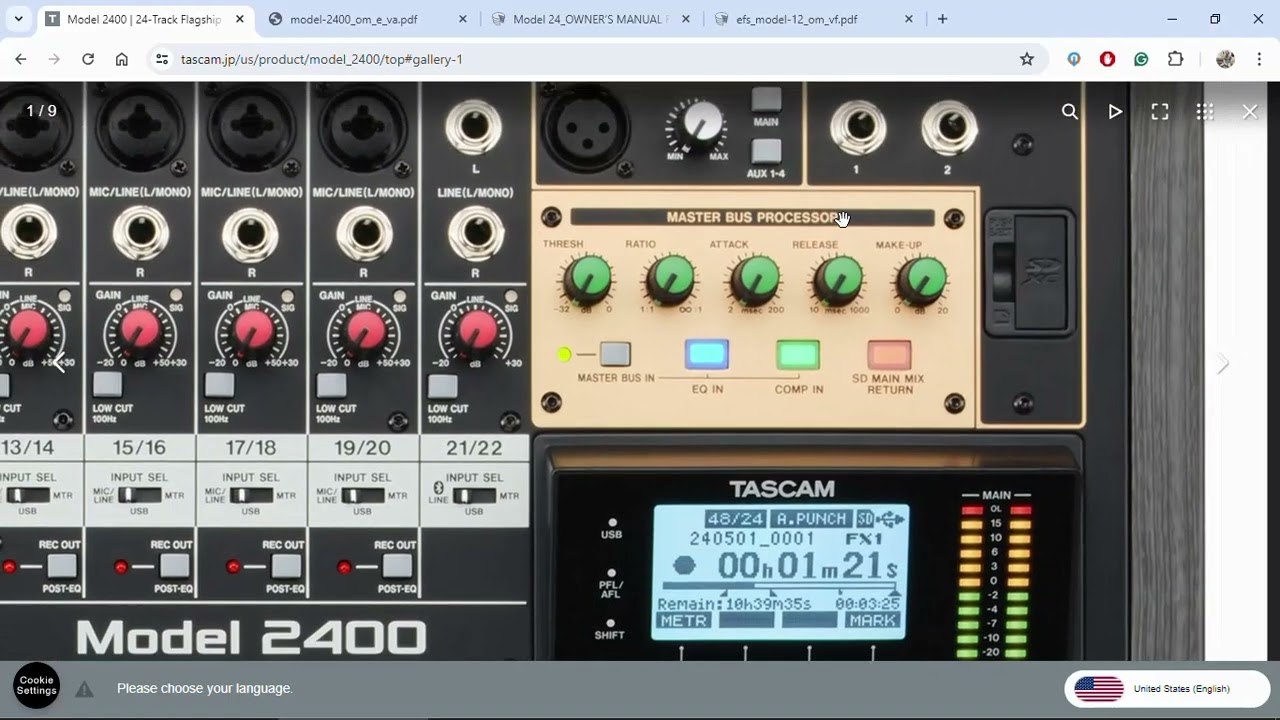
Petition: Comment below the video if you want the Model 12 to get the Model 2400 Main Bus Compressor/Limiter feature via firmware update (if possible, the video creator says it’s possible, I don’t know but like the idea!)

4 Likes

Hi! Is it posible to record eq or volume changes on the fly? Is there a way to record modulations of a track already recorded? Thanks!