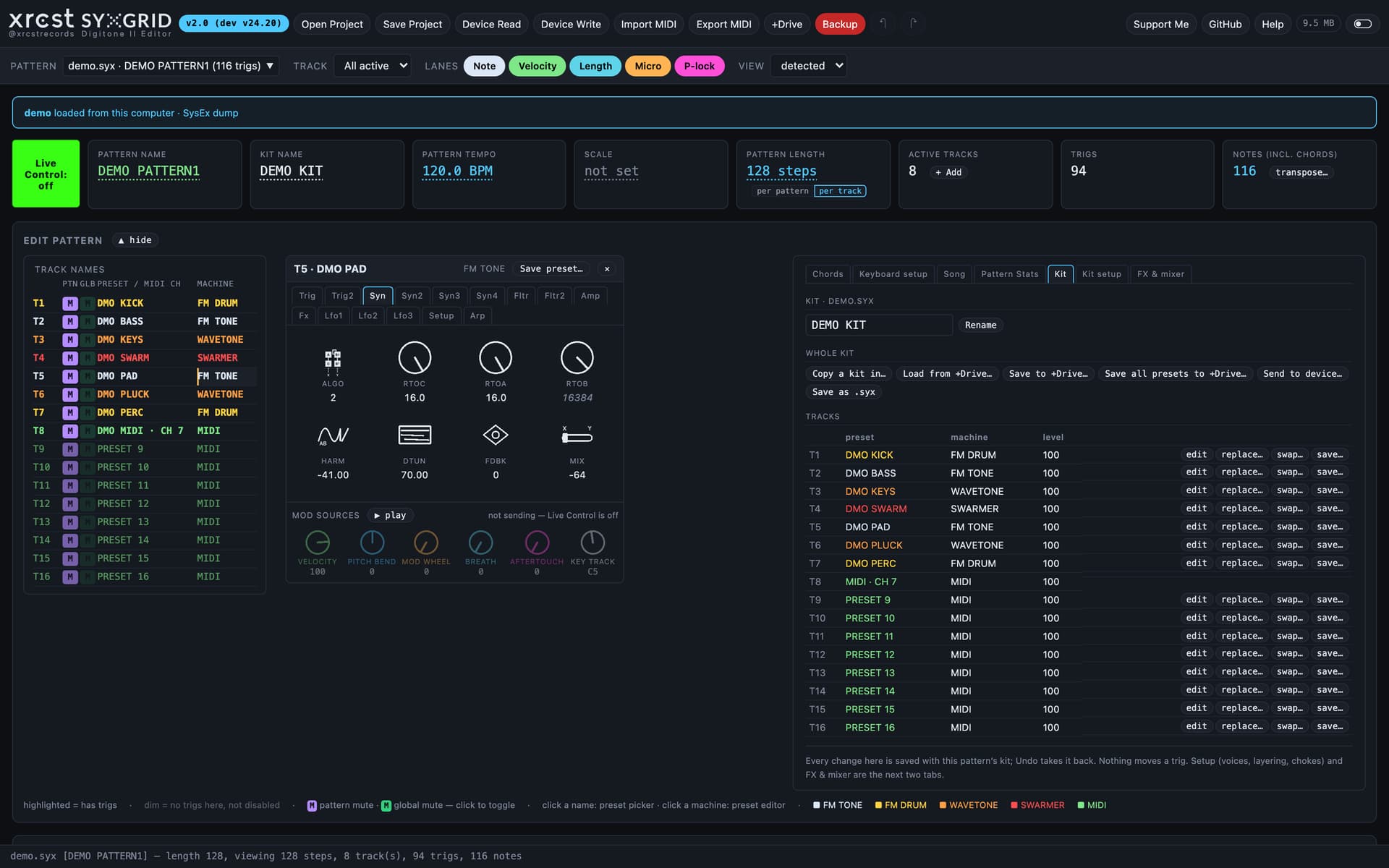
I built a pattern editor for the Digitone II. It runs in a browser, it is free and AGPLv3-licensed, and the SysEx format map it is built on is published under CC BY 4.0 so anyone else can build on it too.
App: https://syxgrid.xrcst.com
Where it came from
I was putting a live set together and decided to make the Digitone II the master sequencer for everything else on the desk. I had parts already written in Ableton and elsewhere, and getting them onto the DN2 meant playing them in by hand on a four-inch screen — again, every time I changed something in the DAW.
So the original goal was small: MIDI import and export for the DN2. But to write a pattern back to the machine you have to understand the file it lives in, and nobody had written that down. It turned into days of dumping patterns off the hardware, changing exactly one thing, dumping again, and diffing the bytes.
That map is now a published part of the project rather than something buried in the source.
What it does
- Loads a
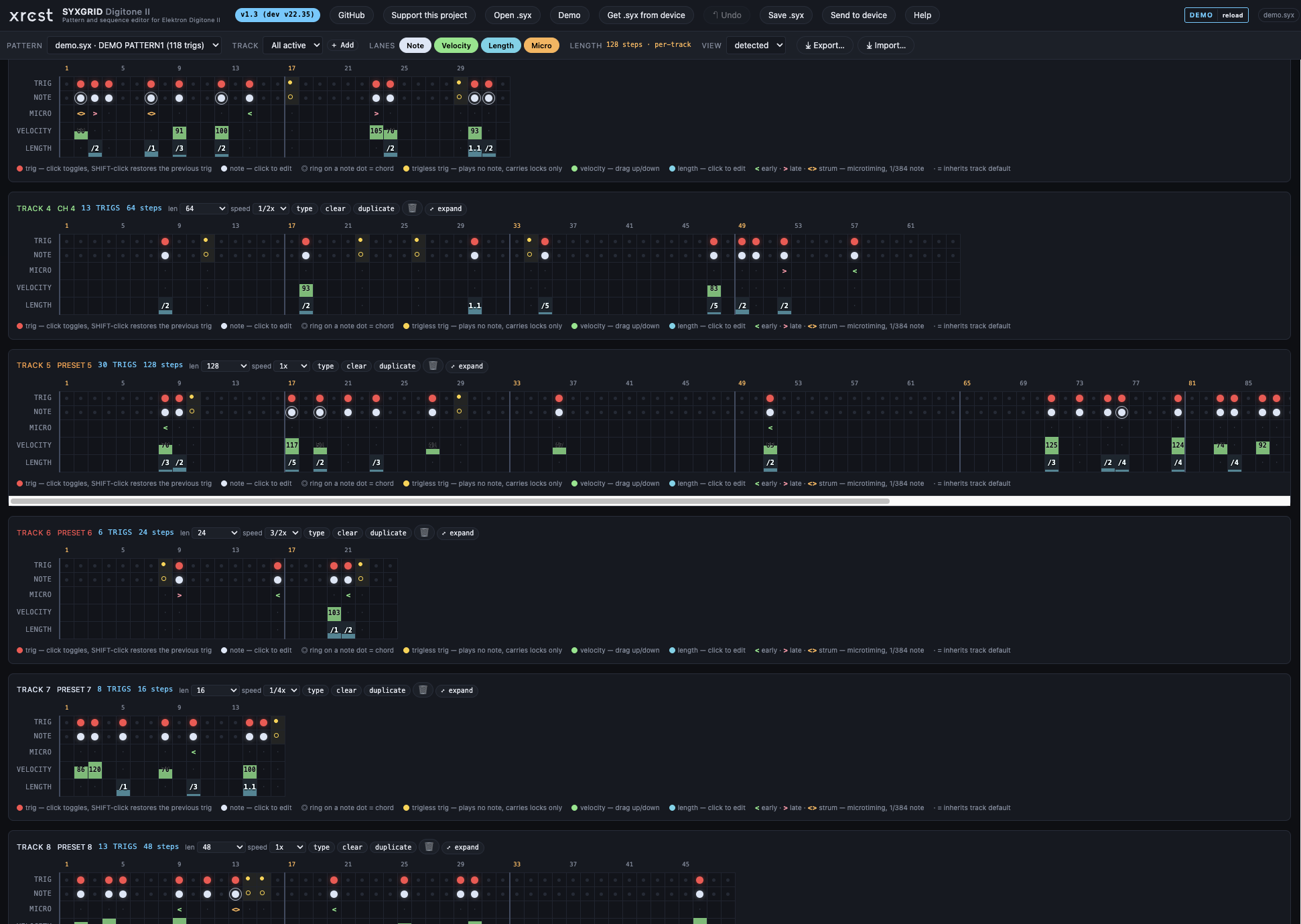
.syxpattern or a whole 128-pattern project dump, and renders it as an editable grid: 16 tracks × up to 128 steps, with separate lanes for trigs, notes, velocity, length and microtiming. - Web MIDI both ways — pull a dump straight off the device, edit it, send it back. No file shuffling.
- Edit everything on the grid: notes, chords, velocity, note length, microtiming, pattern and kit names, preset and MIDI-track names, pattern length, per-track length and speed.
- Trigless trigs are decoded, shown as their own thing and preserved — not quietly dropped.
- Microtiming is real, not decorative: ±23 units of 1/384 note per note, and it survives a round trip through
.midand.alcin both directions. Import turns an off-grid note back into a trig plus an offset instead of quantising it away. - Per-track length and speed — polyrhythm without doing the arithmetic.
- Track machines and MIDI channels are decoded from the dump: FM TONE, FM DRUM, WAVETONE, SWARMER, MIDI, colour-coded, with
CH OFFshown as the distinct state it actually is. - An unedited dump saves back byte-identical. That is the property the whole test suite exists to defend — checksums are recomputed, everything unknown is carried through untouched.
There is a Demo button, so you can try the whole thing right now without plugging anything in.
What it does not do — please read this part
I would rather you know before you load a project into it.
- It is not a sound editor. No presets, filters, FX or LFOs. It edits the sequencer.
- Parameter locks are not decoded. They are carried through your edits untouched and nothing is lost — but SYXGRID cannot show you a locked value or change one. On a trig that still plays its note, it cannot even detect that a lock is there.
- Practical consequence worth knowing: a retrig set as a p-lock is invisible to the editor, so
.mid/.alcexport writes a single note for that step. Exports of retrigged patterns are not accurate. The.syxitself is fine.
- Practical consequence worth knowing: a retrig set as a p-lock is invisible to the editor, so
- Sending overwrites. SysEx carries no destination slot, so a sent pattern lands in whatever pattern is selected on the device. Select the target on the DN2 first. (v1.2 removed a “destination slot” picker that implied otherwise — it was a fiction, and it was the most important thing fixed.)
- Digitone II only. The original Digitone is a different product ID and a different format; it is rejected rather than half-parsed.
- Chrome or another Chromium browser for send/receive — Web MIDI does not exist in Firefox or Safari. Loading, editing, saving and import/export work anywhere.
- On macOS, Chrome 152 and Edge 152 cannot receive a dump at all. The device sends, the transfer light blinks, nothing arrives. It is a browser regression, not an editor bug — Chrome 151 works on the same machine with the same device minutes apart, and Windows is unaffected. Sending to the device still works. Use Brave, or any Chromium still on 151; Chrome for Testing 151 installs alongside your normal Chrome and does not auto-update. v1.4 shows a red banner when it detects an affected browser, because there was no way to fix it from inside the app and the only honest thing it can do is tell you.
.dn2prjis not supported. It is undocumented and I have not cracked it. SysEx is Elektron’s own dump format, it goes over the same USB cable, and it is what I could decode. Maybe the project format comes later. No promises.
Back up your projects before you use this. It writes real data to real hardware. I test every release against a physical DN2, but it is software, I am one person, and it is your work.
The format map
sysexmap/ in the repo is the part I would most like other people to use. 45 mappings, map version 1.13.0, each with an explicit confidence level and the evidence behind it:
| Level | Meaning | Count |
|---|---|---|
 A |
Hardware-confirmed against a physical DN2 | 23 |
 B |
Corpus-confirmed by the fixtures in the repo | 12 |
 C |
Inherited — verified elsewhere, only one value exercised here | 9 |
 D |
Unknown — do not rely on it | 1 |
SYSEXMAP.md is generated from mappings.json, and a test fails the build if the map and the app’s constants disagree. A mapping document that drifts from the code is worse than none, because it keeps looking authoritative after it stops being true.
This is reverse-engineered, not vendor documentation. Anything below level A may be wrong. If you find a corner of the format I got wrong, or you have captures that discriminate one of the C entries, I would genuinely like to hear about it — that is how it got this far.
CC BY 4.0. Build your own tools with it.
Credit where it is due
I worked this out from hardware captures, but not in a vacuum. These are the projects that contributed code or shaped the work, and they deserve naming.
digi-roll — GitHub - zooloo303/digi-roll: Browser piano roll for Elektron boxes — draw MIDI patterns and capture them into a Digitakt 2 / Digitone 2 · GitHub, by zooloo303
I found it only after doing a great deal of the reverse engineering myself, so it came late to the party for me — but it helped enormously and deserves to be much better known. Its DN2 pattern-format doc is the most thorough public documentation of this format I have seen anywhere, and it goes past where I had got to: the p-lock pool with a measured paramId table, trig conditions, swing, and the fact that velocity, length and micro-timing are stored per note rather than per trig. Several of the limitations I list above are fixable because of that document.
elk-herd — mark/elk-herd: Elektron device manager - Glyphic Forge, by Mark Lentczner — BSD-2-Clause. The one project here whose code I actually used: its Elektron 7-bit SysEx codec and F0 00 20 3C framing, ported to Python for my research tooling (device-agnostic parts only — elk-herd does not cover the Digitone family). None of it is in the editor itself.
Inspiration and reference, no code taken, but each one informed the work:
- digitone-syx-toolkit — GitHub - emnyeca/digitone-syx-toolkit · GitHub, emnyeca. Used as a cross-reference while checking step-word encodings.
- dn-deobfuscator — https://github.com/zerubeus/dn-deobfuscator, zerubeus. Consulted during the
.dn2prjproject-file research. - libanalogrytm — GitHub - bsp2/libanalogrytm: Portable Sysex Library for the Elektron Analog Rytm Drum Computer · GitHub, bsp2. Reference for Elektron container structure and checksums.
- elektroid — GitHub - dagargo/elektroid: Sample and MIDI device manager · GitHub, David García Goñi. Reference for Elektron device transfer over USB.
- This forum’s own Digitone 2 pattern manager thread — community groundwork on Web MIDI and dump sizes.
If you are writing your own DN2 tooling, read digi-roll’s doc alongside sysexmap/. Two independently derived maps that agree are worth far more than either alone — and where they disagree, that is exactly the interesting part.
Licence and the disclaimer
Correction, as @aLinG pointed out, I changed the license to AGPLv3
App is MIT, the format documentation is CC BY 4.0. Not affiliated with, endorsed by, or supported by Elektron. Elektron and Digitone are trademarks of Elektron Music Machines MAV AB. No warranty — keep backups.
Links
- App: https://syxgrid.xrcst.com
- Source, issues, format map: GitHub - xrcstrecords/syxgrid-digitone-ii: SYXGRID — free, open-source pattern and sequence editor for the Elektron Digitone II. Runs in the browser; includes a public SysEx format map. · GitHub
- Changelog: syxgrid-digitone-ii/CHANGELOG.md at main · xrcstrecords/syxgrid-digitone-ii · GitHub
- If it saves you time and you want to throw something in the hat: Support XRCST — entirely optional, the tool is free either way.
Questions and bug reports welcome, here or on GitHub.