Hi everyone!
I started working on a simple tool to help moving patterns between Digitone II projects… It makes my life easier every time I have to work on a new live set.
If some people are interested to test that would be helpful!
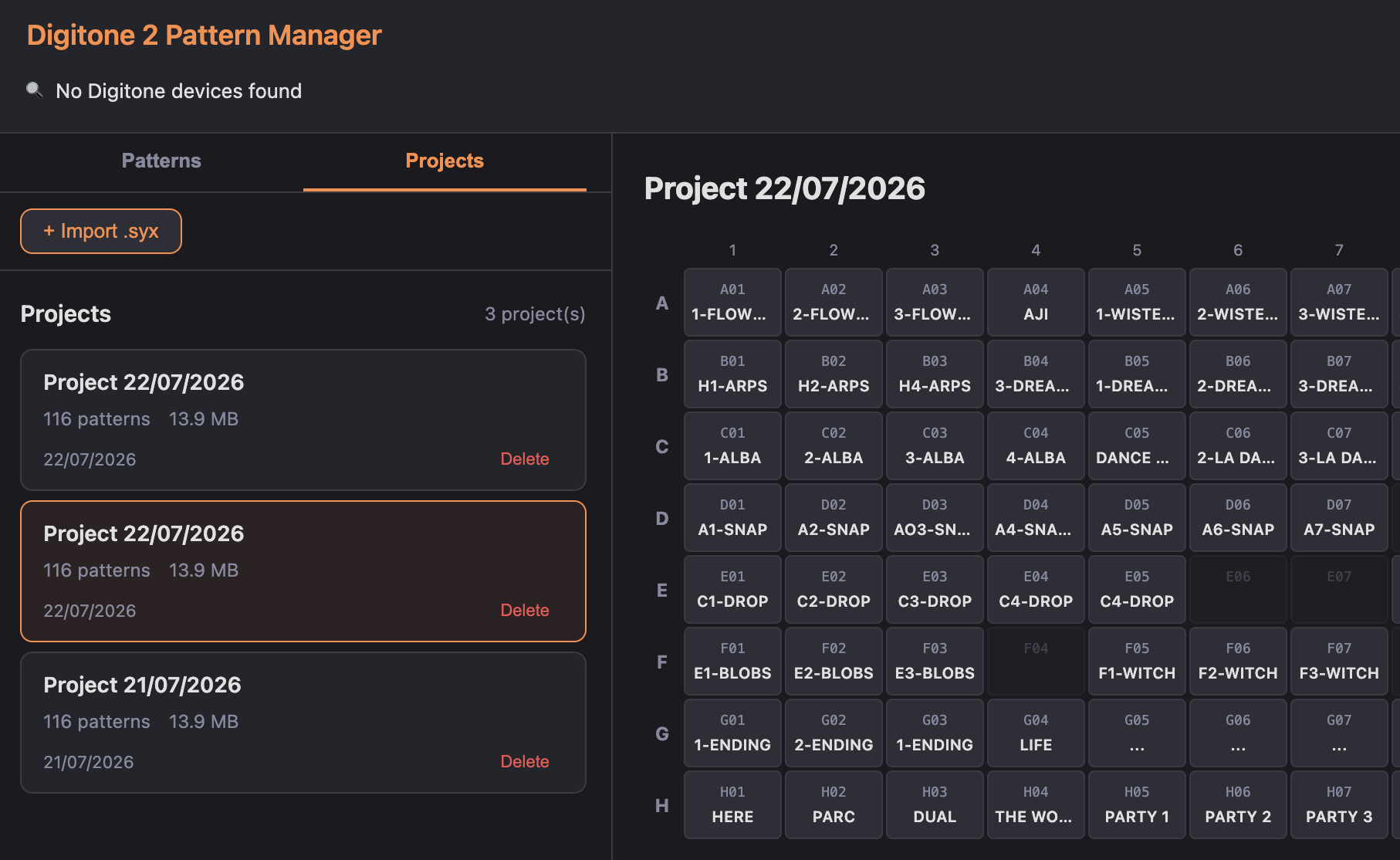
How it works:
- Digitone II Pattern Manager
- It’s a browser web app using the Web MIDI api (only available on Chrome and Edge). Once the app is loaded, all your data stays local, it works offline.
- patterns/projects are stored in their raw SysEx format
- You can restore patterns to another slot of the same project, or to a different project
To use it, I recommend to:
- Connect to your device
- (PC) Go into the Project tab, click Receive Project
- (DN2) System → SysEx dump → Send → Active project (make sure to select USB, USB + MIDI is very slow)
- Once the project is transferred, you can select patterns in the grid and send them back to the device
- (DN2) System → SysEx Dump → Receive → select a pattern slot
- (PC) Select pattern → Send to Digitone 2
Caveats:
- The app dumps raw SysEx, it does not try to parse pattern data except the pattern name.
- Therefore, sound locks probably won’t work if the pattern is moved to another project. I haven’t confirmed, since I don’t really use this feature, but it might need some sound pool loading/remapping to make it work?
- I tested only on firmware 1.10, on Chrome macOS 26
- Make sure Transfer is not opened at the same time
- It’s an alpha, testing version, make sure to >backup< your work first with Transfer
The elk herd project has been very helpful to understand SysEx commands. Once the app is stable and source code cleaned up, the source code will also be available.
Future ideas of improvement would be to handle properly the project sound pool, and also initiate send requests directly from web app side. But for that I would need to dig a little bit more into the Digitone II SysEx data. There is prior work that could be useful for this task.