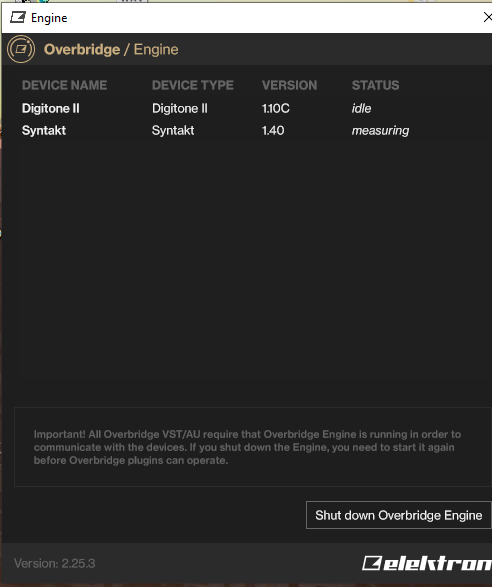
I’m looking for some help with my Syntakt. I’m having persistent connectivity issues that occur on both Windows and Mac.
The device stays stuck on ‘Measuring’ in Overbridge, and when using Elektron Transfer, the connection drops midway and hangs on ‘pending’. I have already tried everything: reinstalled Overbridge, tried multiple USB cables, and even did a full factory reset on the Syntakt.
I also ran the internal ‘Test Mode’ on the device, and it reports no issues at all. My Digitone II works perfectly with the same setup and cables, so I suspect something is wrong with the Syntakt unit itself.
After unplugging everything (MIDI, audio, USB, and power) and reconnecting only the USB and power cables, everything is back to normal. I was really scared for a moment.
I’ve tried a dozen of times just before I made the post. Stopping and starting the pattern didn’t help. I didn’t reload the project or something like that, but when I just tried it for the 13th time, it suddenly works again. Strange!
I did also noticed some hanging notes when I started sequencing and I’ve also noticed some minor lagging overall. This is all shortly after startup.
Shortly after startup might be the key thing… it can take up to a minute to sort the ram out if you add lots of new samples … you should wait for the spinning icon top left to settle
It wasn’t that short after startup. I was already programming the 5th track after quickly laying down a few drumtracks. But no worries… if the issue remains or returns I’ll make a ticket for it…if not, all the better
I’ve had issues in the past using Transfer while my Elektrons are connected to other gear via midi. Disconnecting the device from everything except the USB cable to computer and the power cable resolved the issue for me as well
1: if I’m in song mode, and stop a pattern halfway through its repeats (say it repeats 3x and I stop it have it repeats twice), even if I hit stop a second time (slowly so it doesn’t take me to the start of the song) - visually the bar at the top shows me as the beginning of the pattern, but internally it seems to still be on the second repeat, so it will proceed to the next pattern after 1 bar, instead of 3 - so I will see the progress graphic go up about a third, and then go back to the beginning as it goes to the next pattern. Either tweaking the behaviour so hitting stop restarts your loop ‘number’ OR updating the GUI to more accurately show how much of the pattern has passed/left to go - both would be viable solutions
2: I’m getting what seems to be CPU crackling sporadically during areas of a song with this going on. I heard it on a song I made using tracks 9, 10, 11, as well as 1, 2, 3, and 4 - Tracks 1 and two have samples (I think 3 does too?) - when all 7 tracks are going I will get dropouts/crackling needing to stop for a moment and then continue. I have: USB connected to the computer, MIDI out, and MIDI in. Audio in, as well. I am GUESSING it is the CPU hitting a limit, since it sounds like when Ableton goes overboard - however Ableton is A) not showing high CPU usage and B) is not glitching out my vocals as I record them (which is what happens when Ableton overloads while recording)
Setup: I wanted to use twinshot engine to launch amen samples.
Track 1 - TwSh: Kick + hats
Track 2 - TwSh: Snare + hats
Then use layering groups (when one track triggers other) to have a synth kick on track 9 to trigger track 1’s sample, and snare on track 2 to trigger track 2 sample.
Track 9 — Layering—> Track 1 TwSh: Kick + hats,
Track 2 — Layering—> Track 2 TwSh: Snare + hats.
I’ve also setup a choke groups so that Track 1 chokes Track 2, and Track 2 to choke Track 1, so that “hats” part of the samples do not stack, so each new trigger of sample would choke already playing one.
The issue:
Sometimes one of the sample tracks does not play when triggered via layering, and even triggering it manualy does not produce sound unless you manualy launch sound which chokes it.
I’ve fixed it by making my Track 9 / 10 choke opposing sample, instead of sample choking sample, but initial interaction was weird.
You got the terms wrong so it’s hard to understand.
“Track relations” is were you setup Layering (one track trigs another) and Choke groups (1 track shuts down another).
I’ll double check but I am convinced you cannot have track 1 choking track 2 if you already set a choke relation in the other way.
“Slot” is used for several different things in the manual, but you can understand it as “a line on a list”. In the context of Twinshot, you can select for each SMP parameter one slot among 64.
So saying that slot one triggers slot 2 makes no sense.
This even less:
You still got a typo here: track 2 trigs track 2 ^^
I hadn’t thought one could make track 1 choke track 2 and track 2 choke track 1, but indeed you can.
And there is, indeed, a bug there, thanks for noticing
Wow, had my ST completely freeze today, for the first time since I got it at launch
I was navigating between patterns after a long (2h+) session, it just froze up, no sound, nothing responsive. A power cycle fixed it, but this is frightening if it happens during a live set!
Probably related to 1.40 since I never had something like this before, unfortunately (or fortunately?) there’s not so much info to reproduce it.
I’ve had to power cycle an Elektron box many a times during a gig. It’s not that bad as long as you have some other instrument to cover for the “gap”, thankfully these boxes start up quite fast