I have no problem with the pattern clear shortcut when not in a recording mode, or with contextual shortcuts in general. However, Elektron already chose to change the clear shortcut depending on context, and grid recording mode shares the same context as live recording mode (single track scope). It’s a clear discrepancy in the design.
2 Likes
This is a bug! 
 But yeah I see that you mean, I guess it’s somewhere in between a bug, deliberate design and incomplete feature implementation.
Regardless, it’s makes using swing on more complex sequences a pain. I’m making a song with lots of swing (56%} and obviously any scaled track is thrown off, forcing me to nudge trigs to get them roughly right again. But what’s even more annoying is that retrigs are ignoring swing completely, making them pretty much useless. I noticed that even the mod trigs (buttons 13-16) ignore swing. I don’t know what Elektron was thinking here but I’m not swinging with it.
1 Like
BUG agreed
It works with the DN because it doesn’t have an issue that the ST has ended up with.
The DN has a similar filter to those of the ST digital tracks.
They both have NRPN control of the fine tuning of e.g. Filter freq
The DN also has a separate CC for fine control of the freq, the ST does not.
I explained elsewhere how an NRPN string is formed, but this is not about NRPN, but by utilising a CC pair you can have a similar control - so the CC MSB(coarse) and CC LSB(fine) are sent in a coordinated way as a pair of CCs where there will be fine changes within each integer step
This is achieved by sending the coarse, followed by the current updated fine value, but the fine value CC is a different identity - the OT learns the coarse value, so it doesn’t process or care about the fine CC coming at it too
So DN works …
The ST falls over because it appears to have inherited code from the DN which packages up the distribution of the fine LSB CC, except that … there isn’t one allocated … so it’s got this default (or error assignment) of the MSB CC(coarse)
So when you are turning the ST Filter freq (and other parameters elsewhere perhaps), but let’s stick with Filter Freq CC on a digital track, it is sending for each change (including on fine changes where it has no assignment) on the device
Coarse CC 74 and spuriously ‘fine’ CC 74
so every step you take up the fine ladder on the device, the OT is echoing back through the bi-directional MIDI the CC 74 value you were on as you start ascending between an integer step, basically all of your fine increments are dragging you back to the coarse integer step below it.
The bug is that it is distributing these spurious extra CC messages between steps, they are utterly redundant and wastefully hog the MIDI bus, and when you are using teh OT in your way it is manifesting in this issue - (you only need to activate the respective OT midi channel to illustrate this, no need even to learn CCs - i use Channel 16 at each end to keep things simpler)
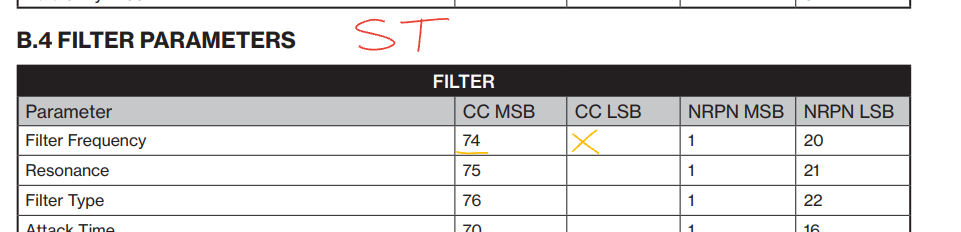
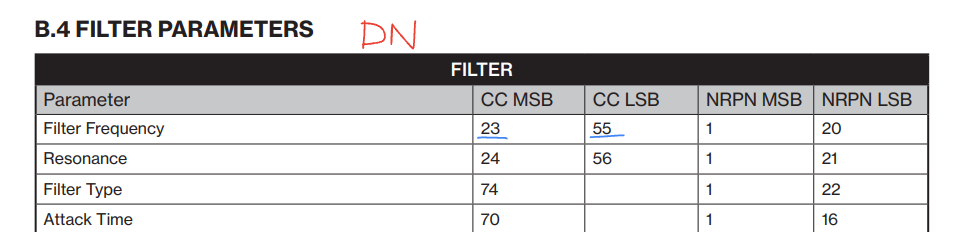
So the bug is that ST will send a spurious LSB fine message exactly equivalent to the current MSB coarse CC, 74 in this case !
In the real world without bi-directional MIDI this is wrong, but benign at the expense of over-defining the steps on the stair, so some have not noticed it - you have noticed it, because when the OT gets barraged by the same CC message as you try to ramp up the fine, it keeps dragging you back - you can only accelerate through teh values to get through it. But this is definitely a BUG, the (re-used?) code to send CC LSB data is not viable as there is no CC LSB number (won’t be any free) to send (see table) - the NRPN side can validly use fine control (a different string of packaged CCs), but this CC LSB should be disabled when the output is CC for any parameters which do not have a CC LSB assignment.
That’s the issue.
4 Likes
The real issue here ^
Thanks for confirming.
I had planned to wait a few years before buying ST so other users could handle all the bugs, but my stunningly beautiful partner bought me one for my birthday as an actual surprise. Lesson re-learned, I’ll let her know for future birthdays.
2 Likes
@avantronica Excellent find!  (and hopefully reported to Elektron support)
1 Like
I’ve got a modulo bug regarding the correct ‘counting’ of pattern cycles.
Track scale set to 3/2, 1st trig set to 1:5. The expected result is that the 1st note of the pattern will always trigger when switching to that pattern from another, but it doesn’t, it seems to keep counting the cycles from the previous pattern (not 100% sure that’s correct but the 1st trig is definitely not playing when switching patterns).
No midi gear hooked up, master length at 256 & 512 on different patterns but with the same result. No microtiming either, literally nothing fancy except the 1:5 condition.
This is more of a logical bug or design mistake rather than an error (At least I think it is)
The Saw and Square LFO waveforms both begin and end on the up/down vertical line part. This means that there are in fact 2 vertical lines rather than one. The problem can be best illustrated by using the one-shot lfo mode, (Eg you can’t use the sawtooth LFO as a decaying envelope - either you have to have one segment at the beginning that goes 0-100% or one segment at the end that goes 0-100%,
In terms of values it looks like this:
0-100-99-98-97,3-2-1-0
or
100-99-98-97…3-2-1-0-100
When really what you want is this:
100-99-98-97,3-2-1-0
(so that the gradually decreasing modulation doesnt suddenly pop up at the end, or isnt delayed at the beginning messing with the transient)
1 Like
Half-ramp is what you’re looking for, it will move a parameter without returning to zero at the end. )Also, I think that on offset phases the 1-shot modes mostly end at the end of the wave rather than going through a full cycle, in case that explains other weird behavior.)
Great suggestion buuuuuut- Half seems OK for the square mode, the saw unfortunately only covers half of the depth - in many cases this would be OK, but there are some where you need those extra numbers.
I tested the end of the wave thing, that is mind-blowingly bananas!! If I choose ramp and put the (normally) “last” bit of the flatline (0) at sphase=114 for example (edit - even 127 does it lol)) It just plays a 0 modulation line instead of actually cycling the waveform, because it (presumably) counts up without looping. Hilarious. Also unfortnate.
1 Like
I meant you could use the ramp wave, half-cycle, and adjust the parameter to fade in a unipolar way (LFO depth as endpoint), to get what you’re trying to do with the saw.
i’ve noticed this too but always assumed it was a user error issue
it’s pretty maddening tbh
Fade with half square might work hmm, good idea. The start phase thing is still weird. I always felt uneasy about my understanding of syntakt LFO rates/speed/etc, I think this is why. If you don’t know, it messes with learning the other ratios of like steps to speed/mult, because you try to experiment but don’t have the right underlying facts.
1 Like
Is there a program change bug in 1.20A? I followed Ivar’s setup to a T but used ST instead of DN, DT is master, and it isn’t changing programs as expected when I change patterns.
I tried with PROG CHG IN CH to AUTO and 1. It works fine when I swap the ST back for the DN with AUTO.
I just turned my Syntakt on and the last pattern I had edited before saving was missing.
Also one of the other patterns I had saved in the same project (but in a different bank) had the correct sequence (including p locks) but all the sounds were back to the default ones.
SETTINGS > PATTERN > RELOAD WHOLE PATTERN somehow brought both patterns back but I’d still like to report this.
7 Likes
Damn this also happened to me after several hours of working on new patterns. I think I lost the work since I have since saved the entire project but next time it happens I will try this reload whole pattern workaround.
3 Likes
I’ve also experienced this but everything was fine on reloading the project.
2 Likes
Yes, it’s a buggy behaviour.
It’s just a little workaround, to get your patterns back.
Great, that it worked for you! 
2 Likes
I had this happened to me once and since then I always load a project again when starting, and I always save the project when shutting down. The “previous state remembered when turned on” feature is rendered useless to me since I can’t trust it.
2 Likes
I’m confused with the sequencer never playing the first trigger note when recording live into it. Step 1 in the sequencer is always empty! My project and pattern have default settings on length and trig conditions. Everything is default.
1 Like
If I’m understanding right, it might be the microtiming on the first note—if a note is set to start before the beat on the first sequencer step, it won’t play until the second time through. This happens to me often when live recording to the sequencer, and it can be nudged back to the 1.
3 Likes