Yeah, when I don’t use samples it is stable for me. I used the sample functionality a bit in the past, but focused more learning the machine and its internal offering and yesterday was the first day going really heavy in and it was a disaster. I will factory reset and start a new project this evening.
1 Like
E-RM Mulitclock. I have the Cirklon too. Also a great midiclock provider, but unless you have MKII you can’t shift the clock earlier. In that case you can use the offset in the TR1k
2 Likes
Mine is both externally clocked (Hapax) and I’ve done lots of sample chopping (breakbeats, vocals etc, all loaded via USB), but no internal sampling or anything like that. I’ve never had a single crash.
I sequence everything externally on the Hapax, other than the samples I’ve loaded onto the TR.
From reading posts in here the things that seem to lead to crashes/ issues are: loading samples via the app, and using the internal sampler
3 Likes
I have the MK ii do you think I need the E-RM for tighter clock ?
If you don’t have a DAW in your clocking network = no. Cirklon MKII with newest OS can shift tracks/clocks earlier.
1 Like
Okay, so the stable way (for now) when it comes to sample handling seems to be:
- 48 kHz / 16-bit
- File names no longer than 8 characters
- Import samples via the USB drive
I will try it this way this evening.
3 Likes
My experience with sampling:
I’ve used the tr1k for like 4 weeks everyday so I‘m already like 100 hours in.
I already sampled like 200 soul tracks each 60 seconds minimum.
Every single one of em has more than 10 letters at least.
I chopped every sample and saved it into a kit/pattern.
I really made a sxitload of beats in january but never experienced a single freeze/lock despite using huge samples only.
Never used a long imported sample though since I only put my oneshots in there.
Maybe the freezes are caused by different bitrates or filetypes mixed into a pattern?
8 Likes
I tried to import samples from a USB stick tonight. I got as far as selecting the samples I want on my PC (all single drum hits).
I’m having trouble figuring out the requirements for import. I’ve seen everyone talking about them being required to be 48k 16 bit samples. Mine are all 44.1k 24 bit (same as I use in my DAW). I am willing to look into some sort of batch conversion and pick and choose some samples to make the number more manageable.
But, beyond that, how do I need to format things for everything to show up on the USB drive? I’ve seen some mentions throughout the thread of name length limits. Looking at the manual the only instructions I see are to have the sound in the root of the flash drive and import them manually one at a time. So where do folders figure into this? Can I import whole folders at a time?
I’m looking for step by step instructions, because googling this I get back to this thread, a few tutorial youtube videos on the TR1k (none of which cover sample import step by step) or step by step instructions on how to import samples for the TR8s which I’m not sure apply to the TR1k.
Yes. Create a midi multi map to play patterns depending on the note you send it. The change mode option can be set to direct jump.
After using the 1k in a dawless setup I am trying to integrate it in ableton now.
- installed the 1k driver on my macbook to sync it via usbc to usbc
- I am using audio via usb to multitrack record in ableton
- I adjusted in ableton settings “Link, Tempo & MIDI → Outputs → TR-1000 → MIDI Clock Sync Delay” to -80ms which makes it pretty aligned to the grid
The problem: The first beat of a recording is still always delayed. I have “Sync Delay” in the 1K Setttings set to 0, but this still happens every time I try to record a loop.
Any advice here? Thanks  Shall I make the 1k the master?
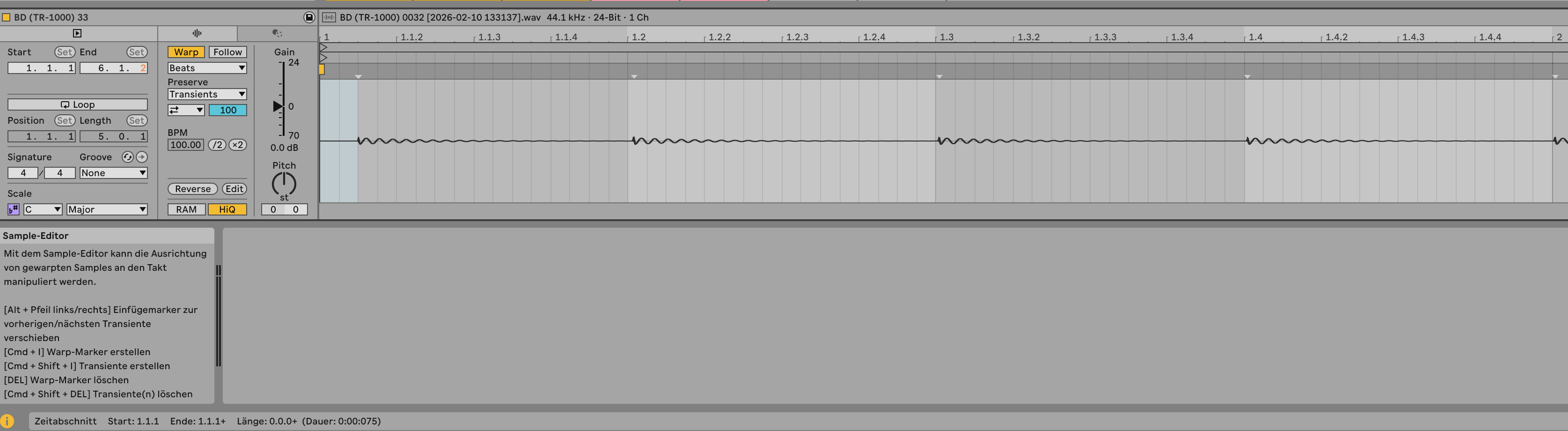
1 Like
Yeah, even with the TR-1000 set as clock master, the first beat is delayed a bit. Seems to be a bug.
1 Like
I just tested this and can confirm
1 Like
This gives me hope ! THX !
Please check my last couple of posts regarding sync. Everything is explained there.
1 Like
I am following the thread but I can’t see that you mentioned anything about the first hit delay
Ah, I see — that’s a new one. I actually use a different workflow:
- With the Multiclock, I have always a one-bar “waiting time” before the TR-1K starts.
- When recording, I use Session View. So the machine and Ableton just run nonstop.
So if possible, maybe try to record it that way. I find it much more flexible anyway — having a Push next to me lets me record clips/tracks in any order, whenever I want with a press of a button. But sure it must fit your style of workflow.
With DAW clocking it’s always a bit of a slippery slope, especially when you’re trying to get everything to land cleanly on the “1”. And of course, it also depends on the receiving device… and Roland aren’t exactly known for being masters when it is about midi clocking.
1 Like
same here  thats really sad !
1 Like

But I understand the biggest problem with the lousy 1st step is just when you want to record something right? In playing live or anything, this doesnt matter, you just hit play and in a moment its all in sync right?
2 Likes
Running into an issue where motion is off and when i turn it on it adds all the motion data as expected but when I turn motion back off it still retains the sound as if motion was on. Clearing motion doesn’t fix the issue and I can only return back to my og sound by reloading the kit. Am I doing something wrong?