The sample is previewed via the sp404mk2, to hear it you need headphones/speakers connected to the sp
4 Likes
This is absolutely correct. Also, from App User’s Guide…
[Preview] button
Press this to play back the selected sample on the SP-404MK2.
You can also use the space bar key on your computer to trigger playback instead of the [Preview] button.
I didn’t know about the space bar option, so I’m glad I took a few seconds to look it up online.
3 Likes
Hello ya’ll -
I’ve done a forum search (as well as a YouTube search) to no avail, and am wondering - has anyone tried pairing Samplr with the 404MK2? It crossed my mind that the 404 as an interface/FX processor for Samplr could be fun.
1 Like
Thanks so much.
I just couldn’t grasp that I would only hear it with headphones plugged into the SP. It just didn’t seem logical.
I thought that too.
I can benefit from it now I can get past the brain block of plugging my headphones into the SP to hear a sample triggered in software. 
2 Likes
If it makes you feel any better I’ve only just remembered that I had the same “brain block” when first using the App too!
1 Like
Thanks. 
Is there an easy way to change back to real time record mode for a pattern while in tr-rec mode or do you need stop the pattern?
if you exit the pattern from TR-REC or Record, it will switch to Play mode, and continue playing… you can then get back into record mode with REC or TR-REC mode with SHIFT+REC
5 Likes
Ahh got it. I kept trying to re-hit shift record or remain to make it jump back from TR-Rec. Simply exiting is much easier.
The SP-404 Mk2 will “pair” with literally anything on earth capable of emitting sound into either its audio inputs, the mic/guitar input, via USB-C, or audio files copied to an SD card.
Have some sort of cute sound app on a mobile phone or pad? You’re in luck!
However, with the 4.04 firmware, the 3rd party Koala Sampler app has special privileges/integration with the SP-404 Mk2.
3 Likes
made my first ambient type track on the 404. totally out of my normal zone but felt really nice to do. got a reface cs yesterday and im instantly clicking with it. super fun to zone out on. i gotta get a better couch and just make it a full time setup.
recorded four chords, let em loop at random intervals and freestyled over the top while playing with the reface faders. then fx’d it up
13 Likes
The Reface sounds dreamy.
1 Like
it really does, i can see myself following this path a lot more
Is there any way to export samples stored on sp internal storage to my computer via the app? It seems to only let me export the whole project
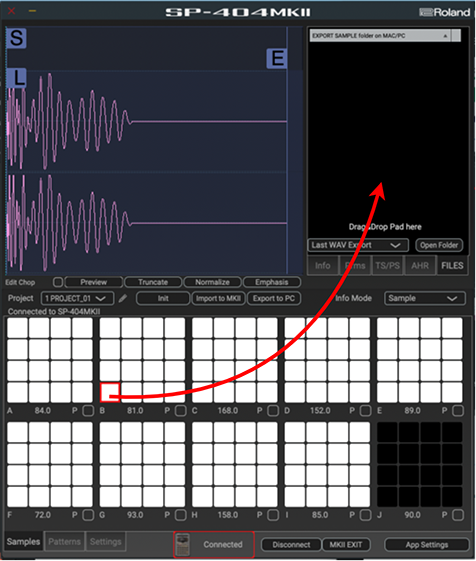
Yes. First, make sure you’re connected to the App via USB.
From the HTML version of the App User’s Guide
Exporting Samples
Here’s how to export a sample that’s assigned to a pad to your computer.
- Drag and drop the pad whose sample you want to export to the FILES tab.
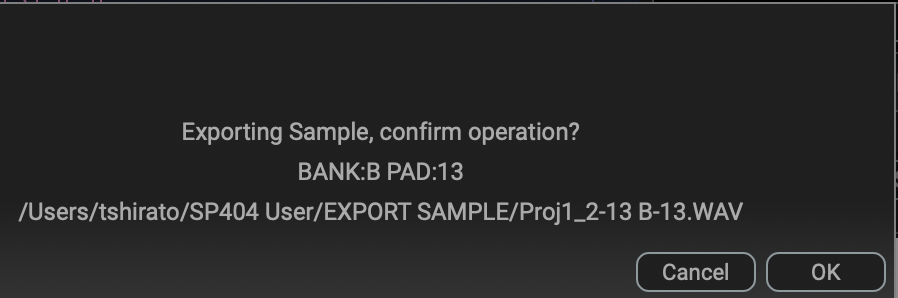
A confirmation message appears.
If you decide to cancel, click “Cancel.”
2. Click “OK.”
The selected sample is exported.
2 Likes
Sounds awesome!
2 Likes
thanks dude! i wish i wasnt in an apartment so i could really let it blast and really soak in it
2 Likes
Question about the SP 404 MKII computer app:
Can you export samples from the SP to a specific folder? I can see no settings for changing the folder on the app (Mac)
I’ve just nabbed one of these for a bargain price, and am really enjoying how different it is to all my other gear!
I have two very basic questions!
-
If my SP-404 was supplied without a protective film on the screen, have I bought a returned item?
-
I’ve managed to create a few patterns and want to “jam” a few samples manually over the patterns (without recording or sequencing them). I’ve been pressing REC to go into rehearsal mode to do this, but wondered if there was a better way to play samples live over the top of existing patterns?