I hope bug fix release soon, I admit its bit of a buzzkill when I import sample then resample and it crashes. Sometimes I remember not too, but when in the middle of making music I forget.
3 Likes
Happens to me all the time too…
Yeah big update but i wish they fix the bugs before another release
1 Like
Hi, congrats on the SP. Indeed different from other gear.
- I got it without screen protector, everything really new so my guess is that there is no screen protector on it, maybe someone else can chime in.
- How about playing a pattern, then change to sample pads and play them? That’s what I do before going into record (and rehearsal mode)
2 Likes
Thanks! @electricthing
I think your answer to number 2 is exactly what I was thinking of, but don’t know how to yet! I’ll try to work it out now I know it’s possible 
1 Like
No screen protector on mine as well when purchased new.
As for your second question, you can exit patten mode while a pattern is playing (just hit the pattern button once) and have access to all banks and patterns.
4 Likes
i am also getting pretty over the crashing bug. getting better at front loading all the samples i want to import but sometimes ill still set up fx settings i want only to have to redo them after the crash. not fun! at least its a quick reboot
1 Like
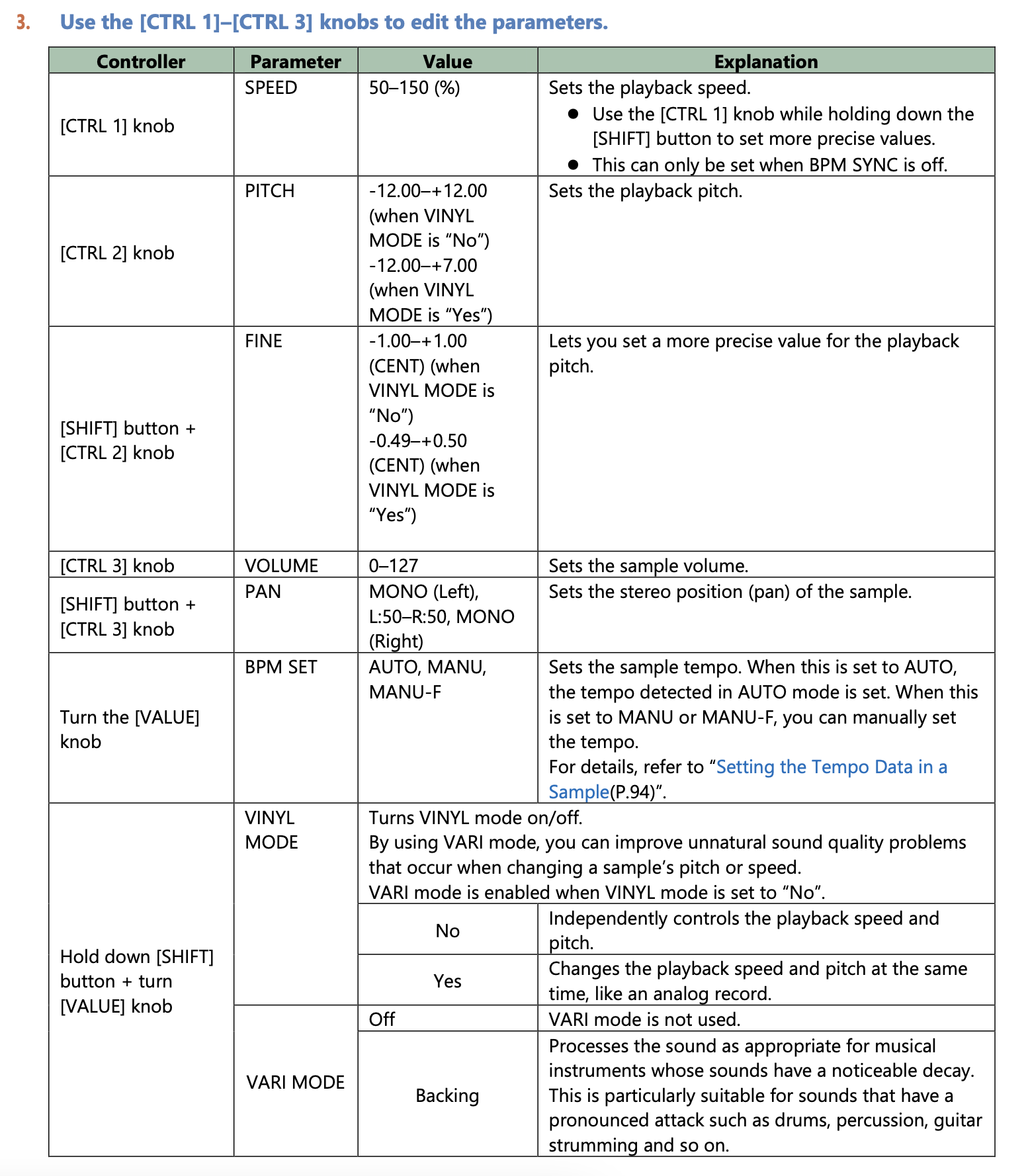
Is there a reason why the pitch is limited to +7 in ‘sample edit’ mode? I know it’s possible to play the sample at double the speed using chromatic mode but would be nice to be able to quickly set it to 200% in ‘sample edit’…
1 Like
I don`t know why it is set to +7 only (Oh, I do know -it is probably something to do with vinyl records playing 33rpm LP records at 45 rpm and the limit of the slider on a record player-The SPs where only meant to be an add on to help DJs-It is almost like Roland stumbled blindly into making some classic gear -like the 303).
There is a setting that switches it out of “vinyl mode” and then you can get plus 12 and minus 12-but I think you have to do it for every sample. I would companies to make life and devices easy, not hard.
Would also like +24 and -24 as standard as well- for sound design purposes.
3 Likes
holding shift and turning the value knob on pitch screen switches between stretching algos
and you can always resample to get those big pitch changes for sound design
2 Likes
Yes I know but that doesn’t speed up the sample. I want to resample at twice the speed and pitch down for DA GRIT
I think it might be related to a new feature that allows you to resample just a set number of bars. I hit my head against this a lot until I realised I had resample set to 4 bars. And the bar length is relative to the project tempo so it gives different results to different sounds.
i feel it, then yeah resampling pitched up 7 then again pitched up 5 is the best way to do it. i just gave it a go and its a pretty quick process
5 Likes
Crazy 404 maths
2 Likes
Noticed when I irresponsibly picked up a DT2 from Alto Music a few weeks back with the 15% off FLOWERS15 discount code that they also had used SP404MK2s for 439 and with said code it brings them down to 373, which seems like a bargain if anyone’s looking. Spread the love 
1 Like
which link did you choose for the brownish cable?
Using the chromatic mode, you can quickly get a +12 pitch.
3 Likes
Yeah I think the easiest way is to use the chromatic mode, that way you only have to resample once
1 Like
I have been working with my 404 MK2 again and had a question I have been wondering about. When resampling (pads not a pattern), is there a way to have volume control over a pad so you can manually fade it in or out? I know you can use the envelope to get some level of this, but would was hoping I was missing a way to manually control a pads volume once you are in resampling mode.