I love the immediacy of my digis for jamming and generating ideas. However, I don’t find them ideal for manipulating sounds live. All of the elements certainly are there, but spread out across a lot of pages and tracks. One thing I really love about A4 are the performance macros. I wish the digis had them as well, so you could set up what the knobs do to different elements of different tracks.
I was thinking I could set something like this up on my OT that’s always connected to my DN which then feeds OT MIDI to ST and DN via thru. However, I haven’t used OT MIDI sequencer like that before. I assume I would be able to set up MIDI CC values on an OT MIDI track with a channel that corresponds to say DN track 1. Is there also a way to set up something like this that would e.g. allow me to open filter on DN track 1, change harmonics on DN track 2 and adjust some envelopes on DN tracks 3 and 4? My understanding is that I could always just set up MIDI CC for one DN track at a time with one track on OT. And I would have to make sure DT and ST are not receiving MIDI CC (or at least not on OT MIDi sequencer channels).
Another idea could be to do the same thing with DN MIDI sequencer feeding into itself or control DN with MIDI CC from DT. Is it possible to feed the MIDI sequencer into itself on digis? Would there be a way to set macros across different tracks?
One thing I also love about A4 macros is that you can tell each one how much the maximum/minimum value turns the knob so to speak. Is that replicable on Ot or digis?
I couldn’t find any topic that deals with this specifically, so I‘m curious if anyone is working like this and what you can suggest.
Unfortunately there’s really nothing like the A4’s performance macros on the Digis. The closest that you’ll get is that the DN and ST have assignable Mod Wheel, Velocity, Aftertouch, and Breath Controller parameter banks (alas not with the DT though). With those you can specify multiple parameters you want to be modified, and the range you want changed. However, that is completely on a per-track basis, and is best managed using an external controller.
If you really want to try to get after this kind of behavior, you’re probably going to have to get some external gear involved and do some detailed and likely painful work in a different environment. One example I can imagine would use a Blokas Midihub, where you can visually create MIDI splitting algorithms. So you’d set up MIDI Out from OT to the Midihub, and then separate outs from the Midihub to your DN and ST (The Midihub has 4 DIN ins and 4 DIN outs). Then on each of your DN/ST individual tracks, you’d assign parameters you’d want to change to one of the above mentioned parameter banks. And in the Midihub, you would have a single MIDI track CC from the OT get sent to each of the correct track CC’s on your other boxes. So one CC on the OT could affect, say, the Breath Controllers on your DN tracks 1 and 3 and your ST tracks 2, 5, and 7. The Midihub is a very flexible piece of kit, as you can filter/transform/isolate/block all kinds of messages/processes from various inputs. You can save presets as well.
Still, it’s a very fiddly pain the ass, to be sure, with setup of the Midihub all managed on your computer and then loaded to the box. Definitely doable. At least the Midihub UI in its computer app is really good. You can do quite a lot of things with it. I think you can also do similar things on a comparable device from Retrokits, but I am not familiar with it.
No thanks, sounds exactly like that. But big thanks for explaining it anyways, I‘m sure others will appreciate that as well.
I think I will try to setup some per track macros on OT - that should be comparatively easy, yes? If it‘s promising, I might start to integrate that into my workflow. And establish a basic set of rules where what thing usually is placed on OT buttons. Would be nice to assign that to the fader, not gonna happen.
How are faderfoxes when it comes to spreading what the knobs do across tracks?
Yeah per track macros on OT should be very straightforward. I often drive my DN with my DT that way when I want to automate MW/BC/V/AT with PLocks and/or an LFO.
Faderfox also very good for exactly such stuff! I have an MPD226 that has assignable faders and knobs, and even more than automating from the DT I use this to do it.
IMO the AT/PB/BC/MW macros is the best way, because you can group tracks by having them listen to the same MIDI channel, coordinate scenes based on different settings per track, you can copy and paste macro pages quickly from track to track, save them in sounds, etc, at least on DN and ST.
On Syntakt I have all the tracks receive midi channel 4, say, and MW makes various changes on lead sounds, AT maybe low cuts some sounds and sends others to delay and adds envelope attack on others, and BC can, say, high pass the kick and lengthen the hats. It makes 4 track-based macros per pattern. I usually find it worth it to dedicate a midi loopback track to controlling them.
Thanks @Humanprogram (and @davestasiuk for starting on Mod Wherl etc.), this is exactly what I was looking for. The setup for these functions look pretty much like A4 macros, minus the straight selection of affected tracks.
I think you made the method quite clear @Humanprogram and showed some ways of applying it, good job. Hope you’re well! The only thing I didn’t really understand is why I need a special MIDI cable to loop ST/DN back into themselves.
I also assume OT doesn’t have these same pages? That would probably be easiest, since its MIDI out is connected to my digis by default.
You should be able to do everything @Humanprogram described from one of the OT’s MIDI tracks. If you are working that the OT MIDI Out goes to the DN and then the DN’s MIDI Thru goes to the ST, for example, you will be able to assign different controllable CC’s on the OT that will drive the Digis. The key is to follow the advice to set all of the tracks that you want to control to receive the same MIDI channel.
The approach I described would be more useful if you wanted to also sequence the DN or ST from another device and needed to keep the MIDI channel unique for each track.
I also don’t think you need any special MIDI cable to do the kind of MIDI loop back @Humanprogram referenced…you just need to be careful not to hit stop twice, as it creates some of kind of endless MIDI feedback loop that bricks the Digis and requires a reboot.
Great to hear, thanks a lot! I will check OT manual and see if I can set it up as expected. It seems a bit more cryptic on OT at first glance, digis UI seems more straightforward (as usual).
Thanks, and glad you think it might be useful. No special midi cable required, I think I might have been saying it works especially seamlessly with the RK-002 polyphony mode (as it transmits CCs to all selected channels).
Yeah, the one thing that’s really left out is the DT, and dealing with that via CC is much more limited (no way to receive relative changes to CC, just absolute values)…
How about getting an external midi controller and mapping those cc to different rotatory encoders on your hardware? ^^
It should be pretty straightforward. Just assign different cc values to the same encoder, this is what the A4 does internally on performance mode.
I would like to do this within my existing setup so that I don’t have to add more hardware. I usually already have a keyboard or Ableton clock on OT in, which I can feed into the digis from there. Adding things at the starting the chain will make it more convoluted and take up more space. I also prefer if I can save these settings within my Elektrons so that they’re saved with the projects.
The other big difference is that CC values are absolute while Ctrl-All and macros make relative changes to set values—with CCs on, say, a filter cutoff, you get jumping values and more trouble to get back to initial settings. There are some settings that work better than others via CC, but the macro controls allow for a lot more flexibility
That’s one main reason why I was asking here. Adjusting filter on my SH-01a with MIDI CC from ST was steppy as fuck when I tried that a while back, which soured me on controlling parameters via MIDI CC.
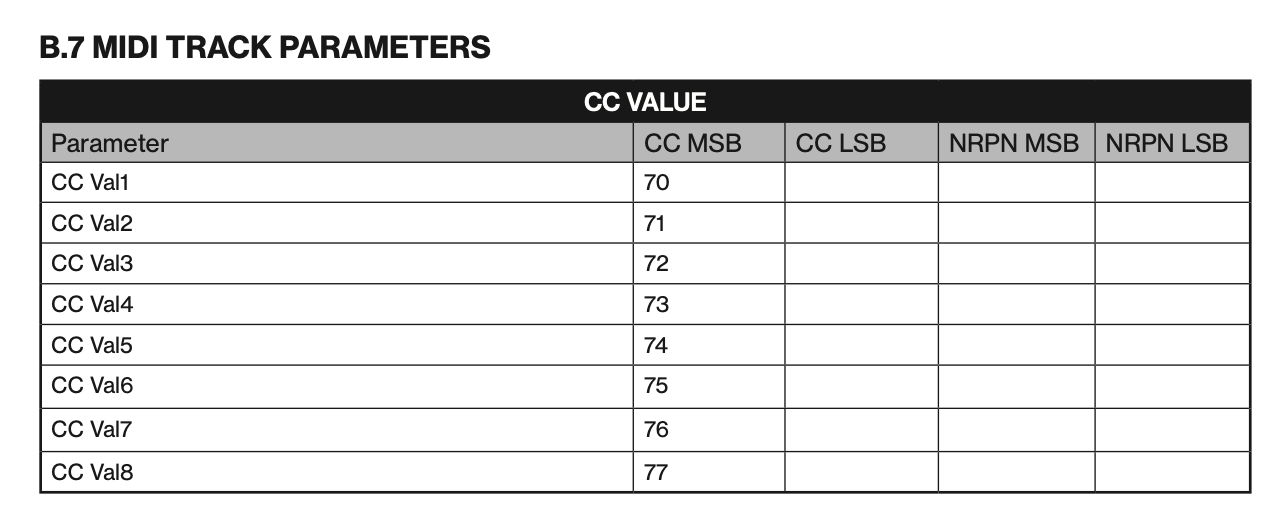
OT can send NRPN MSB and LSB, and AFAIK the Digitone can receive them. I don’t know the true resolution of the MSB and LSBs sent by OT and received by DN, but it should be many, many times greater than a value of 128 u get with CCs.
@Azzarole Thanks for this thread, and to those who’ve posted useful replies and tips: I recently got a Digitone so it’s very timely and relevant for me, (the DN is the second Electron machine I now have, OT being the first). I’m still in discovery and sound design stage and so far only syncing it from the OT.
My aim at the mo is a live rig with an OT, DN and drum machine (Acidlab Drumatix) sequenced by the OT. As is, I have two OT midi tracks left for the DN, though could set 4 tracks to drum machine and 4 to DN on some OT parts.
No regrets whatsoever with the DN, but I didn’t register that its lfos can’t be routed to the the FX. So I figure I’ll route one OT midi channel to the DN FX track (e.g. NRPN’s for delay time modulation - sounds ace manually), and one to the global channel - essential for Program Change. Setting all DN parts to the same channel and using, say, fill triggers on the OT lfos to DN Vel, MW, Breath controller could get pretty radical.
Bit of a long thread of me thinking out loud, but will chime in again if I come up with some pleasing results.
Glad it’s helping you, @Skypainter. Let us know how it’s going, your plan sounds cool. Love the sound of delay time changes and am often using that on Syntakt!
So I’ve found out how to set up performance macros for my Digitone and Syntakt for pitch bend, mod wheel, breath controller and aftertouch. I’ve also found out how to use Digitone’s MIDI tracks to control those macros on Syntakt (DN sending MIDI out to ST). And I’ve found out how to control Digitone’s mod wheel and breath controller settings with a Faderfox UC4 by simply using MIDI CC 1 or 2).
Now there’s one last thing I can’t manage to do and I’m wondering if I’m doing something wrong or if it’s not possible: I want to use my Faderfox to control the breath controller or mod wheel settings on a Digitone MIDI track. So that I can control the macros set up on the Syntakt. I can already change the ST macros with the DN MIDI track using DNs own encoders. But these DN MIDI tracks don’t respond to MIDI CC 1 or 2 being sent from Faderfox to DN when I’ve selected a DN MIDI track. It works fine for DN’s own internal audio tracks and the macros I’ve set up for them when I select an audio track. MIDI channel settings on DN/ST/Faderfox are correct and work for other values being sent.
The MIDI implementation chart for DN doesn’t list pitch bend/mod wheel/aftertouch/breath controller/velocity as a destination for MIDI tracks. Does that mean it’s not possible or am I doing something wrong?
Thanks for that! I would be fine if DN out didn’t forward incoming breath controller, pitch bend etc. per se. But if there was a way to control the encoders for these in DN MIDI tracks with an external controller.
I mean Elektron already allows for these encoders of DN MIDI tracks to pretend they are a breath controller or a mod wheel. So maybe there’s a way the just respond to any kind of CC?
I haven’t tried it but maybe assigning the midi track CC values to AT/BC/MW and using the UC4 to control these instead of sending CC 1/2/3/4 etc. to the midi track?
the midi track CC values are open and you can set the destinations to anything (I think…)
I can’t test this as I only have DN and AR on the table, and AR has only Aftertouch mod which has no CC you can send, but I can see that you can assign any CC on the midi track values and you have MW/BC there and they all are controllable so you have at least two mods you can send to your Syntakt…
 . Let us know how it’s going, your plan sounds cool. Love the sound of delay time changes and am often using that on Syntakt!