R4E-1; Software Groovebox

Sorry if I missed these answers somewhere:

-do you foresee recordable automation/modulation for the patterns?

-do you foresee being able to sidechain tracks to the kick (or anything else)?

-do you foresee a ‘auto randomized pattern’ feature for the ACID machine based upon a set key or scale? That’s how I get my best stuff with 303 style instruments sadly haha

1 Like
  • Automation recording is on the cards, it’ll likely apply at a PLock level to the track, but possibly in future I can look at automation lanes, but this will get a bit fiddly and moves into DAW territory. I’ve not implemented recording for notes or automation yet, need to give it a little thought, but it’ll be added!
  • Sidechaining the compressor is definately going to be a thing. I’ve got a “sidechain” working for the feedback machine, it can ingest from other tracks, so exposing the same functionality to the compressor is likely easy enough.
  • Yes, although this will likely come after I’ve got the key and scale locks in place. I’ve got a ticket drafted for them, this will likely come at the same time as the euciliden pattern generator update (although not exclusively locked to eucilidean mode).

Cheers, I’ll keep these tracked! I’m currently working on the sample slicing as you’d mentioned earlier in the thread.

3 Likes

Thanks! Man this thing looks great already.

2 Likes

Sample pool and sample slicing added as requested!

  • Current pool is 64 samples, can extend it but it was a nice integer
  • No limit on RAM, upload as long as you want
  • All machines share the pool across the pattern (will be project level when projects are added)
  • Machines can select a subset of samples from the pool, so if you have a machine doing hats, you can select 6 hat samples from the pool and avoid the complexity of ensuring you’re sweeping the correct values, or something doing drum breaks, only select the drum breaks you want. When selecting them, it sets the order injected into the machine, so if you want a vocal chop appearing when scrubbing, you can do 1, 2, 3 as drum breaks, 4 as a vocal, then 5 and 6 as drum breaks.
  • Can upload a full folder if you want, or individual samples.
  • Auto slicing working, with manual slicing to come later, slice up to 64 times; can either do zeropoint crossing (within 256 samples of the chop point), or exact devisions. Helps avoid pops and clicks. Zeropoints are calcuated on sample load so no overhead enabling or disabling it. Slice into any integer from 1 to 64, you can auto chop into 13 parts if you want.
  • Sample selection can either jump between samples, or crossfade; if you have two samples, half way between each on the knob will blend them if crossfade is on.
  • Loop & pingpong work with slices
  • Can have slices update as you scrub through the knob, or only update when it hits a trigger.
  • Pretty much everything modulatable other than the enum options.

Fiddling with a prechopped pattern if you understandably don’t want to hear my voice:

Talkthrough of features:

4 Likes

Man, this is looking more amazing with every update and the 64 samples is a great starter to mess with, 128 would push it to Digitakt territory and around 256 is the Polyend Play, but 64 is cool especially with allowing longer samples.
Also great that you can load a sample folder to R4E1, so we can curate a sample set to use per project.

1 Like

Cheers, glad it’s hitting the mark!

So on the folder load, you can actually load multiple folders into the pool, it tracks the files loaded into the sample pool via an XML file in the background; I’m working on project management solution at the moment which should add sample collection allowing you to zip up a project to share or archive; means you it will duplicate the samples into a R4E1 project directory so you never lose them (totally optional, that or just keep using file paths and possibly break the project if you happen to move them).

It’ll also handle pattern management (8 banks of 16 patterns) so you save, name, copy and transition between patterns you’ve made, which naturally leads onto a song mode, automating a list of patterns plus mute states, and storing songs within the project.

Won’t lie, hitch free transitions are currently buckling my brain so this might take a while to get out; any machine in any slot causes a lot of problems for note tails and timing. Fixed kits for pattern transitions might make it a bit easier, but you’d lose flexibility… I’ll keep forging and see what I can do.

2 Likes

I’m not sure if it was mentioned or noted on the slicer, but is there a feature where the sample slices can be randomised on the pattern trigs?

For example: The Digitakt there has an option to assign the slices randomly to the existing sequencer trigs, or on Polyend Tracker there is a fill function to randomise selected steps with the sample slices and these are set unless the function is performed again.

This is a cool way of discovering loops which you can then copy and use in subsequent patterns, or is this what the modulation tool can already with a random lfo shape selected to modulate sample slice, do the slices change each time the pattern bar is looped? or can it be set so it is a constant, unless the user wants to try a different slice arrangement? Would this this also be possible for the sample pool too?

Being honest, not currently no, not without applying an LFO to them; the S&H LFO still needs a little work as I’ve been trying to add smoothing to it and is currently a little borked.

I’d need to do some machine to sequencer coupling which might end up a bit odd when you switch machines. At the same time, I have considered different sequencer lane designs for different machines where it makes sense, such as the RAM recorder, so it’s maybe not out of the question.

Perhaps the easiest way to do this at the moment till I’ve got new seq lanes designed would be to add a “shuffle slices” button, and a “reset” button or something similar to modify the ordering; assign Saw LFO to the slices from 0 to 100%, shuffle slices, and then they’d play back in a random, seeded order. Click shuffle to re-order them. Dunno if this is good enough, or a hackjob till I properly take a look at doing a digitakt style autoplock trigs.

On sequencer lanes, I’ve been doing some design to try and make them more informative without being messy (This is just figma bumf at the moment)

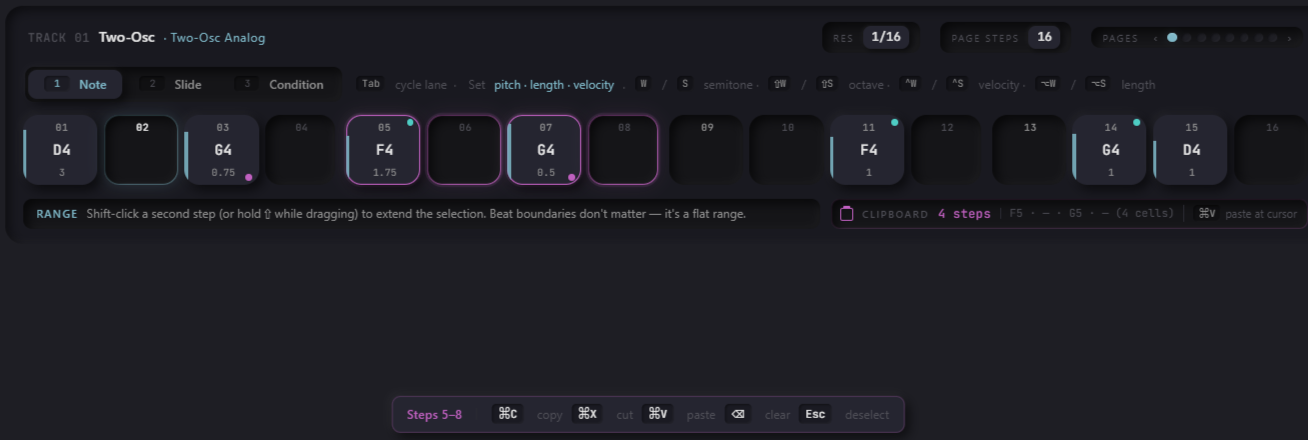
Can see note lengths with the whisker under the notes, the velocity as a vertical bar, the shortcuts on the keyboard for modifying or moving through trigs when in edit mode.


Trig painting for quicker group note entry, drag to add, maybe set velocity on them via a the height of the drag? Maybe a shift modifier for a ramp up, ramp down? Dunno, still brewing on this.

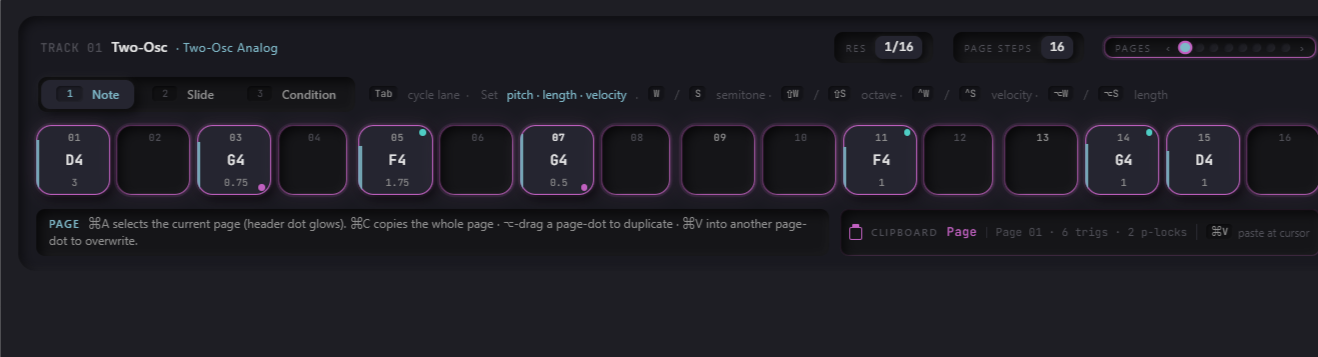
Also trying to work out copy pasting controls:
Steps

Pages:


I’m also thinking edit mode, when you’ve got an item highlighted, if you turn a knob when in edit mode, it plocks that knob for the current highlighted step, rather than a specific “add plock” button, which would make the workflow a bit smoother.

I’ve made progress on transitions on patterns, you can now switch patterns without a glitch when chained; I think the machine switch is now in the sub milisecond range, near instantanious, so pattern 1 can be a kick, pattern 2 it could be a highhat, and you shouldn’t hear pause, or parameter glitch, but I’ve got some issues to hammer out with autosaving, and sequencer population, they need to be realtime safe. Doesn’t seem like a big deal when you hear it, but it’s been a serious rework to some of the core architecture to allow machine preloading outside of the audio graph, and replacement with a memory pointer on trigger boundaries. Then I can hopefully get some semblance of proper project management finalised.

If anyone has any thoughts on the sequencer shortcuts, layout etc, let me know.

1 Like

Haven’t had a thorough look yet but love the UI. As a UI/UX person, always happy to see good UI baked-in from the outset rather than bolted on later.

Can you just manually change patterns at will whenever you feel like it? Or, does it need to be chained and auto-advance after a certain number of repetitions?

I’ve got a direct jump mode added, which is kinda working, I’ve only been working on transitions for the past three days but making progress. It would definately work if I locked the bank to a kit, but I’m trying my best to avoid doing that so the dream of any machine, any track, any pattern, any time doesn’t die; hence the current migrane I’ve got.

Every machine has parameters that need registered, they’re of varying sizes and complexity, and things can’t be truely instant unless I have all 41 machines loaded for 14 tracks which is (maybe? maybe not?) crazy. So at the moment I’m focusing on pattern transitions which allows me to preload 1 extra machine, per track when you click on the next pattern button; they can finish in one of three ways
image

  • Natural: Track with the most steps is the “master” transition controller, when it elapses, you switch track.
  • Fixed: You set the number of steps till transition.
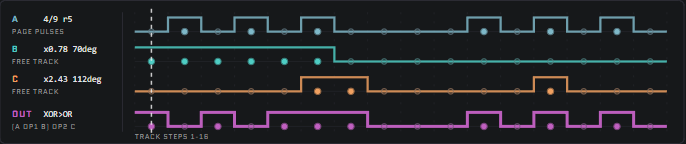
  • Lowest Common Multiple: Works out the time your polymeter across tracks finishes, and transitions then IE Track 1: 5 steps, Track 2: 6 steps, Track 3: 7 steps therefore LCM = 210 steps. Displays in seconds as well so you get a rough idea; gives you a warning when you’re above 512 but doesn’t stop you.

If the sequencer is paused it’s instant.

Hopefully I’ll get direct jump working seamlessly, but baby steps for now!

@Obsolete Cheers man, if you’re a UX person, feedback is always welcome; it still needs “solidified” but I’m trying to not go overboard crystalising it too much whilst things are still a bit fluid. Critique on layout, flow etc is always appreciated though.

2 Likes

hLHjM8

Good news, direct jump is now working solidly! I’ve had to rewrite so much of the codebase to get pattern transitions working safely, but it’s been two days now and I’ve not had a crash.

UI is not final, this is just debug UI whilst I’m hashing stuff out. I missed the fact you can save and load projects; each project has 8 banks of 16 patterns, and each project has 8 songs you can configure.

Click to transition, shift click to transition instantly, on the same step (modulo’d for non-standard pattern lengths), or step reset to 0 if you apply it in the settings menu.

Songs can mute individual tracks, add and loop patterns, with different transition modes: Fixed bar count, natural (longest number of bars in the pattern), or LCM.

Note tails persist between pattern transitions until they hit a new note at which point they switch to the new machine, cutting the old tail. This bit was a pain but it’s now working.

2 Likes

Any chance of making this 16 banks of 16 patterns?

I just ask because the way I am understanding it(?), the “banks” would kind of be the “song” in a live situation. 16 songs instead of 8 would pretty much ensure that you could get a whole sets worth of music in one ‘project’

Unless I am misunderstanding the hierarchy which is totally possible haha

Sorry if I wasn’t clear on heirarchy!

Project: Collection of patterns, samples and songs.

Each project:

  • 8 Songs: An list of patterns from any bank, played in sequence from start to finish. Can set mutes on tracks, and set the BPM per row. I might add offsets or length ala the octatrack.
  • Bank: A group of 16 patterns, used this to try and allow for some sort of logical grouping, as a huge pile of patterns with no structure felt a little hard to follow.
  • Pattern: A group of 14 audio machines, 2 send FX and master track settings. Includes the machine settings, and sequencer notes.
  • Kits: Just the settings for all machines in a pattern, no sequence data.

Projects are saved to disk, and mounted on app start. It loads the last project you were working on. You can save and load another project at any time, loading takes a second or two so yeah, probably unsuitable for live performance, whereas pattern jumping or song switching is realtime safe. It’s possible to even extend the songs out to “performances” which chain “songs” together, but tbh, right now is the very first time I’ve thought about it.

I can extend these out to 16 banks of 16 patterns if you fancy, but the RAM requirement will jump, as they needed to be RAM mounted for smooth transitions. The patterns themselves aren’t too huge, so it’s totally feasable, I’d just likely need to fiddle around with the load process, UI and some internal iterators.

Kit-locking is something I’m considering so you can play a song to keep settings as patterns transition.

A performance screen with macros might also be nice, but I’m a little puzzled on how I’ll handle this considering every machine has different parameter counts.

1 Like

Thanks for the detailed reply!

Yeah I was just thinking that 8 songs per project might be kind of pushing it for a whole set unless you have quite long songs. Whereas 16 songs is for sure enough. Just a thought

My only other thought is in terms of song mode, where it is automatically advancing patterns….i wonder if it might be possible to toggle a switch to take it “in” and “out” of song mode. To allow you to sort of ‘hang out’ on a pattern for a longer period of time if you want, maybe go crazy with some buildups and effects, and then toggle song mode back on once you are done. Again, just thinking out loud! This thing looks amazing.

As for the performance macro screen, I agree that would be awesome. I wonder if the solution is to somehow allow the user to assign basically any parameter on any machine, to the macro knob(s), and be able to stack them on a single knob

My only other thought is in terms of song mode, where it is automatically advancing patterns….i wonder if it might be possible to toggle a switch to take it “in” and “out” of song mode. To allow you to sort of ‘hang out’ on a pattern for a longer period of time if you want, maybe go crazy with some buildups and effects, and then toggle song mode back on once you are done. Again, just thinking out loud! This thing looks amazing.

Great idea! I’ll see what I can do with this, I don’t think it should be too hard (he said, before getting lost in two weeks of head scratching because of something silly). I’ll try and roll this in when I solidify the songmode/pattern management UI.

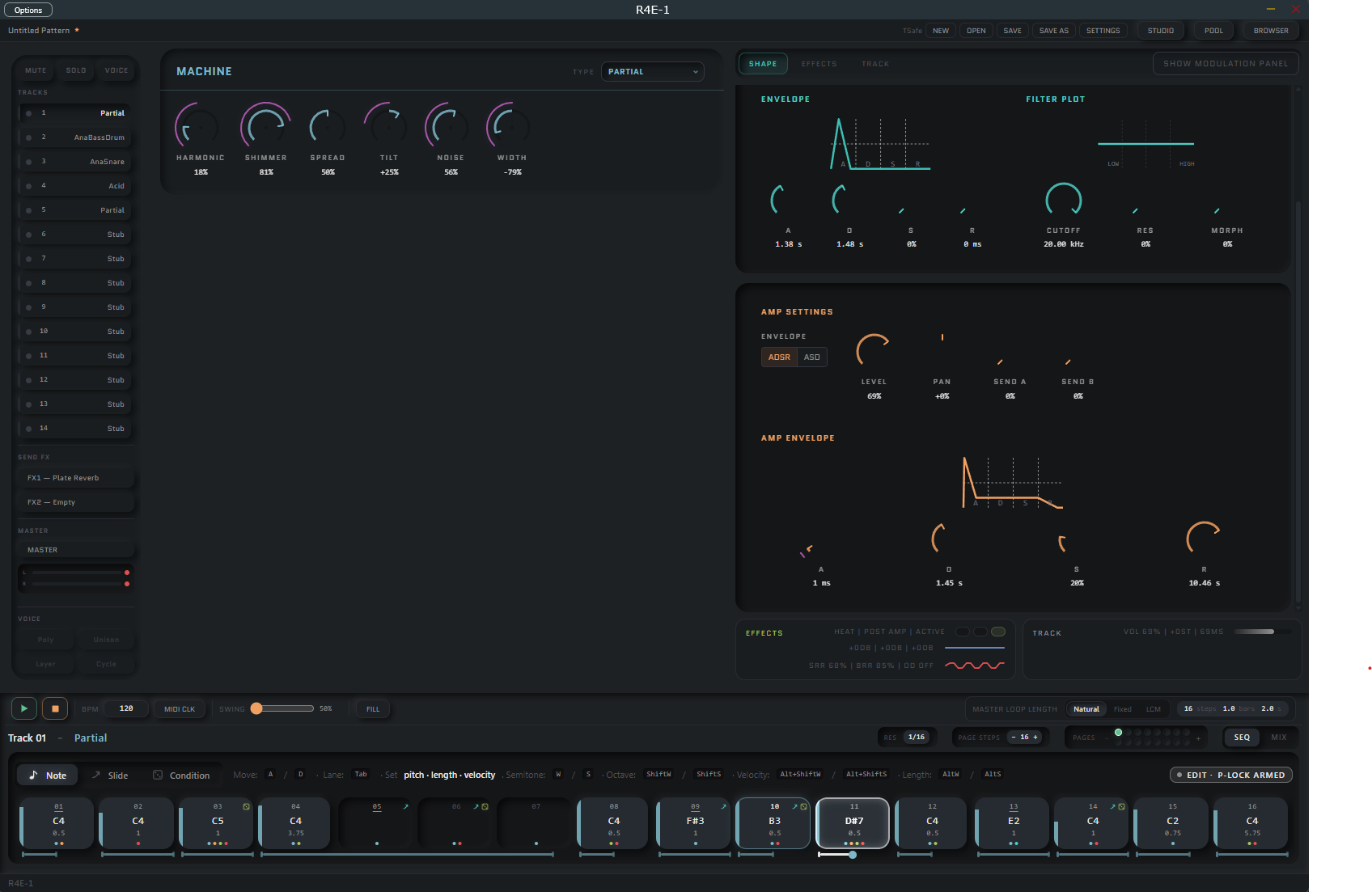
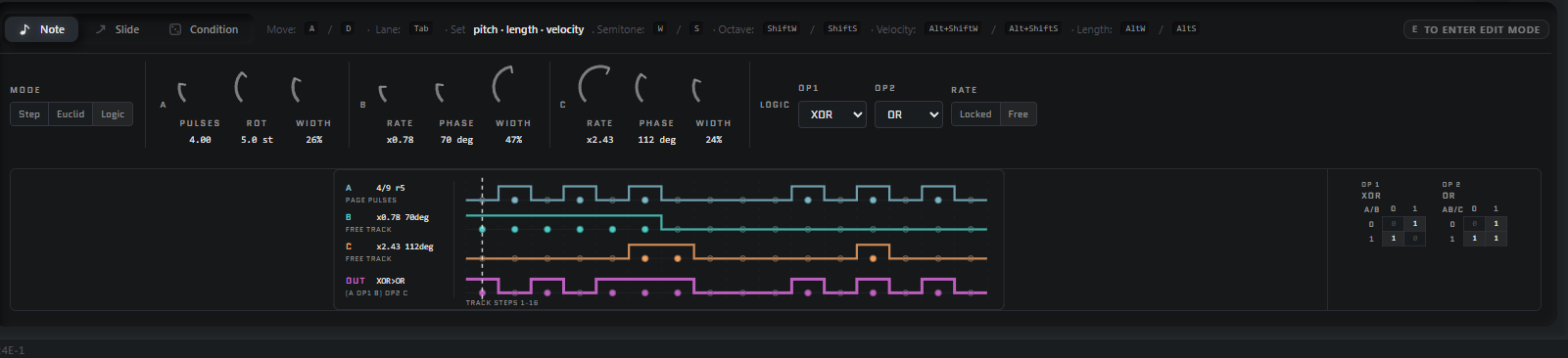
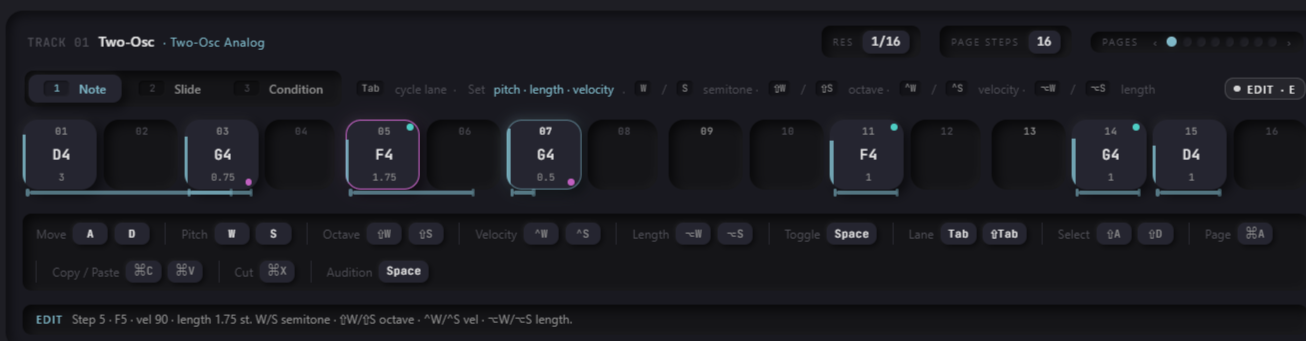
I’ve reworked the sequencer lane now, as it was fiddly, unintuitive and one of the core ways you’d actually interact with the synth.

Keyboard shortcuts galore, I’ve maybe been slightly swayed by the fact I play a lot of FPS games on PC, but this is really fast for entering notes now.

  • WASD to move through the sequencer.
  • Space to activate or deactivate a note.
  • Three lanes: ; Note, Slide, Condition.
  • Tab between then with tab, shift tab to go back. Shortcuts are contextual based on your lane
  • A/D to move left and right a step on the seq lane.

Note Lane Shortcuts:

  • W/S is for incrementation of semitones
  • Shift + W/S jumps octaves
  • Ctrl + W/S increments velocity.
  • Alt + W/S increments note length

Slide Lane Shortcuts:

  • W to add a slide
  • S to remove it

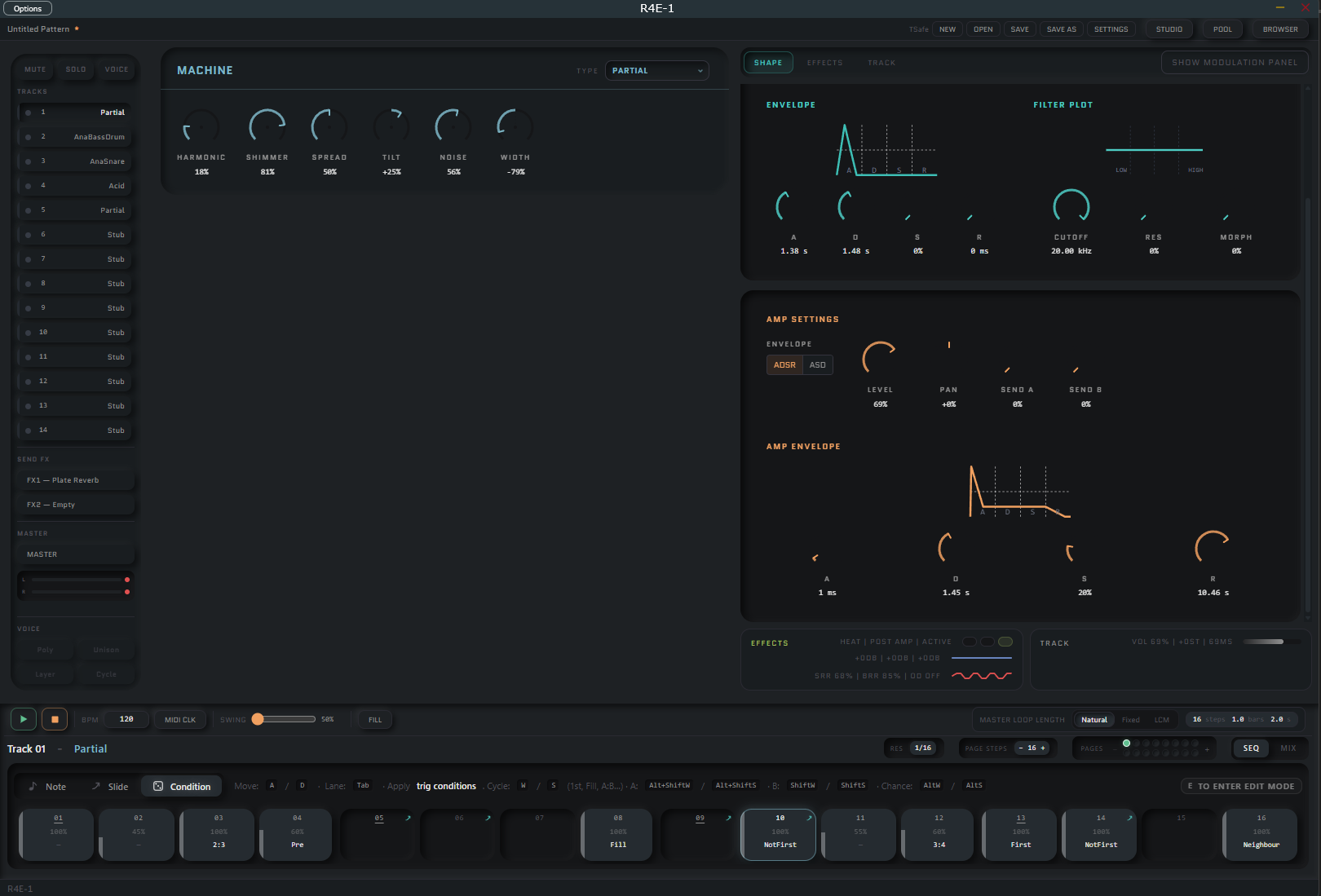
Condition lane:

  • W to cycle up conditions (First, Fill, A:B), S to cycle down
  • Shift W/S to increment, decrement B
  • Ctrl W/S to increment, decrement A
  • A:B is the elektron modulo 1:4, 3:8 etc.
  • Alt W/S to increment/decrement percentage chance.

Arrow keys work instead of WASD if you prefer them.

Note whiskers added to show length. For non keyboardy people, you can click and drag them.

Velocity is also dragable per step.

Note painting: Click and drag to enter notes. Veleocity sensitive to height, can paint a set of 20%, then release, then paint a set of 90% and release.

Copy paste buffer; Shift drag to select, CTRL + C, CTRL + V. Standard stuff.

PLock update: Now when in edit mode, when you’re on a step, moving a knob plocks it. Plocks now have an arc on the knob. Each step shows a set of pips colour coded to the lock: Machine - Light blue, Lofi - Red, ADSR - Orange, EQ - blue, Filter - Teal, FX - Green.

Notes show if they have a slide or condition on them with the little slide arrow, or dice in the top right corner.

Sequencer now has the track number and machine displayed on it so it’s quicker to identify what you’re modifying rather than having to look at the track bar.

Will bash out a video demo, but it’s mostly smashing a keyboard so I might need to set up a webcam as well.

Oh, and a tiny change, 1, 5, 9, 13 all have a small underline marker on the note number to help anchor you when you’re adding notes.

Note edit mode with plock previews:

Chance lane:
Note, the sidebar shows the % chance in chance mode rather than the velocity, dunno if this is confusing. Also think i need to brighten it, as it’s a bit dim. Was going to use colours here but i’ve already bulked out the pallet quite a lot and didn’t want to lose colour meaning.

2 Likes