When I load the VST/AU Overbridge plugin into Ableton Live, I can only select audio from tracks 1 through 15. The Digitakt 2 has 16 tracks, plus the input channels—why are those missing? I’ve included a screenshot below for reference. Overbridge for my other devices like the Syntakt and Digitakt 1 (which I used before) work fine. Does anyone else have the same issue? Your help is appreciated.
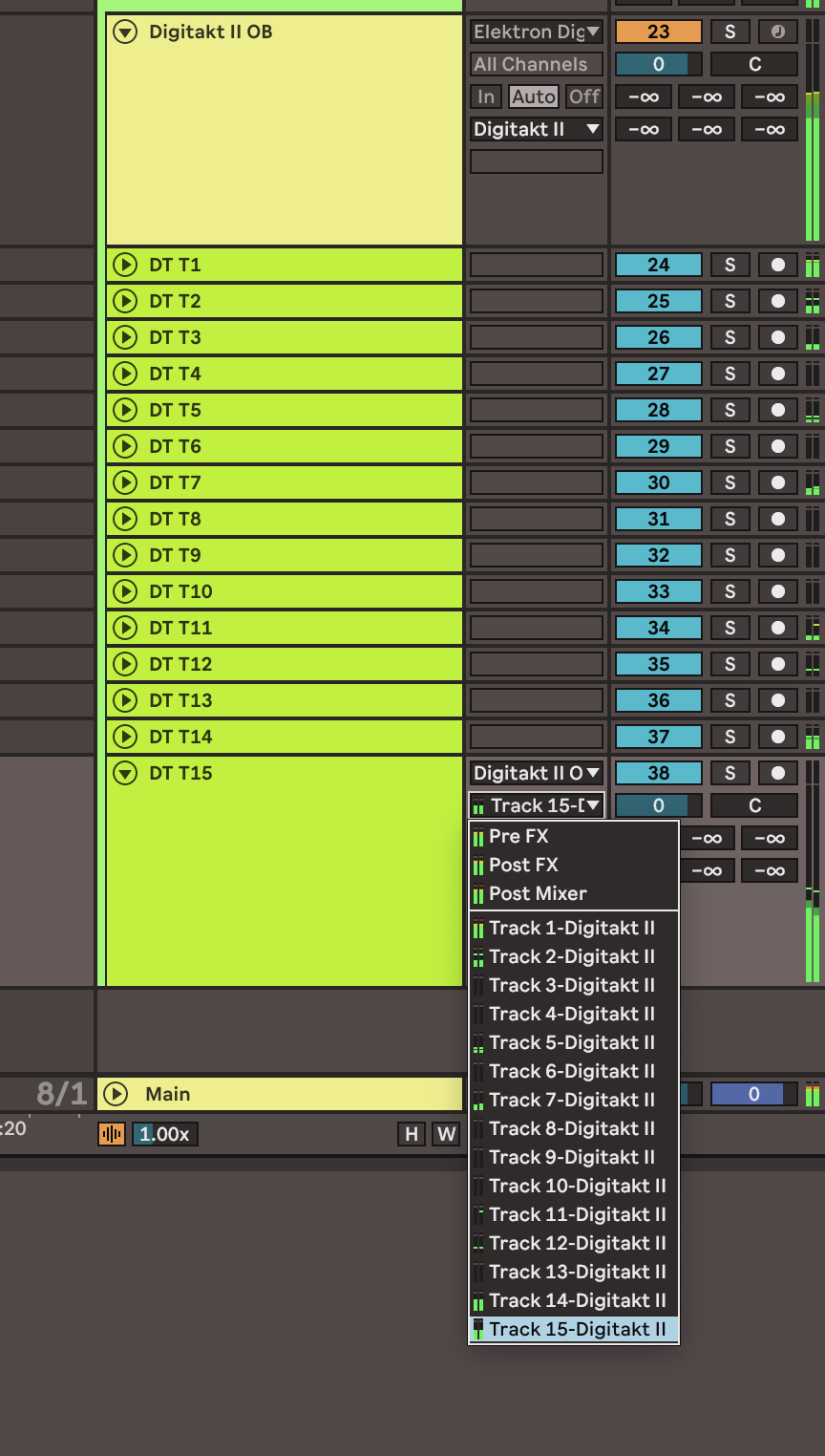
it’s a limit of Ableton, maximum 16 tracks in plugins, you already have 15 plus the master output. To overcome this problem Elektron added the ability to merge multiple tracks into one, see the Overbridge settings. Alternatively you can get around this limit and have the input and effect tracks using the Digitakt as an audio interface.
5 Likes
Thanks for the response! Very helpful.
1 Like
I’m having the same issue (only able to output 15 tracks). Can you point me to where in the OB settings you can merge multiple tracks? I’ve combed through the OB settings and manual and can’t seem to find anything about it.
Look in the mixer, on the tracks there is the option “audio to”, from there you can do the routing of the tracks

1 Like
Man this is such a bummer. I have so many projects and kits that use track 15 for closed hats and track 16 for open hat or ride. Now I have to reprogram and relearn all of these if I want to have them as single OB tracks. I‘d really like to know if Elektron is in contact with Ableton so that they will solve this issue.
This isn’t just issue with Elektrons Overbridge, but vst in general in Ableton live.
This is a known issue since ages as far as i know.
So don’t put your money on it that it will be solved in near future
4 Likes
I know it’s not the best solution but we’ve already talked in other threads about the fact that at least you can use the dt as a sound card, and in some ways it’s a good solution, there aren’t many problems with latency, sampling rate, etc. Surely like everyone else you will have your system with your sound card, but you can always open multiple ableton sessions. I don’t have a mac, but I think in that case it would be even simpler, you aggregate your sound cards and it’s done
Yeah thanks. I know there are several workarounds, but they all come work their own pair of issues and limitations. I would have hoped this would just work fine and it limits the use of OB on the new digis when using the most popular DAW. I know it’s not Elektron’s fault, just hoped they could probably get Ableton to fix it. I guess I‘ll re-structure my kits and make 1-8 my drum tracks.
1 Like
Good thing is that in OB you can run few tracks on same channel, making room for fx and other stuff
I heard back from Ableton support today saying they have a feature request open, but don’t know when/if it will be solved. And they sent me the link to the present thread, FWIW.
1 Like
Just ran into this myself after discovering that running DT2 and DN2 in audio-over-usb mode creates sync jitter. Overbridge solves that but then Ableton has this limitation? Stupid. Thanks Elektron for the workaround though, I guess I can merge a few tracks.
Can anyone explain how the merging of multiple tracks in OB works? Is it a case of having 2 tracks recorded on top of each other in DAW?
Also, is this issue of track 16 solved when selecting DT2 as the interface? Bit confused bout that, although will give it a go later when in the studio…
ps. Came across this problem in Logic too, so its not just an Ableton issue.
In OB mixer drop down menu you can make choices which track goes into what channel. You can put as many tracks as you want on a single channel.
As far as i remember It should yes, if digi box is interface you should have all tracks displayed.
But someone else can confirm this as i use audio interface, and have only 15 tracks available.
Thanks, will have a go with DT as interface…
How does that work in the DAW though? Im imagining 2 DT tracks recorded onto the same track in DAW, but surely not what ppl mean?..
Yup, exactly that. In a daw 2 dt tracks would go trough one channel
1 Like
Thats not a workaround then really. still missing 16. Hopefully using DT2 as interface will work, otherwise its soloing 16 and recording separately which would be a faff… Will have a go in the next few days…
You won’t be missing track 16 if you route it through Track 15. The idea is you can mix a few tracks together that don’t need separate processing (such as hi-hats/cymbals, etc) to free up tracks. This is what I do and it works fine.
2 Likes
Yeah, that’s a really useful example of how you can work with it, although if I could layer samples together, Id do that on the DT in the first place and save a track.
Update: tried using the DT as an interface… still missing track 16 didn’t work out for me, only solution I can see right now is recording 16 in separately. Hopefully an update allows all tracks to work simultaneously via OB in the future!
If you are using it as an interface you should definitely have access to all 16 tracks + reverb/delay, but to be clear you should not be using the OB plugin in that case.
Instead, check the Ableton audio settings and make sure all of the inputs are enabled/turned on. Once done, they should all be available as inputs on your audio tracks (ie direct input, NOT streamed from the OB plugin which will always be limited).