Another thought is that there’s a device called a USB Galvanic Isolator that might work as well. I have one and can try it with mine if disabling charging doesn’t solve the problem for you.
1 Like
yeah, it’s pretty common problem, i use iFi Audio iDefender+
2 Likes
Is there a switch to turn off charging on the OPXY? I know the OP1 had it, can’t seem to find it on the OPXY
1 Like
Yes. Com and turn the white knob
1 Like
Even if you only have one synth, it doesn’t necessarily have to be the cause. A ground loop always involves multiple components. It could be the speakers (especially if they have a grounded power cord), or it could be crappy USB power adapters or bad/poor-quality usb or audio cables. Or all together 
To solve your problem easily, it’s best to connect a ground loop isolator between the line out of your XY and your speakers:
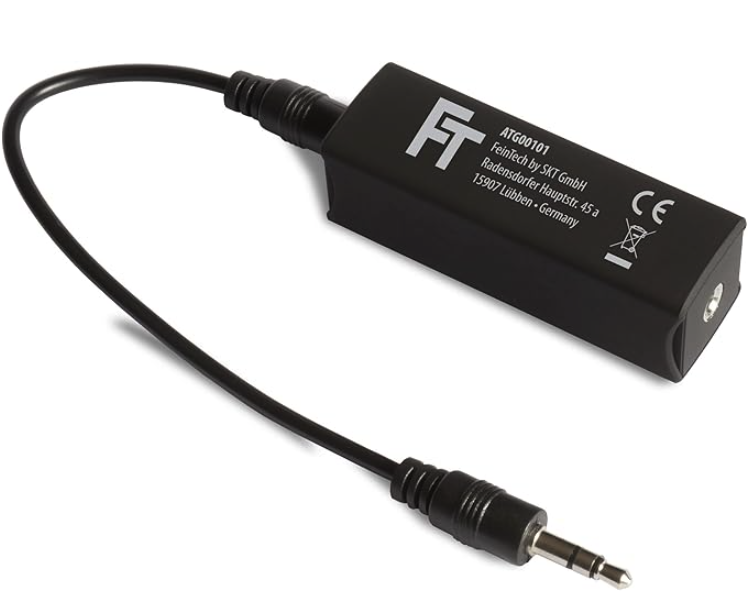
These devices are cheap as chips, require no power supply, and work much more reliably than expensive USB isolators (which, for example, can slow down or disturb the data transfer).
3 Likes
Good advice! I use these for many years now and completely removes the ground loop noice.
1 Like
I’ve never had a problem with the deck saver coming loose. I keep the OPs packed in their cases in my backpack sitting vertically.
2 Likes
Mine shakes crazy. Hate it.
1 Like
Thanks a lot, I appreciate it! I’m planning vertical in backpack too, so should be similar.
Thank you, that’s helpful. Just to check that I understand: this is with the op-1/op-xy + decksaver in the waterfield steam deck pouch?
1 Like
My bad, I didn’t see the part about being in the case, I store my OP-XY in a Pelican case so I have foam putting pressure on the top keeping the case in place
Outside of the case the Decksaver fits hella loose on my OP-XY, shakes visibly/audibly
My DNII Decksaver fits tight/snug with no shaking
1 Like
Thanks, that makes sense! Yes, my DTII Decksaver also fits nice and snug!
1 Like
Anyone tried using OPXY as a midi controller in ableton? When I try and enter midi map mode in ableton to assign an encoder, ableton just reads the pitchbend control. Seems like the noise/jitter on that is what’s sent so it’s making it impossible to assign the encoders and not the pitchbend. Not sure if I can disable pitchbend or there’s a clever utility to filter it out temporarily when assigning stuff? I guess it may be a faulty or noisy pitchbend and I’ve just never noticed it before too.
Did you try to calibrate it ?
1 Like
I haven’t no, I only saw a sensitivity slider I brought the faders all the way down on.
I’m having a hard time using the OP-XY as a sequencer with external clock.
I have it set up where I have:
MIDI out from my Mac to the OP-XY
Midi out from the OPXY to a midi thru box to my modular + a couple other synths
The OP-XY is sequencing those synths as well as its internal synths.
When I set the OPXY to Clock:Out, everything works as expected. But Logic won’t take clock so this doesn’t work for recording.
When I set the OPXY to Clock:In, the sequencer works as expected (starts when I hit play in Logic, takes clock from Logic) but it doesn’t pass clock on to the synths, only notes.
When I set the OPXY to Clock:Both, everything basically stops working on the external synths - the sequencer only plays the first note of each loop, clock is sent but it seems to make everything lock up
I’m not sure how I can record in Logic when using the XY as an external synth with clock, I had to just set the clock to the same BPM and record it without sync and drag the clips to line up as best I could (which isn’t perfect).
Anyone have success with a setup like this?
Edit: realizing that this works correctly if I use midi in from USB but not if I use midi in from TRS. Odd.
Just wanted to thank you, this was the cause.
I thought I read the manual completely but must’ve missed this.
Thanks you kindly.
3 Likes
Ah, when the cable is disconnected you don’t see the option. Hence my confusion, because I know it had it somewhere in there.
2 Likes
completely missed the calibration button! it doesn’t solve it completely, there’s still jitter, but I did manage to get it stable enough temporarily to map some stuff this time. I read somewhere on reddit I think that just pressing and using it more for like 15mins, might help, so might use it as a fidget toy whilst watching tv later and see if that helps!
I enjoy the OPXY the most when I think less. It’s a good device for that, even if it means things stay pretty messy.
Still that’s why my main ask is multi track out to polish later. It’s still a fun sketch pad.
5 Likes