Thanks so much for the inspiration here @Chewwt . I picked up the CME U6 today. Can I ask a basic question. How is the mapping of the CME managing to get the pitch bend and aftertouch macros working without any midi loopback? How are the elektron boxes picking up the midi cc to change the macros? Sorry i am fairly new to this.
1 Like
I should say, i am running a dawless setup. LC XL 3, DT, DN
1 Like
I presume what you do is give an encoder a CC that you are not using elsewhere in the setup on the LCXL, and then in the CME U6 settings you tell it to transform that midi CC into aftertouch or pitch bend. The Electron device understands aftertouch and pitch bend, but doesn’t have a CC assigned to them as a mappable thing, so the U6 sitting between the LCXL and the Electron machine does the transformation from one thing to the other for you.
Edit:
Although now I look at it more closely, I don’t see how to select which CC is to be transformed into pitch bend, so I also want to know the answer!
1 Like
I’m not sure I understand your question.
You don’t need midi loopback to make this work.
My setup is just LCXL3 to CME to DN2.
I created a custom templates for the LCXL3
I send the CCS from the LCXL3 to the CME
CC 1: modwheel and CC 2: Breath control
- two CCs that are not normally used by the DN2: CC 122 and 123, in order to control Aftertouch and pitchbend.
I have configured the CME to send the CCs to the DN2
CC1 and CC2 are routed notmally (for MW and BC)
PB and AT, are not regular CC messages, so I use the midi mapping feature of the CME to convert my two CCs (122 and 123) into PB and AT. (see my post).
So basically the LCXL3 sends two CC messages (122 and 123) but the DN2 receives a PB message and an AT message.
If you’re struggling with the setup, let me know.
That’s it. I used CCs 122 and 123.
You could use another one (just check the midi implementation of the DN2 to see which CCs are unused)
Thanks both. Sounds straight forward. I just didnt quite understand the magic of the CME!
Looks like I can also use the CME to configure a reset for all values as well and map it to the LC buttons. Very cool.
1 Like
Yes, I created a reset button for Pitchbend, because its base value is 64 (and not 0, like the other macro controls).
For AT, MW and BC, you just have to move the value all the way down to go back to the base value of the macro.
But getting to 64 for PB could be a bit fiddly with an encoder or a fader. That’s why I prefer to just press a button to reset the value.
Plus, remember that in the DN2 track settings, you can define the range of each track’s PB. By default, it’s 2 semitones. but you can set them to 0 (to avoid pitching the note) or + 12 (to have a range of one octave).
So PB allows you to change the pitch value, the macro’s value or both.
1 Like
Hi, I’ve recently bought the LCXL3 to use with my DN2 and DT2. I also have a Keystep 37, TD-3 and a Quadra Thru. I’m a bit confused on how to connect them all up with midi.
I use the DT2 as a master for clock/transport and the Keystep for playing DN and DT on auto channel. I just sequence on the TD-3 and don’t use the midi tracks on either boxes for it. Any advice on how to introduce the LCXL3 into my midi setup to control both DN and DT and still have the Keystep control both too?
Kinda new to figuring this out so any advice or tips welcome.
Thanks
@Chewwt…hoping for some advice. So i managed to mostly replicate your mapping with the CME box and can achieve the same results with LC 3 and DT. Only a couple of issues…
I wanted to create a channel to control all. I managed to map channel 8 to control 1 to 7 (8 to 1, 8 to 2…). Works great for breath control and modwheel but doesnt work for aftertouch and pitch bend. I assumed it was an order thing so tried to change the order in the CME mappings but no luck.
I was also trying to map a reset to zero button on channel 8 to reset AT and PB and another to reset MW and BC. Again, couldnt get it working. Im huessing its too many sequential commands for the CME box or i am getting the mapping wrong.
Would it be possible for you to show your CME mapping page for pitch bend reset? I only have it resetting to zero even though tried entering the value 64 in the CME software.
I’ve seen others asking about how to route your midi to use both DT and DN. I havent got it working yet on the DN whereby clock, start, stop, program change comes from DT to DN. But I am assuming the answer will be to route midi from LC 3 to CME midi in. Then out to DN and DTs then loopback DT into LC 3 to get the clock from DT. Is that what people are doing?
Hope at least some of that makes sense.
1 Like
nice to see you’re trying things out.
I’ll try to look into your issues later.
I can already answer your questions about pitch bend reset.
I didn’t add a specific mapping for PB reset in CME, just the one I use for PB.
the PB reset is done in on the LCXL3
I map the PB reset buttons to the CC I use for PB and set the values to 64 for “on” and for “off” (that way, every time I press the button, PB resets to 64)
1 Like
Thanks so much!
Totally overlooked that solution for pitch bend. I was over complicating it!
1 Like
I wanted to create a channel to control all. I managed to map channel 8 to control 1 to 7 (8 to 1, 8 to 2…). but doesnt work for aftertouch and pitch bend.
==> can you post a screenshot of how you’ve set it up in CME?
I was also trying to map a reset to zero button on channel 8 to reset AT and PB and another to reset MW and BC. Again, couldnt get it working.
==> not sure but it might work if you make 2 separate mappings and select “keep original value”
Would it be possible for you to show your CME mapping page for pitch bend reset?
==> the mapping for the PB reset button is done on the LCXL3 itself. map a button to the CC you use for PB and set the “on” and “off” values to 64
I’ve seen others asking about how to route your midi to use both DT and DN. I havent got it working yet on the DN whereby clock, start, stop, program change comes from DT to DN.
==> clock and transport send (for the DT2) and receive (for the DN2) have to be enabled in the midi settings of the devices. I would loop back the DT2 on the CME.
BTW, there was a nice video by a French guy explaining how he set up his LCXL to control both DT and DN
2 Likes
Thanks for you help! Some responses to your responses. I am getting there, but control all not got working yet.
I wanted to create a channel to control all. I managed to map channel 8 to control 1 to 7 (8 to 1, 8 to 2…). but doesnt work for aftertouch and pitch bend.
==> can you post a screenshot of how you’ve set it up in CME?#-
=> See below screenshot of the first step. This in fact isn’t really working. Seemingly only works for the first value and then stops executing (i.e. it will output channel 8 to 1 but not then move to 8 to 2 even if I select “keep original”)
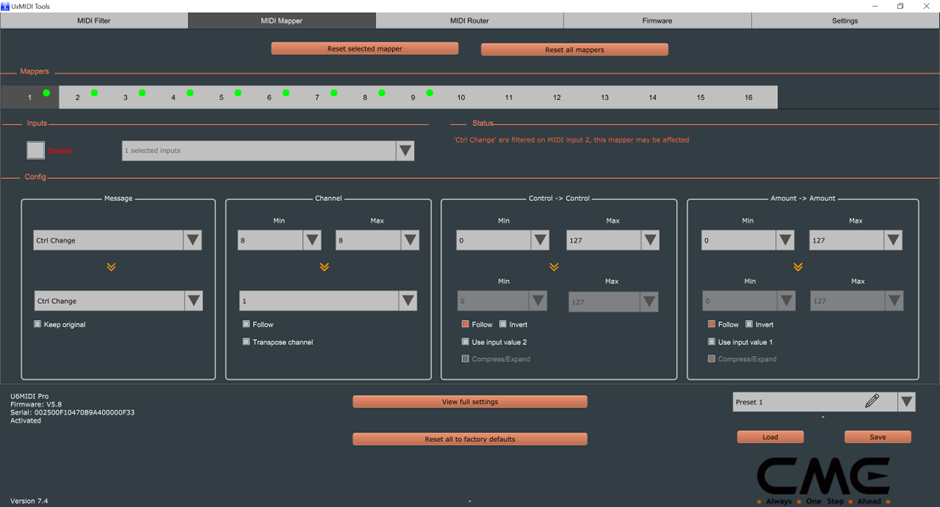
I was also trying to map a reset to zero button on channel 8 to reset AT and PB and another to reset MW and BC. Again, couldnt get it working.
==> not sure but it might work if you make 2 separate mappings and select “keep original value”
=> Good idea, will try
Would it be possible for you to show your CME mapping page for pitch bend reset?
==> the mapping for the PB reset button is done on the LCXL3 itself. map a button to the CC you use for PB and set the “on” and “off” values to 64
=> works perfect now thanks
I’ve seen others asking about how to route your midi to use both DT and DN. I havent got it working yet on the DN whereby clock, start, stop, program change comes from DT to DN.
==> clock and transport send (for the DT2) and receive (for the DN2) have to be enabled in the midi settings of the devices. I would loop back the DT2 on the CME.
=> this routing works great now thanks!
BTW, there was a nice video by a French guy explaining how he set up his LCXL to control both DT and DN
[/quote]
I was inspired by Mystere to get the LC XL 3 in the first place actually. I chose your route with CME as its cheaper than a BOME stand alone box. Maybe some limitations not being able to code it though?
Disclaimer: I have no gear with me at the moment and I have no idea if this would work.
If you have an input and an output left on the CME, you could try to loop the CME back to itself.
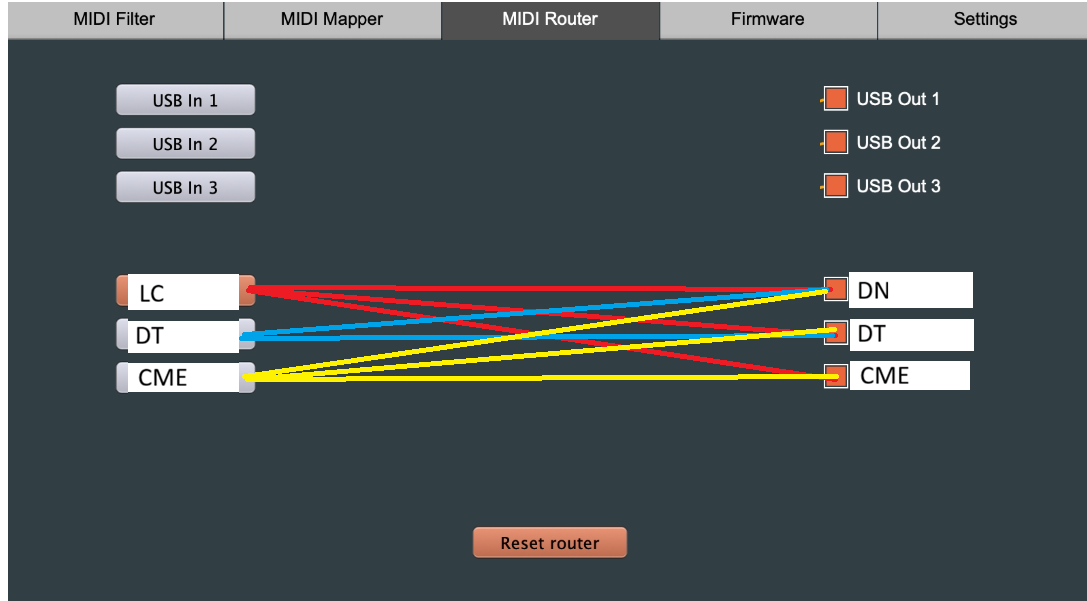
add the following mappers
Mapper 1 : LC in - CH 8 to DT DN and CME out – CH1
Mapper 2 : CME in – CH 1 to DT DN and CME out – CH2
Mapper 3 : CME in – CH 2 to DT DN and CME out – CH3
And so on…
You might have to do some midi filtering to avoid overwhelming the midi loop (filter out anything coming from the CME input or going to CME output, except for what you need (CC, AT, PB…)
1 Like
I’ve thought about the CME loop for a global control on CH8
The mappers could be even simpler. You just need one:
Mapper = CME in Channel 2-8 transposed -1 to CME out
that Way ch8 becomes ch7, the next loop ch7 becomes ch6… and so on until ch2 beomes ch1
an issue might be a slight increasing delay with each loop (it’s a kind of daisy chain)
1 Like
Just had an idea in case you’re like me and still have at least a row of unused encoders and buttons - but just realized that this only applies to the 1st gen Digis (DT1, DN1, ST):
- Dedicate one row of encoders for Track Level
- Set the Audio Routing Mixer to Global (Internal) - this ensures that all track levels are persistent across pattern changes, just like the macros (mod wheel, breath, etc)
- Dedicate a row of buttons to reset Track Level back to 100, which is the default.
Now you can quickly initialize a project’s mix levels to 100 by pressing all of the buttons, and then use the row of encoders for performances - fading elements in and out for example.
Actually, this would work fine in DT2 and DN2 too as long as you remember to press the button first to reset the XL3’s internal value back to 100 so it matches the track level. But it would have been nicer if they reintroduced the global mixer again on the II’s.
2 Likes
Thank you!
Will give it a go as soon as i can! Great ideas
1 Like