Hybridsetup

Hey y’all!

I desperately need you help and expertism… :pray:

I want to build a hybrid setup, to be able to record 24 hardware channels simultaneously and also to produce inside of Ableton at the same time. I think i’ll also need a stable MIDI clock to sync and drive my outboard gear properly. Ableton’s MIDI just isn’t stable enough.

So far, I’ve been working with a Soundcraft MTK22 and Focusrite, but it seems it is just not working out for me—fluctuating recording latencies (FML!) and too little flexibility in terms of setup. So I’m pretty frustrated with my setup. I’ve spent a lot of time trying to make it work for my purposes, but now I’m at a point where I think it just doesn’t make sense and I need to replace my studio equipment—i.e., get rid of the Soundcraft MTK22 and Focusrite and build a new studio which follows another logic.

I was thinking of using ADAT and connecting my gear to a 48-point patchbay, then going through 3 ADA8200s to record multiple channels via ADAT, using a proper soundcard - but which one? It should have ADAT and also MIDI, so i can sync and start outboard gear and Ableton simultaneously.

Also, i want the setup to be expandable in the future in case i’ll need more channels. (Would that be possible by simply purchasing additional patchbays/ADA8200s?)

How should I approach all this? Are my considerations correct per se?

I’m worried that I’ll spend money, rebuild everything, and it still won’t work as it should because I forgot something—or because there are even better solutions out there.

Can anyone confirm that such an approach (Patchbay, ADA8200s, RME Babyface Pro FS (?) and Midi-Clock (Nome II?)) would be reasonable, recommendable, and usable for a hybrid setup (i.e., using hardware and software instruments at the same time without sync-issues and high quality all in all)?

I would be extremely grateful for any assessment, help, or tips for reliable devices for such a hybrid setup.

Thank you so so much! :heart_hands:

2 Likes

I think the Babyface only has one adat i/o, so not sure it can support three ADA8200 unless I’m missing something?

You could look at the larger audio interfaces such as Motu 16a and then add a Motu 828es using AVB or an ADA8200 using adat…

If you are happy with 24bit/48khz then adat is not bad but using two interfaces with AVB will give possibility of higher sample rates if bothered, I am happy with 24/48 for my setup

Something like a midronome or erm multiclock will offer better midi timing, I have only used the multiclock and it was able to sync hardware that would otherwise always be out of time with Ableton.

1 Like

Clockstep Multi works good with Abelton, but it only has one 5 pin midi out - if you want to address 24 channels, you would need a ERM multi midi clock with that. Other option would be Hapax, it also compensates midi channels, and works with Abelton sample accurate. (Has also more out 3x Din, Host USB, Device USB - but most probably you will use the host port to connect midi controllers.) (Hapax is a good choice because it includes the midi clock offset stuff, if you factor that in, its not that expensive - ERM multi costs like 500 Euro.)

RME is the choice with lowest latency, but i am not sure if its needed, if you offset the clock with ERM, Clockstep or a Hapax. (For me it works well with a presonous thunderbolt audio interface (which can be stacked, but does not have the same mixwizard like RME), which has 5-6 ms round trip.)

1 Like

at one point I had a 16 i/o RME-based setup sending sample accurate MIDI using Expert Sleepers modules. It technically worked but I ultimately didn’t find it worth the time sink to constantly deal with all the failure points - I would strongly suggest to first achieve rock-solid and dependable performance with the simplest hybrid setups possible before adding additional complexity

I never used any of their products, but https://www.innerclocksystems.com/ has some very helpful information, analysis, and resources directly related to these types of hybrid workflows

1 Like

I agree with this, I bought a Nome II midi clock for my live setup and it has fully revolutionised my recording setup now too. The latency doesn’t fluctuate like it did previously, I’ve had to dial it in once and that’s it. Highly rec the Nome II, I’ve found that using the analogue sync function (sending 24ppq sync from Ableton to Nome II out of sound card) has provided rock solid midi clock. I think the U-sync plugin is the recommended method for syncing from a DAW though.

2 Likes

Nome II or USAMO would indeed be a worthwhile investment if you want a solid MIDI clock from a DAW

Nome II should work pretty well, I have the Nome I (Midronome) from back in the Kickstarter phase, it’s been fucking great, even more if you have a Mac and can use the VST (U-Sync).

I have mine syncing Bitwig with all my hardware, including using the clock out from the Nome to sync a modular case.

Hello!

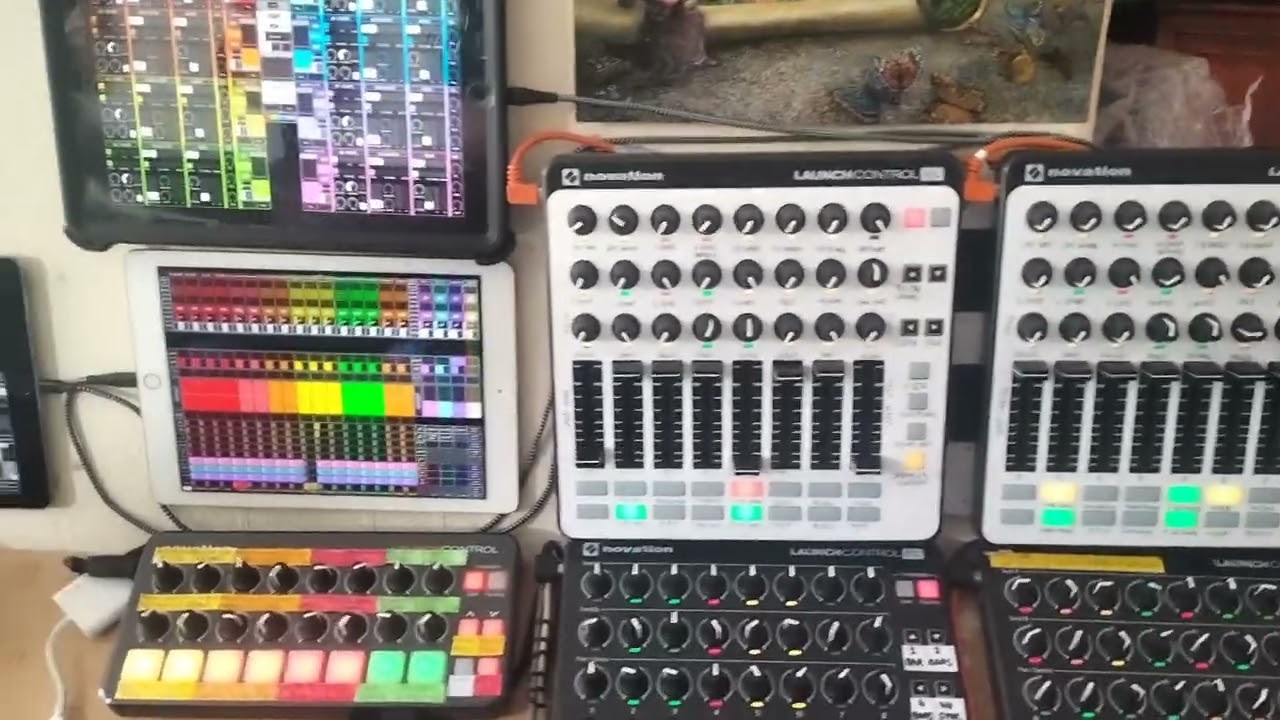
I run a pretty crazy complex hybrid setup. 2 Macs running Ableton, 7 Ipads (TouchOSC and Drambo), Hapax for sequencing, hardware synths etc. Cymatics uTrack24 to get everything into Ableton.

I use 2 Macs, basically one is a sound module, the other for mixing/fx/recording. Keeps things simple and spreads the CPU usage.

My goal however is jamming, I rarely record, however I can multitrack if I want.

What you haven’t mentioned, and is important, is how you are sequencing. This is important as it’s that device that needs to send its MIDI correctly to get everything on the grid.

I send an audio sync direct from a track in Ableton to the Hapax. Aligning the track manually to ensure it’s as close to the grid as possible. Takes a while to setup and tweak but works well.

I’ve never used a MIDI clock device but I’m sure they would work just as well too.

MOTU rack unit. I have the 8M. They may have some more recent offerings. My MOTU 8M includes AVB, patching matrix, gate, filters, eq per channel, aux channels, mixing groups. Clock sync configuration, ADAT in/out. Configuration saving. Any kind of setup you need you can do it. Also, I’ve had it for years, so they last. It’s very deep for an audio interface. You can also control it from an iPad or any device connected to your home network

  • 848 is their latest

Damn, I know it’s not the right thread but do you have a picture of your setup ?

1 Like

I can throw in a vote for the ERM - had one back in the day and it’s very good at what it does. I had a friend who had three(!) of them in his studio…

As other people have also mentioned the Babyface won’t cut it, as it doesn’t have enough ADAT ports. You can go the MOTU route (I had a 16a but currently downsized to an M4) but this approach gets quite expensive quite quickly. There are also other vendors that do multichannel interfaces (I’m thinking Antelope Audio, Ferrofish, Presonus, etc.). I’d also question whether you need a patchbay (obviously I don’t know your setup, so you may well need it!), as even the cabling for this adds up quickly to a pretty penny.

I did this back in the day with 16 MIDI, 16 audio channels (+ FX sends) and 2 48-point patchbays and it was absolutely not worth it for me in terms of setup time, cost and troubleshooting but each to their own.

1 Like

I recently migrated to a hybrid setup and have scoured the forum for various resources on managing hybrid setups, so can speak to the MIDI-syncing side of things (hopefully accurately). There’s several threads you can find through search, so this thread is somewhat duplicative, but nevertheless…

Your setup sounds much more elaborate than what I’m doing, but it seems there’s (at least) three general options:

  1. Manually control latency per track
  2. Use an Overbridge-connected device
  3. Get a hardware MIDI sync box (ERM Multiclock, Nome)

At first I was adjusting latency manually, and while it was do-able, I eventually got fed up with it. One of my goals in putting together a hybrid setup was to create a solid foundation, so while it was an admittedly luxurious expense, I opted for the Nome II. And it works.

From other anecdotes around the forum, some folks seem to manage larger setups without a sync box, so I don’t think it’s a requirement - but for me, not having to think about it or manually adjust things later made it worth the expense.

1 Like

Tiny vid there (it’s evolved a bit since then).

Off-topic setup explanation!

Built quite a lot of cool stuff, got Octatrack-style samplers (with record trigs, record buffers etc), Octatrack-style scenes with crossfading etc.

I’m trying to do some vids showing it in action, I’ve found it’s quite hard to film stuff. I’ve just bought a head-mount-for-phone (or how to look like a twat) which hopefully will work better as I need two hands to operate it.

When I talk about it on here, I get a sense people don’t believe me when I say all the stuff it can do… I guess seeing/hearing is believing, so will have to get a few videos done at some point. I’m right in the middle of doing a huge upgrade though so it’s gonna be a while.

One of the Ipads in the middle runs Drambo (big project, over 4,000 modules), which handles the MIDI processing, lights on the controllers, and logic of stuff etc.

Small bits of Lua coding in TouchOSC handles conditionals/logic on the other Ipads, the rest is handled by a few M4L devices for basic transformations etc.

It’s very very complicated, but a lot of time and work has gone into making it work like one big groovebox. When it’s working well, using it is just amazing, everything at your fingertips. No stupid limitations like you get with most hardware. Also, if I think of something I need, I just build it in!

5 Likes

Awesome. Subscribed

Ha ha cheers!

Not much point subscribing though, gonna be a while before I do any videos of it as I’m in the middle of a big change/upgrade. Plus, there never seems to be enough time!

I do want to film eventually though… I have this Battalion and Microtonic integration that’s pretty crazy that I want to share. Plus a ton of other stuff!

1 Like

Just got the Babyface Pro FS USB to bridge my iPad M2 with my Desktop/MOTU 8M build. Really working on reducing and improving cable management. For a grand (USD) it better cook me dinner and tell me I’m handsome. I’ll let you all know how it goes.

2 Likes

Thank you so much y’all.

I’ll look into your suggestions as soon as i can! I did think about a MIDI clock and obv mentioned it, but for whatever reason (because it makes perfect sense), I underestimated its influence and relevance a bit. So thank you!

Regarding my considerations purely related to the audio setup:

Sending the outputs of a patchbay to the inputs of (for example) an (or multiple) ADA8200 and from there sending the channels via ADAT to an ADAT-compatible sound card is, in itself, a plausible and logical and (per se, depending on how many ADAT-Ins the soundcard has) expandable approach, right?

I totally understand the idea of keeping things simple and all that. Really—and I’m grateful for your comments on this.
The thing is, I have the gear, but I don’t have a decent infrastructure to use it properly. I’m aware that I might not be happy with it and I’m open to downsizing the setup/adjusting the workflow, but I still want to establish the studio infrastructure that allows for the integration of so much outboard gear (i.e., the simultaneous recording of separate channels alongside synchronization with “in-the-box” channels), as I’m sure that sooner or later I’ll want to work this way.
If relevant, here is a list of my current setup.

Octratrack MKII
Machinedrum UW+
Monomachine SFX60+
Arturia Microfreak
Behringer Deepmind 12D
EmpressEffects ZOIA
ZOOM B3
Alesis Quadraverb

Regarding the question of how I sequence:

I usually set the Elektrons to follow Ableton’s start/stop and external tempo.
Then I go from my Scarlette via MIDI Out to the Octatrack, and from there (depending on whether I want to control other things with the Octatrack or not) via MIDI Out / MIDI Thru to the Monomachine, from there via MIDI Thru to the Machinedrum, from there via MIDI Thru to the Deepmind, and from there via MIDI Thru to the Microfreak. In addition, the MIDI Out of the Monomachine goes to the ZOIA, and the MIDI Out of the Machinedrum goes to the Quadraverb.

Thank you so so much for your time and help <3

Again, I’d ask why the patchbays? You don’t have that many samplers or FX processors that would need the routing changing that often? I feel like if you needed patchbays because building physical FX chains is part of your workflow, you would have already discovered that by now with your mixer/interface? Surely you’d just now go into the inputs of your multichannel interface(s), rather than channels on the mixer and doing mixing and effects send routing in the DAW? Or are you worried about latency of potentially going into the computer from an instrument and then back out again to a different unit for processing?

But to the other part of your question, yes you can absolutely use multiple ADAT interfaces and have those receive signals from all of your instruments at the same time. I would suggest maybe also looking into AVB/Dante or any of the audio over IP protocols though, as they will offer better sample rates and potentially be more expandable in the long-run.

Sorry! Sure, I don’t have that much equipment, but that could change, and I think it makes sense to set everything up so that you can expand and be flexible in the future.

To be honest, I don’t quite understand that.
Perhaps it’s relevant to mention that I don’t use the mixing console very often, despite its multitrack and aux functions. For that I find it too big and idk - It just doesn’t fit my (desired) workflow, I think. I also don’t use the USB return to record its main outputs.

I use the inputs (up to the USB multitrack out—which is basically almost “not at all”) and the aux sends on the Soundcraft, always (when recording/working with hardware). I don’t have anything else (“multichannel interface(s)…”) that can handle so many channels. Even if I don’t use them all at the same time—because that’s how the cables are laid out. Sure, I could rearrange the cables for a specific purpose at any time and, if I need less, use the Scarlette instead of the Soundcraft and build FX chains, but I don’t see why that should be more convenient than using a patchbay…? But I don’t think that’s what you meant.
I often want to route/chain more flexibly and differently, but I don’t do it because I’d have to crawl under the table to do so and would end up losing track (no pun intended – but yes). Sometimes it would also be possible to send the mixer’s aux sends elsewhere (the cable ends are ready and waiting there (and lead to the inputs of the MD, for example)) - but still.
And regarding the latency: yes.

Thank you for your suggestions and thoughts!

If this works for you, then great.

For me though, this is too much daisy-chaining of MIDI. I recommend investing in a MIDI router with filtering etc. Filter out everything except for the exact stuff you need.

Otherwise you can never be sure if latency is due to bottlenecking at some point in the chain.