I’ve seen in different threads that some people are having issues getting their multisamples into the Multiplayer or drums into the Subtrack. To make this easier, I built two helper tools — one for the Multisampler and one for the Subtrack. Maybe they’ll come in handy for some of you. The tools are in beta, so if you spot any bugs, please let me know.
Multisample Architect v. 0.71:
Kit Constructor v0.72:
Multisample Architect
Features:
Import your multisamples as WAV or AIFF (with loop points and root note stored in the chunk/header — if not: choose “one shot” ->, a loop=off will be written in the elmulti).
NEW Automatic recognition of loop points vs. no loop points – if the WAV files contain no loop points, one-shot mode will be activated.
Optional: cut at loop end (+64 samples)
Optional: crossfade up to 1000 samples (default 32 samples, recommended)
velocity layers (new I pre alpha)
Round Robin (new I pre alpha)
Drum Mode (new I pre alpha) if you have drum loops or Multisamples, where loop start and loop end = Sample Start and Sample end
Optional: looping on release (keep release in loop)
Optional: -6 dB to 0 dB normalization + per channel > (If the right and left channels have different volume levels)
Batch rename samples
Folder naming
Root note detection by filename or metadata (if your samples don’t include C3, D#2 etc. in the name, you’ll need metadata and set detection to root note mode)
Auto-fill pads (based on names like Kick, Snare, Hi-Hat, etc.)
Drag & drop from your library
NEW!. Drag & drop to the Slot Field is now implemented in version 0.71. Multi drag & drop of up to four samples per slot in RR and Velocity mode is supported.
NEW: velocity + Mode (pre alpha status).** Drag & Drop up to 127 Samples per slot (in Tonverk make sure to disabling velocity->volume for each of the 8 subtrack slots/pads).
akphabetic order of drum samples → velocity 01 - 127.
velocity layers (new I alpha)
Round Robin (new I alpha)
Normalize from -3 dB to 0 dB
Audio preview
Cut Wizard: record your drum machine in one run with pauses → automatic sample detection → assign to pads
Note: Your samples never leave your computer — nothing is uploaded anywhere, everything runs locally in your browser.
If you find the tools helpful and would like to support, it’s very much appreciated as development comes with costs — but it’s absolutely not expected.
If I knew how this is supposed to look in the elmulti, then it certainly wouldn’t be impossible to implement. Same with velocity layers. Unfortunately, I don’t have an elmulti example template.
I assumed it was an identical structure to the subtrack TOML config, maybe experiment with just copying it. I found that velocity layers worked on subtracks a few weeks ago by basically copying the multisample velocity layer approach:
For Tonverk export, what exact filename convention does Multisample Architect expect for notes and velocity layers under each “Filename Recognition” setting? For example, should files be named C3_V127.wav or 1_13.wav for 16-layer multisamples? When I export, the .elmulti sample fields include extra characters (e.g. NAME_C1_V08-C1-V08.wav) — could you provide one correct filename + settings combo that avoids this?
I’ve now implemented velocity layers in both the Multisample Architect and the Kit Constructor. Feel free to test it out and let me know if anything doesn’t work as expected.
Yeah, unfortunately, I can’t get it to work.
I have successfully built .elmulti files and sample folders that work, with velocity layers, but it was cumbersome, I was hoping to find something more streamlined. Your app looks great, but I haven’t gotten any patch to successfully load in Tonverk, despite trying every setting combination and naming convention I can think of.
Hmm, that’s strange. What kind of error message do you get on the Tonverk? Does the app maybe not recognize the different velocity layers, or where exactly does it fail? Do you perhaps have an example you could share with me?
Thanks for making this tool. Just what I was looking for. I am on a MAC with the Tonverk 1.01 firmware. I put the unzipped folder with files in the multisample folder of the user folder. Before I load the multisample I can play the preview, but when I say YES to load it, I get this error: Failed to load instrument multiplayer sample. Am I doing something wrong? Hope you can help, thanks!
Basically, the way you describe it sounds correct. Could you somehow share the files you loaded into the Multisample Architect with me? (I only need a simple example, nothing complex.) I just want to trace where the error might be — whether it’s a misassignment due to sample naming in the app, or something else. It’s always really difficult to judge from a distance when someone says it won’t load in the Tonverk
EDIT: Try again now. I think your WAV files didn’t contain any loop points in their header chunks. I added a function that automatically sets loop=off when no loop information is found during .elmulti creation.
THANKS!!! It worked perfectly. It was an old mulltisample from Reason and had no loop. Good luck with the further development of the Multisample Architect app. Cheers!
Edit: Just bought your “Echos of Hawkins Pack” for Tonverk (very nice presets!) and something for the quick support.
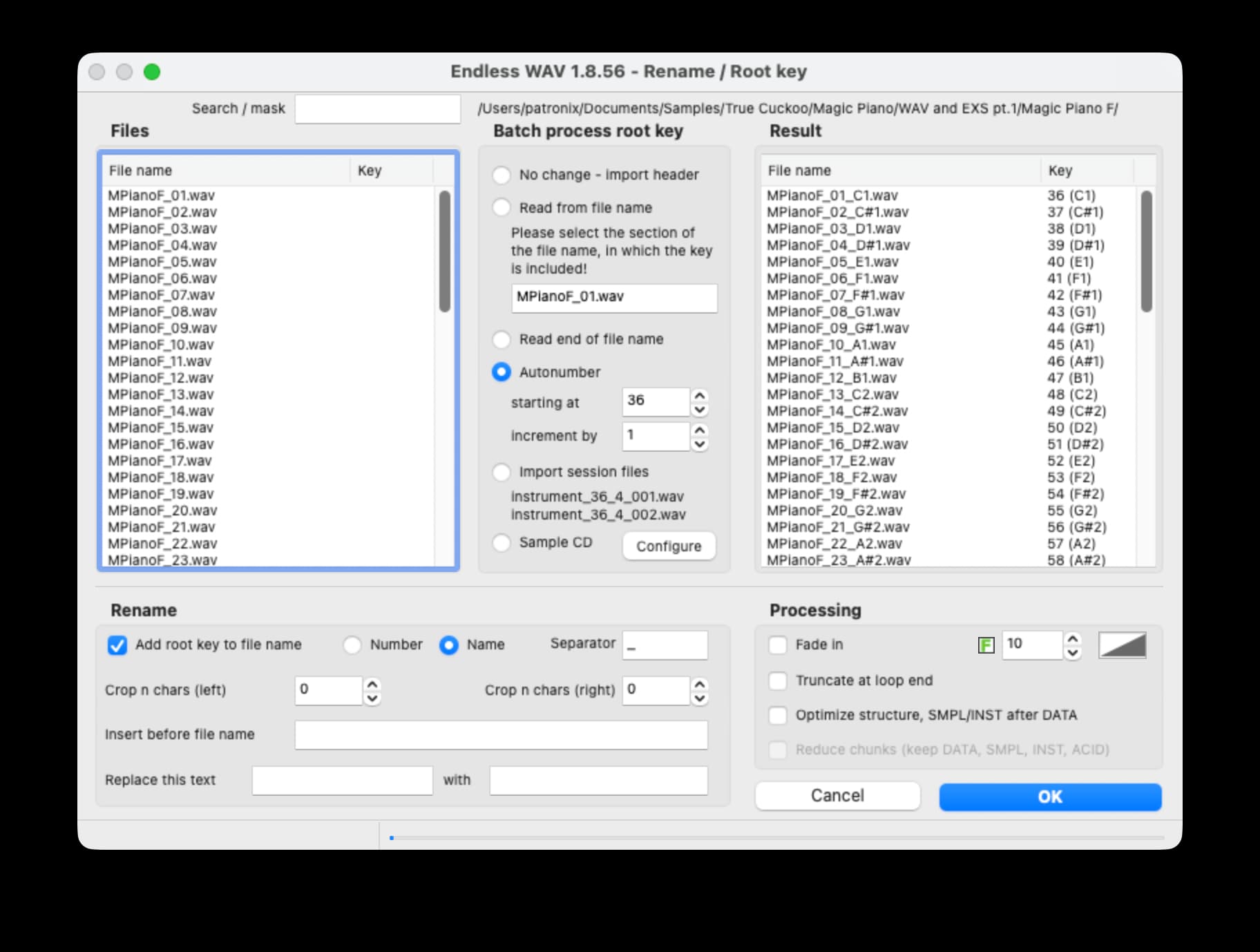
Is it possible to implement an option to refer a number in the filename to connect to a root note? Say I have a multisamples with numbers like “name_01.wav, name_02.wav…” and I know the root note for 01=C1, 02=C#1… Or is there maybe a tool for this?
Glad to hear it’s working now! Also, thank you so much for your support — and I’m really happy to hear that you’re enjoying the presets.
Regarding your question: it’s quite individual and can’t really be standardized. For example, you might use C1 as number 1, while someone else might start with A0 — or C0 — which already shifts the entire numbering.
Here’s what you can do: especially for batch renaming and file assignment, you can easily use ChatGPT to build a small local HTML5 tool tailored to your needs.
For example:
I need an upload field for multiple WAV files. The goal is to assign root notes and perform a batch renaming. I’ll upload files named like “01_name”, “02_name”, “03_name”… and I want them to end up as “name c1”, “name c#1”, “name d1”, …
Your configuration for mapping could look like this:
01 = c1
02 = c#1
03 = d1
…
After the renaming and root-note assignment, the page should offer a ZIP download of the newly named samples.
It might take two or three tries until it works perfectly, but that’s exactly how I’ve handled several filename renaming setups myself.
Thanks so much for your support — 10 $ is already more than enough!
I really appreciate every bit of support.
And yes, these are the same apps as mentioned above.
Thanks again for pointing that out — I’ve updated the links now - just forget to update the “content part”.
Thanks for this great tip. And I did create it in 5 versions with chatgpt (I’m still a newbie). wav-renamer v5.html.zip (3.0 KB)
Is there a simple way to create or find looppoints in samples? Does Audacity or Audition writes them in the wave files?
One of the best tools to create/adjust loops is Endless WAV (it’s free and available for Mac and Windows).
Audacity doesn’t support loops. You can use Sound Forge and Wavelab to edit loops. You can also use Ocen Audio and (iirc) Wavosaur. Both editors are free, but allows only rudimentary loop editing.
The best method for creating automatic loops that are truly seamless is Autosampler in Logic and Mainstage. But that requires you to record the samples with Autosampler. However, you can also load a sample into Logic’s standard sampler and then autosample it using Autosampler including automatic loop creation .
EDIT: Attached is a sample which is autolooped with Logic’s Autosampler.
Thanks krunchr!! This is also a great tool and it worked perfectly with MS Architect app. It is really fast and easy to find a good loop point. It also can store root keys in the (re)name and wav files and in the way I was looking for. sample_01 => sample_01_C1.
 Multisample Architect v. 0.71:
 It worked perfectly. It was an old mulltisample from Reason and had no loop. Good luck with the further development of the Multisample Architect app. Cheers!

 .
.
 This is also a great tool and it worked perfectly with MS Architect app. It is really fast and easy to find a good loop point. It also can store root keys in the (re)name and wav files and in the way I was looking for. sample_01 => sample_01_C1.