Is this all with OT connected to logic?
What happens if you run OT solo?
Yes, this is all with Logic. Though Logic isn’t doing much other than routing audio and providing the reverb on the synth. It typically isn’t playing, recording, running a clock or anything. OT is the clock.
I’ll try with just an instrument and OT.
I confirm that the “bad” tempos are bad when running Moog->OT->headphones. The “good” tempos I tried worked great.
1 Like
Those naughty tempos. Give them a spanking and send them to bed without any tea.
2 Likes
lol. Just a quirk with how the playback timing for samples works, I guess.
I do note that every 4th bpm from 60 to 120 seems ok. My hypothesis is that those might evenly divide into the clock that’s keeping everything in sync. But past 120 the every 4th thing breaks down. 124 and 128 don’t have clickless playback, suggesting that first playback trig gets nudged.
A fun little math problem to ponder over a cup of tea.
1 Like
Check if the number of sample chunks (44 100 per sec) can be perfectly divided at given tempo.
Also, tempi with decimal are not what you think :
The Untold Truth About Octatrack Tempo
3 Likes
Do you think it is sample chunks or sequencer resolution? I have no idea what the latter might be, but suspect it is not at audio rates.
Well…
Capturing loops and then manipulating them in all sorts of cool ways, plus midi sequencing, plus fx processing, plus sample playing. This is what octatrack excells at.
Seemless Live looping… not really.
There’s a difference between capturing a loop (sampling) and live looping.
the octatrack internally multiplies tempo values by 24, so here a amateurish attempt to show impact of tempo changes.
var t = [
  56, 60, 62.5, 63, 64, 72, 75, 96, 100, 108, 112, 120, 125, 126, 135, 144,
  55, 61, 62, 65, 66, 67, 85, 86, 87, 95, 97, 110, 122, 123, 124, 127, 128, 129, 130, 131, 132, 134
];
var check = v => 44100 / (v * 24);
var r = t.map(v => [v, check(v)]);
console.table(r);
1 Like
Just a line of inquiry.
Sequencer resolution is 96 PPQN.
Could list steps on how to reproduce your test ?
But it can! You just have to pick your BPM carefully. It expands what the device can do …
Make your ambient, constantly recording live loop. Resample it and destroy it, restore to the ambient loop that you’ve been adding to on the side, add some more to it. Resample that and destroy it. Lather, rinse, repeat. Get the best of both live looping and the sequenced awesomeness that Elektron does. 
1 Like
I’ll do that when I have the Octatrack in front of me tonight.
1 Like
Might have a fiddle with Lyra and OT later.
1 Like
Here’s my workflow for testing this. I’ll just use one track feeding itself instead of two with recording buffers bouncing back and forth for simplicity.
- New project
- Project>Control>Audio: Set Track 8 to Master, Cue Cfg to Studio
- Project>Control>Memory: Flex Format to 24 bit, Dynamic Recorders to Yes, Recorder Format to 24 bit
- Project>MIDI>Sync: Transp to Send, Clock to Send
- Project>MIDI>Channels: Trig Ch 1 through Ch 8 set to Off
- Set T1 to Flex, pointing to R1>Recoding1
- T1 SRC: LOOP to OFF, TSTR to OFF
- T1 FX1 set to None
- T1 FX2 set to None
- T1 REC1 setup 1: INAB to A, INCD to -, RLEN to 16, SRC3 to T1, LOOP to OFF.
- Place a record trig on trig 1
- Place a playback trig on trig 1
- MIX: Set Main to +12, GAIN AB to -12
- AED FX1 page for RECORDING 1: Gain to +0.0 dB
- T1 AMP: Vol to +63
- Hit play and make some loops.
That should be looping at 120 bpm. Mine are clickless.
When you are satisfied it works, turn T1 Vol down to -64. Change the Tempo to 95. Turn T1 Vol back up to 63. Make some loops and listen for clicks. Shouldn’t take long.
Try some other BPMs. 96 and 135 should be good. 124 probably won’t.
not sure if i mess up the intention how you attempt to test, but wouldn’t it be kind of beneficial to use a testtone - lets say a sinus wave - that bounces in a multiple of the running mechanism,. In this way you get certainly frightned how much clicks you’d produce by simply changing tempi as there is no sample fade in the OT on a returning loop-point. All you have is a fade-In for triggers.
if the machine runs samples in 44100hz then some audible range could be in example 44100/24 = 1.837,5hz sinus wave. Or 44100 / 16 = 2.756,25hz, or 44100/48 = 918,75hz and like-like
Which would allow you to record and see what actually happens, aka where the former wave curve hits the clicky reentry into the nicely starting wave form.
1 Like
Not sure if setting Main to +12 is necessary…if you record Main it will be +12db louder…
One bar at 120 bpm is 88 200 samples exactly.
96 bpm 110 250
75 bpm 141 120
60 bpm 176 400
56 bpm 189 000
…
Maybe related…
@Shredrr do you have a formula to calculate round tempos that correspond to round samples ?
1 Like
Yes … but 124 bpm fails. And I’ve experimented with 13 beat loops with no issues.
I think this is governed by the sequencer’s timing resolution, not the sample rate. I think the sequencer is clocked less frequently and “nudges” the sample on the trig to keep things in time.
I take your point, but don’t have a convenient sine wave generator. Plus my main use case is music.
That’s me trying to get reasonable levels on my audio interface without using the preamps.
I don’t usually sample main, just cue … but I’ll keep that in mind if I decide to sample main.
1 Like
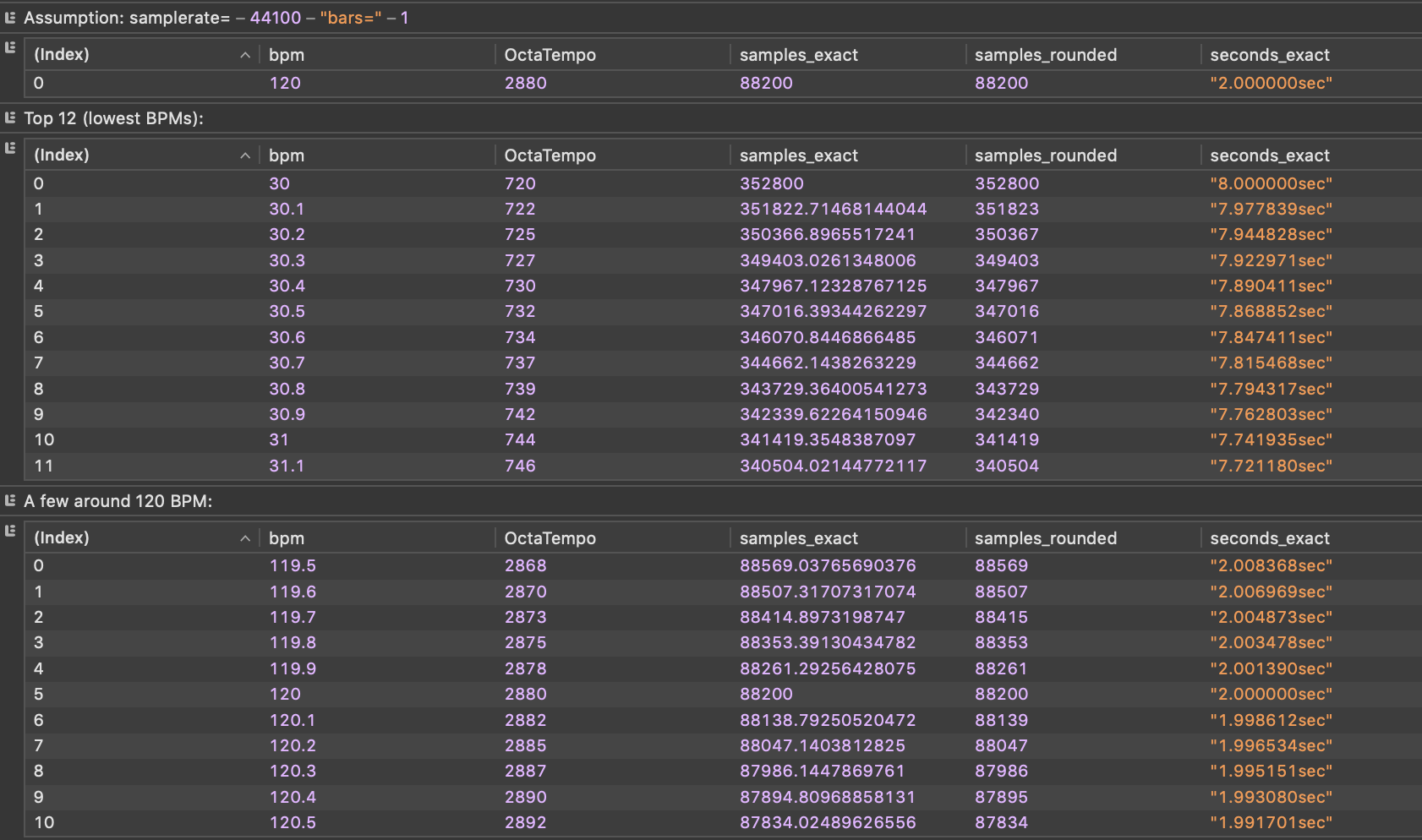
digging a bit deeper.
var samplerate = 44100;
var minBpm = 30.0, maxBpm = 300.0;
var stepBpm = 0.1;
var bars = 1; // number of bars the 16-step loop represents
var ticksPerBar = 24 * 4 * bars; // 96 for bars=1
var numerator = samplerate * 60 * ticksPerBar; // samples = numerator / OctaTempo
var rows = [];
var range = Math.round((maxBpm - minBpm) / stepBpm);
for (var i = 0; i <= range; i++) {
  var bpm = +(minBpm + i * stepBpm).toFixed(1); //make sure only sharp 1commata values are used
  var octatempo = Math.round(bpm * 24); //do the Octatrick
  if (octatempo <= 0) continue; // heck, no endless loop!
  var samplesNeeded = numerator / octatempo; // exact float
  rows.push({
    bpm: bpm,
    OctaTempo: octatempo,
    samples_exact: samplesNeeded,
    samples_rounded: Math.round(samplesNeeded),
    seconds_exact: (samplesNeeded / samplerate).toFixed(6) + "sec"
  });
}

console.log('Assumption: samplerate=',samplerate, 'bars=', bars);
  console.table([rows.find(r=>r.bpm===120.0)]);

console.log('Top 12 (lowest BPMs):');
  console.table(rows.slice(0,12));

console.log('A few around 120 BPM:');
  console.table(rows.filter(r=>r.bpm>=119.5 && r.bpm<=120.5));

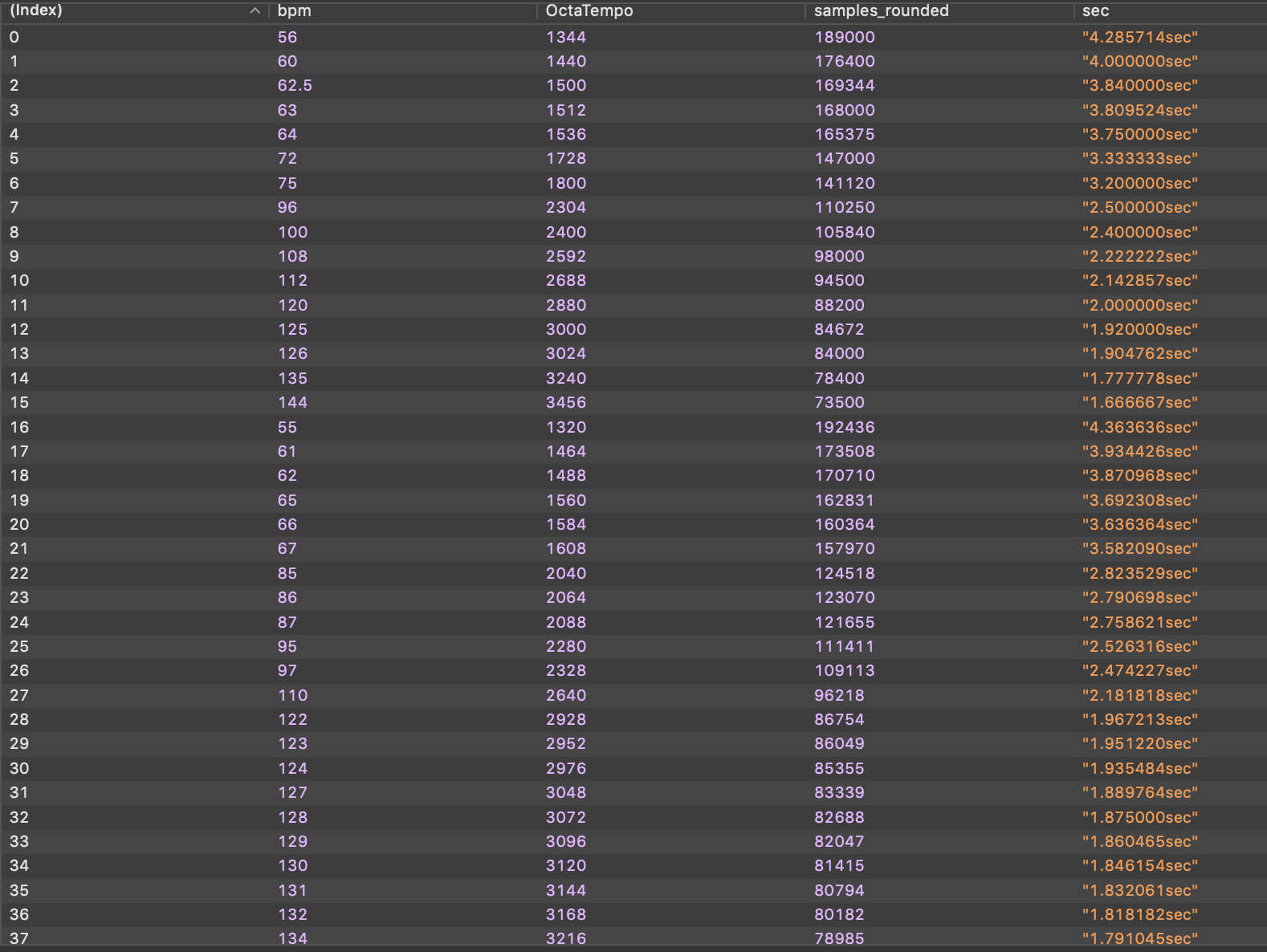
var check = [
  56, 60, 62.5, 63, 64, 72, 75, 96, 100, 108, 112, 120, 125, 126, 135, 144,
  55, 61, 62, 65, 66, 67, 85, 86, 87, 95, 97, 110, 122, 123, 124, 127, 128, 129, 130, 131, 132, 134
];
var result = [];
for (var i=0; i<check.length; i++) {
   var test = check[i];
   var row = (rows.find(r=>r.bpm===test));
   result[i] = {bpm: test, OctaTempo: row.OctaTempo, samples_rounded: row.samples_rounded, sec: row.seconds_exact };
}
console.table(result);
explains at least what the challange is…
see screenshot…
and here the selection of your former test bpm…
1 Like