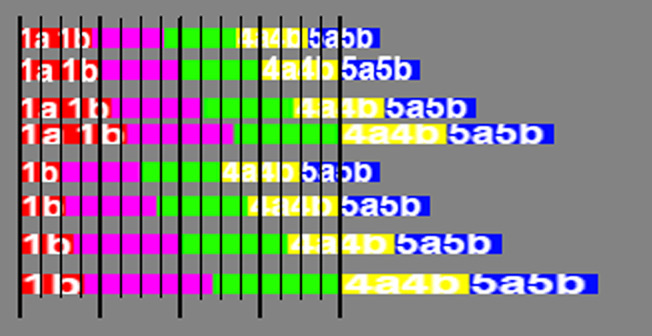
I’m having a problem with the Octatrack Megabreak of Doom pattern, as shown here -
Set it up with just four breaks initially, switching on trigs 1, 5, 9, 13. I’ve set up the time slice samples in the prescribed manner, configured trigs 1, 5, 9, 13 to p-lock to the relevant samples, and set up scenes to slide between slices 1-4. The pattern works — the problem is with the fader action.
There are 16 notches on the fader. I was expecting them to change the underlying break on 1, 5, 9, 13, matching the trig positions. But instead they switch on 1, 6, 11, 15. So there is some kind of “slew” effect.
I’m wondering if this is because of how the OT maps the fader values onto the encoder (128) positions and then onto the slice number (64 slices). Maybe there is some kind of rounding in all this? Unfortunately it seems very hard to debug as the fader value isn’t output anywhere.
Has anyone had a similar experience with the fader + slices and knows how to fix?
Ther cross fader interpolates between values.
So yes, there is ‘slew’ of a kind. Dont ask me for the maths on the curve, I have no idea. But cross fader interpolation is mentioned in the manual.
I will do. Thank you. But let’s say I have multiple tracks, they are all slices in a single sample. Currently I have kick slices 1-4, snare 5-8, hat 9-12. You say change kick to 1-5. Is snare then 6-10? 5-9? Etc
This is in order to divide the crossfader in 4 equal zones, with 4 slices max.
It gets more complicated if you have more slices than scene B setting.
And there is something weird with slices values : there are 2 positions per slice value. Believe me or not, depending on how you lock scenes, behavior can differ with the same values.
For slice 1 I turn START conter clockwise.
For slice 5, I set slowly from slice 4 to slice 5.
If you set slowly slice 5 from slice 6, the internal value is different, and crossfader zones are different.
WITH SAME CROSSFADER POSITION and SAME SCENES SLICES VALUES YOU CAN GET A DIFFERENT SLICE, depending on how you set values.
I discovered that recently; after 11 years with OT. I just checked again, trust me. This is a bug because of 128 Start values vs 64 Slice values.
On lfos you have to multiply depth by 2 with slice destination.
I’m familiar with the 2x positions per slice value. It’s because the encoders have 128 positions but there are only 64 slices available, and the OT wants to map those slices over the full encoder range. There may be something else weird about slice position 1, which may be a “default slice”, and somehow different in nature from slices 1+ . That may explain your 1-5 solution
Yeah that’s what I’m doing but I get slew with it. I am going to try some other combinations. I might try skipping slice 1 and starting everything at 2 as I think there is something unusual about slice 1
What seems to match the best 4 zones is Slice 1a / Slice 5a.
One possibility with more than 4 slices would be to have the same slice on 4 and 5, but that would warp my head ! I’d probably use 1a / 4b settings, which works well if you have the crossfader in the middle of each zone.
Maybe I’m misunderstanding. 1, 6, 11, 16 is linear … 5 ticks between the slices.
It sounds like you’re hoping for 4 ticks between slices so that you get 1, 5, 9, 13. But OT spreads the slices as far apart as possible instead of giving each slice the same range on the slider.
Thank you for all your input. I haven’t been able to resolve this by changing scene B to lock slice 5 instead of slice 4 unfortunately. I think we will have to put this down as a curious edge case of OT slider operation. I did discover some more stuff - if you sweep from right to left it interpolates at different points from left to right! And sweeping back and forth multiple times seemed to change the precise switch points, as if the fader algorithm had some kind of “memory”. I don’t know. In the absence of Elektron actually telling us how the algo works, this is probably unresolvable. As @sezare56 says, this is most likely due to the fact that we have 128 encoder points to sweep across but max 64 samples. So the 2x issue may be messing things up. It’s only really an issue with the megabreak of doom pattern if you use a small number of input samples, say spreading 4 inputs across 16 trigs. Then the fader has to do a lot of interpolation work, I guess. If you use 16 inputs, like the MoD author originally suggested (or 64!) then it’s much less of an issue. So I think this is just an (interesting?) edge case. I liked @Bryan_T’s idea of a quantized fader, but then I’m not sure why the fader wouldn’t be automatically quantized in the first place. Thank you everyone!
Probably because you didn’t take the time to read above.
There are 2 internal values for each slice, depending on encoder position.
128 Start values vs 64 Slices values.
I called them a and b.
So depending on how you set slice values, you have at least 4 possibilities to plock scenes with slices 1-4 and you can be surprised if you are not aware of that.
And also 4 possibilities if you have only 4 slices and want them equally dispatched by setting scene B to slice 5.
The black lines represent OT crossfader lines. I doubt they are perfectly aligned with real values on the faceplate.