Absolutely, the white line, spanning from top to bottom, is a perfect visual indicator. Both feature the same height, but different diameters (15/15 & 20/15 mm).
The 5+3 value knobs are aluminum on the outside, with a D-shaft 180-degree plastic fitting on the inside.
The endless rotary knob is a 15/15 mm pure aluminum knob with a hexagonal screw to lock at the potentiometer.
The rotary knob is a bit more matte, yet they all have the same vertically oriented ripple surface.
I somehow ignored the original choice of knobs by Dreadbox before (now there is certainly no way back) — yet, since I placed a Dreadbox/Polyend Medusa (2nd gen) in front, I needed a calmer and more harmonious visual interplay between both.
It’s been part of an attempt to reduce the visual clutter on my studio desk, down to the choice of cables. It’s for those aesthetic freaks, since it evidently didn’t affect the sound, but my ease of mind.
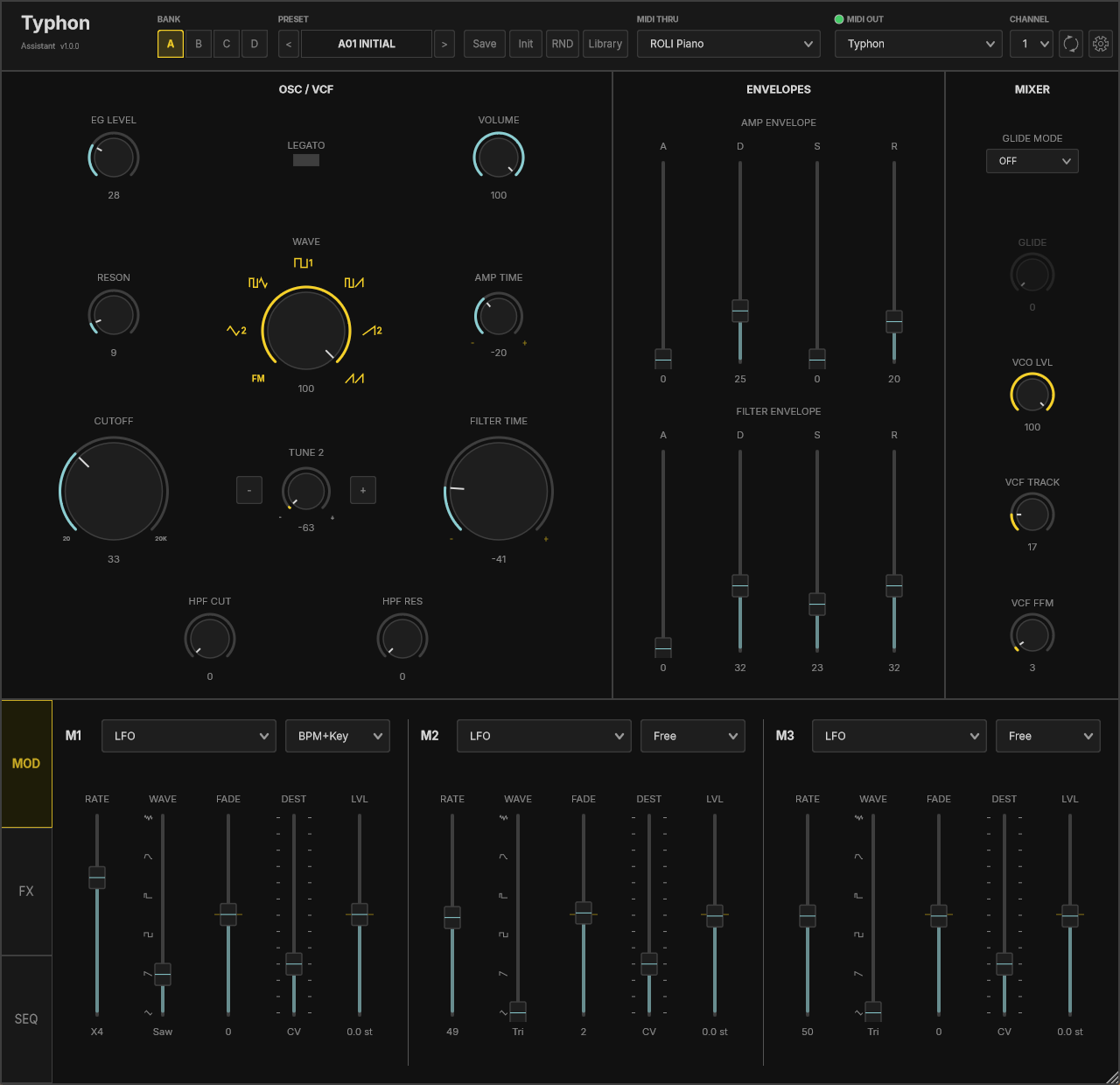
Voidcontrol MIDI has released the Typhon Unofficial Assistant, a software controller and patch librarian for the Dreadbox Typhon synthesizer. It brings the Typhon’s sound onto the screen, adds full DAW automation, and keeps a lossless library of Assistant patches on your computer.
The Typhon shares its sound parameters over MIDI but not its patch storage or internal routing, so the tool is an Assistant rather than a full editor: it focuses on live sound control and patch management.
Features include:
Live control of parameters the Typhon exposes over MIDI, laid out by section
One-click read of the current sound from the hardware
Full DAW automation with real automation lanes, not just MIDI learn
A 32-step sequencer that locks to DAW tempo or MIDI clock and plays the Typhon, with per-step gate, tie, velocity and gate length, plus global division, swing and probability
A patch library with naming, categories, favorites, search, and single-file or full-bank import and export
Preset export to .typhonpr for use with Dreadbox’s own Preset Manager
A standalone version for use without a DAW
Init and randomize
Resizable UI, 50 to 300 percent
The Assistant runs on Windows 10 and 11 as a VST3 plugin and a standalone app, and requires a MIDI connection to a Dreadbox Typhon. It has been tested with firmware 4.2.1 and requires firmware 4.2 or later. It has been tested in Ableton, Bitwig, Cubase, Reaper, Studio One, and Waveform. A Mac version is under consideration.
The Typhon Unofficial Assistant is available now at voidcontrolmidi.com for $15.
Voidcontrol MIDI is not affiliated with Dreadbox. “Typhon” is a trademark of its respective owner.
Still Windows-only at the moment, but… the Typhon Unofficial Assistant now has a free demo (v1.0.3).
It’s the same download as the paid version. Purchase and enter a key and it turns into the full product in place, same session, nothing to reinstall.
The demo runs in 30 minute sessions, unlimited, no expiry and nothing to sign up for. You start a fresh session by removing and re-adding the plugin or reopening your project. The clock only starts when the window actually appears, so opening a project in the morning doesn’t quietly burn a session. Time remaining lives in the gear menu with a Buy button next to it.
The important part is what’s in the demo: everything runs at full quality. Every control reaches the synth exactly as in the paid version, preset loading and auditioning work, reading the current sound off the synth works, and your DAW project saves and reloads normally so you never lose an evaluation session. What’s held back is saving presets, favoriting, import, export, and saving named sequencer patterns. So it’s full control of the instrument, with persistence withheld until you buy.
Also in 1.0.3, for existing owners too: a background license check that could keep running after the plugin closed is fixed, and an instance that came up dimmed and inactive now recovers on its own instead of needing a DAW restart.