Edit: I figured it out. You need to press REC+PLAY to trigger the preroll and the metronome must be on. Just pressing PLAY won’t do it or pressing REC+PLAY without the metronome on will begin recording immediately.
I’m not able to get this working. I’m trying to record 8 bars of the Digitone into the Digitakt II. What am I doing wrong?
MIDI sync settings:
- On Digitone, I have “clock receive” and “transport receive” enabled.
- On Digitakt II, I have “clock send” and “transport send” enabled.
Digitakt II metronome settings:
- Preroll is set to 8 bars.
Digitakt II recorder settings:
- Record length is set to 128 steps.
- Record start is set to play.
- Arm is enabled.
When I hit play on Digitakt II, it begins sampling immediately without the preroll.
If I disable “clock send” on the Digitakt II but otherwise keep the settings the same, there will be an 8 bar delay until the Digitone starts playing, but the sampling on the Digitakt II still starts instantly so that it’s ending the recording just as the Digitone starts playing.
Yes, edited. Metronome shouldn’t be necessary imho.
2 Likes
Someone already mentioned velocity mod being able to control 4 parameters at once with the velocity knob in the trig page.
One thing I’ve been doing is turning off velocity control of the volume (found in the sound setup page) and using Overdrive as a volume knob instead. Gives it a unique timbre change when things get loud. A bit more natural for drums.
22 Likes
Most efficient method to duck volume / mimic side chaining?
Would using an lfo (settings?) or as I’ve read you can use trigger conditions as well? Thanks-
Curious if there’s a button combo to turn the pre-roll and metronome on and off versus going into the metronome settings everytime
3 Likes
Use the compressor for this.
Set the SC to /COMP and exclude e.g. the Kick track from compression in the SETUP menu.
I’ve tried that method without the right outcome. The volume didn’t duck nearly enough for my liking.
Set the threshold really low, fast attack and highest compression available. If it still doesn’t duck then there’s something wrong with your settings.
1 Like
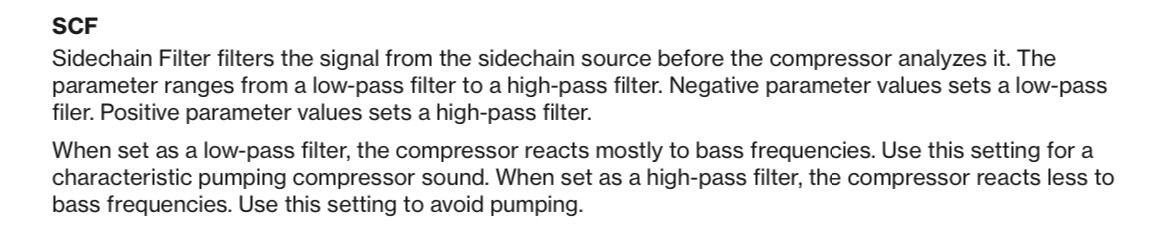
The side chain filter also needs to be set to low-pass in order to achieve the ducking effect- from the manual:
7 Likes
Try harder.
Highest ratio, not so low threshold maybe, fast attack and low enough release…
Of course full wet.
Experiment with just a kick and a bass or pad to get the settings right.
5 Likes
Is it possible to monitor only the ipad output from DT II without hearing DT II main in the same time? I am trying to process DT II audio through iPad FX with only a usb audio cable but can’t find the correct setting in DT II/AUM. I think the easiest way would be to add an audio interface in between but would be great if it worked directly
That should be the Int to Main setting in audio routing. Turned off, it should send your main audio to iPad, then you can dial in the wet/dry mix on iPad.
5 Likes
Works perfectly thank you
2 Likes
I watched a EZBOT video and he showed/mentioned that when a scale is active for a project, say pentatonic minor, when in step recording mode on trig page turning encoder A for note value the notes available will be within that chosen scale. This is not working for me. It still just scrolls through all notes in a chromatic scale. It would love for it to work like EZBOT showed. Anyone played with this?
1 Like
You have to press down on the encoder before turning it for this to work
4 Likes
ahhh…yes!!! Thank you!!! I wasn’t holding the encoder down while turning. Thanks again, very useful feature.
4 Likes
Seems obvious maybe, but you can record specific pages using page loop (grid recording, press page, select page(s) with trig 9-16).
In Sampling page select Length,
Start = Play, Arm on, and press play.
(I didn’t test all possibilities, and I read about some bugs with page loop so…)
This can be used to record fx tails if your pattern is 4 bar max : double its length with twice more pages, record the doubled part by selecting right pages with page loop function.
For external gear :
Digitakt II Tips & Tricks - #93 by sezare56
10 Likes
I had a similar thought process and have been enjoying using the portable Roland J-6 chord generator and processing it through the DTII.
2 Likes