I don’t always know what I’m doing, but when I do… I still have room for surprises ^^
I give a few hints here (feels like I am repeating myself but just in case you’ve skipped these)
Additional ones:
- Algo #2 with its dual/parallel setting is the best to understand FM and explore it when you don’t know what is does what: you work on one side, get a first tone, set your mix to full B, get a second tone, then adjust the mix (possibly with an LFO). Really good one, dead simple to understand what is going on
- in the default setting for the OG machine (FM TONE), use offset close to -1 to get extremely slow oscillators with aliasing. Boost the feedback for more noise.
- in the same screen as the offset, you have keytrack that lets you tame treble frequencies if needed
Now what is going on with every algorithm is just incrementing complexity (thus tones).
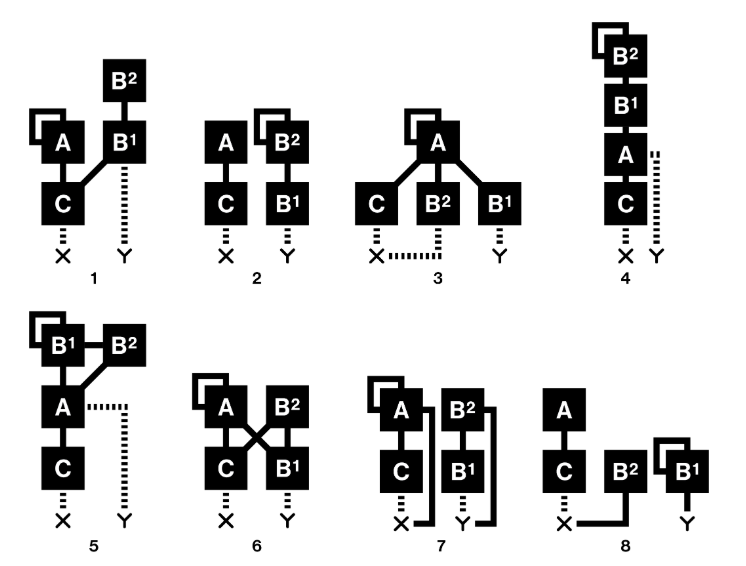
- I learned 1 cause it’s the default and rather interesting configuration for starting from scratch
- 2 is the simplest, I use it quite a lot as well for “simpler” tones, and it was how I learned what I was doing
- I don’t use 3 a lot, cause you loose B modulations.
- 4 is the one you want to check once you understand 2. Rather straightforward then
- 6 is the one with the most modulations, it’s good for percussions I found. You will most likely need A and B2 to have a decreasing envelope.
- 7 gets you lots of outputs, it can be nice, especially if you want chords.
We have LFOs to add extra envelopes, e.g. with decreasing exponential LFO set to ONE. Many places to experiment here, maybe Offset is the one I have overlooked for the longest time. It’s nice cause it lets you tune the oscillators individually, but on a short range.
Keytracking is brilliant macro, the cherry on the cake to have sounds that can be useful on a wider range of the keyboard.
Check this place for extra knowledge:
And of course