Absolutely, this is a really good way to do it. The benefit of the Arrangement approach is the thing where you plot the markers along a timeline and build your track up quickly from there. I do this based on a reference track and it’s cool how it helps you pull an overall arrangement together that you may not have done before.
Also, and this is just me, I tend to find that when working in Session View, the sort of music I do lends itself to arranging in Session View (eg: I don’t leave a lot to chance.) I tend to end up with a vertical arrangement as such. The nicer thing about this is it’s quicker to get an idea sorted, and you can see the whole thing more easily. All you have to do is add automation. Pros and cons to both and I’m interested to see how it works out in 24.
Working into ableton I have already had some crashes. Actually already more now than after years of studio one. Crashes occurred when grouping channels or inserting (stock) plugins. First impression is, that live isn’t the most stable daw. It’s not a showstopper for me, as I think push 3 will be very nice to work with. Just hope the crashes don’t become normality
in live 11? weird, I barely had it crash maybe twice over the last 3 years…
are you on the latest version 11.3.13? there was some previous version which was really acting weird, I think 11.3.11, but didn’t really crash. never ever had it crash when grouping or inserting stock plugins.
are you on windows? maybe it’s something related to the audio interface?
Couple of times here. One I can recreate each time. Try to group chains within an audio effects rack. Not even sure if that is something that should be possible but it instantly crashes Ableton.
Another happens with midi mapping sometimes but not sure why and it goes away when removing the particular device and adding it again (or undoing the removal).
Nope. M1 mac mini. But maybe it’s time to finally update the OS. I’m still on the OS it got delivered with. Plugins didn’t work with the newer OS. Think that should be resolved.
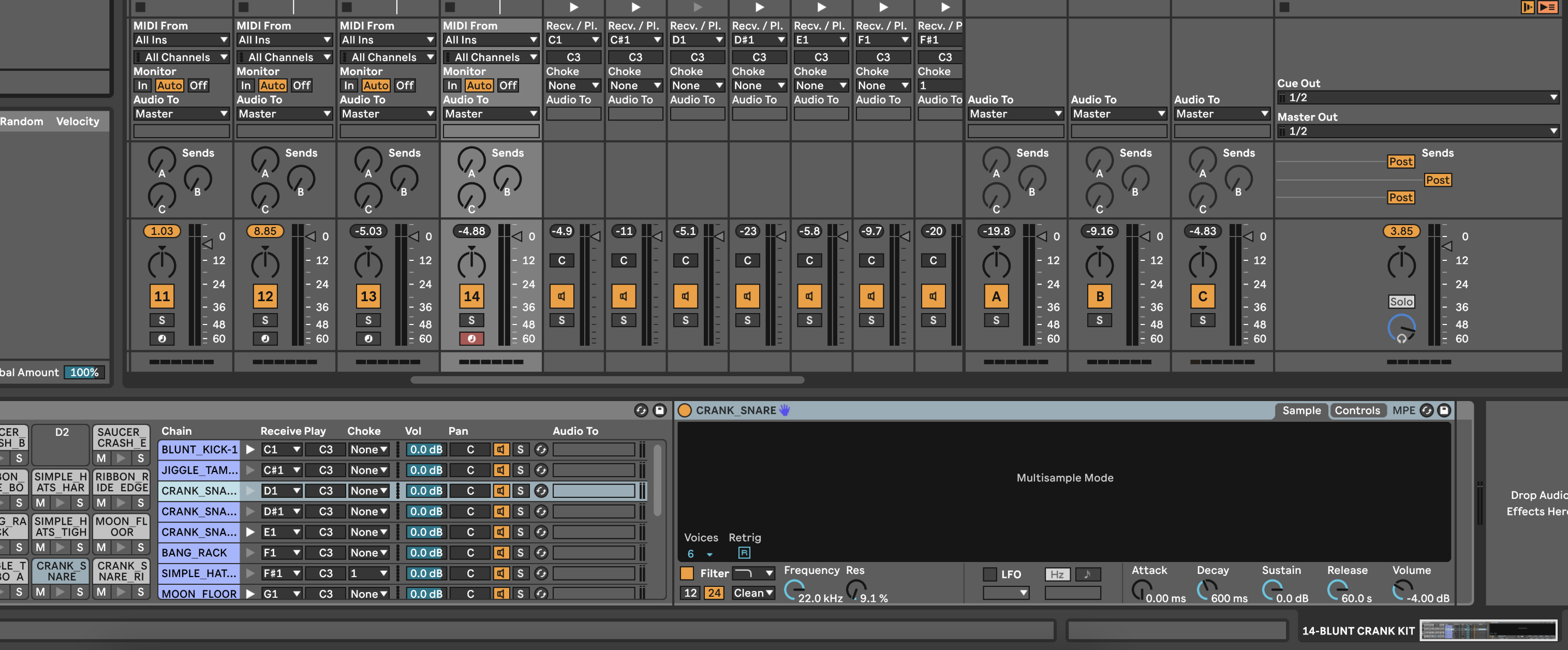
How do you view the individual samples in Simpler when you see this ‘Multisample Mode’ window??
I’ve YouTube’d it but all I see is how to create your own multisamples using an Inst Rack… it’s not telling me how to access these ones in a preset kit…
Hi everyone,
I have a very strange issue.
My left hand side menu basically stopped working. When I click on instruments, effects. samples, max4live etc nothing happens.
Live 11 Suite is up to date firmware wise and already tried reinstalling once.
tldr; you need to add -DisableGraphicsHardwareAcceleration into the Options.txt file
or perhaps there’s some vst that gets the program stuck, you can launch Live in “safe mode” by holding Option and clicking on the Live icon, it should load without and vsts.
I feel a bit dumb, there might have been a slight UI change since the last time I used it because the problem was that the left hand side panel was simply not opened enough for me to see the expanded menus. All is well I did add the option.txt file and reset database, just in case.
actually, if that wasn’t the issue I’d remove that from the options.txt, this change moves the UI handling to GPU instead of the CPU which should lower CPU usage, considering this is an Intel mac I’d move as much load possible to the GPU, my 2019 mbp fans were kicking in real fast with Live, a GPU help for the UI should be good for your mac.
I didn’t realize how the drum buss is good for absolutely everything. Especially with wind synths, it sounds so much more natural. In fact, a lot of Ableton stock plugins sound very good with wind synths right off the bat.
Here’s Respiro with the drum buss, glue compressor, reverb and a little bit of erosion :
I feel like Drum Buss is cheating somehow but I can’t stop using it. I’ve tried all kinds of bus processing – plugins, external hardware compressors and saturators – and nothing sounds as good. I’ve given up fighting it and now I just slap Drum Buss on everything.
I‘m on a M2 MacBook Air Running Live 11. has anyone experienced that simpler’s/drumrack’s high pass filter is not working at times. Really strange. I have several drum chops from a converted drum break in a drum rack and the high pass filter is working on one hihat for example while on another hihat it isn’t. Just silence, even though I use the exact same adjustments and even the sounds are nearly identical.
I would like to leave here on the internet what I’ve found about how multi-sampling for Ableton Live Sampler instrument can be done quickly and efficiently.
I used to use Redmatica Autosampler and I’m now using Autosampler utility tool in Apple MainStage for multi-sampling hardware synths, modular synths or even software instruments (multi-notes and multi-velocities). Autosampler is creating an exs24 file program with a samples folder.
Up to Ableton Live 10, we could import these exs24 sample program files directly into Ableton Sampler instrument.
Since Ableton Live 11, the support of exs24 files was dropped. I was super frustrating ! I didn’t find any alternative ways myself or on the internet to efficiently and quickly create multi-samples for Ableton Sample instrument.
After many trials during the past few days, it happens that samples made with Apple Mainstage Autosampler contain root note, note mapping and velocity mapping embedded in their metadatas. Importing Autosampler samples into Ableton sampler is just a matter of dragging and droping these samples directly into Ableton Sampler zone window. That it ! Simple and efficient !
This should be documented into Ableton sampler help pages.


 I did add the option.txt file and reset database, just in case.