I found this too, but disappeared if going through another mixer first.
I assumed that the “high voltage level for modular” 1010 talk about might need some serious attenuation/buffering? Or maybe as @gradient found, the additional mixer just removed grounding noise; though I never had ground noise before 
Thanks James. I’m definately finding that the output signal from the Blackbox is pretty hot. I paid closer attention to gain staging - which helped. Gain settings on the SSL channels are now set lower. However, the Blackbox is still noisy which I think is just a characteristic of the device. I have to disconnect the modem in my studio when I’m using the Blackbox to avoid interference/noise. This isn’t an issue with any of the other devices in my set up. I’m going to try plugging in my Behringer hum destroyer later and see what outcomes I get form that…
I use the Blackbox and SiX - haven’t had any issues with noise.
Blackbox is on Bus B, I have the gain up pretty high to compensate for the BB’s attenuation. And then BB returns on Ext1, gain from Noon to 3 o’clock.
This occurs without USB devices connected?
I haven’t experienced the blackbox being noise by default - only when certain conditions apply, in my case the powering of it. But the unit itself seems very quiet. If all’s well and you crank it up and get a lot of noise, something else is going on.
Part of the perceived problem with noise is the BB can only be powered by USB — and there are a lot of ways to get USB power that are noisy by default. Attaching it to any sort of hub or even running it from my laptop gives me noise, for example.
The normal solution for this (a USB isolator) is difficult to come by because the power requirements of the BB are so huge. You can find USB isolators in the 200–500mA range, but the BB requires a full 2A.
The best way to power it is direct from the wall with the adapter and cable 1010 provided. Anything else is asking for trouble.
2 Likes
As of yet I’ve only used mine on battery power and it’s quiet as a mouse.
2 Likes
Thanks for the responses everyone. Just a quick note that I tried running the BB from a battery and plugged directly into the wall and still had noise issues when connected to the SSL. Yesterday, I put my hum destroyer between the BB and the SSL and this solved the problem. It’s a fix for now…
So sampling audio into the BB via Bus B and then monitoring the BB output into Ext 1? I’m using Bus B as a way to send audio to my DAW.
Yep, exactly. The BB acts as my DAW in some ways. Thanks to the the 2.x firmware, I also use it as a bus EQ when I’m not sampling anything.
You could consider a small DI Box which is normally used for live purpose.
But as there are more events with artists performing on iPads etc. there are some devices with 3,5mm Stereo jack Input and balanced line TRS or XLR out. There is also a ground Switch on These devices which can solve the problem. Hum destroyers tend to cover the audio signal in the upper frequency range.
First post here (hi!  ). I’m interested in replacing my 4track tape recorder with the blackbox, I’m just wondering about a few things before I go for it…
-
my planned use case is to have my mixers main output go to the blackbox, and then send a stereo out from the blackbox back into a stereo channel on my mixer. My thought being that I could grab synced loops from any of my synths with the blackbox, and then resample those loops through effects on my mixers aux sends back into the blackbox… Has anyone else used it this way? I guess as long as you keep monitoring off, it should be doable without any unwanted feedback?
-
Can you have some samples be free looping(unsychronized), while others are synced to an internal/external clock source?
-
Can the blackbox send out program change messages? I feel like this is a no, but would be great for my situation right now…

Yes. You don’t even need a mixer for this. The blackbox can handle that workflow on its own, due to its clever routing options. I resample stuff live from the blackbox, through fx, back into blackbox and monitor the result only, all the time.
Can you ever. The blackbox excels at this. I mix 8 step drum patterns, time stretched loops and totally unsynced stuff at the same time, all the time. It’s glorious.
It can receive them. Not sure about sending them. But a program in the blackbox in this context, is the actual loading of a new patch. So even if it works, you probably won’t like how it works.
But I’ll admit, I don’t use it for this, so I don’t know for sure.
1 Like
Ooh awesome, thank you for the reply! Ya I’m not interested in patch changes, but some mungo modules I have use program changes to recall states, so even just sending out the same program change everytime I load and play a patch would be perfect. Fingers crossed for a future firmware addition I guess. I don’t know why I never looked into the blackbox sooner, something about the UI just didn’t grab my interest at first glance, it looks like exactly what my setup could use as a sort of sketchbook / arranger though…
1 Like
That’s how I use my three BBs. I make sure each of the mixers I use has a separate bus output though, as I like to deliberately push a button to choose the tracks routed to it for recording.
2 Likes
I haven’t used BB as a looper and I’m struggling to grasp the flow. Here’s my current thinking, does this make sense?
To Model 1 mixer
- Rytm -> input 1
- Modular -> input 2
- More synths/effects-> input 3, 4 and 5
- Blackbox -> input 6
From Model 1 mixer
- Cue B -> Blackbox input L/R
Blackbox setup
- Novation Launch Control XL controlling the levels of 8 BB pads
- Those 8 pads are set up to record X number of bars with rec-to-play turned on
- Record monitoring off
Flow
- Start jamming, find a good sequence with the modular, press cue B on channel 2
- Press pad 1 on BB to start recording into it. I’m still monitoring channel 2 on the mixer, NOT monitoring the BB
- When recording finishes, BB starts playing it back but the volume is down because launch control fader is down.
- Now transition from mixer channel 2 to the BB playback on channel 6, quick crossfade or something more dramatic
Am I missing anything or is there a better way?
1 Like
I’m having trouble doing “pseudo” midi-thru with my blackbox using a pad to “pass-through” midi. I’m running the 2.0.5 firmware. Has anyone had any success with this? I’m trying sequence the blackbox with my Machinedrum, using th BB as a sample player, and then pass midi to a MicroMonsta and I don’t currently have access to a midi-splitter.
Have asked in 1010 forums but only got a semi-rude-unhelpful standard reply
I do this by creating an pad with a silent sample (or just the mix all the way down). When this pad is selected the midi send in goes thru.
1 Like
This is what I’m trying to do - but it’s not working. Are you also on 2.0.5?
If I trigger the pad manually on the BB it sends a signal to the MM2 - and transport / clock is received from the MD finde - it just doesn’t seem to trigger the pad?
MD directly into the MM2 works fine as well
EDIT: from testing - it seems as if maybe midi in on my BB is somehow broken - it only seems to recieve transport and clock but no notes.
EDIT EDIT: So I tried one last thing before reverting to 1.7 firmware - creating a new presetproject. This solved the midi-in issue  - no idea why
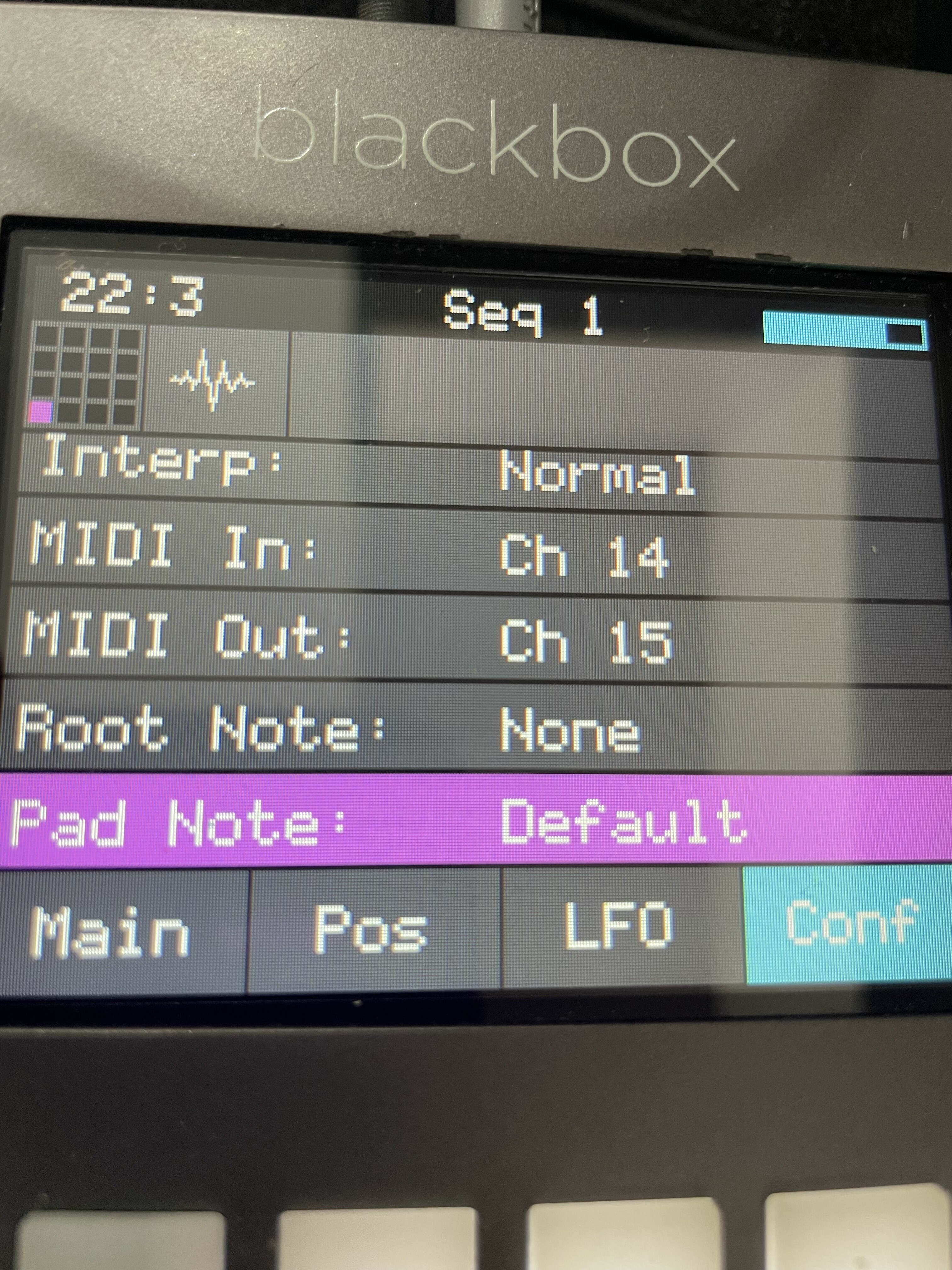
Not near my BB at the moment. So just how i remember it: Check the midi settings under the tools button. You can set how the bb and the pads react on incoming midi.