Cheers will check that out, looks pretty nice. Been using ipad mini & BB a lot, but mostly with PureData or Lemur.
1 Like
A question for you, what is the longest sample you managed to load into Jamm Pro as a clip?
I was looking at the manual last night and it says JammPro will keep in time samples that loop perfectly at lengths of 2^n bars, which is the same concept as in the BB, but can you confirm it works for a sample at, say, 1024 bars? Or is there a cap at 16 bars, as the manual implies?
I receive a message on Ninja Jamm Pro when I load a long sample that is several minutes long. It won’t accept it. Long samples and custom recordings are definitely a benefit on the BB. Also, the ability to play 16 sample slots simultaneously. On the Ninja Jamm you get 64 samples but can only play 4 slots at the same time. Where the Ninja Jamm shines is sample mangling. Each track has independent distortion units, Filters, Delays, Reverbs, Sidechains as well as a generative sub bass module that creates a sub from your beats. I hope to partner the BB and Ninja Jamm as they seem to have strengths together that could reap many benefits for both studio recording and live performance.
1 Like
Ah. I assumed it might be more difficult than that. I’ll give it a shot.
It’s just a standard micro sd card with a standard file system, folders, sub-folders, files, etc. 
Arguably there could be some kind of software to create presets on the computer. Given the nature of the presets file it would be pretty simple to create, but since it’s also equally simple to do on the device… not sure if there’s enough incentive here.
1 Like
Surgeon with a Black Box:
4 Likes
After some tinkering I honestly think that the granular engine is Blackboxes biggest strength… it’s the best way to timestretch any audio with the most pleasant artifacts…
I had a lot of fun just running three loops with midi lfos affecting speed and it sounded really cool!
2 Likes
Any idea if blackbox or bluebox can be powered by a power solution like the strymon zuma?
Is dc to usb even a thing?
Quick Question.
If I have say, a 2 minute synth recording in one pad. Then, I have 6 other pads with one shot drum samples. Can I then go into the sequencer, change the resolution so my 2 minute synth is then in a sequence so I can then play that while sampling more into the recorder. BUT, can I record into the recorder a 2 minute drum backing for the synth FROM the pads to the recorder/sampler. Or, I guess resampling would be the word if I’m doing it from the pads with samples already. Is that possible or do I have to use an external drum program to record into the blackbox. I dont know if I described this correctly…eek.
So, essentially I want to record a cool 2 minute drone from my Lyra 8. Then use the blackbox for some drums behind the drone noise. Can I record into the sampler from the pads, 2 minutes of drums, while listening to a sequence that I put the Lyra recording into?
Thanks.
I don’t think so. The resampling is only from the main outs, which is everything playing on the Blackbox.
If you have a mixer, you can send your drums out the Blackbox and back in and then sample those!
1 Like
Use a phone charger and plug in your USB A to B cable. iPhone chargers provide about 1A but for the Bluebox you’ll need a charger with at least 2A (my Samsung charger does the trick). This also gets rid of any unwanted noise in a dawless setup.
DC to USB can be done but it’s not trivial unfortunately. I don’t know of any off the shelf cables that do so.
I’ve got my Blackbox MIDI out going into my Model:Cycles MIDI in, I’ve tried both the Blackbox’s 3.5mm MIDI and the Cycles’ 3.5mm MIDI into a working cable but when I press Play on the blackbox the Cycles doesn’t play its pattern.
Any clue what I’d need to set up? I’ve got Clock In enabled on the Cycles and Clock Out enabled on the Blackbox, I can’t seem to observe any other setting in the options of either that would need to change.
Edit: Nevermind, I realized I could just send MIDI over USB to the Cycles, though while Play starts the clock, Stop does not appear to stop the playing on the Cycles?
My sampling will be done so I’m not so concerned. Just odd!
Edit: Edit: Then Stop started working again? Little glitchy i can deal with but hopefully it gets worked out nonetheless.
Okay, i now know how to at least sample in. I unfairly judged the simple UI before getting my hands on one, now i love it!
Next step: figuring out the song structure.
1 Like
One little dark secret the song mode contains, which isn’t obvious, is that it doesn’t reset the sequences if you trigger them across song clips. That is very powerful, so I’m just gonna share this here despite you not asking for it 
Let’s say you launch Sequence 1 and Sequence 2 in Song Clip One. All good so far.
So let’s say you launch Sequence 1 and Sequence 2 in Song Clip Two, and also Sequence 3. Blackbox now interprets this as you just want 1 and 2 to continue wherever they were at, not just trigger them from the start again. So while it’s very abstract considering the interface, it does mean that all 16 sequences run independently of each other across song clips, and for free form stuff and even further polyrythmic mayhem, that’s pretty spectacular.
So song mode is not just batches of sequences going on and off. It’s actually a way to create long form stuff that travels across hundreds of bars, either looping or just really long recordings while other stuff is going on in parallell, independent of this.
9 Likes
One interesting change to the workflow, i’m draining my grooveboxes of all the loops i’ve spent forever making through several projects and banks and you know what…none of them seem to play well with each other 
I’m wanting to build up slower and less sloppily so i can have more (if not clarity) ability to mash up loops more naturally.
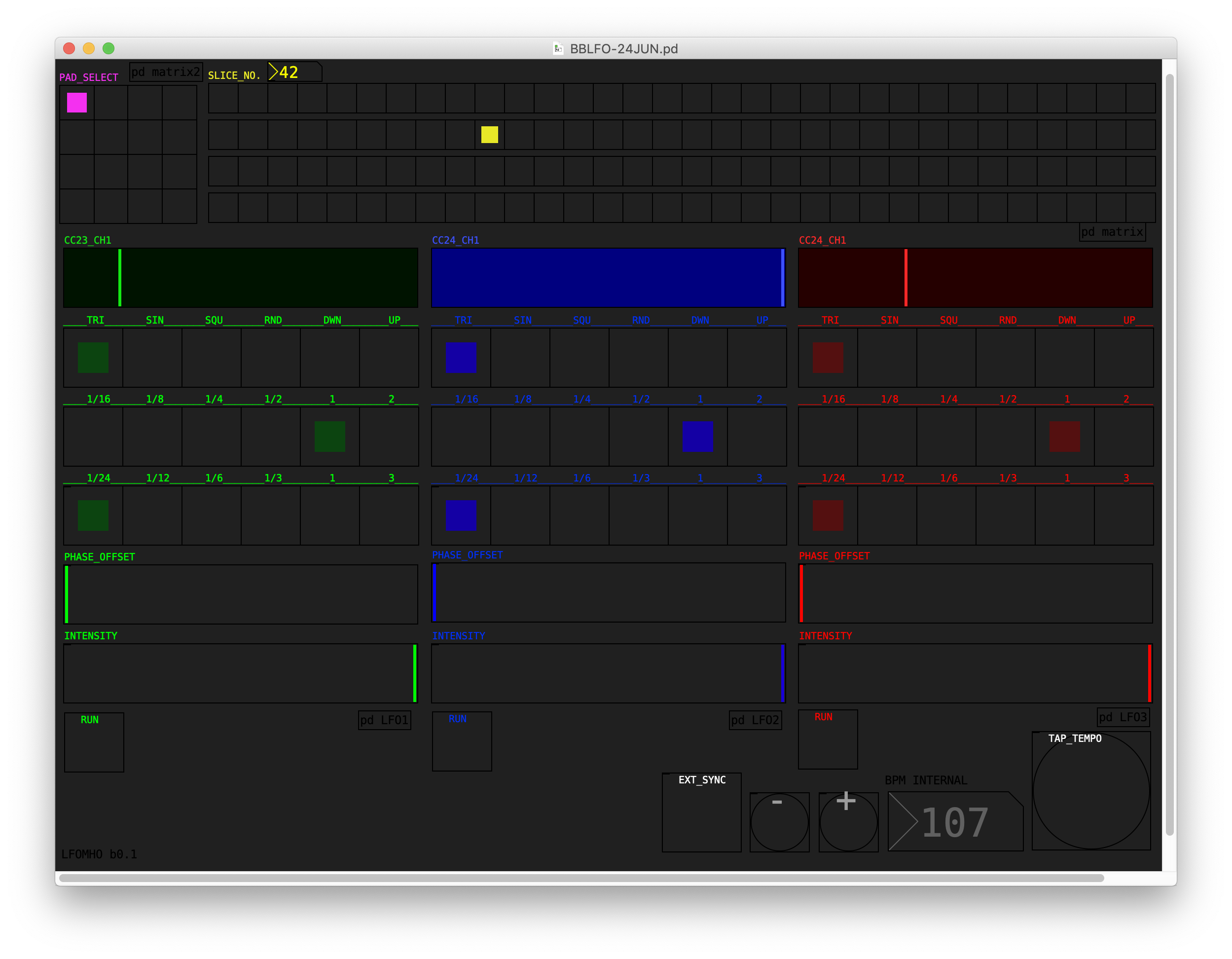
PureData patch: 3 LFOs and a slice selector for Blackbox
Hi all,
I’m confident that 1010music will provide us with LFOs/continuous automation eventually.
In the meantime, I went ahead with my personal wish list, in the form of three syncable MIDI CC LFOs and a slice selector for pad slices triggered by a sequence.
BBLFO-24JUN.pd.zip is entirely Vanilla Pd and will run anywhere, but the layout is optimized for an iPad mini tablet.
Still a few bugs to iron out, but nothing fatal.
It’s probably not immediately clear to everyone how to use it (I plan on doing a short tute-vid when I have time, in 2047) so feel free to ask questions.
Requirements: MIDI IN/OUT connection with Blackbox.
Known issues in the 24 june version:
- LFO3 label should read: CC25_CH1
- patch needs to be re-loaded after disconnecting and reconnecting MIDI.
Tags: blackbox, lfo, midi, puredata, slices
BBLFO-24JUN.pd.zip (7.6 KB)
8 Likes
This is awesome! Thank you so much for doing this!
How does the sequence triggered slice selector work?
1 Like
The blackbox accepts a CC value to change slice number (1-128).
-
On the BB, auto-slice your pad into (ideally) 128 grid slices.
-
Make a sequence in PAD mode triggering the pad you want in a loop, one note is usually sufficient. This should trigger slice 1 repeatedly, at each loop of the sequence.
-
Next, you will need to assign the CC coming from the patch to the slice parameter of the BB, with ‘Learn’. On the BB, under ‘Slice’, go the CC page and press ‘Learn’, on the left of the Pd patch is the ‘Pad Selector’. Select the pad you are making the assignment to, and press any button in the slice matrix. This will send a CC number to the BB and the ‘Learn’ button should turn back to grey. Repeat for every pad you want to slice control.
-
When you press on one of the 128 squares of the slice matrix, the slice triggered by the pad sequence will change to the new number when the sequence loops and a/the note is played.
-
NOTE: Make sure you are only sending one, single CC when doing ‘Learn’ assignments!
3 Likes
And feel free to delete the LFOs, if you don’t need them, and make the slice matrix bigger. The patch is fully editable in Pd.
3 Likes