I have an audio interface where my PC is already, but do all the (non-DAW) music stuff at another desk. I use that desk for all kinds of other things as well, so I have to re-setup my gear all the time.
The L6 has such a great feature set for us synth enthusiasts and it is small enough to always keep it on the desk together with the monitors. It would be great to be able to just plug in the guitar at any moment without the need for other gear.
I’m cool with only having clean sound as I tend to practice without distortion and effects anyways. Still would be great if they could add distortion to the effects section.
Super excited for this. It seems to solve all the issues I have with the Behringer Flow 8 I currently use as my main mixer:
4 stereo tracks instead of 2 and 1 “double mono”
eq and pan accessible from the front panel (Flow 8 is app only)
encoders with led rings are much better when there are multiple functions assigned on them (on the flow the faders never correspond with the function that they are currently controlling)
That’s a day one buy from me. and then the midi and sampling for more or less the same price.
The only thing I hope they will add that the Flow 8 has - Aux pairing so there can be either two mono sends or one stereo. I hope that’s doable at all with the hardware. Super sad if not.
It may not be your fault. The forum software deletes the quote on replies to the immediate above post sometimes. It also does not make it clear if the immediate post bellow is a reply or not. A part I dislike in how discourse is configured in this particular case.
I‘ve checked how the bigger mixers in this series handle this topic.
It seems they use scenes / monitor outs / ipad–control for that.
Maybe it will be controllable via iPad on the L6?
For example:
„Best of all, the master-section headphone output also makes possible the feature that was probably top of my wishlist on the L‑12. In addition to mute, select and record/play status buttons, each mixer channel (including the effects returns) now has its own solo button. Engage solo on one or more channels and the main and cue mixes are unaffected, but the master headphone output is automatically switched to pick up a PFL bus, enabling the engineer to check individual sources without disrupting what anyone else hears. It’s not the most flexible solo function of all time, but it’s beautifully simple, very intuitive and works in exactly the way you’d want it to in most conceivable L‑20 use cases.“
And in the manual of the 20r from page 46 to 51 regarding the scenes:
In a regular mixer that’s fine and all. But since everything past the ins and before the outs is digital, wouldn’t a rerouting of the connections in the DSP be possible? Not arbitrary, I understand that timing bandwidth and processing limitations come into play.
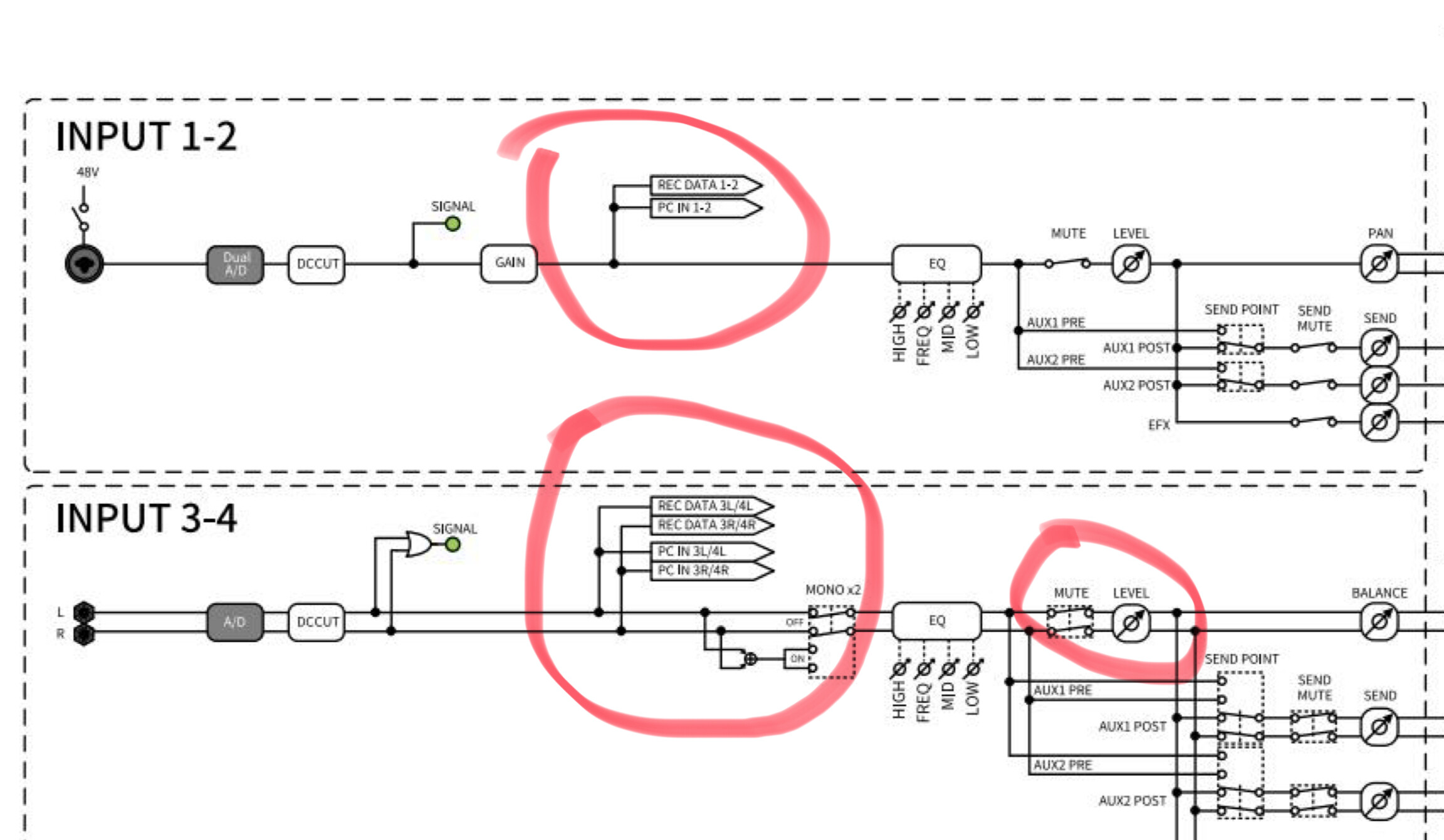
But for example rec outs:
It happens in parallel to the routing, for writing to disc it should not make a difference if the signal is read before or after the fader.
Cue out could be a bandwidth problem cause it would increase the data streams to another pair of stereo outs.
was just pointing that current version of the manual indicates that is not the case.
I share the perspective that is could be technically possible with a firmware to add/change routings between the A/D and D/A. As said e.g. establish a digital cue mix bus and route that on AUX1/2 as an option or on a dedicated USB channel.
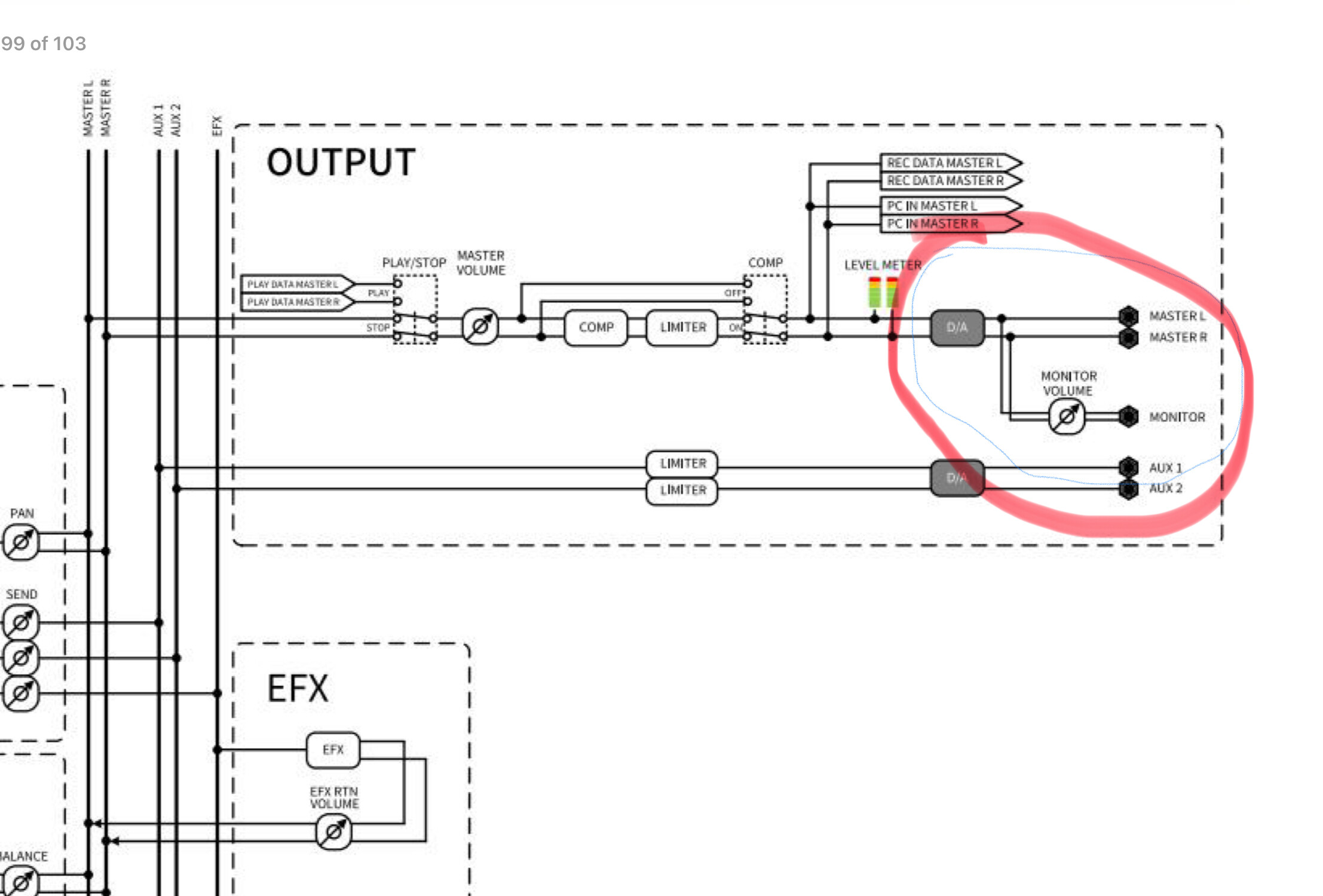
On route a cue bus onto the Monitor out looks less likely, Unlike the L-20. the L6 has no dedicated D/A for monitor on the current schematic.
But maybe board design allows flexible routing to a spare D/A channel that can be linked via firmware update to monitor out lines.

 maybe if it’s the last message I’m replying to.