So I’m working this out at the moment. Hopefully, it’s of use to any of yous.
I’ve had this setup without DAW like you probably all would:
- Audio - DT > A/B
- Audio - DN headphone > Microcosm > C/D
- Midi - OT > DT. DT Thru > DN. DN Thru > Microcosm
Now the Microcosm is on all DN tracks; which forces me to sample the DN into the OT dry for basses and such. I was thinking about bypassing this and having the Cosm as a send via Cue Outs, but there’s just no way to make this work standalone. I’d also like to use the Cosm on other stuff in the DAW.
Now I’ve changed the setup to utilize Overbridge. Main reasons: Seamlessly switching between Ableton mode, lots of FX on individual tracks, and using a Glue Comp on the OT at the end of it all.
I’ve made an Aggregated Audio Device via Mac:
-
- DT multitracked via Overbridge. Group > DT’s input. This goes into OT’s A/B.
-
- DN multitracked via Overbridge. Group > DN’s input. This goes into OT’s C/D.
-
- Both the DT and DN plugin are set to ‘no sync’, to ensure the OT remains the brain.
Now I can use Ableton’s FX on all individual tracks; before then routing the stuff like you would do anyways into OT.
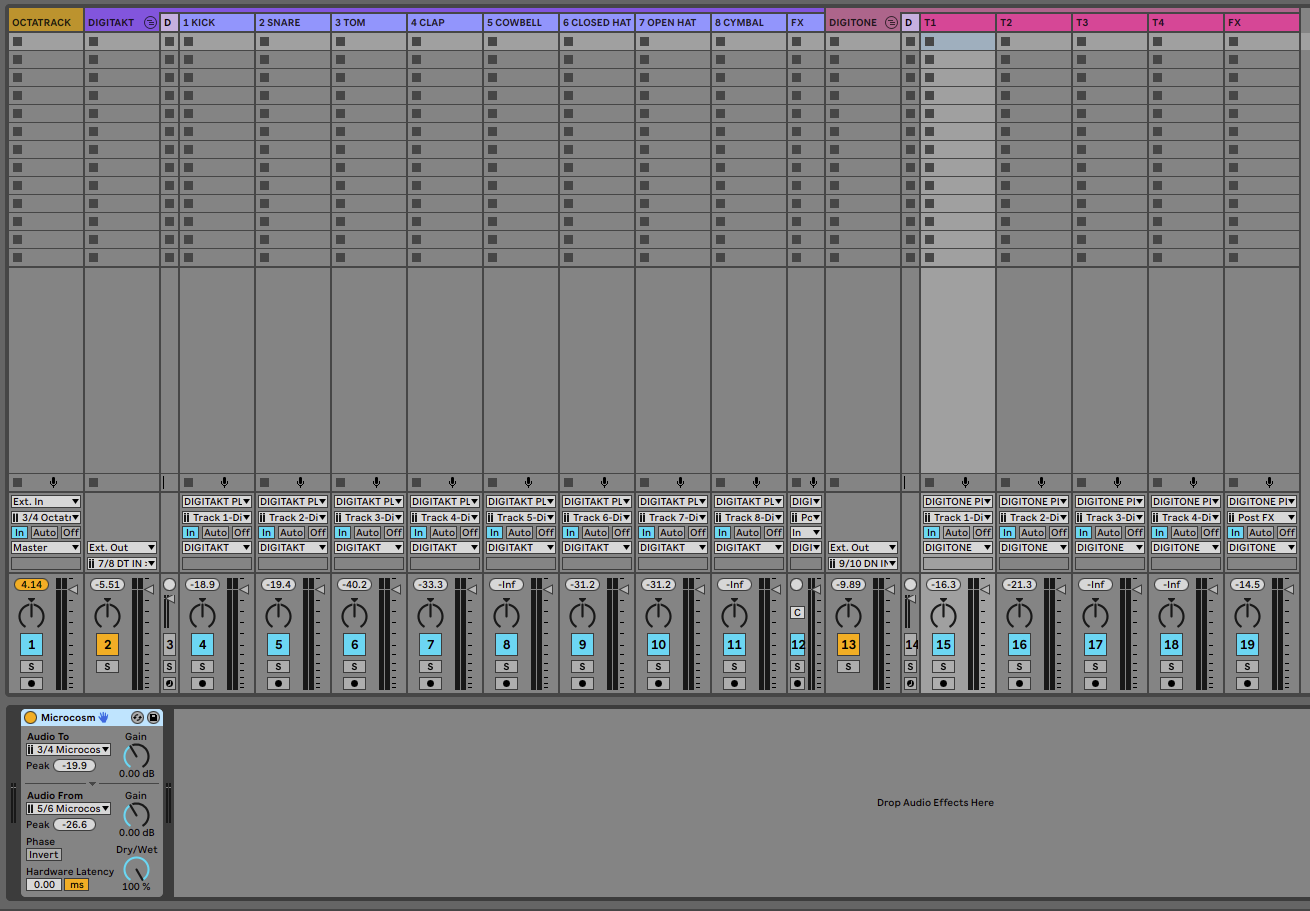
I use the other output’s on my Focusrite to send into the Microcosm via a 2 TS > 1 TRS cable. It’s not possible via Send unfortunately; because AFAIK I cannot route a send into the OT.
For now I’m using the EXT. Audio Effect to route individual tracks into the Microcosm.
One weird thing that’s happening: The OT Scenes are affecting the Microcosm, probably via some Midi CC message or something. The light’s change once my slider goes far right. Anyone know where to disable what? 
It’s the result of my 3rd OT: I’ve finally realized that it’s not competing with Ableton. I can take both a dawless approach, a hybrid approach, or an ITB approach. Whatever works. This helps me switch between these seamlessly.
