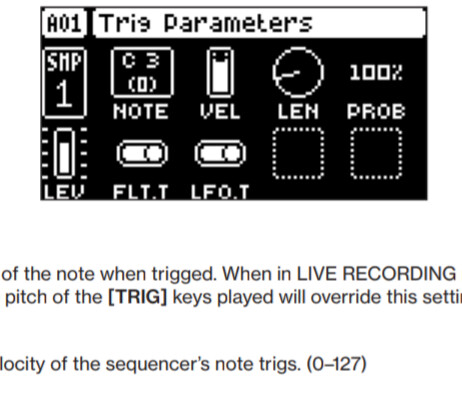
As I understand, LFOs set to trig (TRG) mode should activate only when and if a trig is played that has LFO.T on the trig page) switched ON (assuming this is switched off for the track in general).
So in other words, on a track with LFO.T switched OFF, and no trigs plocked to set it ON, the LFO should never take effect.
I am clearly wrong with this because, with the above setup and a simple LFO modulating sample tune, I hear it take effect.
The way, I understand it is that instead of the LFO being free running, trig mode makes it start at the beginning of the LFO phase Every time you press a key or trig.
Just for clarity the OP is asking about the LFO.T on the Trig Parameter page
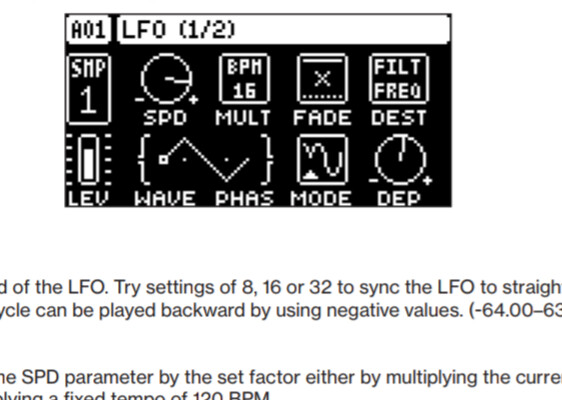
As opposed to the trig mode on the LFO page which can can be selected as a MODE.
I have had the same case. LFO.T turned off and still hear LFO effects.
Have you got latest fw update? I can’t recall having the issue in a while…although I have mostly stopped used LFO for fades so much because of this issue.
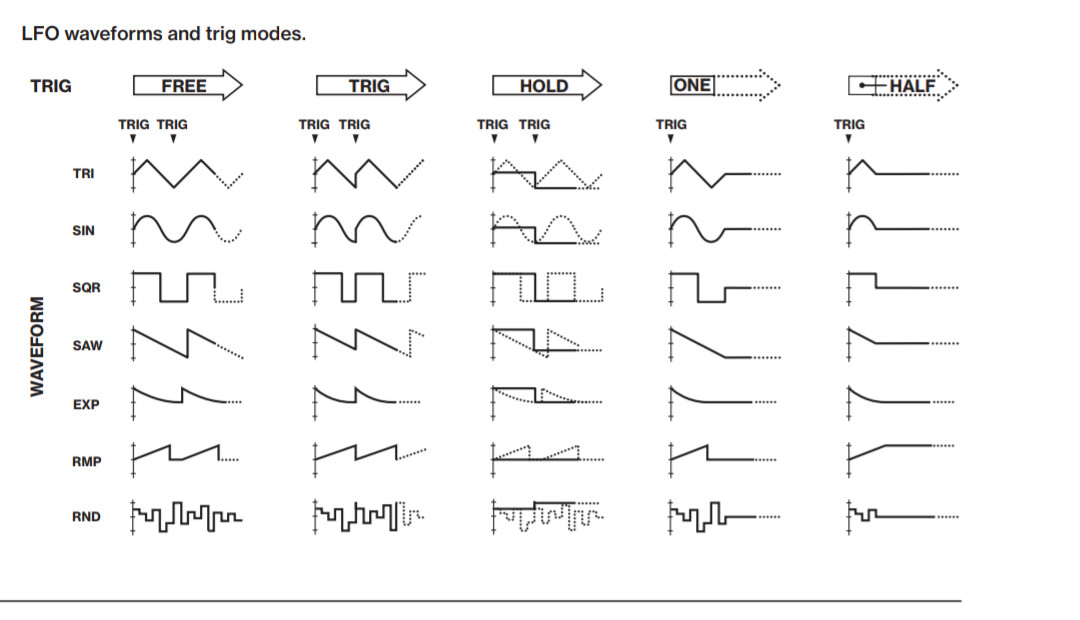
The LFO is always running if not set to “one shot” or “half shot”. The LFO.T parameter sends a trig to the LFO. And depending on the LFO mode will either reset from start or sample and hold if it is in that mode.
It does not do anything with the “output” of the LFO.
Thanks, guys. OK I understand now that the LFO is always running (unless it’s on one/half-shot). To clarify, I’m refering to the LFO page > mode = “TRIG”. I had mistakenly thought that meant the LFO would not activate until and unless a step with LFO.T set to ON was triggered.
No, the LFOs have always been lockable. It servers a purpose in that you can choose to not trigger the LFO even when not placing a trigless lock and vice versa.
LFO.T is - should the LFO trigger here?
LFO mode is - what happens when the LFO is triggered?
I meant that on the early trinity you couldn’t plock LFO triggering parameters.
But you could more or less do so on the Monomachine with the trig lane. I thought LFO.T parameter was somehow a reminder from such past.
AGHHHHHHHHHHHHHHHHHHHH why are fades on Elektron so complicated???
(Sorry, I just had to get that out of me.)
The keen-eyed among you will discern from the above that I’m still struggling.
I’ve read various threads on this, and the helpful replies in this thread.
All I want to do is gradually turn down my filter frequency from its current value down to 0, once, over the duration of a pattern.
I have a 4-page pattern that plays twice. LFO.T is off for the pattern. My LFO1 is set to destination = filter freq., wave = ramp, depth = 0; mode = one (I want the frequency to be turned down, and stay turned down).
I then have a trigless trig on the first step of the first page, which is conditionalised to the second playthrough (2:2). This has LFO1 depth = -50 plocked to it.
My thinking is, the LFO is always running, but has no depth, so does nothing audible. Then this plock happens, and suddenly it has a depth of -50, so should kick in.
I recommend creating a test project. In that project use something very obvious, like an LFO to the pitch of a sound, and then test. Create patterns, mess around with LFO.T and p-locks… You’ll figure it out
Good advice. Modulate pitch to start with as it’s so easy to hear. Then when you have the modulation you want, switch to the right destination, and adjust depth.
I think you need to lock LFO.T back on again where you want it to trigger.
And maybe ramp set to half or maybe exp set to half.
My logic being you want to come from 50 to 0 not from 50 to -50 or to jump back up at the end of the cycle. I’m sure you are doing it anyway but use the graphic on screen to make sure the ramp goes in the right direction. You can make speed and depth go negative!
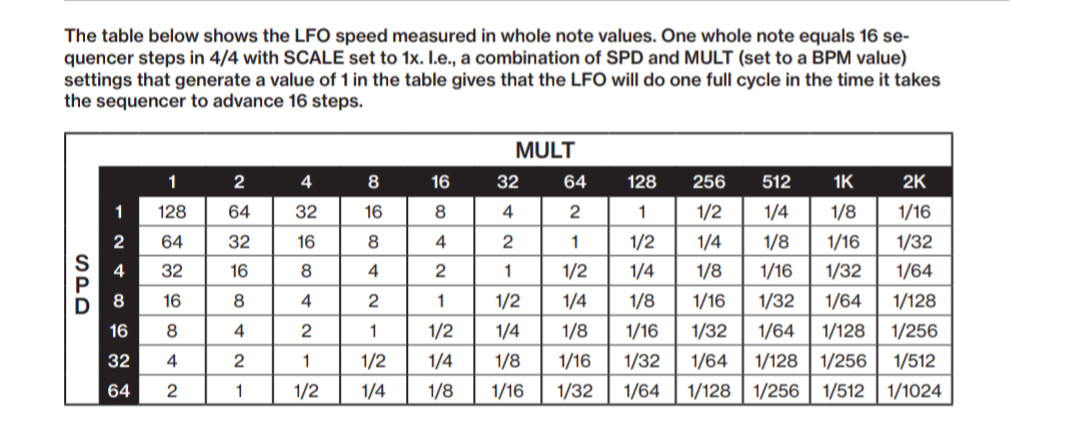
And remember that this table is in note length so 1 equals 16 steps. The fact we need a table and it doesn’t just show the length on screen drives me crazy.