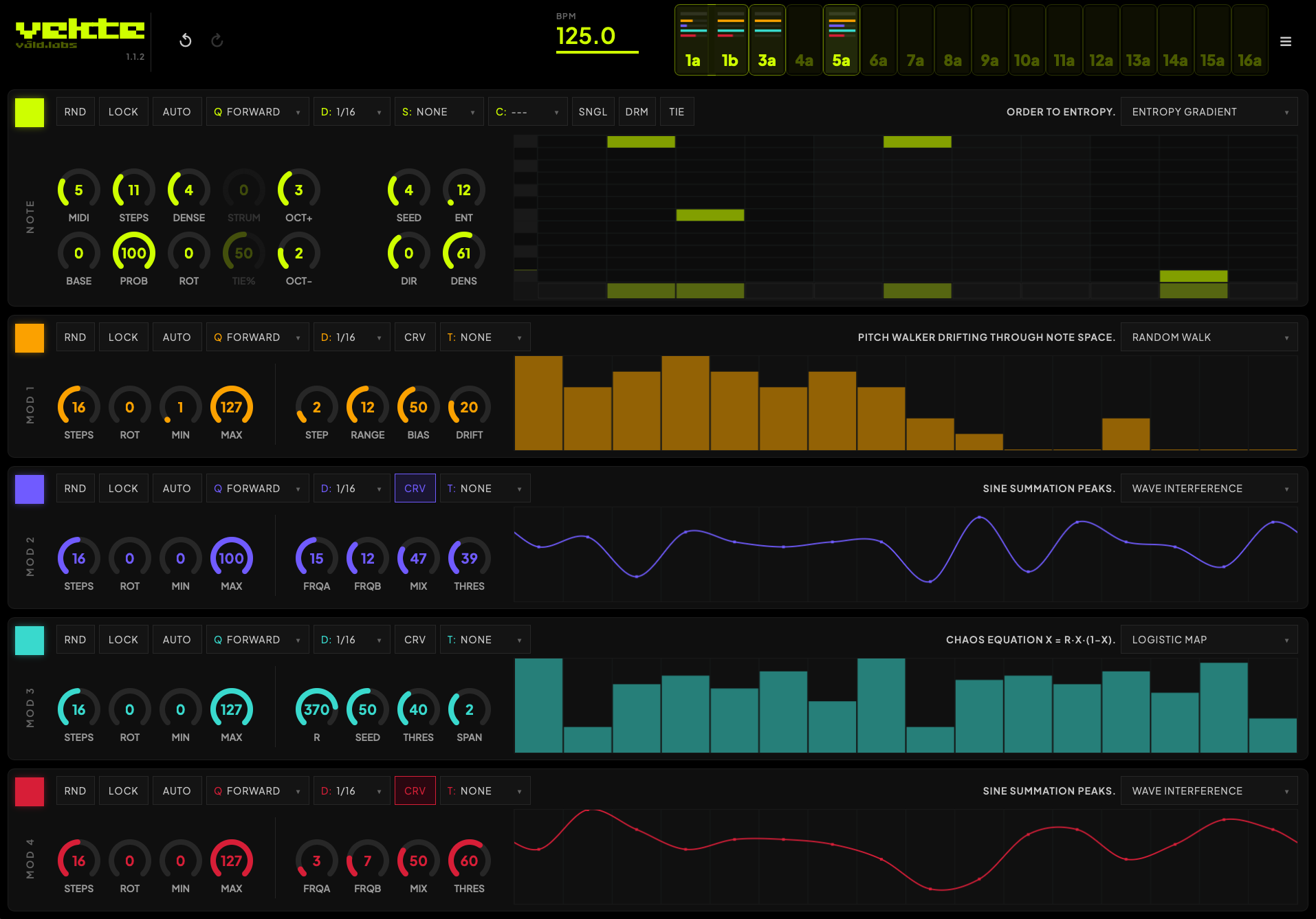
Vekte by Våld Labs — public beta (generative MIDI sequencer, VST3)

Vekte is a generative MIDI sequencer plugin. It runs 31 algorithms — Euclidean, Markov, cellular automata, Xenakis sieves, Kaprekar, logistic maps, and more — and uses them to write patterns to drive your instruments.

Every channel has one note lane and four modulation lanes. Each lane runs its own algorithm and can target velocity, length, any CC, transpose, scale, chord, octave, or another lane’s parameters, with sixteen slots per session (which can be either routed freely to any channel, including multiple slots controlling one single channel).

The engine is deterministic. Each pattern is hashed from its algorithm and parameters into a seed, so a given configuration always produces the same result. Patterns are exact and repeatable, and you can export any state as a preset string to recall later or hand to someone else (this part is still WIP, and will be improved massively in the next one).

It began as the software side of Rekke, our hardware sequencer, and the two share part of the same algorithmic core.

This is a public beta. VST3 only for now, on Windows and macOS. AU and an iOS AUv3 build are planned, but I want VST3 solid first. Free during the beta.

I’m after real feedback: what breaks, which hosts misbehave, what’s confusing, what’s missing. Bug reports and DAW-specific quirks are the most useful thing you can send (you have a form in the menu for direct feedback from the app).

Hope you all like it!

23 Likes

Xenakis Sieves :heart_eyes:

6 Likes

i’ve tried to be thorough and obscure :slight_smile:
let me know if everything goes well with the install, as it’s the very first public beta so bugs are expected! thanks

1 Like

I’m with @Jeanne on this one! Got some really cool sequences running with that algorithm.

Install went great on windows 11 and running the VST via Ableton. I’ve been imagining a sequencer like this recently and was planning on trying build something out on my own when I happened to see your post.

Only got to scratch the surface a little last night by generating some bass lines, but already having a great time. I’m planning on hooking up my Voltage Lab 2 over the weekend and trying to get some crazier soundscapes going using the MOD lanes. I’ll share screenshots of lanes and some samples if I find anything interesting.

One thing to note that probably falls into the “too early and too small of an install base to care” camp. I have an old laptop that runs Ubuntu (don’t have version right in front of me) that I tried loading the VST on. I used yabridge with the VST install handled by wine and tried loading into bitwigs. Kept crashing, which I think is probably due to some base incompatibility.

2 Likes

No issues at all installing on MacOS 26.5.1 and loading in Ableton Live 12.4.2. On my 13" MacBook, the UI runs off the bottom of the screen, and I can’t see a way to resize the UI or access the bottom part of it. I’ll give it a go tonight on my desktop machine with a larger monitor, but just FYI. Looks cool!

1 Like

@Rue amazing, thanks for the feedback! :raised_hands:

good to know it meets your expectations, and that you’re enjoying using it!

I would love to see stuff that you build with it. and, beyond sharing samples, you can also share the channel state, as it’s all deterministic (the manually inserted notes are also shared though they’re not deterministic)

You can access it by clicking on the burger menu, and “copy channel” - then you can paste the hexadecimal string anywhere to share it. Or simply paste on another channel to clone it and make variations.

Right now the string is pretty lengthy but I’m working on an algorithm to encode all data of a channel in a string which fits on a tweet. will try to fix it by next release :slight_smile:

Also, i thought about releasing for Linux as well but yes as you say there are dependencies which are exclusively OS-dependent (mainly for the UI), so I need to do one build for each platform. Since the community for Linux is quite small, i’m focusing right now on finalising the VST3 so I can work on the iPad and iPhone versions (which are already semi-functional).

For Ableton Live users: here is a small MAX utility which allows to map Vekte’s mod tracks (sending to CC’s) to any control - place it on the instrument chain (not Vekte’s) before the instrument, select the CC’s that Vekte is outputting and just map the control you want modulated.

https://drive.google.com/drive/folders/1FCu52ndgUQoxTzO6-z62IwyFcZx0yEqk?usp=drive_link

Also, if you would like to try out my synth (now only for iPhone and iPad) check out TRESSE — 39-Engine AUv3 Synth for AUM - also in open beta, next week also in VST3

@elmer i’ll make the interface a bit smaller, but this one is definitely resizable! try the corners

I swear I poked at the corners before and I couldn’t get it to resize, but I guess I just needed another cup of coffee. Works like it should! Now to go make some noise. Cheers!

EDIT: Ok, I’m not completely losing my mind, the VST3 one resizes correctly but the AU version that also gets installed is definitely not resizable. I guess I grabbed that one the first time.

1 Like

Glad it worked out but i’ll reduce windows size anyway since it’s workable with a smaller window :slight_smile: i’ll remove the AU on the next version as the VST3 is more reliable and there will be an AUv3 coming as well

Enjoy, let me know what you think of it!

1 Like

Getting great results from this one, thank you for haring the beta.

Am I right in thinking I can only run one instance of Vekte at a time? I’m n Ableton Live Suite 12.4.1 and a single instance works great, but a second instance doesn’t generate notes no matter what MIDI channel I choose.

hello, first of all thanks for the positive feedback!

Regarding your issue: are you in PC or Mac? in MacOS it works out of the box, but in PC you would need a loopback utility such as this one:

https://www.tobias-erichsen.de/software/loopmidi.html

You would then go to options on Vekte and select Midi Out: Loopback Port and enable it on the Audio Midi settings on Live. Then you would choose midi from: loopback port on the instruments and you should be able to split by channel

Let me know if that solves your issue. Unfortunately Live merges all channels and MacOS allows to create a midi bus which solves the issue; on windows you need a third party tool such as the one I’ve shared.

Hi! I installed the package V1.1.5. on my Airbook M1 Sonoma 14.8.7 with Ableton 12.4.2. and there is no VST3 Plugin to see - just the AU-Version but it doesn’t work.
In the Plugin-Folder of my Mac the Vekte is still in the VST3-folder but not shown in Ableton.
Any Ideas - would really love to test this amazing looking sequencer

Hello, I’ve never tested on MacOS 14 but try to restart Live, and check if you have the correct VST3 folder selected, and also try to rescan for new plugins within Live.

also, could be that you didn’t turn on the notes module on the secondary channels - they’re off by default so you must turn the lanes on

1 Like

Thanks for your fast reply. I tried all this but it doesn’t work :confused:

Don’t understand what you mean with note module . I can’t open the plugin - that’s my main problem :wink:

oh the notes module comment was directed at the question by Claid, sorry about the confusion :slight_smile:
on your case, can you try to move the plugin to a secondary folder and point the custom vst3 folder from live to that new location just to test if it might be something related to the plugin path? then restart Live, rescan for new plugins.

Hey everyone, VEKTE 1.1.6 is up.

main thing this round is groove. there’s swing now, plus humanize on both the
notes (timing) and the mod lanes (velocity, length, CC). like everything else
in VEKTE it’s deterministic and drawn onto the canvas, so what you see is what
plays. it gets recomputed at the start of each cycle and when you touch a knob,
it just never re-rolls under a note while it’s sounding. probability works the
same way, the muted notes show for the current cycle and update as you turn
PROB.

i’ve also tightened the timing. the grid now locks to the host bar/beat, so if you
loop or seek it re-aligns by itself instead of drifting as it sometimes happened.

Sharing system and iPad/iPhone versions are next!

2 Likes

it’s getting stranger and stranger… when I install the 1.16 version nothings is shown in the ableton plugin folder. I tried all your tipps - nothing worked. never had such problems with any other plugin… :pensive:
I was so curious about testing this amazin looking sequencer

My previous issue is sorted. :slight_smile:

Gonna dig into the update today!

1 Like

Quick initial impression: installation quick and no issues, first few randomized sequences (playing through an instance of a Serum 2 pluck) are musical and interesting. Haven’t gotten into the Mod lanes yet but this sequencer seems very cool and well laid-out. Nice job!

2 Likes
