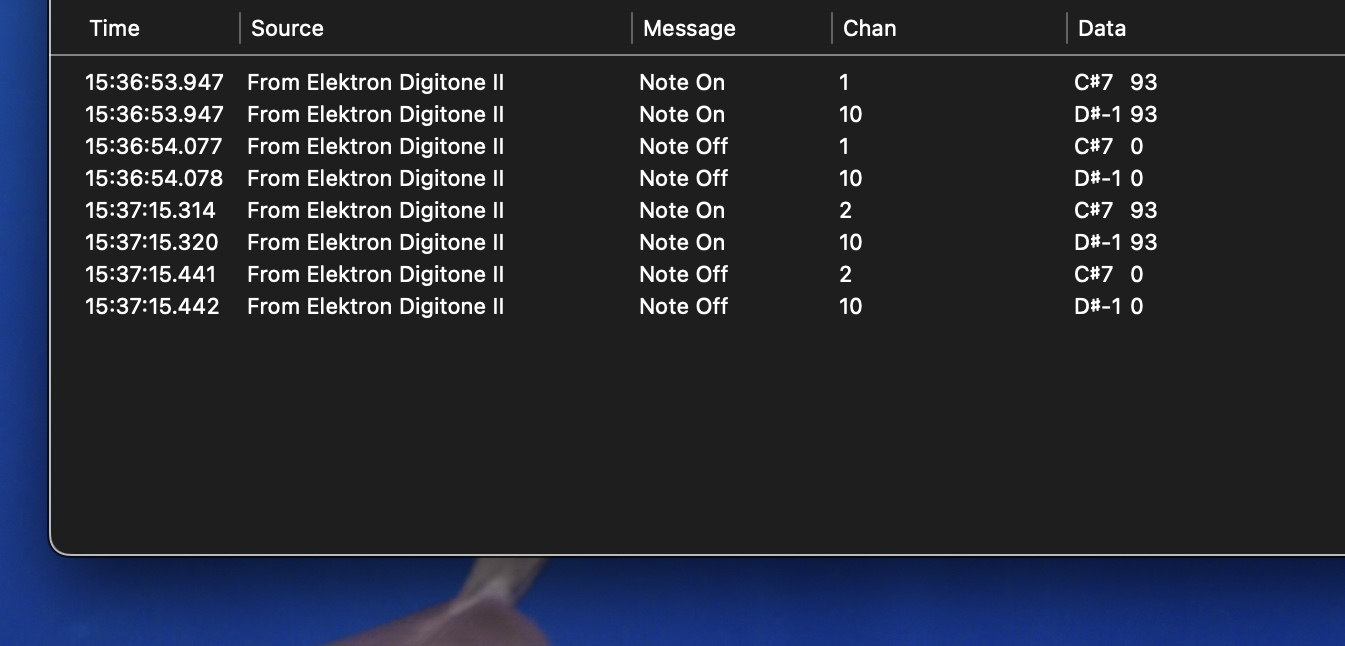
I am trying to send notes from the Digitone II using a midi track and keyboard mode, but all that I see on midi monitor on my laptop (over USB) is a single unchanging note no matter which button I press, where I expect to range over the miniature piano keyboard that is lit up.
(It does seem that the unchanging note is the one it would be per track – so track 1 is C-2, etc.)
How can I configure so that I can use keyboard mode to emulate a midi keyboard.
I think that if you’re in chromatic mode it should just work. You made sure chromatic mode is engaged? It sounds like you’re on the active track but not in chromatic keyboard mode.
Maybe check your trig mode and make sure it’s on “Tracks” and not on velocity or something else.
Yes. Is your trig key destination under midi settings > port set to int+ext? If it’s only set to INT it won’t work.
I assume it has to be set correctly if it’s sending any midi notes at all.
Um, maybe you’re inadvertently playing the active track via the autochannel because you have the outbound midi channel on your midi track set to the same channel number as one of the track channels.
If you go into midi settings > channels you can turn off the midi channels assigned to the internal audio tracks, so try that and see if it helps you at all.
Just double checked that I am track 16, with midi machine, and using keyboard mode (lit up like a single 8ve piano)
In the SYN screen, I have the track sent to channel = 1 (A), though also tried 2.
When I press button 9, I get the following. I think I should see “C4 93” but for some reason it’s transposed up a half step and multiple octaves. (The D#-1 on channel 10 is just the 16th track midi note indicator so that makes sense.)
It also doesn’t play pianoteq which is currently receiving midi and works with a regular midi keyboard.