I’ve had 2 cheap Chinese usb to midi in/out leads for years and they work great and are class compliant. I had the idea that if I bought a couple of DIN F/F adapters and connect the outs to ins it should work as a USB to USB. Sadly it didn’t work, I’ve verified all the components work individually including the adapters.
I bought it for MPC ONE to iPad.
The out works but it doesn’t get past the adapter. I was wondering if anyone had any ideas on why it fails?
Perhaps it’s a current issue. I have a Kenton thru box that a mate has borrowed so I’ll get that back at some point and give it a try with that in the middle, but it defeats the point really and adds a PSU…
Does the MPC ONE work as a class compliant usb host? If you’re getting the in/out leds on both interfaces while each is connected to the ipad and the mpc to light up then it might be worthwhile to check that all relevant pins on the ff connectors are actually used? If you have a multimeter you could check continuity on the adapters. Or just see if they work with 2 midi cables connected.
Yep, both devices work with the cables and are compliant, I often use in both directions. One USB cable and an adapter with a midi cable works fine. I’m 100% satisfied that all the individual components work. It’s only when the 2 usb cables are either end when it doesn’t work. It would be a great cable to have if it did work, I really thought it would.
They work great, I’ve probably had them for around a decade and used them with loads of devices They don’t process Sysex but apart from that they’re flawless. The issue is in the analog domain where the din connections meet. I’m 100% certain that they both send and receive midi individually when connected to midi devices, but for some reason not when connected to each other.
I had one that would stop passing note data if you sent a program change while sending CCs. At the end of the day, they’re a €10 midi interface, you can’t expect them to be perfect forever. I still use that wonky one if I want to play round in the dining room
I have a decent midi interface, that’s not my problem or what I’m asking. Both of these cables work perfectly fine, I use them all the time with the MPC and the iPad. My question is about why the joined cables do not pass data through the adapters. Both cables and the adapters all work perfectly individually. I’m guessing it an impedance/electrical issue because Midi cables do carry a small charge.
I guess this is just going to end up a ‘don’t use Chinese midi cables’ thread. I’m perfectly happy with them, I just want to know why joining them together fails. My mission was to make a USB A to USB A midi cable.
I’m hoping someone who understands the electrical aspect will answer.
It would be really handy if it worked and save some complexity, it’s not the end of the world and don’t have much hope now but I really want to know why it should fail, it’s just connecting 2 sets of midi cables at the end of the day.
I don’t think this can possibly work. You have a USB-A connection at both ends, that can’t work. The A end of a usb connection is the “host” which controls the “device” at the other end. You can’t connect A to A because you would have host talking to host, and they both want to be in charge. That’s why you can’t get USB-A to USB-A cables, they always have B or mini-B or micro-B at one end.
Midi cables just contain wires, no smarts. Each pin is connected to another pin by a wire. But the USB protocol is much more “clever” and isn’t just a case of connecting the corresponding pins via some wires. The two ends of the usb connection have to agree to talk the USB protocol, and one end agrees to act as host and one end agrees to act as device. You can’t have two hosts communicating.
Edit: though I guess it could work in theory, since the two hosts don’t actually see each other as usb hosts, just as dumb midi devices. Hmm.
Edit 2: now I’m really confused whether this can work… I should stick to the beer thread when I’m this drunk at midnight.
Yeah, I don’t see how the USB has anything to do with it, both are converting to Midi. I’ve just had it all out again and tried every test/combination just to be fully certain there’s no physical defects causing it. I’ve also tested on a MacBook instead of the iPad and it’s the same.
I’ve also tried using MPC USB Midi out to Virus TI Midi Din In and the used the second USB cable from the Thru port to the iPad and that works as expected passing the midi through. Basically using the TI instead of the adapter. I’ll hopefully get my Kenton thru box back to test in the next week, although I’d want something passive for it to be useful.
It seems plausible that your adapters were designed with the assumption that there would be a fully functional MIDI device on the other end, and then cut some corners to save costs or design time.
The E-Mu branded cable I mentioned over in the X.05 thread is apparently still made with the good stuff, so if your goal is to have a USB-USB MIDI null modem setup, then you might try a pair of those. The E-Mu passes sysex, which a lot of cheap cables manage to screw up. If they paid more attention to detail in the software, maybe they didn’t cut as many corners in the hardware.
Maybe it’s a MIDI loopback issue? Does it work with just one of the plugs connected (ie. sending MIDI from MPC to ipad?
Any reason why you’re not just using one USB-MIDI cable from the ipad to the MPC’s DIN sockets? Or a USB-A cable from ipad to the USB-B input on the MPC?
Yeah these cables don’t do sysex, but they are honestly flawless outside of that, I’ve used them a lot over the years because they are convenient to move around rather than the hassle of an interface.
Tbh, it’s not something I want to spend a lot of money on, I just had the cables and thought I’d get some adapters and give it a try.
I’ve been reading up on it a bit and it seems that midi outs send 3-5v and inputs should be passive. Perhaps these cables aren’t but then you’d expect the midi ins wouldn’t work at all if that was the issue.
I’ve only been testing the midi in most of the time, they have midi activity indicators on them. Yeah the cables work great from both devices. I usually use the midi ports to iPad usb, but it ties up the ports, it would be great to use the iPad via USB. It’s not the end of the world, I’d just like to know why it it doesn’t work.
As for the A to B cable, I don’t think that would work would it? I’ve seen people complaining about the ipad not being class compliant for midi and so I’ve never tried. I’ll go and try it now though!
EDIT: No sadly neither side sees anything, I don’t think either of them are class compliant…
I mean you’ve tried everything else, why not? Even if it’s not the solution you want it’ll help isolate what the problem’s not. See if that extra data point shakes anything loose.
I have a feeling it will work with the Kenton and it’s maybe a voltage issue, and it needs something powered in the middle to reamp the signal, considering that the virus TI as a thru box worked. I’ll maybe pick up another brand of cable at some point too to see if it will change anything.
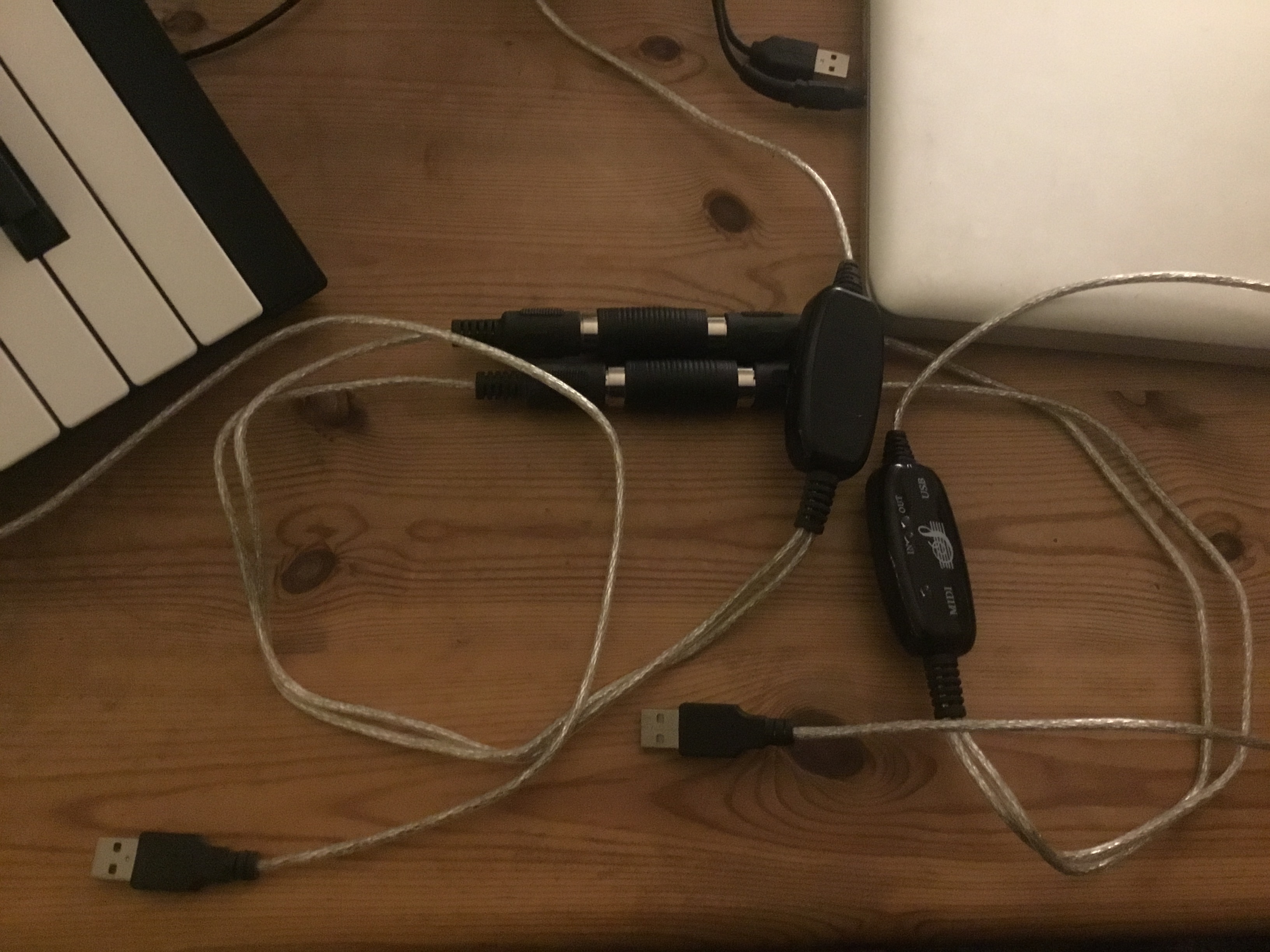

 I’m perfectly happy with them, I just want to know why joining them together fails. My mission was to make a USB A to USB A midi cable.