Probably stating the obvious here, but the normal shelf life of a computer is around 6 years, however, music software isn’t horribly taxing on CPU and RAM - nothing like video production, for example.
I gave my old 2012 Mac Mini i7 quad core with 16gb RAM and upgraded SSD’s to my brother about 6 years ago and he was still using it with Ableton and Cubase up until a year ago, it was a real work horse. We finally ended up swapping it for a Mac Mini M1 with the same 16gb ram last year and it was literally like night and day, particularly with the newer breed of plugins. Almost completely silent as well, in 99% of usage scenarios - this is an important benefit for music production environments.
You can pick them up for pretty cheap on eBay, say £350-£500.
- Add MIDI note controls to manually choke drum channels.
OMG YES
scrapyard engine sounds great, also loving the new distortion effects (especially dropout)
regarding preset switching - it would be cool if one could restrict the random preset loading to the folder of the current preset
(i’m now in the lengthy process of deleting all factory presets one by one - does anyone know where i can find them on my filesystem on macos?)
what would be really cool would be adding the possibility to switch presets according to their position in the current folder via 128 midi notes on a separate channel
this way it’d be super easy to structure live sets
Hey guys,
inexperienced Battalion user here - i tend to use my hardware drums a whole lot more since i so far havent been bothered with learning the plug, but i am getting there.
So far, the sound seems quite lo-fi to me; mayhap it depends on either effects or the sounds / synthesis methods used, or something else. I would like to get as clear a sound as possible on the drums, so that i can muddy them up later. For now, it makes my mix very crappy as there´s no way to blend the different sound sorces properly.
Please tell me it can behave and give me clean sounds all the way through? I realy want to use it to synthesize fm drum sequences and similar, as opposed to all my other drum machines i already use.
Thanks!
Hard to diagnose the issues you’re having so I’ll just add my 2 cents. I’m having no issues with clarity, the plugin/synths/samples sound fantastic.
Is there a factory preset you’re using? Are you using your own samples? How are you routing the 8 voices?
Hey, thanks for responding.
I am using presets so far, no samples of my own and i will likely use mostly synthesized sounds further on.
I was thinking the sound quality was a result of the preset and/or effects used, and i will dwelve deeper into the plug to find out how to get clean sounds.
Just your opinion that the output is clear and sounds good is enough for me, i have bought the plug anyway so i will keep at it until i am satisfied! 
Thanks !
maybe try the direct outs? , this bypasses the maximiser etc
Good idea, i will give it a try.
If I might make a rather pedestrian request, I would personally love the “Voice Preset” section of Battalion to get some TLC.
At the moment the available sound presets are all very “out there,” which can be wonderful when you want to experiment and get weird. For me personally, I’m finding though that I love to use Battalion for fairly straightforward 808/909/CR78-ish sounds as well as for more unusual sounds and it would be super useful for me to have some preset sounds that were in that wheelhouse dialed up and ready to go.
ATM, I’m trying to cook those sorts of sounds up myself when needed, but the realization that I want those sounds tends to come in the midst of creative flow and I personally find needing to go deep into sound design/sound chasing can get me off-track, creatively speaking. It would be great just to have some good starting points for the basic drum machine food groups.
I’ll also note that at the moment “Save Preset As” for the entire kit/sequence brings me to a folder popup that leads towards Battalion but doesn’t actually put me directly into the Battalion user preset folder. This creates a few extra steps to save to the proper preset folder. The “User Presets” in the main pull down menu is also greyed out for some reason, so it’s not possible to browse my own kits/sequences without using “Load Preset” and then browsing through the folder structure manually. I checked in Battalion’s control panel and don’t see anyway to manually set the direct path, so I’m unsure how I could remedy this. Thoughts?
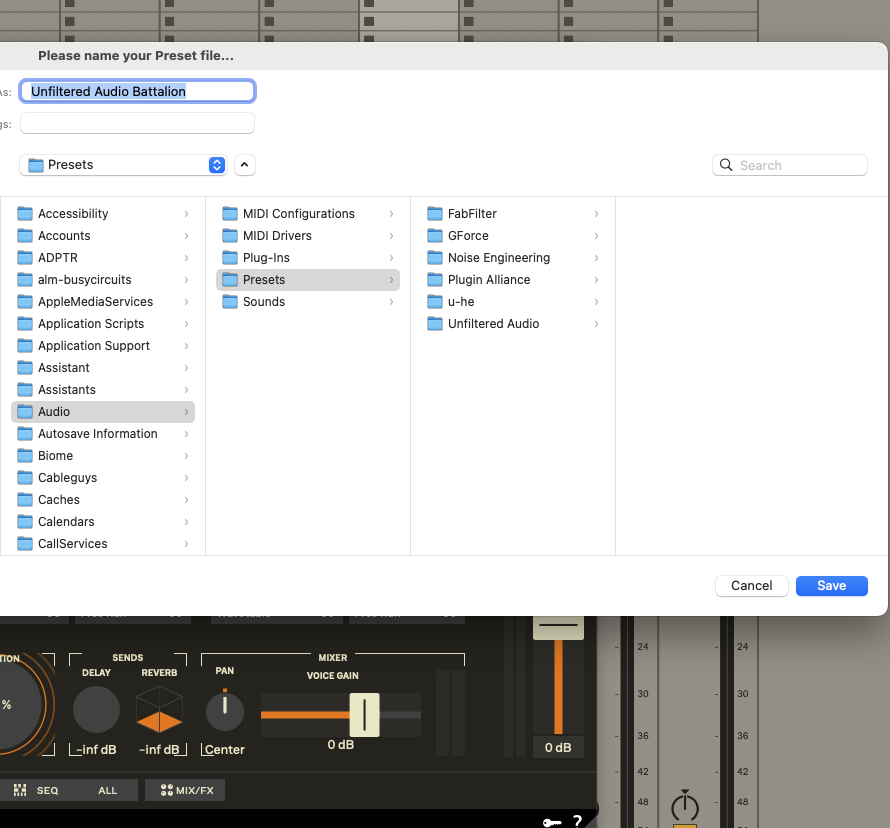
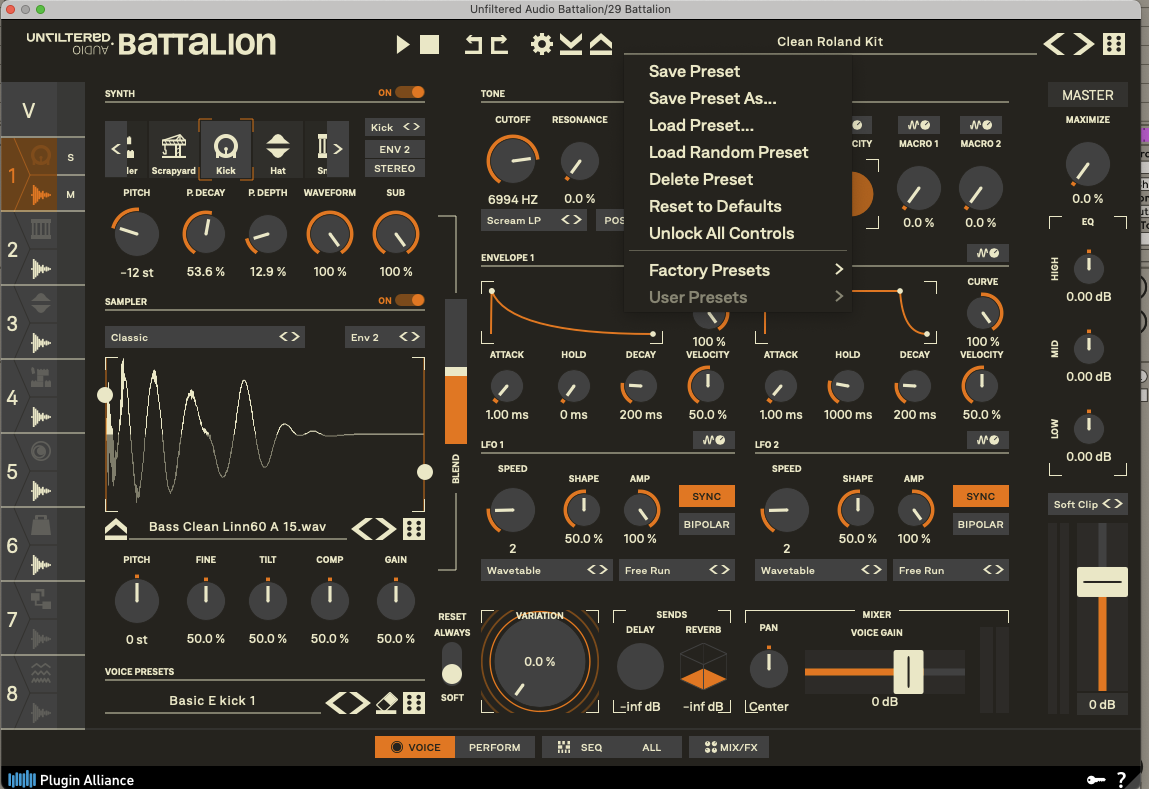
Having aired a few irks, I’ll still confidently say that I absolutely love Battalion. I’d just like to iron out and improve some workflow issues and then get on with using it day to day.
Thanks so much for the instrument. It’s wonderful.
I’ve had the same issues, I tried splitting out sessions, one to work on new presets and learn the plugin but destroyed the momentum I had with the song. I’ve put it down to growing pains and tried not to stress over it, there’s a lot to Battalion and I wouldn’t change that. Trouble for me is I just don’t have enough time… Is anyone sharing presets?
Am having crash to desktop issues and 9173 errors in Pro Tools (I realise I may be the only person on this board using Pro Tools but I’m not sure I want the growing pains of learning Ableton as well). I had a ticket with PIA for the CTD but put it on hold when I got the 1.05 beta, I thought it was the complexity of the presets that was causing it but I think its actually selecting a menu on the performance page as it happened with one of my (simpler than factory) presets last session. Will try and recreate it to report. Last session’s 9173s had the buffer at 256 and I’ll increase it to see how it goes but I’m tracking instruments and would prefer to not be changing the buffer as I go between, first world problems and all - the PC I use is an I9 9900K and a tad old…
Off-topic and can only relate my experience, I switched from Cubase/Reason (using from wayback - SX and Reason 1, long-term user), to Ableton 11.
Took maybe a year to get comfortable, but I’m very glad I switched now!
I was finally able to isolate this. It’s the sequencer mode selector on the ALL sequencer page (the one that starts as VEL at the top). It’s now fixed. My kids just walked in the door, so I’ll post a new beta tomorrow. Thanks for the report!
1.0.5 Beta 2 is now up (Beta – Unfiltered Audio) with fixes for the Pro Tools crash. @Choopy I have to look into the NKS channel stuff. The first release of the NKS stuff is due today and just has a basic implementation, but I would like to add light guides and more stuff when I find a moment.
couldn’t repeat the ctd, thanks for the fix!
I know this beta wasn’t intended to address my issues but for what it’s worth - the MIDI Overflow warning and momentary audio drop out when opening the Battalion GUI are still present in Reason 12 with this beta
I checked the manual but couldn’t find an answer to this question:
Is there a simple, fast way to bring up one of the preset rhythms/kits in Battalion and click a single button to reset all of the sequencers so that you can use all of the sounds with a newly programmed beat of your own? I know there’s “x” to reset the modulation, but I don’t see an equivalent for sequencer steps. Am I missing something obvious?
So. Updated to 1.0.6. Seems to load user patches wrong. Patches using “Builder” loads with “Scrapyard”, and all my user patches seem to load with the new Contrast distortion algo. Reported to PA. VST3 in AbletonLive 12 on OSX.
(Also, when loading a new instance. You seem to have to trigger each voice eight times to get to normal volume, volume seems to start at zero and ramp up a bit for each trigger. After that it seems to work as expected.)
Ppl thought it better to post here than on KVR, so cross-posting. Not meaning to spam or anything…
First of all, thanx for a great, flexible, powerful and pretty unique drum synth! Been searching for a long long time for something like this, and I feel it (together with Fors Opal) is the closest software equivalent to the Elektron Machinedrum UW (in spirit, not in sound, but that’s a good thing since I already have a MDUW!). It goes from traditional drums with dynamics and feel to waaaaaay out there in a way both sample based drum synths, or drum synths intending to do “analog drum machine from yesteryears” do not! Still learning, it’s deep, but I really like it!
Another bug though, that I think might be a more subtle but difficult one. There seem to be problems regarding the update order of modulations relative the sound triggering. If modulating things with velocity for instance, with an env attack time of zero, it seems the velocity modulation will be one step off, actually affecting the next note, not the current one. I’m guessing this is due to wrong internal update order, that the sound gets triggered before the modulation for that trigger has done all of its updating of engine parameters. I have had this happen with other mods than velocity as well, so it’s not just velocity. This seems to be the case both when played from the internal sequencer and from MIDI. Automation seem to be unaffected, at least as far as I can tell. I reported this to PA support (with screen recording and Live set example) quite some time ago, guess they did the PA thing and just binned the report.
There’s a preset exposing the (simplest form of) the problem here:
https://www.dropbox.com/scl/fi/dpl9agyj … zirca&dl=0
As that pattern is set up, it should be a 4/4 kick with the 1-3 long and the 2-4 very short due to velocity control of env decay/hold. But when I run it as VST3, in Live 12 on OSX, it plays back wrong, the velocity gets delayed one note trigger, so the 1-3 are short and the 2-4 long. See if you can reproduce. If you want other examples or live sets exposing this, just reply and I’ll ad one.
Another minor bug. When copying a drum voice by dragging-dropping it onto another slot, all modulation routings seem to get lost.
Actually. Automation isn’t unaffected, but it’s different. There seem to be a point after a voice is triggered that the plugin stops automating that voice, and then when the voice is triggered next time, it realises automation has happened, and “slides” to the correct values at start of note. This seem to happen both when modulating one of the macro knobs, in turn modulating paarmeters, and when modulating the parameter directly. For instance, with a modulation of decay time like:
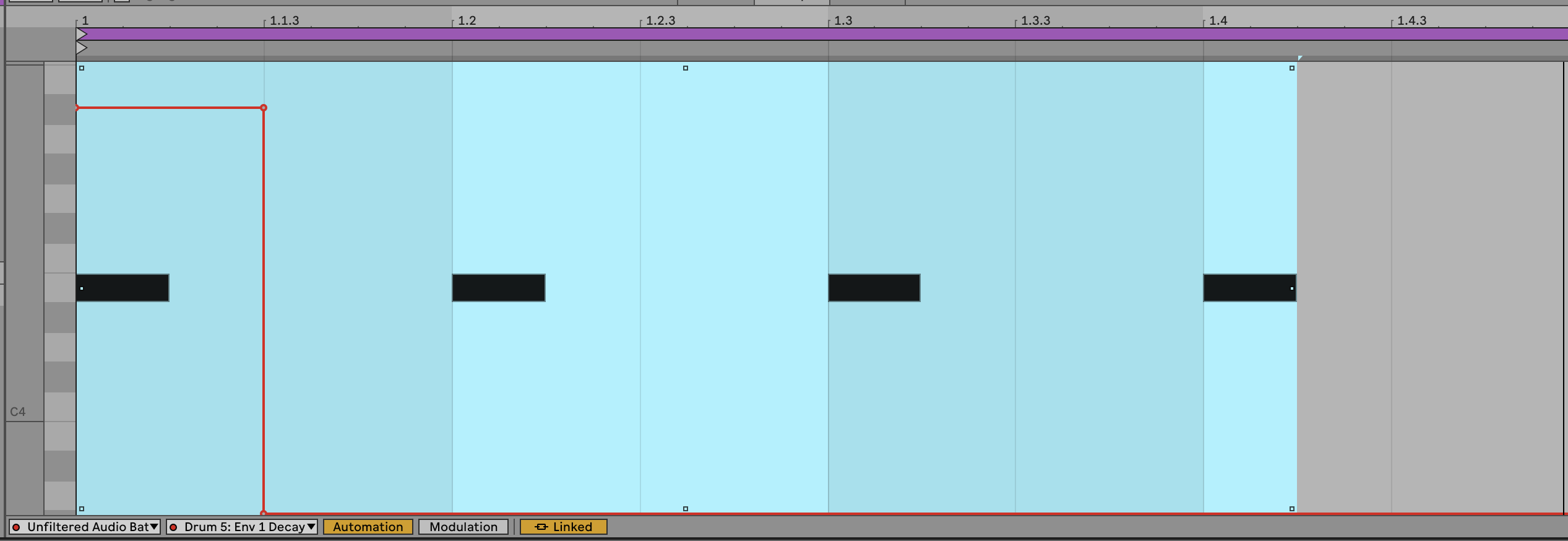
I would expect the first hit to be long, and the next three to be short, and sound the same. However, hit 2 starts with a “zipper” sound, and is still longer than hits 3&4, even though the decay automation happens way before the second trigger. (And also doesn’t seem to affect the first trigger, even though the voice is still sounding and the sudden change in decay ought to just cut the first trig short.)
Thank you for the detailed reports! I’m looking into these right away. Can you PM me an example patch of a preset saved with Builder for me to look at? I’m hoping it’s only Builder that broke, as all of the factory presets still sounded the same to me while I was regression testing.
Thanks for the detail on this. Was this occurring with 1.0.4 or prior, or is this new behavior? We did a lot of optimizations for silent voices, but this might be a new issue.
Sounds like this might be related to the optimization as well.