You can put them anywhere, basically, then define an environment variable (VST_PATH):
https://tutorials.renoise.com/wiki/Linux_FAQ#Setting_Up_Third_Party_Plugins
You can put them anywhere, basically, then define an environment variable (VST_PATH):
https://tutorials.renoise.com/wiki/Linux_FAQ#Setting_Up_Third_Party_Plugins
Unless it’s different with the Linux version you can only specify the path for non-VST3 plugins though, no? Maybe that’s the issue? On Windows VST3s have to go in ‘common files’ so I’m guessing there might be some similar default on Linux that Renoise looks for.
I found a couple of comments online that might help, if that’s the case:
You can argue if this is the right location, but at least these are the official locations for VST3 taken from the Steinberg VST3 specification:
1 - PriorityScopePath1User$HOME/.vst3/
2 - Global/usr/lib/vst3/
3 - Global/usr/local/lib/vst3/
4 - Application$APPFOLDER/vst3/
vst3 plugins are usually “bundles”, so copy the whole
Other Desert Cities.vst3directory to your your vst3 directly, which usually is a hidden folder in your home directly~/.vst3. If this directory doesn’t exist create it yourself.
Please note that on linux a.at the beginning of a filename or path makes it a hidden path, therefore the.vst3.
Hi folks. Looking for recommendations for a Linux distro that isn’t bloated with apps. I had a look at AV Linux, but that’s loaded with a crazy amount of music/production apps that I will never use, and would be super tedious to uninstall all of them. It seems that this is the case for all audio/video distros.
If I’m not mistaken, I really only need a distro that has a real time kernel? Then, I can manually install what I need?
I only want to install Renoise, KX Studio, and potentially Wine.
Thanks in advance!
I’m using Arch these days, so I totally customize what gets installed, even down to the window manager. It’s not super hard, but I’ve worked with linux for decades, so maybe it just seems that way to me. It’s a rolling release distro, so I wouldn’t really recommend this for inexperienced users, unless your goal is to go deeper into linux land – I’m presuming your goal is to make music instead 
I haven’t used Ubuntu in a while, but they at least used to have a “minimal install”, where less packages are installed, so maybe check that out. Debian can also be set up pretty barebones – I think you can get the “minimal install” ISO, boot from that and then install whatever packages you want over the network.
You could also choose whatever distro you like and simply uninstall what you don’t need through the package manager. What does AV Linux use? dpkg/apt? You could just install that and then sudo apt purge <all the shit you don't want>
Maybe someone else knows a nice slim distro geared towards audio that has a precompiled real-time kernel, but I think a minimal Ubuntu/Debian should do the trick. You’ll just have to install all the dependencies you need for all the software you’re going to run.
Another Arch fan here. The install is a bit of a chore, though, so I just go for EndeavourOS now. It’s basically just an opinionated Arch with a much gentler install experience, but still quite lean. My only complaint is that I’ve had some issues with the Pipewire audio system that it uses out of the box, so I got rid of that and instead went for the (possibly controversial?) PulseAudio + JACK combo. Worth mentioning that the EndeavourOS community is on the whole a lot friendlier than the notoriously curt Arch one.
I second the Ubuntu/Debian recommendation as well, if Arch isn’t your vibe. As for me, though, pacman > apt and I’m not going back
Haha yeah, there’s a lot of hate for PulseAudio (and its author) out there! Personally I just use JACK (and ALSA of course), because I had problems with PA a few times years ago. I don’t mind needing to start jackd on boot or whatever, and don’t really need the desktop integration from PA, but if I did I’d probably give it another shot – I’m sure it’s much more mature today than it was when it came out. I keep meaning to try Pipewire, but haven’t had a real need yet.
One negative thing about Arch that can mess people up is really just updating packages without reading about conflicts first. If a user doesn’t have time to (or care to) keep up to date on the newsletter and all the releases, it’s pretty easy to run an update on all packages and break something, then they end up in dependency hell and in some extreme cases have to rebuild the whole system to recover. It’s a bit more of a commitment than some OSes, but if you’re into it, it’s great. I used FreeBSD and Gentoo back in the day, so I like Arch because it’s similar… I just don’t have to compile everything from source, which is nice. I also like that it doesn’t come with a bunch of crap installed :))
I think if someone just wants make some music and not geek out on linux, they might be better served with one of the more mainstream distros. Some flavor of Ubuntu is probably smart, because there’s a big user base out there, so there are plenty of tutorial and troubleshooting threads for common solutions.
While not on my main audio system (now a M2 mini), I have been running Ubuntu Studio for many years as a workstation where I do pretty much all other stuff, work, coding, internet etc. plus sometimes using Reaper, Renoise and a few other audio-related apps. Sure there are a lot of apps that I don’t really use either, but I think it is well curated and still a very lean install. You can install Renoise on top of that easily and just ignore everything else, no need to uninstall anything.
Advantage is that it comes with a pre-configured Jack server, that should work with most audio interfaces pretty much out of the box. Another alternative might be to use a vanilla Debian and to get Jack running on that.
Oh no, I didn’t/don’t know about the author (can’t seem to find info on this), hopefully they’re not a creep? That’s interesting, I ended up with PA + JACK for similar reasons - Pipewire gave me mediocre latency and crackles. I also start jackd manually.
I also like PulseAudio can be routed into JACK for doing things like processing YouTube videos with SuperCollider 
Oh definitely not like that. Most of the criticism was specifically because of PulseAudio itself. When it was released it broke everything. It was incompatible with all sorts of APIs that predated it and many people (myself included) didn’t like that at the time. I think at this stage it’s probably fine. It’s had almost two decades to mature and most software has been made compatible with it. I’m just in the habit of avoiding it, but should totally get over it and give it a shot some day.
Another source of criticism was his authoring of systemd, which at this point has pretty much replaced the old init system in all Linux distributions. There’s quite a lot to say about that, but the short version is that it wasn’t all that well received either – perhaps even more broadly criticized than PulseAudio! Search for Lennart Poettering if you’re interested in knowing more details on that. Regardless of the reception of those packages, I think he’s a super talented programmer.
I think it’s safe to say that both systemd and PulseAudio are part of the mainstream and totally functional in the Linux world these days, but you could still run into a grumpy old Linux geek who’s holding a grudge if you look hard enough. Lol
I was happy running Fedora  Renoise/Reaper lastest versions tested were happy with Pipewire and Wayland. I was happy with Gnome almost stock also. (After years of distro hopping and tuning got bored of it and Fedora was the right balance of availability and updated content.)
@Mumdad, I thought I would continue this Renoise chat over here, so all the M8 peeps don’t feel like we’re getting too off topic 
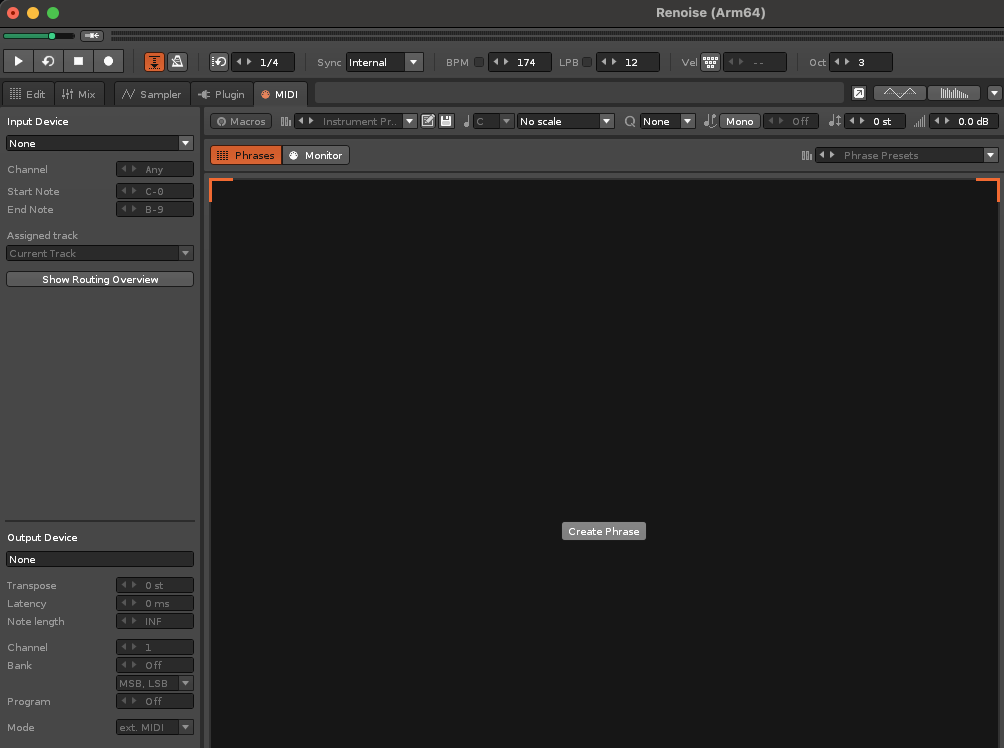
You can use Phrases for MIDI (for external hardware), by going to the MIDI tab and then Phrases -> Create phrase:
You just need to have your MIDI output device and channel set for it to work. I think Renoise is actually pretty dope for controlling hardware. I find the timing is tight too.
Cheers, I sussed it out pretty quickly so not sure what I was doing wrong when I first tried it. Probably just gave up too early, thought I’d figure it out later, then my brain turned that into ‘it’s not possible’ somewhere along the way. Glad I mentioned it though! I’d also somehow never noticed that the MIDI tab has its own phrases section…
Yeah, it doesn’t seem like that many people sequence hardware with Renoise generally but the timing was actually a big reason for me switching from Live a few years ago. Not sure whether it was Renoise dealing with it differently or just that it’s so much lighter to run or what, but the difference was immediately noticeable.
Renoise I love it. Same with the OT. I used to have OT in the center of my studio to run midi to all my gear. Now Renoise is the center and comming from OT workflow I feel at home. If you put in the work like it is with every instrument or daw you will find that Renoise or any tracker has one of the most intuitive workflows out there. I use Renoise for midi and sampling tricks which are one of the best out there. Record multitrack in Protools then mix there.
Renoise let’s you have 4 different midi controllers connected at the same time. With keyboard shortcuts you have all the power you need.
Throw that mouse away and transform the computer into an instrument.
Used Renoise demo last year and it’s still on my mind to buy it and combine it with hardware. I noticed the tight timing, liked the results. Plus I think it will really add to the toolkit of making interesting beats. For the price it offers a lot.
But I thought: let’s wait until I see an update to be sure it’s supported, because I have no idea about that. Last update was 2022, which is not very long ago and maybe Renoise does not need that many updates like the bigger brands do (that use updates to finance the bigger overhead).
Anyway; what’s your thoughts about, insights in this?
Well it is supported and has been for decades, updates are just quite slow because it’s a small team and it seems to be something they kind of do on the side rather than full-time. One side of ‘support’ that it has over most DAWs is you can go on the forum and engage with the main developers directly if you want.
It’s also supported by end users making add-on tools for it as well. This is a bit of a double-edged sword for me though, because there’s so much stuff that should really be integrated into the main program natively (particularly to make keyboard-only approaches more viable since this is often talked up as a strength of Renoise) but there seems to be a bit of a sense of ‘we’ll just let the users sort that out’, similar to that of Ableton with M4L.
Personally I don’t use tools all that often even though there are some great ones because there are always slight limitations/quirks in how they can function and they also often take away from how unified the experience feels to me. Plus there’s always the chance of something breaking when the program is updated so I’d rather rely on them as little as possible.
VST3 was a massive addition and doubtless took a lot of work. I don’t know if they’re working on CLAP now but if so I imagine that’ll be quite intensive too. Things like FM/granular are often requested but I think loop point automation is the big one I feel is lacking - for something that’s fundamentally a sampler this has always felt a weird omission to me. Ensoniqs were doing powerful stuff with this even as far back as the 80s. Other than that, I’d just like general QoL stuff as mentioned above really.
Thanks for the insight. Makes sense that the team does this on the side.
Lack of updates can be frustrating as it makes the project look dead, but then again it’s one of the most stable music programs out there, so not much needs fixing that often. They will push out a bugfix when it’s needed. Most of the existing bugs are minor things that can be easily avoided so not critical enough to warrant an update. They usually get rolled into a bigger release.
Another way to think of it, which is rare in today’s SaaS world, is that Renoise is complete. It’s a stable, cohesive program that doesn’t need anything more, imo. It still gets bug fixes and updates to keep it compatible with newer operating systems, and that’s great!
3.4 was released in 2022 but the current version is 3.4.3 which was released in July 2023 (⮚ Renoise 3.4.3 and Redux 1.3.3 released (was beta, now is stable) - General Discussion - Renoise Forums).
Cool, did not find that info, thanks.
On the main page there is a link to 3.4.0 from 2022. On the download page is 3.4.3.