Every data storage solution has a life expectancy. Shorter or longer, but still.
Outside of mechanical wear (that does not apply to some devices) or component faults, the rule of thumb is, the bigger the capacity of the storage device, the longer it lasts. Most devices also have redundancy space that kicks in once blocks get corrupted (although I have never seen this happen on multiple storage devices I own!)
I would NOT be afraid about life expectancy of modern devices through, as even old 128GB SSDs which have been used to death (by a typical user), well, still work in most cases.
If you want to increase your sense of security, you can try buying a high endurance card like this one: Amazon.pl
However, an SSD is still a better choice for the MPC because of the bigger DRAM and cache values they have. In practice, this means faster transfers (for longer), better random access rates and so on.
Yeah I missed but wouldn’t the time to mess, so not in a rush. I got Jura when it dropped. It’s one of the good ones & makes me not want to buy any of the Vintage series plugs. I still see some those mastering FX on sale. I hope they lower the price for the pro-pack or break that bitch up already.
Just got some real great housing news which took major stress of my plate!, so whatever. Hopefully when the Force 2 drops, Akai will do a special sale.
Just get a decent quality card & based on the test MPC-Tutor did years ago on the SSD vs SD, there’s not much difference & you don’t have to get the fast one as it tops out before most cards top R/W speeds - maybe it’s different for G2 units.
You’re right about the speed difference. I would be surprised if there’s any big noticeable difference on the new generation MPCs between a fast SD card and a good SSD.
But there can be significant differences in endurance between good SD cards and good SSDs. And endurance not only depends on the technology of each, but also how the card is used in terms of small or larger or random writes. For instance, my understanding is that high endurance SD cards designed for recording video do not last nearly as long in some other applications when used with a computer.
So it’s above my pay grade to understand it all, but I think solid SSD is probably a better bet for long-term usage.
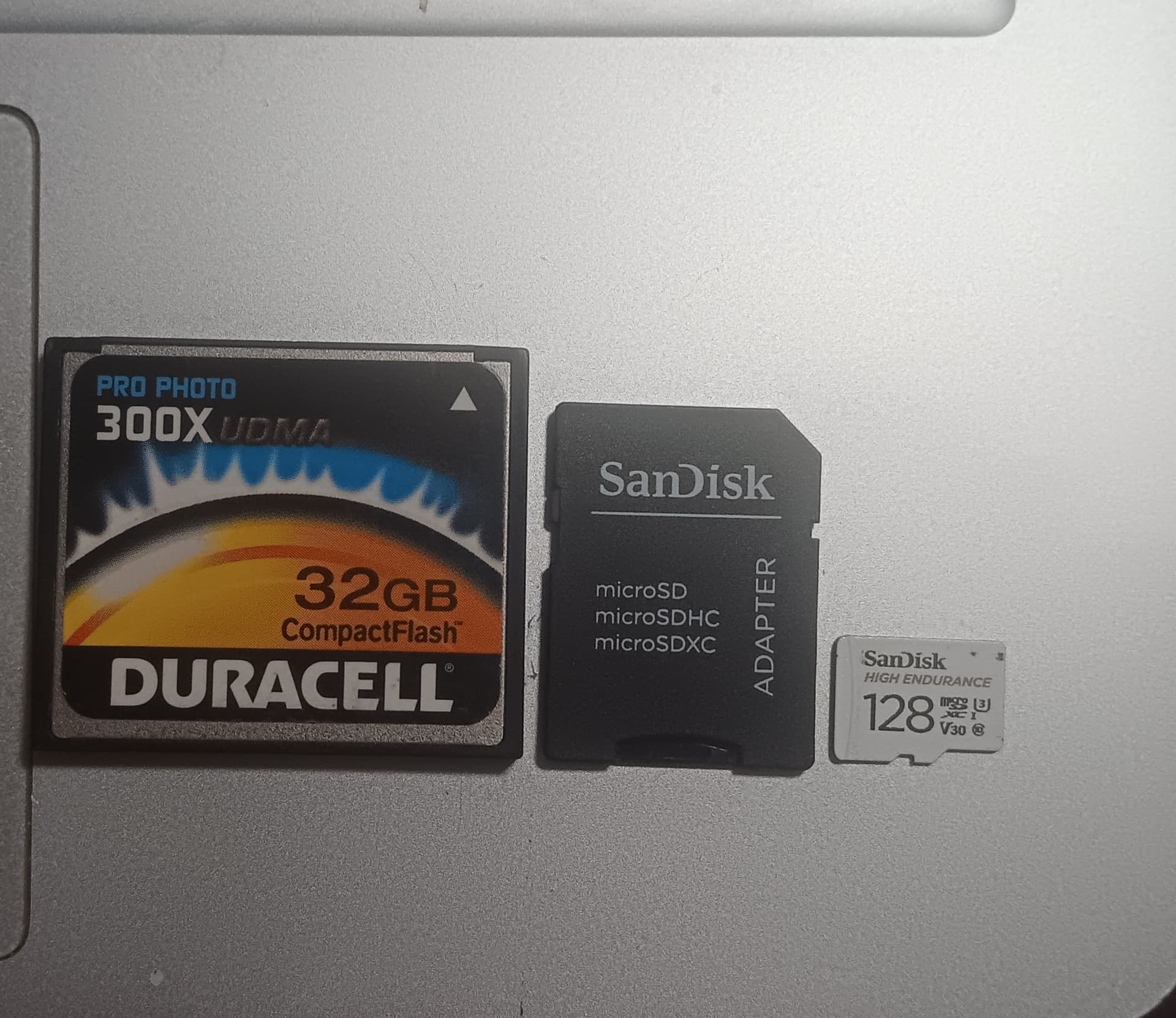
The other thing that might make the SSD better over time is that it’s not being inserted & removed from the card slot like SD cards. One of the only SDs to fail on me was a card for my camera. My 32GB CF for my MPC2025/1000 from 2011 is working & it moved from the MPC to a card reader 100s of times.
Maybe CF cards are just more durable, but my SD micro connected to a SD adapter I’ve been using since I got the Force in Oct 2021 has been moved to the card reader a bunch of times since my USB port is kinda broke so I rarely use PC mode & instead take it out & put in the card reader & its still going!
That being said, it’s not that simple. How much the MPC is using random writes versus sequential writes, and then the average file size, is going to affect speed. Some SD / SSDs are better at some things than others.
Maybe somebody here has the technical background to tell us what kind of writes of the MPC uses more of when writing our project files. And then we would have to test for that to know.
That being said, I suspect that it’s not the write speed that matters as much as the read speed. How often do we write a project file? And I would bet that if you’re sampling, a good SD card has no trouble keeping up writing to the card. Versus how often is the firmware loading samples, effects, and instruments from the drive?
Because I don’t really care if it takes a while to expansions, or sample files, or effects, or instruments to install to the drive initially. Because I’m not doing that while I’m working on a project.
Those are UHS-II cards, at that point you are better off buying an SSD because a 128GB UHS-II costs more then a 1TB SSD. Plus I’m pretty sure MPC is capped at UHS-I speeds (~100).
Good info for sure, just keep in mind that’s the Live II, which didn’t have SATA 3 so the SSD is capped in that machine. L3/XL made a lot improvements on that front.
I get that but most are still on g1 units & for them it don’t matter you use. Like @raistlin65 was saying read speed is more important, esp when streaming.
I was hoping you test the SD on the L3 to if it made a difference vs on the g1 MPC.
What I really would like someone to test is how many short samples streaming at once will cause problems on G1 vs G2. They say don’t use too many but don’t say what too many is. I can test the for g1, but then I would still have to test that on all the different memory types & speeds.
Anybody owners of both gen’s down for a streaming war of short samples?
I don’t know of a hard limit (other then gen1 playing back a max of 64 voices and gen2 256, I think?)
I think it will depend on the card and for randomly accessing a bunch of small samples latency is more important then speed. The Dirtywave M8 is built on streaming samples so I would go with one of their recommendations.
Also this got me curious so I did a random read torture test on two SD cards I own. One is the Kingston that came with my M8 and the other is a SanDisk Extreme Pro that has the same ratings as the Kingston, but is on the Dirtywave’s “fail” list. Sure enough the Kingston was 28% faster in random reads.