Have someone find out how to copy scene, like the full scene like in eg Ableton Push?
I know you can copy track scene, and that is ok.
I would like to copy a scene while in the building flow.
Lets say, start the jam with a field recording sound… keep that as scene 1.
Then copy that entire scene to scene 2 (which would keep all the mutes and would indentical to the scene 1. In the beginning until continued)
.
Then ad to that scene bass…
make a copy for scene 3.
Start to built drums like the kick…
Copy to scene 4
Add hihats
Copy to scene 5…
Now once im ready with the full part i could then just change scenes, and they would make sense.
The problem now is that when you create a new scene, it uses as the basis, not the scene you just heard or was modifying, but rather a scene that was somehow the original…
So the logic is not good in my opinion.
How do people feel about that? Have you had similar issues, or have you found out some works around?
Agreed. It seems a strange way of designing it alright.
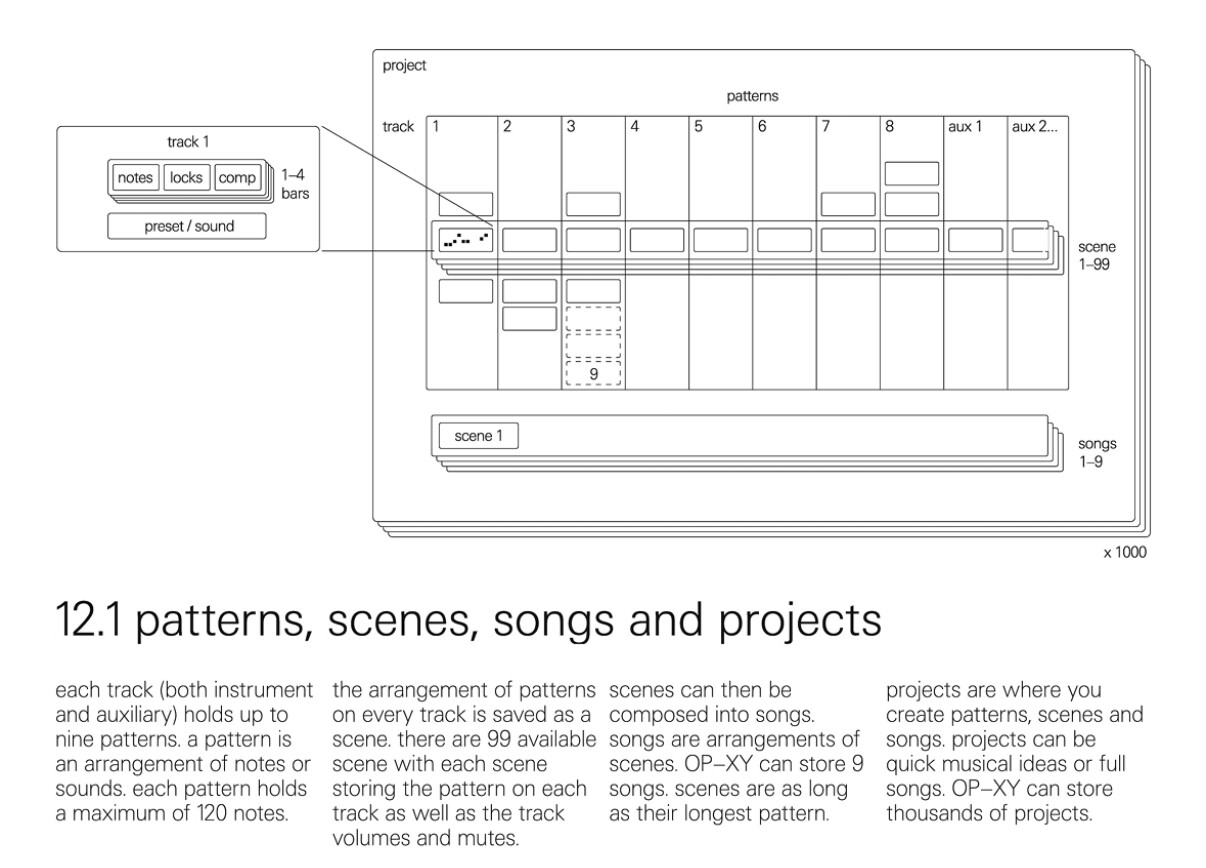
What myself and others seem to have done is to ensure to leave pattern 1 on all tracks empty. Then when creating a new scene it’s blank, rather than full of whatever was in each pattern 1 for all tracks.
I agree that the current setup with this breaks the flow. The way the EP-133 had the commit scene was very intuitive, the XY a little less so imho.
Another quick tip too is to set this up in a project called #template or #base first, then duplicate this when starting a new project. Saves trying to remember to to this the whole time. Also the # at the start of the name ensures that this template project will always be at the top of the project list.
Ensure to create the new second blank pattern on both the instrument and aux tracks too.
Edit - I don’t take any credit for this idea, I saw it on someone’s YouTube video about the XY. I actually tried going back to see who’s video this was, but i can’t find it now. If I see it I’ll ensure to link it here. There were lots of good tips in it.
I definitely agree with you on this. I find 9 patterns limiting, and using scenes doesn’t help—it just makes it feel more repetitive. To an extent, I feel like the OP-Z offered a bit more freedom in this area.
Yea for sure. I’m not trying to knock the opxy and I think it’s a great piece of kit, but it’s an unfortunate limitation (for me), even when I use all the punch in fx tracks.
Sure, I could get around this limitation by cramming things into other track patterns, but I feel like it ends up becoming this disorganized thing that doesn’t gel with my brain. I’m also certain that with more complex tracks that I’d still run out of tracks with one op-xy. I guess I’m more used to the m8 where I’m basically given limitless pattern variation.
I really wanted to convince myself to keep this but I think it’s going to have to go.
This sounds like the right move. The entire sequencer is built around using step components to add variations to patterns, and it sounds like that’s definitely not for you.
For sure the 9 pattern limit seems very arbitrary. If the XY can store all this data very efficiently (as it’s MIDI data really unlike the OP-1), I’m not sure why we couldn’t have more patterns per track. Maybe there’s a technical reason though.
I know TE love a good arbitrary limit on certain things too as “limitations inpire creativity” or something like that.
There’s no harm in making your thoughts known to TE too. Send them a quick email or raise a ticket to ensure they know you’d like the pattern limit raised. The more people that contact them about the device and report bugs and limitations, the more likely these things will get fixed and updated.
It’s not only midi data on the OP-XY and I don’t think it’s an arbitrary limit. Every pattern on every track can hold a different sampler preset. 8 x 9 x 6.7 MB and you’re pretty close to the 500 MB RAM that’s stated on the TE website.
We’ll never know exactly how the programming of closed source devices like this work and you definitely might be right, but I’m sure there’s fast enough flash storage in there and the m8 handles loading samples from microsd with no issues. Would make sense to only load samples from other patterns to memory when the pattern is loaded and allow additional patterns.
Either way, yes, there may be a technical reason alright.
I think the crux of this is learning the full power of the step components (skip trigs, ramp up/down, ratchets, random, etc.) and sequencing the aux tracks (brain for transposition, punch in for fills, breaks, etc.) to build out variation in a song.
Apples and oranges. Try scrolling through a bunch of multisampler presets on the OP-XY. It takes a few seconds for them to load into the RAM.
Switching scenes is instant on the OP-XY during playback, so I guess everything has to be loaded into the RAM within a project. I don’t think lots of people are going to fill all available patterns with samples, but I guess TE had to make sure that this is possible without audio dropouts.
I’d love to learn more about the internals of the XY too. I’ve taken apart and repaired enough OG-1s and Fields to know all the components. I’m sure the main internal layout is the same as the OP-1 Field anyway.